To XProc Users: Welcome to XSpec!
Preview of XSpec feature to test custom XProc steps
To XProc Users: Welcome to XSpec!
Preview of XSpec feature to test custom XProc steps
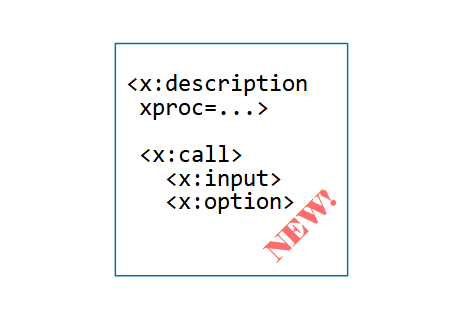
XSpec is an open-source software tool for testing code written in XSLT, XQuery, and Schematron. This list of supported languages is expanding! I’ve been working on adding support for testing XProc steps, also known as XProc pipelines. My code changes haven’t been released yet, but they are available for viewing, downloading, and trying.
This topic describes a sample XSpec test suite for an XProc step and then tells you how to get the enhancement for testing XProc using XSpec.
If you create XProc code, I hope you’ll try out this XSpec enhancement and provide feedback.
Walk-through of a Sample XSpec Test for XProc
Let’s look at a sample XSpec test. The test is for an XProc step that you can view here. The step takes an XML document, wraps its content in a parent element, and adds an xml:id attribute to the parent element. The data we will provide when calling this step are:
- The main XML document, on the input port named
source. - An XML document having at least one
xml:idattribute; the first one is used in this step. The input port for this document is namedid-data. - The name of the parent element to use. The caller can pass this name in through the XProc option named
wrapperor accept the default element name,wrapper-element.
The XSpec test, which you can view here, has portions described in the next few subsections. All XSpec elements shown in this topic use the prefix x, bound to the namespace URI [http://www.jenitennison.com/xslt/xspec.](http://www.jenitennison.com/xslt/xspec.)
Outermost Element, <x:description>
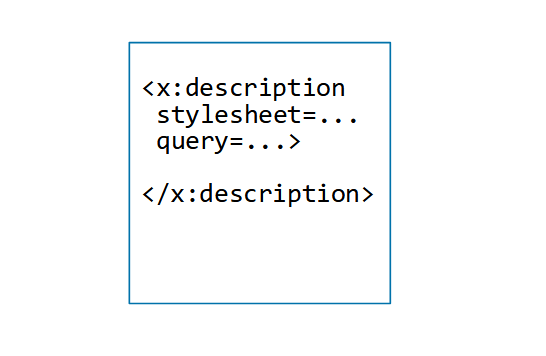
Like all XSpec test suites, this one has <x:description> as the outermost element. The xproc attribute (new, specific to testing XProc) points to the XProc file that declares the step we want to test.
<x:description xmlns:eg="x-urn:tutorial:xproc:xproc-demo"
  xmlns:p="http://www.w3.org/ns/xproc"
  xmlns:x="http://www.jenitennison.com/xslt/xspec"
  xproc="demo.xpl">
  ...
</x:description>
Test Scenario, <x:scenario>
The <x:scenario> element represents a test case or a group of test cases. In general, an XSpec test suite can have any number of <x:scenario> elements, nested to any depth. This simple test suite has only one.
The <x:scenario> element requires a description, using either a label attribute or a child element named <x:label>. This scenario uses <x:label>. Its text content is an incomplete sentence; another element’s label will complete the sentence.
<x:description xmlns:eg="x-urn:tutorial:xproc:xproc-demo"
  xmlns:p="http://www.w3.org/ns/xproc"
  xmlns:x="http://www.jenitennison.com/xslt/xspec"
  xproc="demo.xpl">

  <x:scenario>
    <x:label>Executing eg:demo with a source document, a document having @xml:id, and a wrapper
      element name</x:label>
    ...
  </x:scenario>

</x:description>
How to Call the Step
Within our <x:scenario> element representing a test case, we want to tell XSpec to execute the XProc step. The <x:call> element sets up a call to the step, including:
- Which step to call, using the
stepattribute of<x:call> - Documents to pass in through any input ports, using the
<x:input>element - Any non-default values for options, using the
<x:option>element
The step, <x:input>, and <x:option> features are all new, specific to testing XProc.
Below is the <x:call> element that goes inside this example’s <x:scenario> element:
<x:call step="eg:demo">
  <x:input port="source">
    <p:document href="document.xml"/>
  </x:input>
  <x:input port="id-data">
    <element-with-id xml:id="a123"/>
  </x:input>
  <x:option name="wrapper" select="QName('','outermost')"/>
</x:call>
This <x:call> element tells the processor to call the step of type eg:demo, where the source port receives a document from an external document.xml file (containing <doc>Sample document</doc>), the id-data port receives a document containing the <element-with-id xml:id="a123"/> element, and the wrapper option causes the parent element to be named outermost.
Ths first <x:input> literally uses the XProc <p:document> element to tell the XProc processor to fetch the external document. The second <x:input> element embeds XML content directly. As for options, if we wanted to pick up the default value of the wrapper option, we would omit the <x:option> element.
Verifying Document on result Port
So far, we’ve identified the XProc file and described a particular way to call a step that the XProc file declares. After XSpec executes the step according to our description, XSpec retains what are called “actual results”: zero or more documents on each of the step’s output ports. Next, we need to express what we expect those documents to be like, or what we want XSpec to verify about the documents. For this task, XSpec provides an element named <x:expect>, which has flexible options for how to express expectations.
Here is an element that embeds the content of the document we expect to see on the step’s output port named result:
<x:expect label="returns the document, wrapped and having the specified ID."
  port="result">
  <outermost xml:id="a123">
    <doc>Sample document</doc>
  </outermost>
</x:expect>
The port attribute (new, specific to testing XProc) indicates the output port of interest for this <x:expect> element. XSpec compares the step’s actual result on that port with our expected result. If they are deep-equal, the <x:expect> element passes; otherwise, it fails.
If you’ve used XSpec to test other languages, you might wonder if a select="/" attribute is needed, as the XSpec way of saying, “My expected result is a document containing the embedded <outermost> element, as opposed to the <outermost> element itself” (see Element or Document Node? for more). In certain <x:expect> syntaxes, such as the one above, the “element itself” interpretation wouldn’t make sense because any XML content on the step’s output port would take the form of a document node, not an element. In those syntaxes, we can actually use a shortcut (new, specific to testing XProc): we can leave out select="/", and XSpec will still know that our expected result is a document node.
Verifying Document on Another Port
The step we are testing returns the original source document on a secondary output port named original. We can verify that behavior as follows, using the attribute port="original" instead of port="result":
<x:expect label="The original document is also available at an output port"
  port="original">
  <doc>Sample document</doc>
</x:expect>
HTML Report of Test Results
When we execute this test suite, XSpec produces an HTML report of the results. The report uses text from our <x:label> elements and label attributes, and it indicates which verifications passed or failed. (A third category is “pending,” which refers to test code you have disabled. This example has nothing in this category.) The top part of this test suite’s report looks like the following.
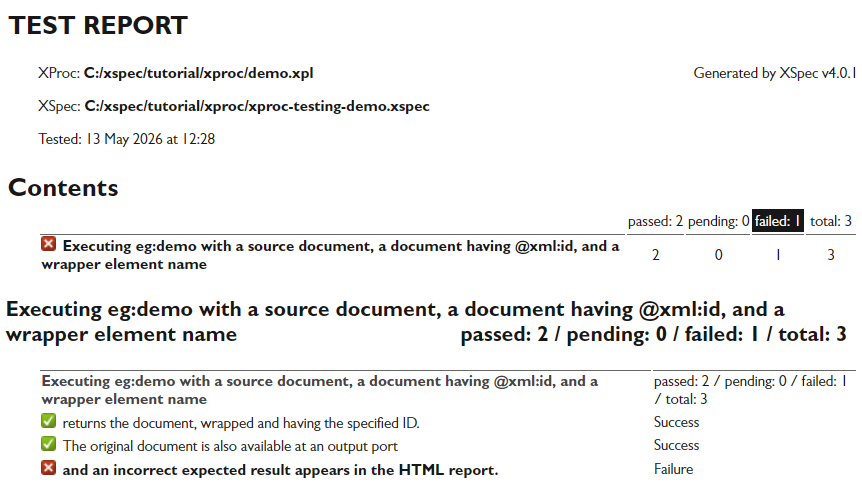
Summary of test results
For <x:expect> elements that failed, the report also shows diffs of actual and expected results. For the failing <x:expect> element in this example, the diffs use reversed colors (white on black instead of black on white) to draw attention to the discrepancy between the step’s actual result and our expected result.

Actual vs. expected results
Want to Try It Yourself?
XSpec v4.0 is available as a Pre-release. Follow installation instructions for macOS/Linux or Windows. Then, check out Writing Scenarios for XProc.
Key Takeaways
- XSpec v4.0 enables you to test custom XProc steps.
- The proposed vocabulary, behaviors, and reports are similar to precedents for testing XSLT stylesheets, with some differences tailored for the XProc language.
- If you have any feedback, please create a new issue on the Issues page. You’ll need a GitHub account for that. If you have a Medium account but not a GitHub account, you can add comments to this page in Medium. Either way, thanks!
메타데이터
- post_id
- 6448a032e2e5
- slug
- to-xproc-users-welcome-to-xspec-6448a032e2e5
- url
- https://medium.com/@xspectacles/to-xproc-users-welcome-to-xspec-6448a032e2e5
- canonical_url
- https://medium.com/@xspectacles/to-xproc-users-welcome-to-xspec-6448a032e2e5
- author_url
- https://medium.com/@xspectacles
- status
- ok
- fetched_at
- 2026-07-15 21:32:05