Enforcing Signed Container Images in Kubernetes Using Cosign & Kyverno (Helm-based Setup)
Securing the container supply chain has become a baseline requirement for production Kubernetes clusters. As clusters grow and multiple…
Enforcing Signed Container Images in Kubernetes Using Cosign & Kyverno (Helm-based Setup)
Securing the container supply chain has become a baseline requirement for production Kubernetes clusters. As clusters grow and multiple teams deploy workloads, admission-time controls act as guardrails, preventing untrusted images from reaching runtime.
This article explains how Cosign, Kyverno, and Harbor can work together to enforce image signature verification in Kubernetes. The approach is well-suited for enterprise environments with private registries, custom TLS certificates, and restricted access to public transparency logs.
Why Image Signing Matters
Image signing provides three fundamental security guarantees:
- Integrity Confirms that the container image has not been modified after it was built and signed.
- Authenticity Verifies that the image originates from a trusted source and not from an unknown or compromised registry.
- Deployment-Time Enforcement Prevents unsigned or improperly signed images from entering the Kubernetes cluster.
In this setup:
- Cosign is responsible for signing and verifying images.
- Harbor stores container images and their corresponding signatures.
- Kyverno acts as a Kubernetes admission controller that enforces signature verification rules.
If an image does not meet the defined verification criteria, the deployment is blocked before the workload reaches runtime.
High-Level Architecture
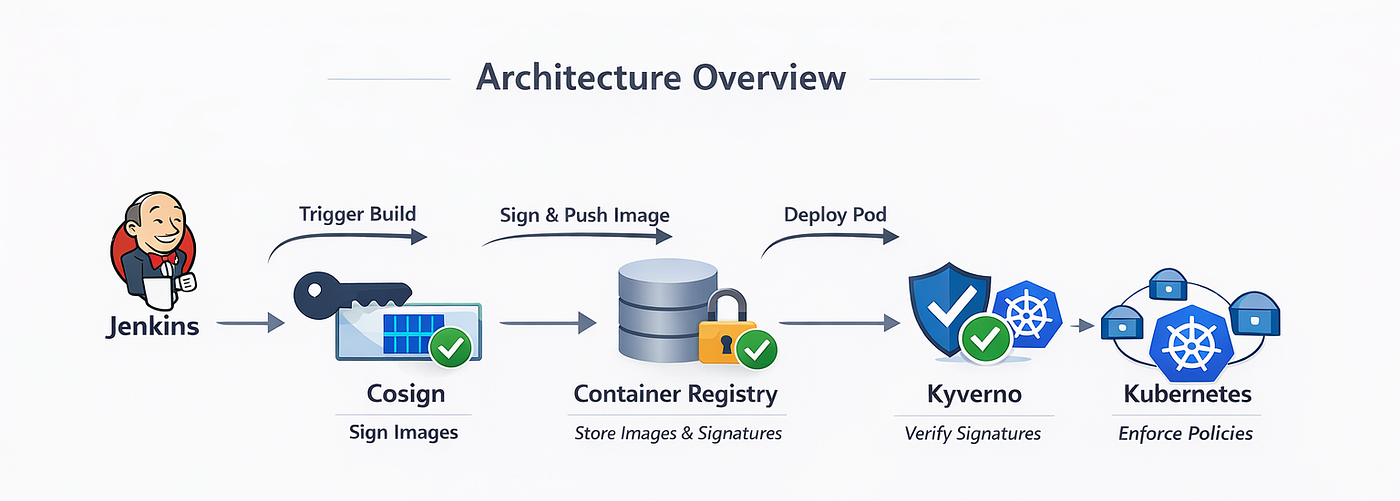
Architecture Overview
The flow of image signing and verification works as follows:
- A container image is built and pushed to Harbor.
- The image is signed using Cosign.
- The signature is stored as an OCI artifact in the same Harbor repository.
- A deployment request is sent to Kubernetes.
- Kyverno intercepts the request during admission.
- Kyverno verifies the image signature using the Cosign public key.
- Only verified images are allowed to run inside the cluster.
This shifts supply-chain security enforcement directly into the Kubernetes control plane.
Prerequisites
The following components are required:
- A running Kubernetes cluster
- A private Harbor registry using a custom CA
- Helm installed
- Access to the
kyvernonamespace kubectlconfigured with cluster access
Step 1: Generate Cosign Key Pair
Generate a Cosign key pair:
cosign generate-key-pairThis creates two files:
- cosign.key → private key (used for signing images)
- cosign.pub → public key (used for verification by Kyverno)
The private key should be kept secure. Only the public key is used by Kubernetes/Kyverno.
Step 2— Sign the Image Using Cosign
Before an image can be verified, it must be signed.
cosign sign --yes \
  --key cosign.key \
  --allow-insecure-registry \
  --registry-username <REGISTRY_USERNAME> \
  --registry-password <REGISTRY_PASSWORD> \
  --tlog-upload=false \
  <REGISTRY_HOST>/<PROJECT>/<IMAGE_NAME>:<IMAGE_TAG>
Key Notes
--tlog-upload=falseavoids reaching out to public Rekor (useful in restricted networks).--allow-insecure-registryis often required with internal CAs or when Harbor uses a non-public CA chain.- Cosign pushes the signature as an OCI artifact next to the image.
Step 3— Export the Harbor Root CA Certificate
Kyverno must trust Harbor’s TLS certificate in order to verify signed images.
The Harbor root CA can be extracted using:
openssl s_client -showcerts \
  -connect <HARBOR_REGISTRY_HOST>:<PORT> </dev/null 2>/dev/null \
  | openssl x509 -outform PEM > <HARBOR_CA_FILE>.pem
Example:
openssl s_client -showcerts \
  -connect registry.example.com:443 </dev/null 2>/dev/null \
  | openssl x509 -outform PEM > harbor-root-ca.pem
This command generates a PEM-formatted CA certificate that will later be injected into Kyverno.
Step 4— Install Kyverno
Helm Chart Version vs Application Version (Important)
A common mistake when installing Kyverno is attempting to use the application version instead of the Helm chart version.
For example, the following installation attempt will fail:
helm install kyverno kyverno/kyverno \
  --namespace kyverno --create-namespace \
  --version v1.16.0
This fails because Helm installs chart versions, not application versions.
Kyverno maintains two separate versions:
- Chart Version → Used by Helm
- App Version → Kyverno controller version packaged inside the chart
Finding the Correct Chart Version
List all available Kyverno chart versions:
helm search repo kyverno -lThe output will look similar to this:
CHART VERSION    APP VERSION
3.6.0            v1.16.0
Here:
3.6.0is the Helm chart versionv1.16.0is the Kyverno application version inside the chart
Correct Installation Command
Install Kyverno using the chart version:
helm install kyverno kyverno/kyverno \
  --namespace kyverno --create-namespace \
  --version 3.6.0
This installs Kyverno successfully with application version v1.16.0.
Verify the Installation
kubectl get pods -n kyvernoAll Kyverno components should be in a running state before proceeding.
Step 5— Configure CA Trust for Kyverno
Kyverno must trust:
- Harbor’s custom CA
- The Cosign public key used for signature verification
Create a CA Bundle ConfigMap
kubectl -n kyverno create configmap kyverno-ca-bundle \
  --from-file=ca-certificates.crt=harbor-ca.pem
Create Secrets for Harbor CA and Cosign Public Key
kubectl create secret generic harbor-ca \
  --from-file=ca.crt=harbor-ca.pem \
  -n kyverno
kubectl create secret generic cosign-pub \
--from-file=cosign.pub=cosign.pub \
-n kyvernoStep 6— Enable CA Bundle Through Helm
The recommended production approach is to inject trusted certificates using Helm values.
Create a values override file values-ca-bundle.yaml:
config:
  caBundle:
    enabled: true
    configMapName: kyverno-ca-bundle
    mountPath: /etc/ssl/certs
Upgrade the Kyverno installation:
helm upgrade kyverno kyverno/kyverno \
  -n kyverno \
  --version 3.6.0 \
  -f values-ca-bundle.yaml
Step 7— Patch Kyverno to Trust Harbor CA (Testing Only)
kubectl patch deployment kyverno-admission-controller -n kyverno \
  --type='json' \
  -p='[
    {
      "op": "add",
      "path": "/spec/template/spec/volumes/-",
      "value": {
        "name": "harbor-ca",
        "secret": {
          "secretName": "harbor-ca"
        }
      }
    },
    {
      "op": "add",
      "path": "/spec/template/spec/containers/0/volumeMounts/-",
      "value": {
        "name": "harbor-ca",
        "mountPath": "/etc/ssl/certs/harbor-ca.crt",
        "subPath": "ca.crt"
      }
    }
  ]'
Restart Kyverno:
kubectl rollout restart deployment kyverno-admission-controller -n kyvernoIf Kyverno is upgraded via Helm, or if the Helm chart is applied again, Helm overwrites the Deployment specification with what is defined in values.yaml.
As a result:
- The manual patch may disappear silently
- Any CA mounted via patching may no longer be available
- Image signature verification may start failing after the upgrade
Step 8— Enforce Cosign Signature Verification with Kyverno
Create a Kyverno ClusterPolicy:
apiVersion: kyverno.io/v1
kind: ClusterPolicy
metadata:
  name: require-cosign-signatures  #<POLICY_NAME>
spec:
  validationFailureAction: Enforce
  background: false
  rules:
    - name: verify-uat-images  #<RULE_NAME>
      match:
        resources:
          kinds:
            - Pod
          namespaces:
            - <TARGET_NAMESPACE>
      verifyImages:
        - imageReferences:
            - "<REGISTRY_HOST>/<PROJECT>/*"
          attestors:
            - entries:
                - keys:
                    secret:
                      name: cosign-pub
                      namespace: kyverno
          mutateDigest: false
          verifyDigest: false
          useCache: true
Important Note on **validationFailureAction**
The field validationFailureAction controls how Kyverno reacts when a policy violation occurs.
validationFailureAction: EnforceEnforce :- The request is blocked if the image does not meet the verification rules.
Alternatively, Kyverno also supports:
validationFailureAction: AuditAudit:- The request generates warnings not block the request
Apply the policy:
kubectl apply -f require-cosign-signatures.yamlRestart Kyverno:
kubectl rollout restart deployment kyverno-admission-controller -n kyvernoExpected Behavior After Enforcement
- Unsigned images → Deployment blocked
- Images signed with an untrusted key → Deployment blocked
- Images outside the allowed registry scope → Deployment blocked
- Correctly signed images → Deployment allowed
Verification occurs before pod creation, eliminating runtime risk.
Production Tips and Good Practices
1. CI/CD Integration (Cosign in pipeline)
- Sign at the end of the build once tests and scans pass.
- Example GitHub Actions step:
- name: Cosign Sign
  env:
    COSIGN_PASSWORD: ${{ secrets.COSIGN_PASSWORD }}
  run: |
    cosign sign --yes \
      --key cosign.key \
      --registry-username "${{ secrets.REGISTRY_USER }}" \
      --registry-password "${{ secrets.REGISTRY_PASS }}" \
      --tlog-upload=false \
      $REGISTRY/$PROJECT/$IMAGE:$TAG
2. Namespacing and Multi-Tenancy
- For tenant isolation, scope policies to specific namespaces and registry paths.
- If different teams use different keys, create multiple
attestorsentries or separate rules per team.
Conclusion
Using Cosign, Harbor, and Kyverno together creates a strong and practical supply-chain security model for Kubernetes. This configuration ensures that:
- Container images are cryptographically signed
- Only trusted images are admitted into the cluster
- Private registries with custom CAs are fully supported
- Security is enforced automatically at admission time
This approach significantly reduces the risk of unauthorized or compromised workloads running in sensitive Kubernetes environments.
메타데이터
- post_id
- 646209ecb8ce
- slug
- enforcing-signed-container-images-in-kubernetes-using-cosign-kyverno-helm-based-setup-646209ecb8ce
- url
- https://medium.com/@hansakabiyon99/enforcing-signed-container-images-in-kubernetes-using-cosign-kyverno-helm-based-setup-646209ecb8ce
- canonical_url
- https://medium.com/@hansakabiyon99/enforcing-signed-container-images-in-kubernetes-using-cosign-kyverno-helm-based-setup-646209ecb8ce
- author_url
- https://medium.com/@hansakabiyon99
- status
- ok
- fetched_at
- 2026-07-13 06:23:13


