Azure API Management as an AI Gateway for Microsoft Foundry: Enterprise Model Governance at Scale
Most organizations adopting Foundry at scale face a common architecture problem: dozens of teams, hundreds of applications, all calling the…
Azure API Management as an AI Gateway for Microsoft Foundry: Enterprise Model Governance at Scale
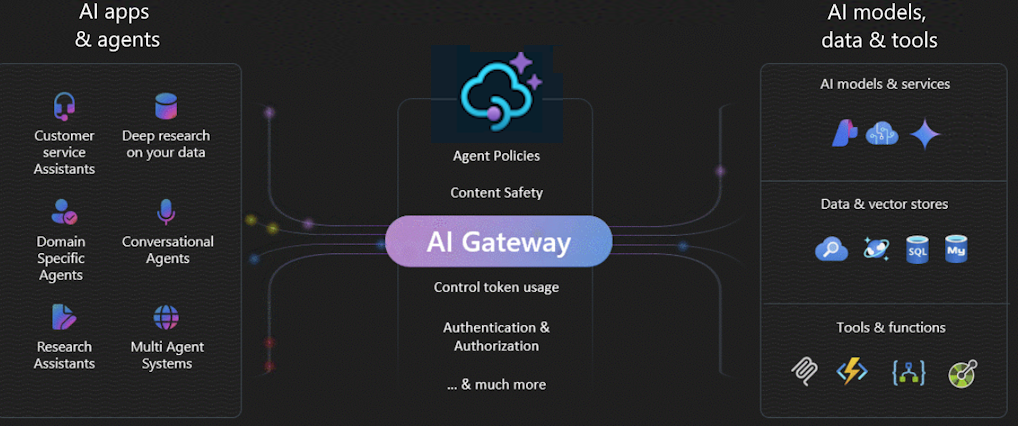
Most organizations adopting Foundry at scale face a common architecture problem: dozens of teams, hundreds of applications, all calling the same model deployments with no centralized control over cost, rate limiting, routing, authentication, or policy enforcement. The result is unpredictable costs, capacity conflicts between teams, and no single place to apply governance policies.
Azure API Management (APIM) as an AI Gateway solves this. It sits between your applications and your Foundry model deployments as an intelligent proxy enforcing policies, routing traffic, managing costs, and providing unified observability across your entire AI fleet.
Foundry’s ‘bring your own model’ feature, introduced in late 2025, supports APIM as a first-class gateway for agent workloads.
In this article we will design the AI gateway architecture, configure APIM for Foundry, implement the key policies, and understand the operational benefits.
Why a Central AI Gateway Matters at Scale
Without a gateway, the typical enterprise Foundry deployment looks like this: each team manages their own API keys, their own rate limit configurations, their own cost tracking. There is no visibility across teams. When one team’s batch job consumes all the available TPM quota, another team’s production application starts failing.
The AI gateway pattern centralizes all of this. One entry point, all policy applied there, all traffic visible in one place. It is the same pattern that API management brought to microservices; now applied to AI model access.
With an AI gateway, you know exactly what every team is spending on AI, you can change routing policies without touching application code.
Create an AI Gateway
Follow these steps in the Foundry portal to enable AI Gateway for a resource.
- Sign in to Microsoft Foundry. Make sure the New Foundry toggle is on. These steps refer to Foundry (new).

- Select Operate > Admin console.
- Open the AI Gateway tab.
- Select Add AI Gateway.

Select the Foundry resource you want to connect with the gateway.

- Select Create new or Use existing APIM.
- Create new: Creates a Basic v2 SKU instance. Basic v2 is designed for development and testing with SLA support.
- Use existing: Select an instance that meets your organization’s governance and networking requirements.
or programmatically:
Create an APIM instance and import your Foundry model endpoints as backend services. APIM uses managed identity to authenticate to Foundry — no API key management required:
az apim create \
  --name ai-gateway \
  --resource-group rg-ai-platform \
  --location westeurope \
  --sku-name Premium \
  --publisher-email platform@contoso.com \
  --publisher-name 'Contoso AI Platform'

# Assign Foundry model access to the APIM managed identity
az role assignment create \
  --assignee $(az apim show -n ai-gateway -g rg-ai-platform --query identity.principalId -o tsv) \
  --role 'Cognitive Services OpenAI User' \
  --scope /subscriptions/SUB/resourceGroups/RG/providers/Microsoft.CognitiveServices/accounts/FOUNDRY
Implement Cost Control Policies
APIM policies are XML configuration applied at the gateway level. This policy enforces per-team token budgets and routes to a cheaper model when the premium quota is exhausted:
<policies>
  <inbound>
    <!-- Identify the calling team from the subscription key -->
    <set-variable name='team-id' value='@(context.Subscription.Id)' />

    <!-- Enforce per-team daily token budget -->
    <azure-openai-token-limit
      counter-key='@(context.Subscription.Id)'
      tokens-per-minute='50000'
      estimate-prompt-tokens='true'
      tokens-consumed-header-name='x-tokens-used'
      remaining-tokens-header-name='x-tokens-remaining' />

    <!-- Route to semantic cache first (cost saving) -->
    <azure-openai-semantic-cache-lookup
      score-threshold='0.92'
      embeddings-backend-id='embeddings-backend' />
  </inbound>
  <backend>
    <!-- Load balance across multiple deployments -->
    <azure-openai-load-balance backend-pool-id='foundry-pool' />
  </backend>
  <outbound>
    <!-- Emit token usage to Azure Monitor for cost attribution -->
    <emit-metric name='ai-tokens-consumed'
      value='@(int.Parse(context.Response.Headers["x-tokens-used"][0]))'>
      <dimension name='team' value='@((string)context.Variables["team-id"])' />
      <dimension name='model' value='@(context.Request.MatchedParameters["model"])' />
    </emit-metric>
  </outbound>
</policies>
Verify the gateway is working
Confirm that traffic routes through AI Gateway:
- In the Azure portal, open the API Management instance connected to your Foundry resource.
- Select Monitoring > Metrics. In the Metric dropdown, select Requests. Make a test call to a model deployment in the enabled project, then verify that the request count increments.
- To check detailed logs, select Monitoring > Logs and run a query against the GatewayLogs table. Look for entries with a
200response code and an API name that matches your AI Gateway. - If you configured token limits, verify they apply by testing a request that exceeds the limit. The API Management instance returns a
429 Too Many Requestsresponse when the limit is exceeded.
Connect Foundry Agent Service to the APIM Gateway
The ‘bring your own model’ feature in Foundry Agent Service lets agents call models through APIM rather than directly. This applies all your gateway policies to agent tool calls and model inference giving you the same governance for agentic workloads as for direct API calls:
# In the Foundry portal: Deployments > New > Bring Your Own Model
# Or via SDK:
from azure.ai.projects.models import ExternalModelDeployment

gateway_deployment = project.deployments.create_external(
    ExternalModelDeployment(
        name="gpt4o-via-gateway",
        endpoint_url=os.environ["APIM_GATEWAY_URL"],
        api_key=os.environ["APIM_SUBSCRIPTION_KEY"],
        model_name="gpt-4o",
        description="GPT-4o routed through the enterprise AI gateway"
    )
)
Once configured, agents use this deployment exactly like any other, the gateway is transparent to the agent logic. But every call is now subject to your cost control, rate limiting, semantic caching, and audit logging policies.
Conclusion
Azure API Management transforms Microsoft Foundry from a collection of model endpoints into a governed, enterprise-scale AI platform. Acting as a centralized AI gateway, APIM enforces cost controls, rate limits, routing, security, and observability across all teams and workloads without changing application or agent code.
Thanks for reading my article and I hope you can take something away.
💯 Don’t forget to follow me on medium for more
💯 Don’t forget to follow me on **LinkedIn **for more
💯 leave some feedback
FURTHER Reading
#MVP Communities — Microsoft
That’s all !
메타데이터
- post_id
- 64953cbf3da0
- slug
- azure-api-management-as-an-ai-gateway-for-microsoft-foundry-enterprise-model-governance-at-scale-64953cbf3da0
- url
- https://medium.com/@badrkacimi/azure-api-management-as-an-ai-gateway-for-microsoft-foundry-enterprise-model-governance-at-scale-64953cbf3da0
- canonical_url
- https://medium.com/@badrkacimi/azure-api-management-as-an-ai-gateway-for-microsoft-foundry-enterprise-model-governance-at-scale-64953cbf3da0
- author_url
- https://medium.com/@badrkacimi
- status
- ok
- fetched_at
- 2026-06-14 17:09:17




