How to Build a Web Scraper with Scrapy + Playwright
Master Scrapy + Playwright in 2026. Learn to build high-success web scrapers using rotating residential proxies to bypass anti-scraping…
How to Build a Web Scraper with Scrapy + Playwright
Master Scrapy + Playwright in 2026. Learn to build high-success web scrapers using rotating residential proxies to bypass anti-scraping blocks.
1. Why Choose Scrapy + Playwright?
When scraping modern web applications, engineering teams often face a dilemma: choose a pure automation script or a scraping framework. Integrating both offers the ultimate solution:
- Scrapy (The Backbone): Manages efficient request scheduling, data processing pipelines, concurrency throttling, URL deduplication, and session state persistence.
- Playwright (The Muscle): Executes client-side JavaScript, handles infinite scrolling, triggers button clicks, takes screenshots, and processes complex single-page applications (SPAs) that require session authentication.
By leveraging the official scrapy-playwright middleware, each Scrapy request can be executed within an optimized, headless browser instance, balancing scheduling efficiency with true browser fidelity.
2. Core Implementation: Building Your High-Success Scraper
Step 1: Environment Setup & Project Initialization
First, ensure your Python environment is version 3.8 or above, and install the required dependencies:
pip install scrapy scrapy-playwright playwright pydantic
playwright install
Initialize a standard Scrapy project architecture:
scrapy startproject myspider && cd myspider
scrapy genspider quotes quotes.toscrape.com
Step 2: Engine Configuration (settings.py)
To integrate Playwright into Scrapy’s lifecycle and enforce production-grade throttling, register the downloader middleware and enable the AutoThrottle extension in your settings.py:
Python
# Enable the Playwright Download Handler
DOWNLOAD_HANDLERS = {
    "http": "scrapy_playwright.handler.ScrapyPlaywrightDownloadHandler",
    "https": "scrapy_playwright.handler.ScrapyPlaywrightDownloadHandler",
}
DOWNLOADER_MIDDLEWARES = {
"scrapy_playwright.handler.ScrapyPlaywrightDownloadHandler": 543,
}# 2026 Enterprise Best Practices: AutoThrottle and Retry Strategies
ROBOTSTXT_OBEY = True # Strict compliance with robots.txt
DOWNLOAD_DELAY = 0.5 # Base download delay in seconds
RETRY_TIMES = 3 # Max number of retries for transient errors
AUTOTHROTTLE_ENABLED = True # Adaptive concurrency throttling
PLAYWRIGHT_DEFAULT_NAVIGATION_TIMEOUT = 30000 # 30-second browser navigation timeoutStep 3: Schema Validation (models.py)
To protect your database from structural web layout changes and polluted data, implement Pydantic for runtime data validation:
Python
from pydantic import BaseModel, Fieldclass QuoteModel(BaseModel):
text: str = Field(min_length=1, description="The quote text content")
author: str = Field(min_length=1, description="The author's name")
tags: list[str] = []3. Integrating Rotating Residential Proxies
During large-scale or high-frequency data extraction pipelines, hitting a target site from a single IP will inevitably trigger rate limits and anti-scraping blocks. To ensure uninterrupted data access for your global operations, integrating a high-performance rotating residential proxy pool is essential. Below, we demonstrate how to configure your system using IPFoxy as the proxy provider.
Important Pre-requisite: The script execution environment must have unrestricted network access to global routing nodes for the proxy routing to resolve correctly.
Step 1: Acquiring Proxy Credentials
- Access your IPFoxy dashboard and navigate to the Rotating Residential Proxy section.
- Select the protocol type:
http. - Choose the credential format:
Username:Password@Host:Port. - Click Generate Proxy and copy the string.
Step 2: Verification via Python Standard Library
Before embedding the logic directly into your Scrapy project, run a quick baseline test using Python’s built-in urllib to verify that the proxy rotates correctly:
import urllib.requestif __name__ == '__main__':
# Paste the connection string copied from your dashboard (replace with your real credentials)
proxy_info = 'username:password@gate-us-ipfoxy.io:58688'
proxy = urllib.request.ProxyHandler({
'https': f'http://{proxy_info}',
'http': f'http://{proxy_info}',
})
opener = urllib.request.build_opener(proxy, urllib.request.HTTPHandler)
urllib.request.install_opener(opener)
# Send a request to an IP geo-API to verify the routing swap
try:
content = urllib.request.urlopen('http://www.ip-api.com/json').read()
print("Proxy Exit Node Info:", content.decode('utf-8'))
except Exception as e:
print("Network error. Please check your connectivity or configuration. Error:", e)Upon successful execution, the log will output geo-coordinates matching your selected rotating pool. Now, apply this dynamically inside your Scrapy Spider via request metadata:
yield scrapy.Request(
    url="https://example.com",
    meta={
        "playwright": True,
        "playwright_context_kwargs": {
            "proxy": {
                "server": "http://gate-us-ipfoxy.io:58688",
                "username": "your_username",
                "password": "your_password",
            }
        }
    }
)
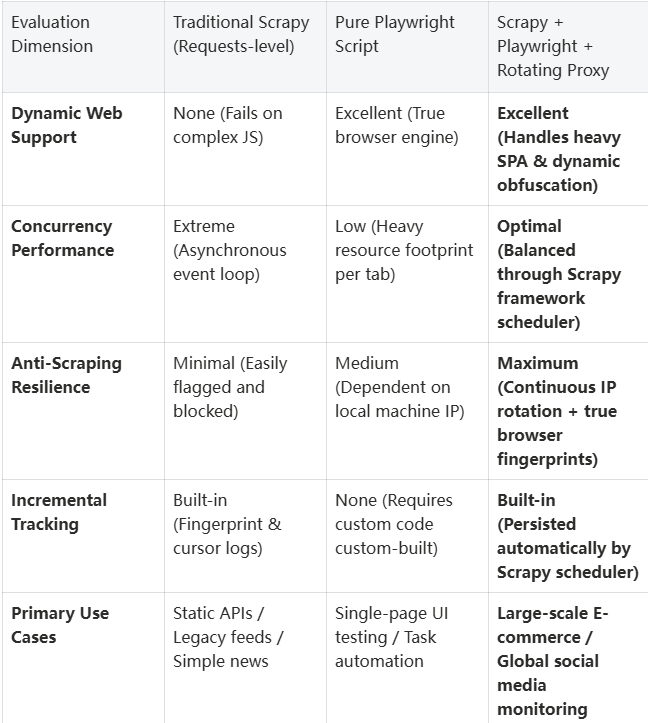
4. Web Scraping Architecture Comparison Matrix
5. Performance and Stability Optimization Checklist
To ensure your infrastructure operates seamlessly under heavy loads, incorporate these optimization vectors:
- Decouple Extraction from I/O Pipelines: Implement a Producer-Consumer pattern. Use Scrapy Pipelines for bulk, asynchronous writes (e.g., stage raw data into a local SQLite instance before loading into a data warehouse).
- Optimize Selector Queries: Avoid highly nested or overly complex CSS/XPath descendant selectors to prevent repeated, CPU-heavy DOM tree parsing.
- Drop Redundant Assets: Utilize Playwright’s
page.route()to intercept and drop requests for heavy assets like images, web fonts, and tracking media (block_resources). This routinely reduces bandwidth and memory footprint by over 60%.
6. Frequently Asked Questions (FAQ)
Q1: Does running Playwright consume excessive memory? How do I mitigate this?
A: Yes, running real browser instances is resource-intensive. To optimize, strictly control your concurrent limits in your settings (e.g., CONCURRENT_REQUESTS = 8) and ensure browser contexts close immediately after completion.
Q2: Why is my scraper still blocked even with a valid proxy?
A: Check if your automation footprint is leaking via headless mode. Modern firewalls scan for the navigator.webdriver property. Consider embedding an evasion layer or utilizing anti-detect browser configurations to inject clean browser characteristics alongside a custom user_agent.
Q3: How should I implement URL deduplication and checkpoint restarts?
A: Normalize your URLs before processing (strip irrelevant tracking query parameters, standardize trailing slashes), and use a Bloom filter for memory-efficient fingerprinting. For checkpoints, maintain an explicit state tracking database or a Redis queue containing processed timestamps.
7. Conclusion
In modern data engineering, scraping goes beyond merely pulling HTML code. It requires an enterprise infrastructure built on a resilient framework, clean compliance, and elastic scalability. While Scrapy + Playwright solves the complexity of rendering frontend elements, routing traffic through rotating residential proxies solves the challenge of rate limits. Start by running a single-page minimum viable pipeline, and scale up incrementally toward distributed infrastructure.
메타데이터
- post_id
- 6501ce040c01
- slug
- how-to-build-a-web-scraper-with-scrapy-playwright-6501ce040c01
- url
- https://medium.com/@fangkay0/how-to-build-a-web-scraper-with-scrapy-playwright-6501ce040c01
- canonical_url
- https://medium.com/@fangkay0/how-to-build-a-web-scraper-with-scrapy-playwright-6501ce040c01
- author_url
- https://medium.com/@fangkay0
- status
- ok
- fetched_at
- 2026-06-20 20:29:01