Claude Code Best Practices: 12 Patterns Agentic Engineers Use
Extracted from 69 Tips in GitHub’s #1 Trending Repo — with Input from Boris Cherny, the Engineer Who Built Claude Code at Anthropic.
CLAUDE CODE
Claude Code Best Practices: 12 Patterns Agentic Engineers Use
Extracted from 69 Tips in GitHub’s #1 Trending Repo — with Input from Boris Cherny, the Engineer Who Built Claude Code at Anthropic.
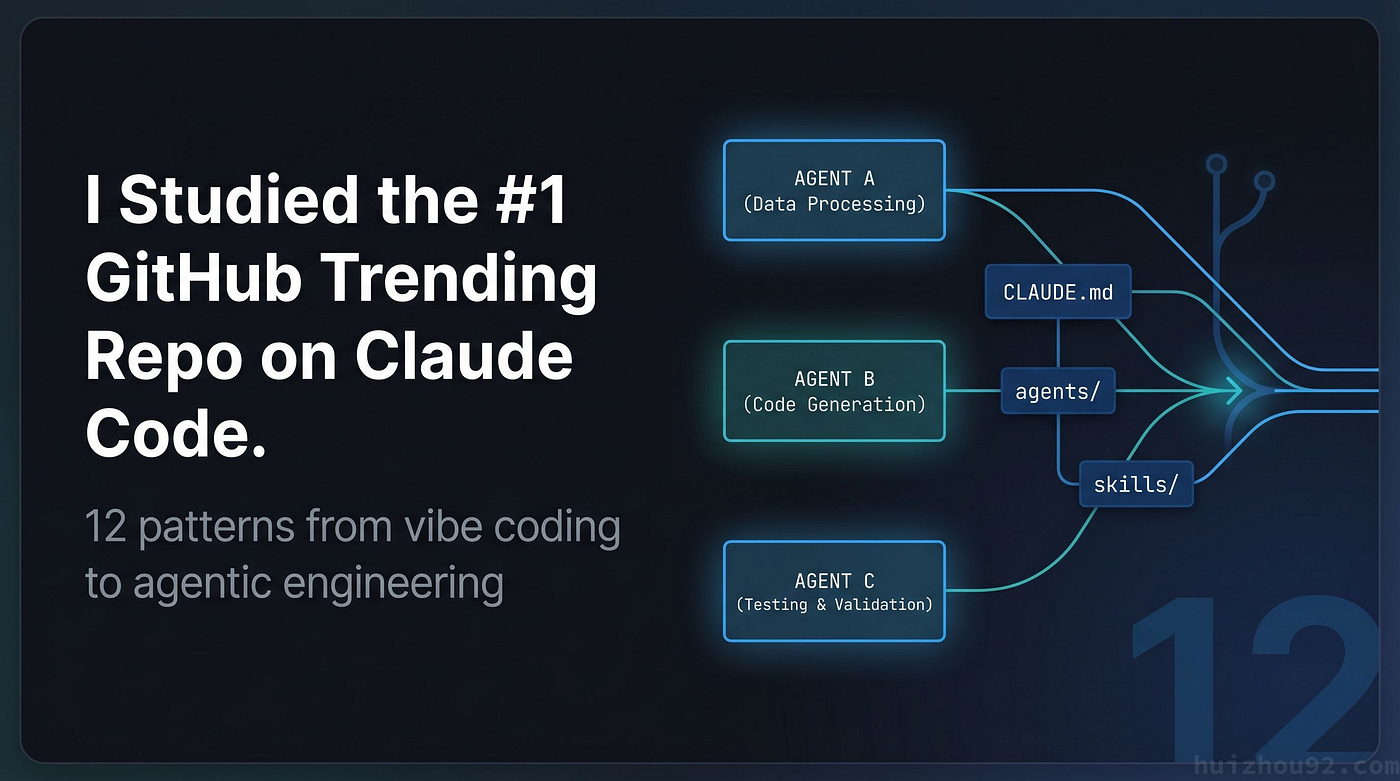
generate by gemini
The third time I watched Claude delete the wrong branch, I stopped blaming the model.
The real problem was how I was using it. Every session started fresh — no structure, no constraints, no reusable configuration. I’d type a prompt, approve permissions one by one, get a result I half-wanted, then repeat. When something went wrong, I’d add another sentence to the prompt.
- Only analyze, don’t modify files.
- Don’t touch anything in
/cmd. - Remember, we're using Go 1.22.
I was vibe coding. I didn’t have a word for it yet.
That word came from shanraisshan/claude-code-best-practice — a repo that hit GitHub Trending Day #1 in March 2026. Its subtitle: "from vibe coding to agentic engineering." The author had compiled 69 actionable tips across 11 categories, with input from Boris Cherny, the engineer who built Claude Code at Anthropic.
I read the whole thing. These are the 12 patterns that actually changed how I work.
1. Your CLAUDE.md is Probably Working against You
Most people treat CLAUDE.md like a configuration file: the longer and more detailed, the better. I had mine at around 500 lines — code style, commit format, test requirements, variable naming conventions, package organization rules.
Claude ignored the second half. Not all the time. Just enough that I couldn’t rely on it.
The finding that surprised me was that 60 lines is optimal. 200 is the ceiling. Beyond that, rules further down the file get quietly deprioritized. Claude doesn’t have unlimited working attention, and a 500-line file is asking it to hold too many constraints simultaneously.
The solution isn’t to delete rules. It’s to make rules appear only when they’re relevant.
The <important if="language=go"> syntax does exactly this. Are the rules wrapped in that tag only visible to Claude when it's processing Go files and writing a Python script? That entire block doesn't exist for Claude in that session.
For a Go service with multiple layers, the file structure looks like this:
my-service/
├── CLAUDE.md           # Root: universal rules, ~30 lines
├── api/
│   └── CLAUDE.md       # REST conventions, error codes
├── internal/
│   └── CLAUDE.md       # Package naming, interface patterns
└── cmd/
    └── CLAUDE.md       # Flag parsing, logger initialization
The internal/CLAUDE.md uses conditional rules:
<important if="language=go">
- No bare goroutines. Use errgroup or WaitGroup to manage lifecycle.
- Channel capacity > 0 requires an inline comment explaining why.
- context must be the first parameter, named ctx.
</important>
Total line count stays manageable. Each rule only fires when it’s actually relevant.
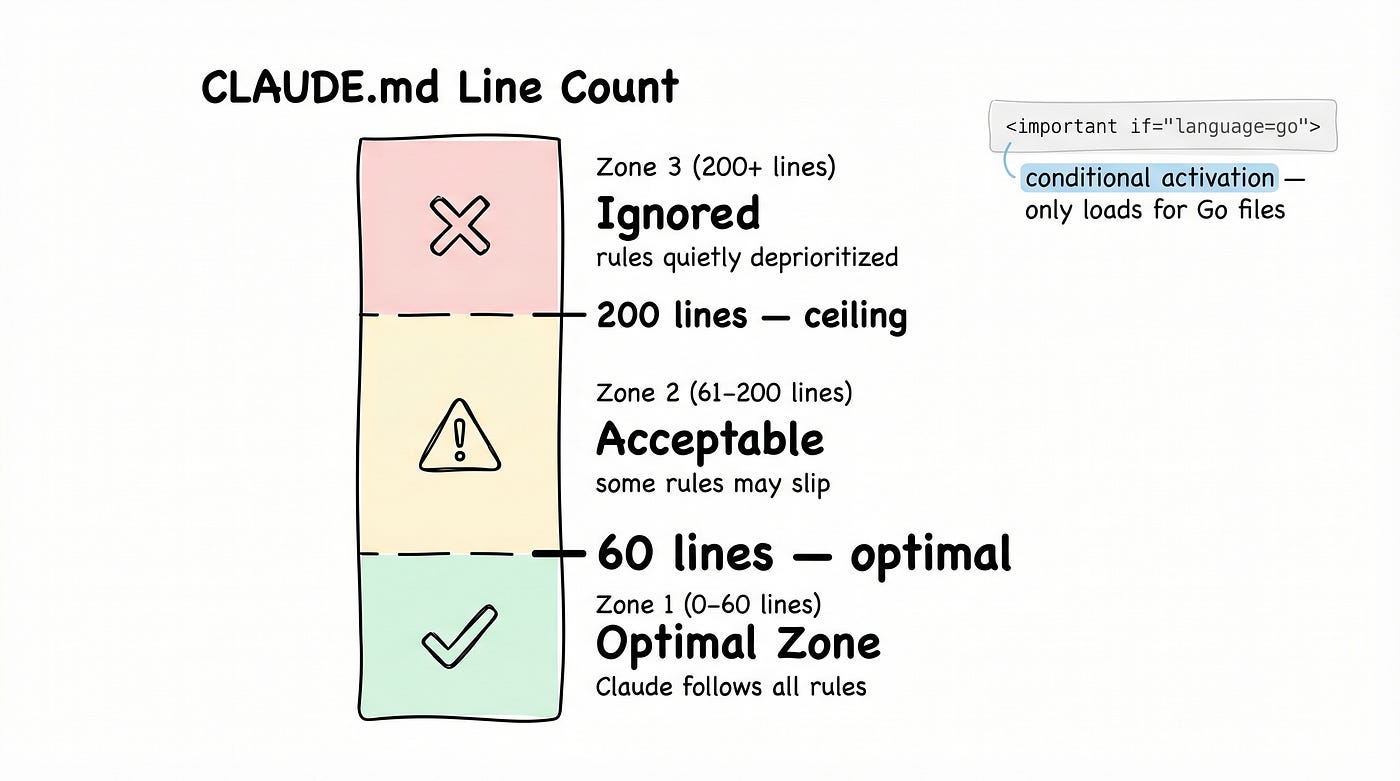
CLAUDE.md/gemini
2. Stop Treating Claude Code like a Chat Window
Here’s a habit that took me a while to break: starting every request with a fresh prompt that re-establishes all the rules.
“Help me review this PR. Only read files, don’t modify anything. Focus on the internal/ package. Use the project's error handling conventions."
Every. Single. Time.
The alternative is to treat Claude Code as an orchestration system rather than a chat interface. The .claude/ directory supports three types of configuration:
commands/: Reusable workflow shortcuts stored as slash commandsagents/: Specialized subagents with explicitly restricted tool accessskills/: Portable knowledge modules that work across projects
The code review example makes the difference concrete. I created a reviewer.md in .claude/agents/ — a dedicated agent that has Read access and nothing else. No write tools. No shell execution. No web access.
That agent physically cannot modify files. It doesn’t matter what I ask it to do in the conversation. The prompt doesn’t enforce the constraint — the configuration enforces it.
The line “only read files, don’t modify anything” has been deleted from every one of my prompts. It’s just not necessary anymore.
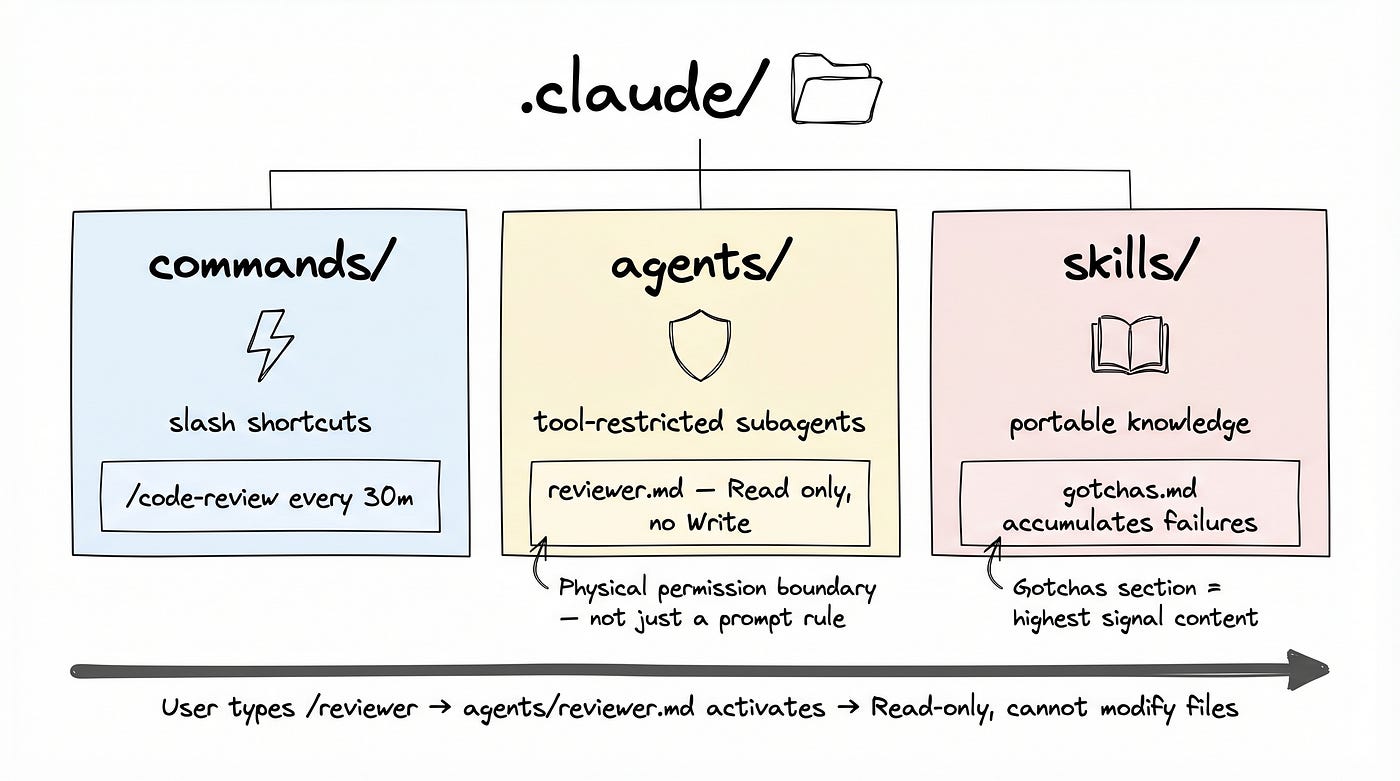
.claude folder /gemini
3. Context is a Resource. Treat it like One.
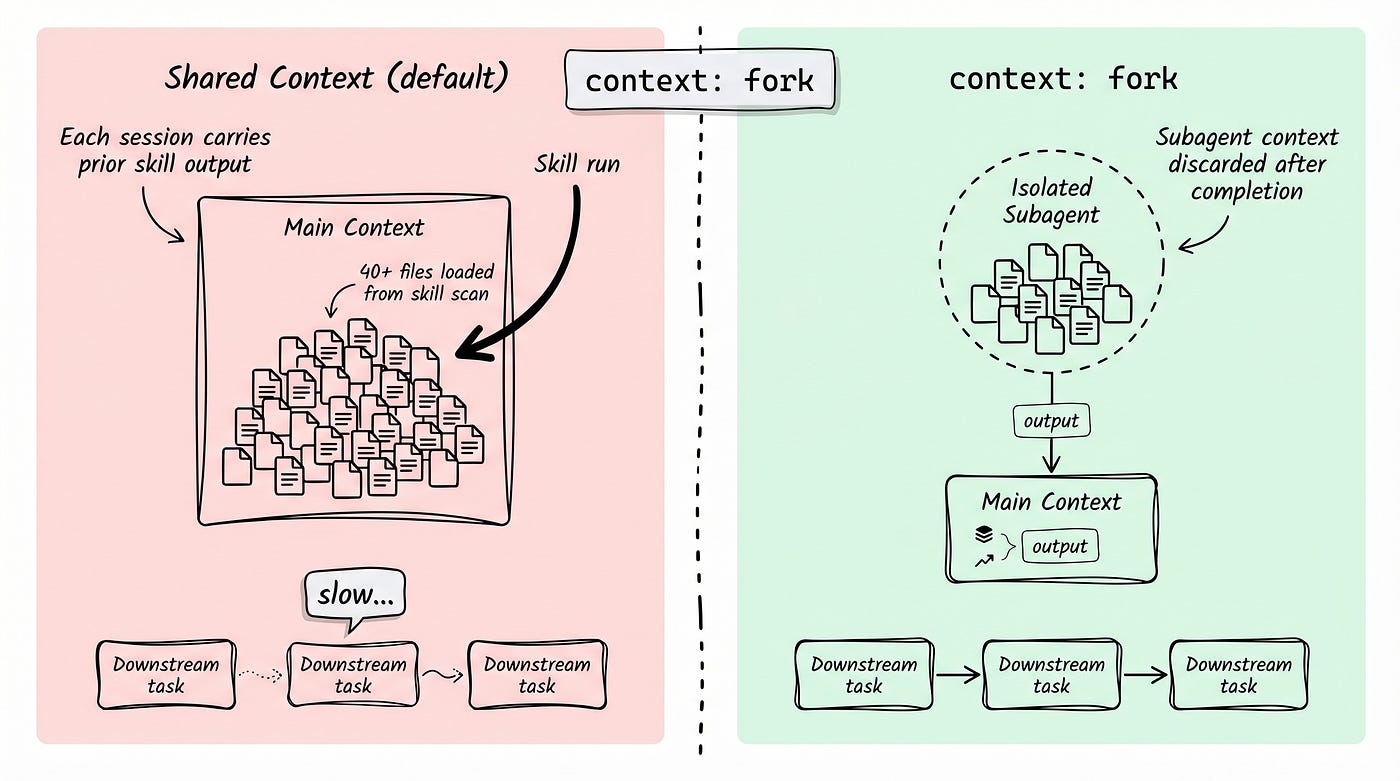
Skills share the main agent’s context by default. This matters more than it sounds.
I had a code quality analysis skill that read 40 files to produce a report. After it ran, every subsequent task in that session started heavier — Claude was carrying all that file content even when answering completely unrelated questions. The responses slowed and became slightly less sharp in ways that were hard to attribute to anything.
One line in a skill’s frontmatter fixes this:
context: forkThe skill runs in an isolated subagent. When it’s done, that context is discarded. The main agent only sees the output — a clean summary, a list of findings, whatever the skill was designed to return.
No manual /compact. No opening a new session to clear the slate.
context fork / gemini
4. Hooks Run outside the Agent Loop
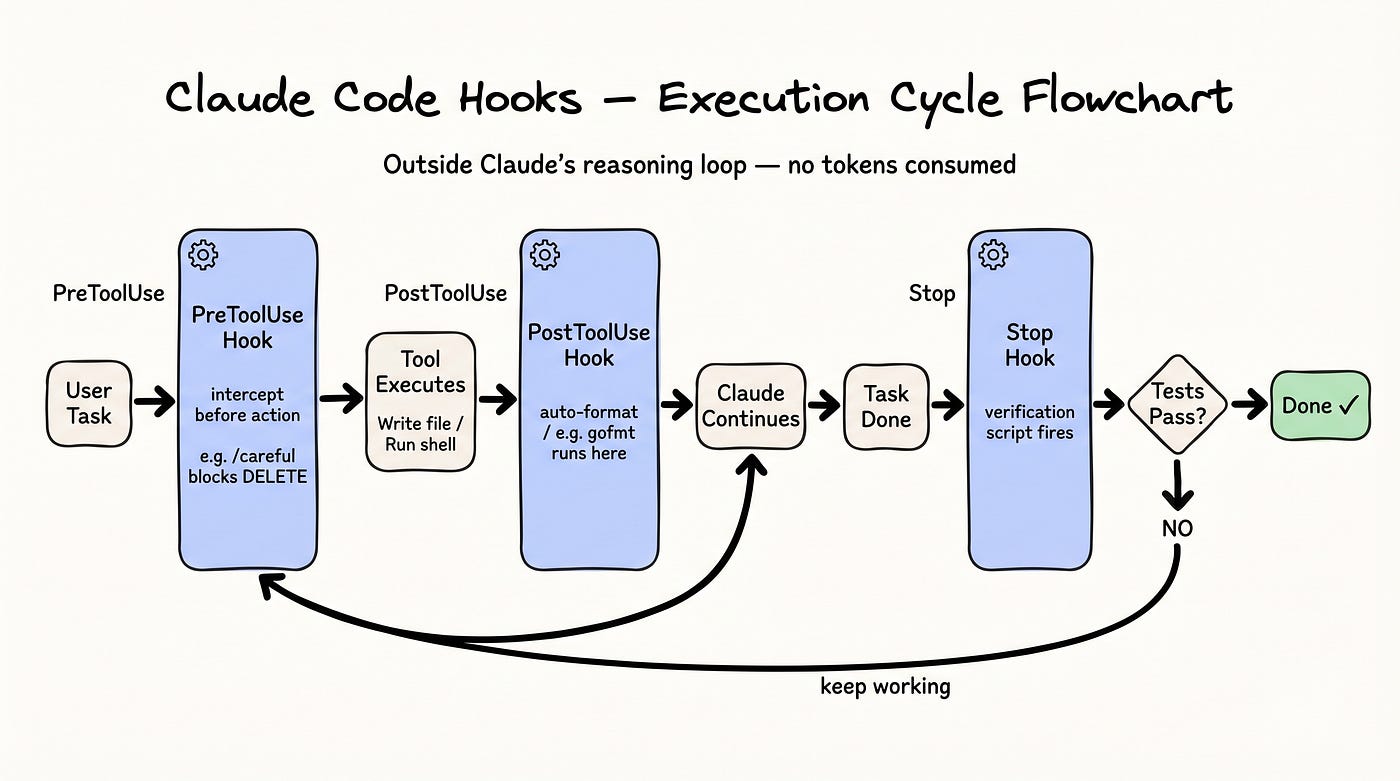
PreToolUse, PostToolUse, and Stop — three hook points that most Claude Code users have never configured.
What makes them architecturally interesting: they execute outside Claude’s main reasoning loop. No tokens consumed. No task interruption. They’re side-channel automation attached to Claude’s actions, not part of Claude’s actions.
A few concrete uses:
Auto-formatting on write: A PostToolUse hook running gofmt after every Go file write means formatting is never something you ask Claude to do — it just happens.
Guarded destructive operations: The /careful pattern activates a PreToolUse hook that intercepts any irreversible action — file deletion, overwrite, branch force-push — and requires explicit confirmation before proceeding. You activate it before a risky refactor; it deactivates when the task completes.
Completion verification: Covered in pattern 11.
Claude Code Hooks / gemini
5. 84% Fewer Permission Prompts
Claude Code’s default behavior is to prompt for approval on every shell command. This is the right default for safety. It’s the wrong default for flow.
/sandbox runs shell commands inside an isolated environment. The blast radius of any individual command is constrained, so the approval threshold drops significantly. In practice: 84% fewer permission prompts.
The tradeoff is real — sandboxed commands have limited system access. But for most coding tasks, the sandbox boundary is never reached, and the interruptions disappear.
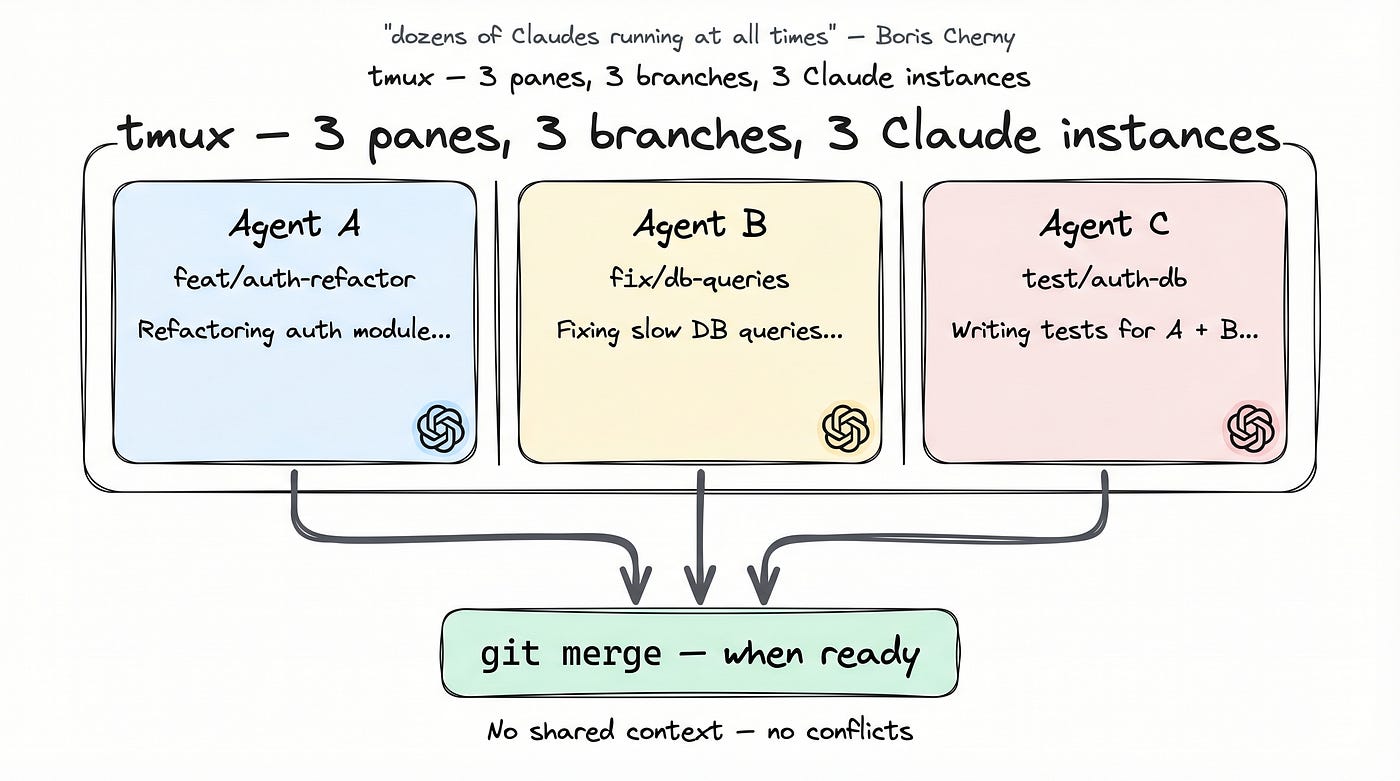
6. “Dozens Of Claudes Running at All Times.”
That’s Boris Cherny’s description of his own workflow. It’s not hyperbole.
claude -w launches Claude inside a git worktree — an isolated working directory on a separate branch. Combine that with tmux for multiple panes and you have independent Claude instances running simultaneously, each with its own context, its own branch, and its own task.
Agent A is refactoring the auth module. Agent B is fixing the database layer. Agent C is writing tests for both. None of them share context. None of them conflicts. Their changes live on separate branches until they’re ready to merge.
From waiting on one Claude reply at a time, to running a dozen simultaneously — that shift is probably the most visible difference between vibe coding and agentic engineering.
tmux + git worktree / gemini
7. ultrathink Is not a Gimmick
Type the word ultrathink anywhere in a task description, and Claude enters a higher-effort reasoning mode. This is the natural language trigger for extended thinking — no configuration change, no model switch, just a word in the prompt.
It’s not useful for everything. Most tasks don’t need it.
I used it once for a service split design. Normal mode gave me three decent options. With ultrathink, Claude surfaced two constraints I hadn't considered — cross-service transaction boundaries and the onboarding cost for the existing monitoring setup. The final choice was completely different from what the normal mode recommended.
8. Local Automation that CI Can’t Do
/loop 30m /code-reviewThis runs a code review workflow every 30 minutes. No human required. Intervals up to 1h, duration up to 3 days.
CI/CD automates what happens after code is merged. /loop automates what happens during development — and it can do things CI fundamentally can't, because it has access to your current working state.
A CI pipeline sees a diff. A loop-based review knows what you’ve been working on in this session, what questions came up earlier, and what constraints you’ve established. On Friday afternoon, I’ve started leaving a loop running through the weekend. Monday morning, I flagged issues and drafted PR summaries while I was away.
Most developers don’t know this capability exists natively in Claude Code. It does.
9. Mid-task Questions without Breaking the Task
You’re running a long refactor. Ninety minutes in, you want to ask about something unrelated — a different file, a different concern. Interrupting means losing context. But the question needs an answer.
/btw queues the question. Claude continues the active task, notes your question, addresses it at a natural pause point, then picks up where it left off.
Once you’ve used it, stopping the whole task to ask a side question feels like a waste.
10. The Section that Makes Skills Worth Writing
If you’re building skills for your team, Thariq — one of the core contributors to this repo’s skills work — has a specific piece of advice:
“The highest-signal content in any skill is the Gotchas section.”
Not the overview. Not the usage examples. The Gotchas.
A Gotchas section captures failure modes Claude actually encountered during real use. Not edge cases you anticipated — real failures, accumulated over time, written down when they happened. These have a much higher signal-to-noise ratio than explanatory prose because they’re specific, they’re verified, and they compound. Every failure you document becomes a future prevention.
Build the Gotchas section first. Update it every time Claude fails. Make it the primary artifact in your skill documentation.
11. Make “done” Mean Done
Claude will tell you that the task is complete. That doesn’t make it true.
I asked Claude to write a set of API handlers. It said done. I looked at the code — two of the three handlers had empty error handling. err != nil followed by nothing. If I'd had a Stop hook wired to a test coverage check, it would have caught this immediately and sent Claude back to fix it.
A Stop hook fires when Claude signals that a task is complete. Wire it to a verification script — run the test suite, check that expected files exist, hit an API endpoint, and validate the response. If verification fails, the task status rolls back, and Claude continues working until it passes.
In automated workflows running overnight or across multiple sessions, this is the difference between output you can trust and output you have to check anyway manually.
12. 10x Faster SDK Calls with One Flag
When using Claude programmatically through the Agent SDK — not the interactive CLI — add --bare.
Context discovery is Claude’s startup routine: locating CLAUDE.md files, loading the configuration, and checking the environment. In an interactive session, this happens once. In batch automation, it happens on every invocation.
--bare skips it. Startup time drops by up to 10x.
For a single invocation, the difference is barely noticeable. We have a daily code analysis pipeline — around 300 files, one Agent per file running in parallel. Before --bare: about 40 minutes. After: 18 minutes. Same infrastructure, same workload.
What These 12 Patterns Have in Common
After going through all 69 tips, the actual gap between vibe coding and agentic engineering isn’t about different tools. It’s about the same tools used differently.
Vibe coding is reactive. You describe what you want; Claude attempts it; you correct; repeat. The output quality depends almost entirely on how carefully you worded today’s prompt.
Agentic engineering offloads that work into configuration. Constraints live in files, not prompts. Workflows run on schedules. Agents have hard permission limits that hold regardless of what you ask them in conversation. Context gets cleaned up automatically. The system is consistent in a way that prompt-crafting never is.
The tools to do this — agents, skills, hooks, worktrees, loops — ship with Claude Code. They’re not advanced features. Most people never find them.
The repo is shanraisshan/claude-code-best-practice. Still actively updated. Worth reading end to end.
References
- shanraisshan/claude-code-best-practice — 69 tips, actively maintained
- Boris Cherny on X: tweet 1 · tweet 2
- Claude Code docs: code.claude.com/docs
메타데이터
- post_id
- 65264e3eb919
- slug
- claude-code-best-practices-12-patterns-agentic-engineers-use-65264e3eb919
- url
- https://levelup.gitconnected.com/claude-code-best-practices-12-patterns-agentic-engineers-use-65264e3eb919
- canonical_url
- https://levelup.gitconnected.com/claude-code-best-practices-12-patterns-agentic-engineers-use-65264e3eb919
- author_url
- https://medium.com/@hxzhouh
- status
- ok
- fetched_at
- 2026-06-09 15:37:30