NativePHP v4 Release: Your NativePHP App Is Now 100% Native, No Web View Required: Meet SuperNative
If you have been building mobile apps with NativePHP, there is one thing you probably never had to think twice about: your app was running…
NativePHP v4 Release: Your NativePHP App Is Now 100% Native, No Web View Required: Meet SuperNative
If you have been building mobile apps with NativePHP, there is one thing you probably never had to think twice about: your app was running inside a web view. Everything felt familiar — Blade, Livewire, the same CSS you already knew — but under the hood, a browser engine was still doing the heavy lifting to render it all.
That just changed completely.
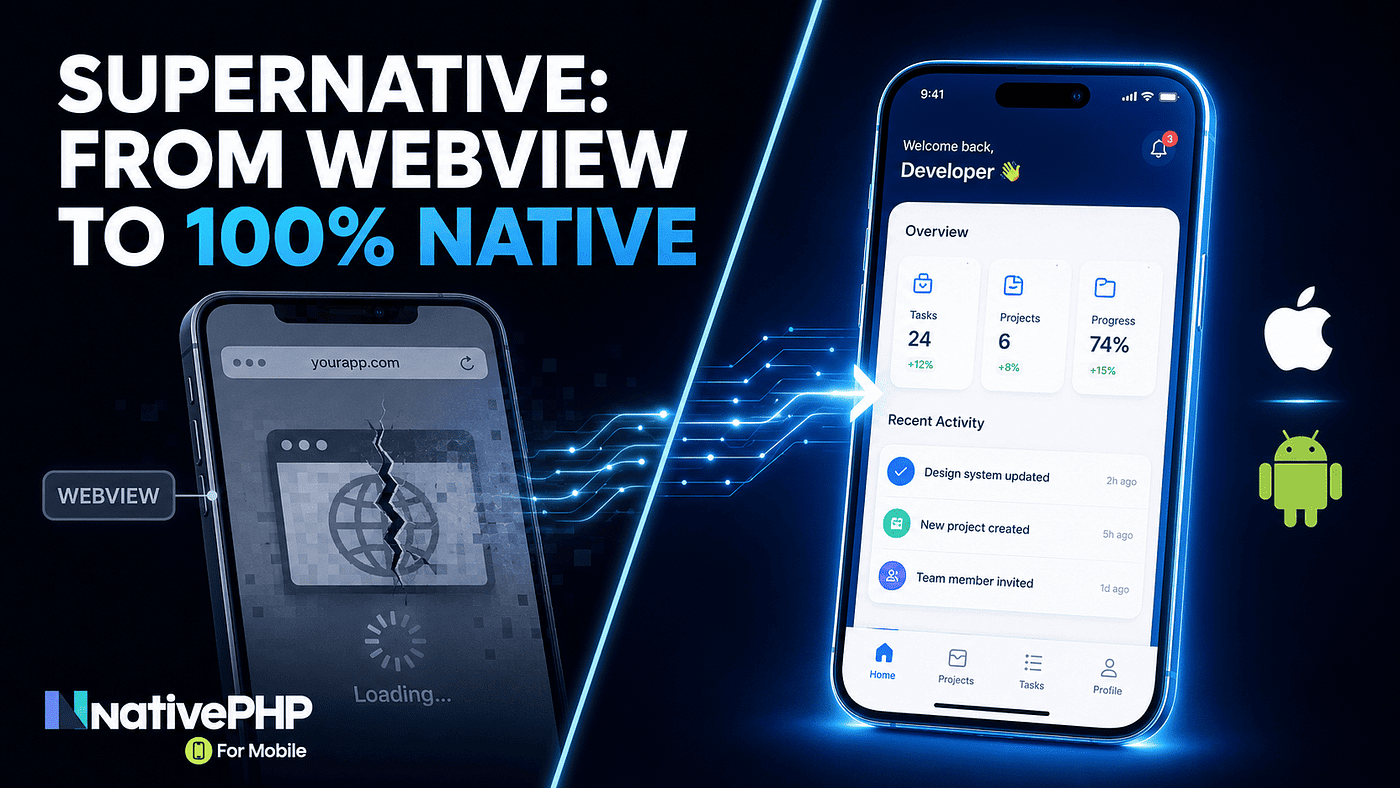
NativePHP has announced SuperNative, a new architecture that is now the default in NativePHP for Mobile v4 (currently in beta). This is not a small update. It is a fairly big shift in how your PHP application actually runs on someone’s phone.
If you have already been using NativePHP v3, this one is for you. Let’s go through what changed, why it happened, how it works under the hood, and what you should know before you consider migrating.
The Problem Web Views Have Been Quietly Hiding
Web views make a lot of business sense. Almost everyone knows how to build for the web, so leaning on web technology for a cross-platform app feels like the efficient move. There are real cost savings here, especially for smaller teams.
But there are two fundamental issues that keep showing up as trade-offs:
Performance is the first one. Web views are genuinely heavy pieces of software. They need to spin up a JavaScript VM, parse CSS rules, and convert plain HTML into a DOM and components, all while trying to hold a smooth frame rate. Browser engines have gotten remarkably fast over the past few decades, but they will never match the performance of a truly native UI. You might not always notice it, but any team that has spent days chasing down a single web view rendering bug knows exactly what this costs.
Accessibility is the second, and it gets talked about far less even though the impact is very real. A few issues that show up when web views are used to build hybrid apps:
- Screen reader focus can get trapped inside the web view, or fail to enter it at all — VoiceOver and TalkBack often behave inconsistently when crossing the native/web boundary.
- The back gesture or system back button may not behave the way users expect relative to web view history.
- Native accessibility APIs and web ARIA are bridged imperfectly, so roles and states announced by a browser can behave differently inside a web view.
- Settings like dark mode, font scale, or reduced motion often do not automatically carry over into the web view and need to be wired up manually.
This is not just a cosmetic issue. For some users, it is the difference between being able to use your app at all or not.
So What Exactly Is SuperNative?
In short, SuperNative is a combination of technologies that lets PHP produce platform-native UI on each platform, with no web view involved at all. With NativePHP for Mobile v4, SuperNative becomes the default architecture — new apps render native screens starting from the very first route, with no extra configuration needed.
Here is the part that stands out the most: this is not just about raw speed. When your UI is rendered natively, AI tooling can inspect and manipulate the UI tree far more easily than when it has to reach one more layer deep into a web view. As AI-assisted development becomes more common, that is a meaningful benefit, not just a nice-to-have.
It is also worth being precise about what SuperNative is not. It is not a fully custom renderer like Skia or Impeller, and it does not try to produce pixel-perfect UI across every platform. Instead, it embraces each platform’s differences and smooths them over with one consistent syntax. It is also not a transpiler or an HTML-to-native converter — NativePHP built its own Blade engine that compiles Blade components into a compact binary format instead of HTML.
How the Render Flow Actually Works
This is usually the first question developers ask: if there is no web view, how does your Blade code end up as a real native UI?
Here is roughly how it flows:
- You write each screen as a PHP component class (
NativeComponent), exactly like writing a Livewire component — it holds your screen's state and behavior. - The UI itself is written in Blade under the
native:namespace, known as EDGE (Element Definition and Generation Engine). - NativePHP’s custom Blade engine compiles that EDGE component into a compact binary format, not HTML.
- That binary data crosses shared memory — PHP and the native side share memory directly, so there is no network round-trip, no heavy serialization, and no waiting on a web view bridge. State changes flow from PHP to the native UI almost instantly.
- On the other end, a native interpreter turns that data into real SwiftUI on iOS, or real Jetpack Compose on Android.
Here is what that flow looks like:
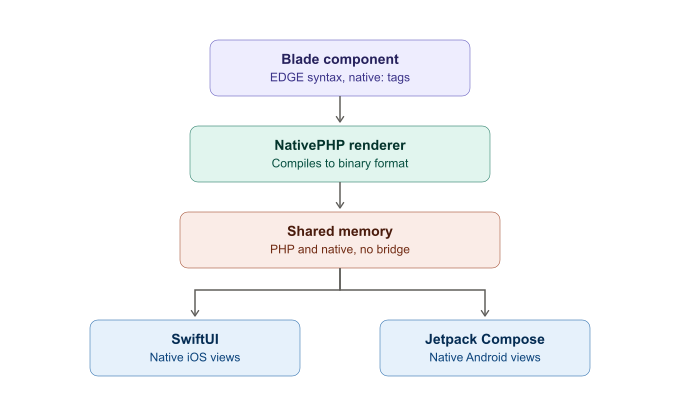
The key takeaway: you do not need to learn Swift or Kotlin, and you do not need to think about different syntax for Android versus iOS. You just use EDGE — write it once, and you get two genuinely native UIs out the other end.
Code Example: Native UI With EDGE
Here is a basic EDGE component. Notice every element lives under the native: namespace:
<native:column class="w-full h-full p-4 gap-4 bg-theme-background text-theme-on-background">
    <native:text class="text-2xl font-bold">Welcome</native:text>
    <native:button label="Refresh" @press="refresh" />
</native:column>
This compiles down to a real native UI on both platforms, complete with automatic light and dark mode support. EDGE components are also fully compatible with hot reloading, so you can iterate on your UI at runtime without recompiling the whole app.
Two concepts you will lean on to turn these screens into a full app:
- Routing — works like a real native navigation stack, because it is one.
- Layouts — wrap your routed screens with shared chrome, like a top bar or bottom tabs.
Code Example: Routing in SuperNative
Native screens in SuperNative form a stack, exactly like a UINavigationController on iOS or an Activity stack on Android. Routes are registered similarly to Livewire routes, but through the Route::native() macro:
use App\NativeComponents\Home;
use App\NativeComponents\ItemDetail;

Route::native('/', Home::class);
Route::native('/item/{id}', ItemDetail::class);
To push a new screen:
$this->navigate('/item/42', ['source' => 'home-feed']);The destination screen can read the route parameter and the passed data inside mount():
class ItemDetail extends NativeComponent
{
    public function mount(): void
    {
        $id = $this->param('id');                   // from the route URI
        $source = $this->data('source', 'unknown');  // from navigate()'s second argument
    }
}
A few other navigation methods you will use often:
$this->back()— pops the current screen off the stack, with a slide-out-to-the-right transition by default.$this->replace('/login')— replaces the current screen, useful right after sign-in or sign-out.$this->exitToWeb('/dashboard')— tears down the native stack and loads a given URL in the web view, for the rare screen that genuinely needs to stay web-based.
You can also override the default transition:
use Native\Mobile\Edge\Transition;

$this->navigate('/item/42')->transition(Transition::SlideFromBottom);
The Web View Has Not Disappeared
If part of your app genuinely needs to render HTML, that option is still there. It is just opt-in now, through a <native:webview> component, instead of being the default:
// routes/mobile.php
Route::native('/home', WebViewScreen::class);

// webviewscreen.blade.php
<webview url="/" fullscreen />

// routes/web.php
Route::view('/', 'welcome');
Then set NATIVEPHP_START_URL=/home in your .env file. This means an existing web view-based app can keep working exactly as before, and you can adopt SuperNative one screen at a time, whenever you are ready — or not at all.
Why Was NativePHP Willing to Rebuild This Much?
This is the part I find most interesting for anyone who has been on NativePHP for a while: the reasoning behind this shift is not just about performance, it is about the long-term sustainability of the project itself.
The web view-based architecture tied NativePHP to a lot of moving parts it did not control. Every upstream release became a risk that something could break. Two concrete examples that will feel familiar if you have dealt with breaking changes before:
- Inertia 3 dropped its axios dependency, which broke NativePHP apps built on top of Inertia.
- Livewire 4 started emitting filenames containing an emoji, which the bundled PHP binaries in NativePHP initially could not read.
With SuperNative, that story changes entirely. The stack is now owned end to end by the NativePHP team — from the PHP engine itself, through nativephp/mobile in your Laravel app, all the way down to the native view tree on the device. Fewer third-party dependencies, fewer moving parts that can shift under you without warning.
For you, that translates into better long-term stability — one less thing to worry about every time an unrelated upstream package ships a breaking change.
Good News for Plugin Developers
If you also build NativePHP plugins, SuperNative introduces no breaking changes to the existing plugin architecture. If anything, it expands what your plugins can do by giving you a standardized target for UI elements — your plugins can now ship fully native EDGE components that behave consistently for every developer using them, without forcing you to make your plugin a UI-less abstraction or support multiple front-end flavors.
It Is Still Beta, So Keep This in Mind
Before you rush to migrate a production app, it is worth repeating: NativePHP for Mobile v4 is currently in beta. Features, APIs, and behavior may still change before the stable release. The official documentation is explicit about this being pre-release.
If you want to try it out, the fastest way is to run the official demo app:
git clone https://github.com/nativephp/super-native
cd super-native
composer install
php artisan native:install
php artisan native:run
You will need a working NativePHP for Mobile development environment first (Xcode for iOS, Android Studio for Android). native:run builds the app and launches it on your connected device or simulator.
A few other things worth knowing:
- Version 3.x (web view-based) is still available and documented separately if you are not ready to switch yet.
- SuperNative ships a full EDGE component catalogue — from Button and Modal to Bottom Sheet and Virtual List — all rendered as native views.
- There is an official Upgrade Guide if you want to migrate from v3.
- The NativePHP team has also hinted at further exploration under the name “SuperPHP,” which they say will be shared in more detail later — so SuperNative looks like just the beginning.
Wrapping Up
For those of us who have invested time learning NativePHP since the web view days, this shift to SuperNative feels like a genuinely big moment. It is not just “a bit faster” — it is a more solid foundation, with a lot less drama every time an unrelated package ships a breaking change.
If you are curious, try it on a side project or a separate branch first — not straight into production, given the beta status. But if you are wondering where NativePHP is headed, the direction is pretty clear: it is getting serious about being truly native, not just a web app wrapped in a native shell.
메타데이터
- post_id
- 6593b9038cc6
- slug
- nativephp-v4-release-your-nativephp-app-is-now-100-native-no-web-view-required-meet-supernative-6593b9038cc6
- url
- https://medium.com/codex/nativephp-v4-release-your-nativephp-app-is-now-100-native-no-web-view-required-meet-supernative-6593b9038cc6
- canonical_url
- https://medium.com/codex/nativephp-v4-release-your-nativephp-app-is-now-100-native-no-web-view-required-meet-supernative-6593b9038cc6
- author_url
- https://medium.com/@developerawam
- status
- ok
- fetched_at
- 2026-07-17 10:42:52