Day 5 — Loops (Stop Repeating Yourself)
“If you find yourself writing the same code again and again, you’re probably missing a loop.”
Day 5 — Loops (Stop Repeating Yourself)
“If you find yourself writing the same code again and again, you’re probably missing a loop.”
So far, your code can make decisions. But what if you want to repeat something multiple times? For example, printing numbers from 1 to 10.
You could do this:
console.log(1);
console.log(2);
console.log(3);
...
But that’s inefficient and doesn’t scale.
This is where loops come in.
What Is a Loop?
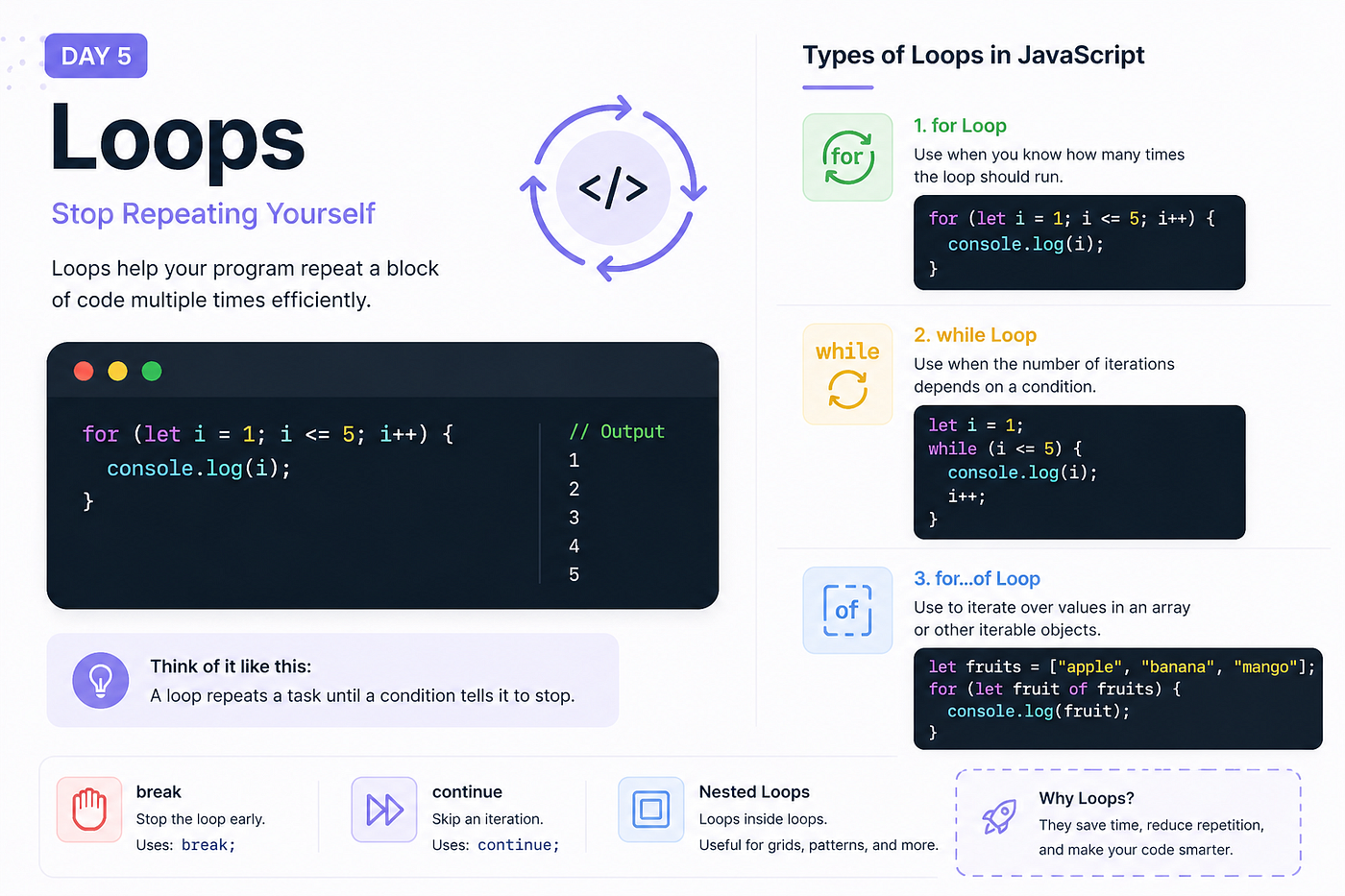
A loop allows your program to repeat a block of code multiple times.
Instead of writing the same logic again and again, you define it once and tell JavaScript how many times to run it.
The for Loop
This is the most commonly used loop.
for (let i = 1; i <= 5; i++) {
  console.log(i);
}
Let’s break it down:
let i = 1→ starting pointi <= 5→ conditioni++→ increment after each iteration
The loop runs until the condition becomes false.
How It Actually Runs
Think of it step by step:
- Start with
i = 1 - Check if
i <= 5→ true → run code - Increase
i - Repeat
Until i becomes 6, then it stops.
The while Loop
A while loop runs as long as a condition is true.
let i = 1;while (i <= 5) {
console.log(i);
i++;
}Unlike for, the setup is more manual.
You control:
- Initialization
- Condition
- Increment
When to Use for vs while
Use for when you know how many times the loop should run.
Use while when the number of iterations depends on a condition.
The for...of Loop
This is useful when working with arrays.
let fruits = ["apple", "banana", "mango"];for (let fruit of fruits) {
console.log(fruit);
}It directly gives you each value, making it cleaner and easier to read.
Breaking Out of a Loop
Sometimes you want to stop a loop early.
for (let i = 1; i <= 10; i++) {
  if (i === 5) {
    break;
  }
  console.log(i);
}
This stops the loop when i reaches 5.
Skipping an Iteration
You can skip a specific step using continue.
for (let i = 1; i <= 5; i++) {
  if (i === 3) {
    continue;
  }
  console.log(i);
}
This skips printing 3.
A Common Beginner Mistake
Forgetting to update the loop condition.
let i = 1;while (i <= 5) {
console.log(i);
}This creates an infinite loop because i never changes.
“If the condition never becomes false, the loop never stops.”
Nested Loops
You can place a loop inside another loop.
for (let i = 1; i <= 3; i++) {
  for (let j = 1; j <= 2; j++) {
    console.log(i, j);
  }
}
This is useful for grids, patterns, or complex logic.
Try This
Open your console and try:
for (let i = 1; i <= 10; i++) {
  console.log(i * 2);
}
Now modify it:
- Print only even numbers
- Stop at a certain number
- Try using
whileinstead
Note
There are more advanced loop patterns and methods like forEach, map, and reduce. We’ll cover them later when we dive deeper into arrays.
Why This Matters
Loops are everywhere.
You’ll use them to:
- Process lists of data
- Build features
- Work with APIs
Without loops, your code becomes repetitive and inefficient.
What’s Next?
In the next article, we’ll explore functions, where you start organizing your code into reusable blocks.
“Because repeating logic is not just inefficient — it’s hard to maintain.”
See you in Day 6.
메타데이터
- post_id
- 65bcb9e2a982
- slug
- day-5-loops-stop-repeating-yourself-65bcb9e2a982
- url
- https://medium.com/@codePeasant/day-5-loops-stop-repeating-yourself-65bcb9e2a982
- canonical_url
- https://medium.com/@codePeasant/day-5-loops-stop-repeating-yourself-65bcb9e2a982
- author_url
- https://medium.com/@codePeasant
- status
- ok
- fetched_at
- 2026-08-20 18:25:04