Dockerize IoT system integrating CoAP and MQTT protocols in python
This is a short idea project to demonstrate a lightweight IoT system that integrates CoAP and MQTT protocols in python.
Dockerize IoT system integrating CoAP and MQTT protocols in python
A critical first step in facilitating smooth connection between powerful data processing systems and limited IoT devices is the combination of MQTT and CoAP protocols. This project shows how to create a Dockerized system that connects these two lightweight communication protocols, using MQTT for scalable data delivery and CoAP for situations with constraints.
The design is made up of a MQTT subscriber for data processing and monitoring, a CoAP server for sensor data generation, and a CoAP-MQTT bridge for protocol translation. The solution guarantees a scalable, isolated, and portable environment for deployment in actual IoT scenarios by leveraging containerisation with Docker.
Description
This quick project concept combines the CoAP and MQTT protocols in a Dockerized setting. An MQTT subscriber processes the published data, a CoAP-MQTT bridge converts data between protocols, and a CoAP server replicates IoT sensor data. The system is made for effective, portable communication that can be used to test different ideas in IoT networks.
I tried to make a block diagram, i don’t know how it could be theoreticall accurate but i will share the pseudo cade and source code also.
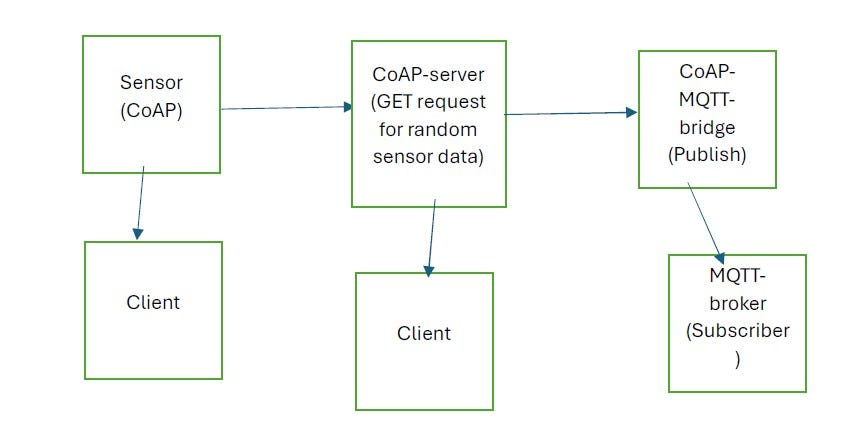
CoAP server to MQTT subscriber flow diagram
I have deployed the whole system in Docker where each component is containerized using Python 3.12. Other Frameworks like Fast API, Node.Js can be used. The docker-compose.yml sets up a Mosquitto MQTT broker, CoAP server and bridge services and an MQTT subscriber.
COAP Server:
This file implements a random data generator for temperature, humidity and anomaly status. It provides data as CoAP endpoint.
pseudocode:
DEFINE a function get_data_as_json:
 Generate random temperature, humidity, and anomaly data
 Return the data as a JSON string
DEFINE a class SensorDataResource (inherits from aiocoap.resource.Resource):
 DEFINE an asynchronous method render_get(request):
 Call get_data_as_json to get sensor data
 Encode the data as UTF-8 and return as a CoAP message
DEFINE an asynchronous main function:
 Configure logging
 Create a root resource (aiocoap.resource.Site)
 Add the SensorDataResource to the resource at the endpoint '/sensor'
 Start the CoAP server context bound to address 0.0.0.0 and port 5683
 Keep the server running by creating an indefinite future
IF the script is executed as the main program:
 Run the main function asynchronously
COAP-MQTT bridge:
This file ultimately bridges CoAP and MQTT protocols. It fetches sensor data from the CoAP endpoint server and publishes it to an MQTT broker, in this case, I have used: mqtt.eclipseprojects.io
pseudocode:
DEFINE constants mqttBroker and mqtt_topic for MQTT broker address and topic
CREATE an MQTT client and connect it to the MQTT broker

DEFINE an asynchronous function fetch_coap_data:
    Create a CoAP client context
    Prepare a GET request to the CoAP server's '/sensor' endpoint
    FOR a fixed number of retries:
        TRY to send the GET request and receive the response
            Decode the response payload as UTF-8
            Publish the decoded data to the MQTT topic
            Print a success message
            RETURN (exit the function)
        CATCH any exception:
            Print a retry message and wait before retrying
    Print a failure message if all retries are exhausted

DEFINE an asynchronous main function:
    LOOP indefinitely:
        Call fetch_coap_data
        Wait for a short interval before repeating

IF the script is executed as the main program:
    Configure logging
    Start the MQTT client's loop
    TRY to run the main function asynchronously
    CATCH a KeyboardInterrupt to handle script termination
    Stop the MQTT client's loop and disconnect
MQTT subscriber:
It subscribes to the MQTT topic to receive and display sensor data.
pseudocode:
IMPORT logging library
IMPORT paho.mqtt.client as mqtt

DEFINE a callback function on_message(client, userdata, message):
    Log the received message payload decoded as UTF-8

SET mqttBroker to the address of the MQTT broker (e.g., "mqtt.eclipseprojects.io")
SET mqtt_topic to the topic to subscribe to (e.g., "SENSOR/DATA")

CREATE an MQTT client instance
ASSIGN the on_message callback function to handle incoming messages

CONNECT the MQTT client to the MQTT broker
SUBSCRIBE to the MQTT topic

CONFIGURE logging to display INFO level messages

TRY:
    Start the MQTT client's loop to process network traffic and dispatch callbacks
EXCEPT KeyboardInterrupt:
    Print "Exiting program..." when the script is interrupted
FINALLY:
    Disconnect the MQTT client to clean up resources
The whole source code you could find in my github repository .
Please drop some comments and suggestions, how i could improve or test more functionalities in the system.
메타데이터
- post_id
- 660ce0bf5df9
- slug
- dockerize-iot-system-integrating-coap-and-mqtt-protocols-in-python-660ce0bf5df9
- url
- https://blog.devops.dev/dockerize-iot-system-integrating-coap-and-mqtt-protocols-in-python-660ce0bf5df9
- canonical_url
- https://blog.devops.dev/dockerize-iot-system-integrating-coap-and-mqtt-protocols-in-python-660ce0bf5df9
- author_url
- https://medium.com/@iamrony
- status
- ok
- fetched_at
- 2026-06-26 21:52:29




