How to stream structured AI on Android without sacrificing UX
Why parser-first streaming creates cleaner interfaces, better feedback and more meaningful progress than raw token output
How to stream structured AI on Android without sacrificing UX
Why parser-first streaming creates cleaner interfaces, better feedback and more meaningful progress than raw token output
1. The problem: why streamed AI still feels slow
Latency is usually the first thing Android teams notice when they add AI features. Five seconds for a chat reply feels slow. Fifteen seconds feels unbearable. That is why streaming, through Server-Sent Events (SSE) and token-by-token updates, has become the default pattern, popularised by ChatGPT.
But streamed text does not necessarily show meaningful progress. Users are not waiting for words to appear; they are waiting for a useful result, whether that is a four-day trip itinerary, a contract summary or a workout draft.
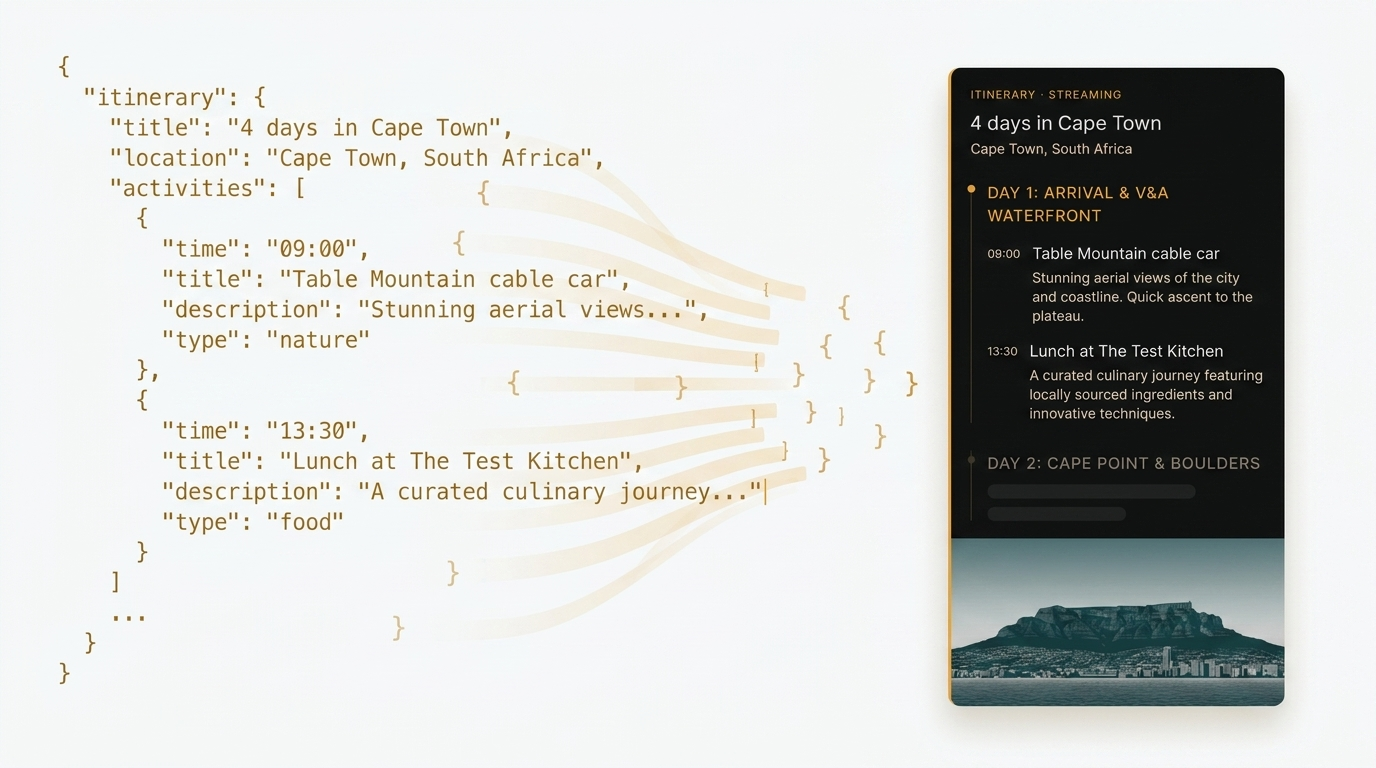
Raw token streaming shows the model “typing”, but not the artefact taking shape. Instead of seeing a plan assemble itself, users watch JSON fragments and formatting noise scroll past — and then suddenly get a complete result. The transition is jarring and breaks immersion. The system still feels slow, even when it is not.
The question, then, is not just how to stream faster. It is how to make users feel that something useful is being built in front of them.
2. The solution: parser-first streaming with WayPoint
Parser-first streaming reverses the usual approach. Instead of accumulating all incoming data and parsing after the stream ends, the parser processes each incoming chunk incrementally and emits structural events as soon as a recognisable unit is ready. The UI updates progressively, titles appear, days fill in, activities slot into place, as the model generates them.
This approach is demonstrated in WayPoint, an open-source Android travel planner built to explore exactly this problem. The project is available at:
github.com/tungamiraimujuru/Waypoint
WayPoint integrates with Anthropic’s Claude API to generate structured travel itineraries as JSON, streams the response via SSE, and renders each piece of the itinerary as it arrives — without ever showing the user a raw JSON fragment.

3. Architecture overview
WayPoint’s architecture started with a simple question: where should the work live? The easiest answer is to do everything inside a single Composable, with networking, streaming state, parsing and rendering all handled in one place. That works for a demo, but it breaks down quickly when you need to test, swap AI providers or reuse logic across screens.
The work is instead split into five focused components:
Orchestrator
Exposes a simple interface: take a request, return a stream of AI events. This shields the rest of the app from which model or provider is in use — whether Anthropic, Gemini, an on-device model or a test fixture.
SSE client
Handles HTTP streaming and is unaware of prompts or domain logic. It streams text deltas and cleans up on cancellation. This keeps business logic out of networking code.
Parser
The heart of the system. A pure, dependency-free component that processes incoming bytes incrementally and emits structural events. It has no Android dependencies and no coroutines, which keeps it reusable and easy to test in isolation.
Reducer
A pure function that takes the current UI state and an event, and returns a new UI state. It lives outside the ViewModel, making logic straightforward to test without any Android frameworks.
ViewModel
Glue code that collects events from the orchestrator, runs them through the reducer and exposes a StateFlow to the UI. It stays small because the heavy lifting is elsewhere.
A few design choices here diverge from typical Android practice. There is no separate use-cases layer — it was an unnecessary ceremony for this scope. A single sealed event stream preserves event ordering. And the parser is kept separate from the network client so that parsing logic stays reusable and isolated.
4. How the parser works
Most streaming implementations buffer all incoming data and parse it once the stream ends. This is simple to implement, but the experience it produces, raw JSON appearing character by character, followed by an instant render, is exactly the problem we are trying to solve.
The WayPoint parser takes a different approach. It is a compact state machine, around 200 lines of Kotlin, that:
- Tracks opening and closing braces to identify when a structural unit (an activity, a day, a title) is complete
- Ignores braces inside strings, to avoid false positives from quoted content
- Strips Markdown code fences that Claude occasionally inserts despite explicit instructions not to — this happened roughly 5% of the time in testing
- Handles truncated buffers mid-string and stays re-entrant by consuming the buffer as it processes
The parser runs in microseconds, has no Android dependencies and is the most defensively coded piece in the project. Here is a simplified version of the core parsing loop:
fun processChunk(chunk: String) {
    buffer += chunk
    while (buffer.isNotEmpty()) {
        when (state) {
            OUTSIDE_OBJECT -> {
                val start = buffer.indexOf('{')
                if (start == -1) {
                 buffer = "";
                 return
                }
                buffer = buffer.substring(start)
                state = INSIDE_OBJECT
                depth = 0
                inString = false
                escaped = false
            }
            INSIDE_OBJECT -> {
                loop@ for (i in buffer.indices) {
                    val c = buffer[i]
                    when {
                        escaped -> escaped = false
                        c == '\\' && inString -> escaped = true
                        c == '"' -> inString = !inString
                        !inString && c == '{' -> depth++
                        !inString && c == '}' -> {
                            depth--
                            if (depth == 0) {
                                emit(buffer.substring(0, i + 1))
                                buffer = buffer.substring(i + 1)
                                state = OUTSIDE_OBJECT
                                break@loop
                            }
                        }
                    }
                }
            }
        }
    }
}
Each time a complete JSON object is identified, it is emitted as a structural event. The UI reacts to that event immediately, rendering the new element without waiting for the rest of the stream.
5. Compose UI rendering
The parser emits structural events, and the UI has to render them efficiently, sometimes dozens of times per second under heavy streaming load.
The standard Compose pattern of mutating state directly inside the ViewModel became cumbersome at this frequency. The fix was to move state transformation into the pure reducer described above. The ViewModel collects events, applies the reducer and updates a StateFlow. That keeps the ViewModel thin and makes the state transformation logic easy to test independently.
Two Compose-specific optimisations made a significant difference:
- Stable keys on list items prevent unnecessary recomposition when the list grows incrementally
- Separating the itinerary preview from the streaming message panel means only the component that changes gets recomposed
Here is a simplified example of how the ViewModel wires events to state:
viewModelScope.launch {
    orchestrator.stream(request).collect { event ->
        _uiState.update { currentState ->
            reducer(currentState, event)
        }
    }
}
This pattern kept UI performance smooth under streaming loads, with no dropped frames observed during testing on a mid-range Android device.
6. Claude integration: what worked and what did not
Using Anthropic’s Claude was a straightforward choice given its stable API and reliable structured JSON output. But integration revealed a few practical challenges worth documenting.
Default serialisation omits default values
Kotlin’s default serialisation behaviour omits fields that match their default values. This caused 400 errors because the Claude API expected explicit field names — including the model name — on every request. The fix was to enable encoding of defaults explicitly in the serialisation configuration, ensuring all required fields are always sent.
Retry logic for streaming failures
Streaming can fail mid-response: network drops, 5xx errors and rate limits all occur in practice. WayPoint implements bounded retries on these transient errors. Parse errors and client-side 4xx errors do not trigger retries, to avoid wasting API credits on requests that will not succeed.
Markdown fencing
Despite explicit instructions in the system prompt to return only raw JSON, Claude wrapped its output in Markdown code fences (json …) approximately 5% of the time during testing. The parser strips these defensively. This is a good example of why production LLM integration requires forgiving parsers — even well-instructed models are not perfectly consistent.
7. Try it yourself
Get the code
WayPoint is open-source and available on GitHub:
github.com/tungamiraimujuru/Waypoint
Prerequisites
Before you begin, you will need:
- Android Studio Hedgehog or later
- Kotlin 1.9+
- An Anthropic API key (available at console.anthropic.com)
- Gradle 8.0+
Key dependencies
Add the following to your build.gradle.kts:
// HTTP streaming
implementation("com.squareup.okhttp3:okhttp:4.12.0")
// JSON serialisation
implementation("org.jetbrains.kotlinx:kotlinx-serialization-json:1.6.3")
// Coroutines
implementation("org.jetbrains.kotlinx:kotlinx-coroutines-android:1.7.3")
Getting started
Clone the repository and open it in Android Studio:
git clone https://github.com/tungamiraimujuru/Waypoint.git
cd Waypoint
Add your Anthropic API key to local.properties:
ANTHROPIC_API_KEY=your_key_here Build and run on a device or emulator running Android API 26 or above. The main entry point for the streaming logic is in StreamingOrchestrator.kt. The parser lives in IncrementalJsonParser.kt — this is the best place to start if you want to adapt the pattern for a different structured output format.
The architecture is intentionally modular. Swapping Claude for a different provider means replacing the SSE client and adjusting the prompt — the parser, reducer and UI layer remain unchanged.
8. Conclusion
The core lesson is straightforward: streaming structured AI output is a user experience problem before it is a networking problem. If users cannot see the result taking shape, the system still feels slow, regardless of actual response times.
A parser-first approach solves this by turning incoming tokens into visible structure. Users do not watch syntax arrive; they watch a plan, a summary or a draft assemble itself step by step.
WayPoint is a prototype, not a production system. It is missing observability tooling, remote configuration for prompts and model settings, provider fallback chains and performance instrumentation. But the architecture already makes room for these without major rework, and the pattern itself is solid enough to build on.
Android still lacks much of the ready-made streaming tooling that exists in the JavaScript ecosystem. That leaves room to experiment, and hopefully WayPoint is a useful starting point for teams trying to make AI on Android feel less clunky and more useful.
메타데이터
- post_id
- 667ac8b83e7c
- slug
- how-to-stream-structured-ai-on-android-without-sacrificing-ux-667ac8b83e7c
- url
- https://medium.com/dvt-engineering/how-to-stream-structured-ai-on-android-without-sacrificing-ux-667ac8b83e7c
- canonical_url
- https://medium.com/dvt-engineering/how-to-stream-structured-ai-on-android-without-sacrificing-ux-667ac8b83e7c
- author_url
- https://medium.com/@gmujuru
- status
- ok
- fetched_at
- 2026-06-25 16:53:31