Building an AI Data Analysis & Indexing System from Scratch
A step-by-step guide to building ADAIS (AI Data Analysis & Indexing System). It analyses images, video, and documents with a provider…
Building an AI Data Analysis & Indexing System from Scratch
Photo by Zach M on Unsplash
A step-by-step guide to building ADAIS (AI Data Analysis & Indexing System). It analyses images, video, and documents with a provider switcher for OpenAI, Google Cloud, and HuggingFace. FastAPI backend, React + Vite + Tailwind frontend, fully typed with TypeScript.
Table of contents
- Why I built this
- Architecture overview
- Backend: FastAPI + provider pattern
- Implementing the three AI providers
- Frontend: React + Vite + Tailwind
- TypeScript types from Pydantic schemas
- Running it locally
- Lessons learned
1. Why I built this
Content libraries grow fast. Manually tagging thousands of video, image, and audio assets is slow, error-prone, and doesn’t scale. Every asset needs a human to describe it before it becomes searchable. I built ADAIS, the AI Data Analysis & Indexing System to automate that entirely.
ADAIS is a full-stack system that accepts any file, detects its type automatically, routes it through an AI provider of your choice, and returns structured, searchable metadata such as labels, transcripts, entities, sentiment, dominant colours, and more. No manual tagging required.
Note
All source code is available at **github.com/foobearer/ai-content-pipeline.** You can follow along by cloning the repo or building from scratch with this guide.
2. Architecture overview
ADAIS has two parts: a FastAPI backend that handles file ingestion, provider routing, and analysis, and a React + Vite frontend that provides the upload UI and renders structured results.
The key architectural decision was the Provider Pattern, an abstract interface that all three AI providers implement, so the rest of the code never needs to know which one is being used.
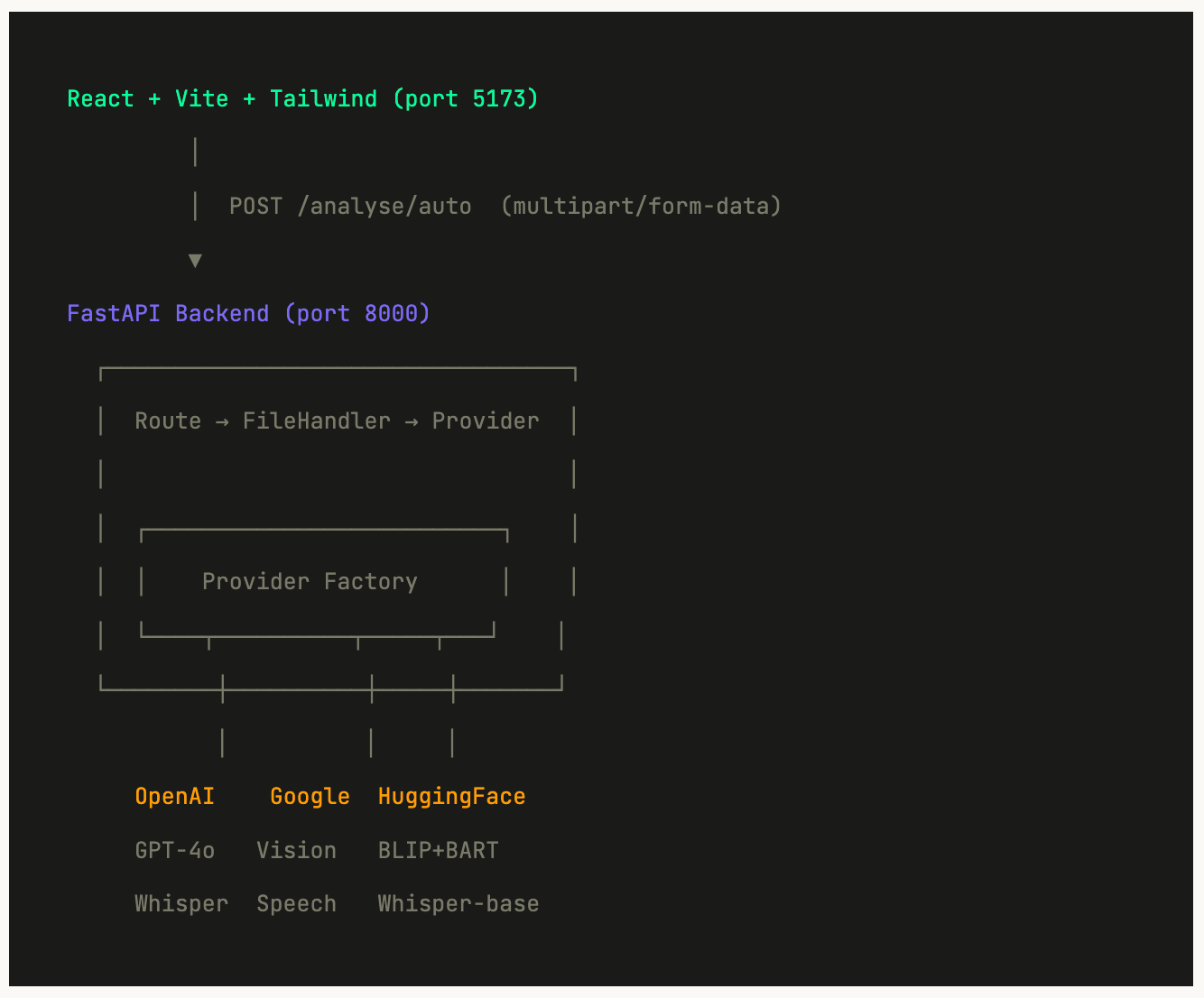
The project is split cleanly into backend/ and frontend/ directories. Here's the full structure:

3. Backend: FastAPI + the provider pattern
FastAPI is an excellent choice for AI pipelines because of the following:
- It is async by default.
- It auto-generates Swagger docs from your type hints.
- and Pydantic handles all validation.
Let’s start with the data models, since everything else is built around them.
Defining your schemas first
I define all request and response shapes in schemas.py before writing a single route. This is the single source of truth - the frontend TypeScript types mirror these exactly.

Tip
Using
str | None(Python 3.10+ union syntax) instead ofOptional[str]is cleaner and now the standard. Pydantic v2 supports both.
The abstract base class
This is the heart of the architecture. By defining an abstract interface, the rest of the app treats all three providers identically, meaning… the routes don’t care if they’re calling GPT-4o or a local HuggingFace model.

The provider factory
The factory is the only place that knows which class maps to which provider name. Lazy imports mean missing optional dependencies don’t crash the app on startup.

The main routes
With the provider pattern in place, each route is just a thin wrapper that validate the upload, get a provider, call the right method and return the result.

4. Implementing the three AI providers
Each provider implements the same three methods. Here’s how each one works internally.

OpenAI — structured JSON from GPT-4o
The key technique here is using response_format: {"type": "json_object"} which forces GPT-4o to always return valid parseable JSON. Combined with a well-structured system prompt, you get reliable structured output every time.

HuggingFace — lazy-loading local models
Loading a transformer model takes 5–10 seconds. The trick is to cache pipelines after first load so subsequent calls are instant. We use run_in_executor to run the blocking model load in a thread pool without blocking FastAPI's async event loop.

Key Insight
Never call blocking code (model loading, file I/O) directly in an
asyncfunction. Always wrap it withrun_in_executorso FastAPI can continue serving other requests while the model loads.
5. Frontend: React + Vite + Tailwind
The frontend follows a clear separation: one custom hook owns all state and API logic, components are pure presentational, and TypeScript types mirror the backend schemas exactly. Here’s the component tree:

The useAnalysis hook — all state in one place
Every piece of state for the workflow lives in a single custom hook. App.tsx just calls useAnalysis() and passes values to components - zero business logic in the component tree.

Vite proxy — no CORS headaches in development
Instead of dealing with CORS during development, configure Vite to proxy API calls to the FastAPI backend. This means your frontend calls /analyse/auto and Vite silently forwards it to localhost:8000.

6. TypeScript types that mirror your Pydantic schemas
The single biggest DX win is keeping your backend Pydantic schemas and frontend TypeScript types in sync. When the API response shape changes, you update both files and TypeScript immediately tells you every component that needs fixing.

Scaling Tip
For larger projects, consider openapi-typescript to auto-generate these types from your FastAPI’s OpenAPI spec. FastAPI generates the spec automatically at
/openapi.json.
7. Running it locally
You only need Python 3.10+ and Node 18+ installed. Follow these steps:


First Run Warning
Using the HuggingFace provider for the first time will download approximately 2GB of model weights. This is a one-time download, models are cached locally after that. Subsequent runs start instantly.
8. Lessons learned
1. Use the provider pattern from day one.
A common mistake is coupling your code directly to one AI provider from the start. The AI landscape moves fast, a model that is best today may not be in six months, and you might need to swap for cost, performance, or compliance reasons. The abstract base class pattern solves this from day one: add a new provider by implementing four methods, and nothing else in the codebase needs to change. This was the single most valuable architectural decision in this project.
2. Validate file types by content, not extension.
A user can rename virus.exe to photo.jpg. Always read the file's magic bytes - the first few bytes that identify the format - rather than trusting the extension. The file_handler.py utility in this project does this before any file touches an AI model.
3. run_in_executor is non-negotiable for blocking calls
FastAPI is async so if you call a blocking function directly (model loading, synchronous SDK calls, file reading), you block the entire server. Every blocking operation in this project runs in a thread pool via asyncio.get_event_loop().run_in_executor(None, ...).
4. Keep TypeScript types manually in sync with Pydantic
For a project this size, manually mirroring the types is fast and readable. The discipline of updating both files when changing a schema is worth it. TypeScript’s compiler immediately surfaces every broken component when a field changes.
The full project is on GitHub at github.com/foobearer/ai-content-pipeline — clone it, run it, and use it as a starting point for your own data analysis and indexing projects. If you have questions or want to extend it with a new provider, open an issue or reach out directly.
Photo by Deng Xiang on Unsplash
Originally published at https://joycee.dev.
메타데이터
- post_id
- 67382bef2be7
- slug
- building-an-ai-data-analysis-indexing-system-from-scratch-67382bef2be7
- url
- https://ai.plainenglish.io/building-an-ai-data-analysis-indexing-system-from-scratch-67382bef2be7
- canonical_url
- https://ai.plainenglish.io/building-an-ai-data-analysis-indexing-system-from-scratch-67382bef2be7
- author_url
- https://medium.com/@ilovejoyceep
- status
- ok
- fetched_at
- 2026-06-23 03:48:11








