EP.02 | How to Buy the TC275 Lite Board and Set Up Your Dev Environment
A complete guide to buying the Infineon TC275 Lite dev board and setting up your embedded SW development environment from scratch —…
EP.02 | How to Buy the TC275 Lite Board and Set Up Your Dev Environment
A complete guide to buying the Infineon TC275 Lite dev board and setting up your embedded SW development environment from scratch — including why automotive companies choose Infineon, where to buy it, and how to install ADS for free.
By AI Craft Toby | Automotive Embedded SW Engineer
This is Episode 2 of the AI-Vehicle Series — where I document building an AI-powered car from scratch, with an automotive MCU and Claude Code. Every step, every failure, every lesson in real time.
In this episode, I’ll cover two things at once: how to buy the Infineon TC275 Lite development board, and how to set up your embedded SW development environment from scratch.
If you haven’t read Episode 1 yet, start here: 👉 EP.01 | Embedded Software in the Age of AI: Starting Over from Scratch
▶ Watch on YouTube (Korean narration, full English write-up below) 🎬 https://youtu.be/GmtcbUJbsbg
Why Infineon? Why TC275 Lite?
Why Automotive Companies Choose Infineon
Inside a modern car, there are dozens — sometimes over 100 — ECUs (Electronic Control Units). Each ECU has an MCU at its core. And for the most critical ECUs, Infineon is the dominant choice. Here’s why.
1. ISO 26262 Functional Safety
Automotive software failures can kill people. That’s why ISO 26262 exists — a functional safety standard that requires safety-critical ECUs (braking, steering, etc.) to meet the highest certification level: ASIL-D.
The Infineon AURIX series is designed from the ground up to support ASIL-D at the hardware level. While competitors often rely on software workarounds, Infineon builds the safety architecture directly into the chip. That’s a fundamental difference.
2. Cybersecurity (ISO/SAE 21434)
Modern vehicles have OTA updates, connected services, and Wi-Fi. That means attack surfaces. The UN R155 regulation has made automotive cybersecurity legally mandatory.
Infineon MCUs come with a built-in HSM (Hardware Security Module) that handles encryption and authentication at the hardware level. In terms of production-ready, validated cybersecurity support, Infineon is currently ahead of the competition.
3. Multi-Core for Real-Time Processing
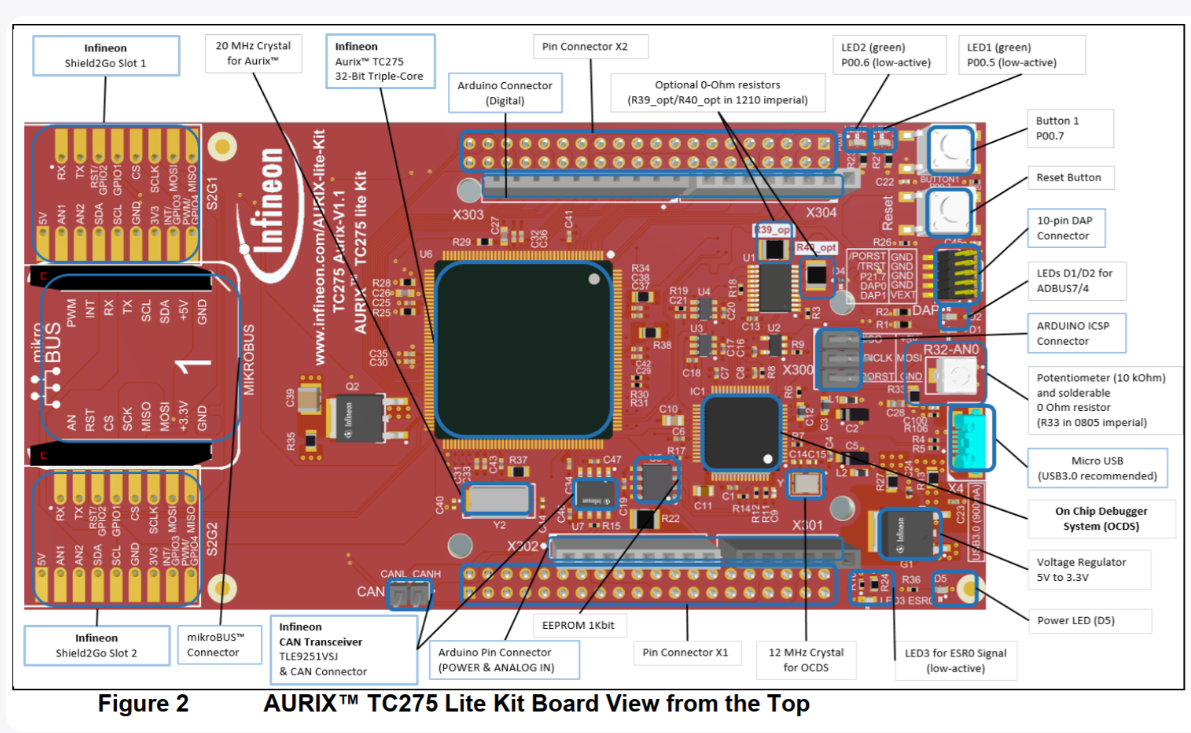
A modern ECU has to read sensors, control motors, handle communication, and run safety monitors — all at the same time. The TC275 has three TriCore cores, allowing you to split these tasks across cores. That’s something a single-core MCU simply can’t do at the same level.
These three factors have made Infineon the go-to MCU vendor in the automotive industry. And high demand means developers who know Infineon MCUs are in high demand too.
Why TC275 Specifically?
Multi-core experience you can’t get elsewhere TC275 has three TriCore cores — the same multi-core architecture used in real automotive ECUs. You won’t find this kind of hands-on experience with Arduino or STM32.
Rich official examples Infineon provides ILLD (Infineon Low Level Driver) — an official driver library packed with example code. When you create a project in ADS, you can load examples directly. No staring at a blank screen wondering where to start.
Built-in CAN communication CAN (Controller Area Network) is the backbone of in-vehicle communication. TC275 has CAN built in, which means later in this series, we’ll be able to do real vehicle network experiments.
Built-in debugger — no extra hardware needed The TC275 Lite board has an onboard debugger. Connect it via USB and you can download software and debug without any additional equipment. Real-world debuggers like Trace32 cost anywhere from hundreds of thousands to millions of won. The fact that TC275 Lite includes one onboard is a huge deal.
Where to Buy the TC275 Lite
Option 1: Mouser Korea
Search for ‘Mouser Korea’ and go to the site. Create an account first. Search for TC275 in the search bar and select the board with part number 726-KTAURIXTC275LITE.

💡 Note: Prices fluctuate based on semiconductor supply. Always check current pricing before ordering.
Option 2: DigiKey Korea
DigiKey also carries the same board. 👉 https://www.digikey.kr/ko/product-highlight/i/infineon/aurix-tc275-lite-kit

Part number: KITAURIXTC275LITETOBO1 — same board, same specs. Check both sites and go with whichever has better availability and pricing at the time.
💡 Free shipping tip: Both Mouser and DigiKey offer free shipping on orders over ₩60,000. Ordering two boards (or bundling with other components) gets you there easily.
What Is a Dev Environment?
Once your board arrives, you need to set up a development environment. In one sentence:
“Building the environment that lets you write code on your PC, put it inside the MCU, and verify that it works correctly.”
To do that, you need three things:
- Source code editor — write the code
- Compiler — convert code into machine language the MCU understands
- Downloader & debugger — flash it onto the MCU and check behavior
① Source Code Editor
The most popular editor today is VS Code — used by over 70% of developers worldwide. Three reasons it stands out: completely free, thousands of extensions, and excellent AI integration. This series will use VS Code as the base editor, with AI-assisted development throughout.
👉 Download VS Code: https://code.visualstudio.com/download
② Compiler (Cross Compiler)
A compiler takes your C code and converts it into binary that the MCU can execute. It runs on your PC, but the output runs on the MCU — that’s what makes it a cross compiler.
In automotive production, GCC isn’t used. The reason is ISO 26262 functional safety certification — the compiler itself must hold a safety certification. WindRiver, TASKING, and Greenhills are all certified; GCC is not.
Here’s the good news: AURIX Development Studio (ADS) includes the TASKING compiler for free. The same compiler used in real automotive ECU development — available at no cost. That’s a genuine advantage of the TC275 Lite ecosystem.
③ Downloader & Debugger
Once your code is compiled, you need to flash it into the MCU and verify it runs correctly. In production environments, engineers use Trace32 — a debugger that costs tens of thousands of dollars.
The TC275 Lite has an onboard debugger that connects via USB. It handles both flashing and debugging. Not as powerful as Trace32, but more than enough to learn and build real projects.
Installing AURIX Development Studio (ADS)
In a professional setting, each tool is purchased and managed separately. At home, we can use a single IDE that bundles all three. Infineon provides one for free.
Step-by-Step
- Create an Infineon account → 👉 https://www.infineon.com/cms/korea/kr/
- Download AURIX Development Studio → 👉 https://softwaretools.infineon.com/tools?q=aurix

- Run the installer → click Next → complete installation
- DAS (Device Access Server) will also be installed. DAS enables communication between your PC and the board over USB. Without it, the board won’t be recognized. Make sure it installs successfully.
- Launch AURIX Development Studio — source code editing, compilation, flashing, and debugging. All in one, completely free.
Why This Matters
The TC275 Lite gives you access to the same hardware architecture used in real automotive ECUs — multi-core, CAN-capable, ASIL-D ready — at a fraction of the cost. Combined with a free IDE that includes the same TASKING compiler used in production, there’s no reason not to start.
You don’t need a lab. You need a board, a USB cable, and a laptop.
That’s the entire setup. And from here, we build.
Follow Along
If you’re an embedded engineer navigating the same questions — you’re not alone.
📺 YouTube — AI-CRAFT All episodes, documented in real time. 🔗 https://www.youtube.com/@AI-Craft-p7f
💬 AI Craft Naver Café (Korean community) Episode archive, code downloads, Q&A, and project sharing. 🔗 https://cafe.naver.com/aicraftlog
💻 GitHub All source code — RPi5/PC and TC237 firmware. 🔗 https://github.com/tobyaicraft
We create value with AI. — AI Craft Toby
메타데이터
- post_id
- 674f12e4eeb4
- slug
- ep-02-how-to-buy-the-tc275-lite-board-and-set-up-your-dev-environment-674f12e4eeb4
- url
- https://medium.com/@johnehk86/ep-02-how-to-buy-the-tc275-lite-board-and-set-up-your-dev-environment-674f12e4eeb4
- canonical_url
- https://medium.com/@johnehk86/ep-02-how-to-buy-the-tc275-lite-board-and-set-up-your-dev-environment-674f12e4eeb4
- author_url
- https://medium.com/@johnehk86
- status
- ok
- fetched_at
- 2026-08-19 23:56:24