Inside Microsoft Foundry Toolbox and Content Understanding: A Technical Deep Dive
Deep dive into Microsoft Foundry Toolbox and Content Understanding: use one MCP endpoint to end AI agent tool sprawl and turn documents…
Inside Microsoft Foundry Toolbox and Content Understanding: A Technical Deep Dive
Deep dive into Microsoft Foundry Toolbox and Content Understanding: use one MCP endpoint to end AI agent tool sprawl and turn documents into clean data.

Inside Microsoft Foundry Toolbox and Content Understanding: A Technical Deep Dive
This article is a practical, technical walkthrough of two Microsoft Foundry capabilities that change how you connect AI agents to the real world: Toolbox, which puts every tool an agent needs behind a single MCP compatible endpoint, and Content Understanding, which turns messy documents into clean, structured data an agent can actually use.
I will explain how each piece works, how they fit into an agent architecture, where they help and where they are still early, and the token and integration costs they remove. By the end, you will understand the components, see how a request flows through them, and have the exact repos to build it yourself.
Reference here.
The real problem: reasoning is solved, action is not
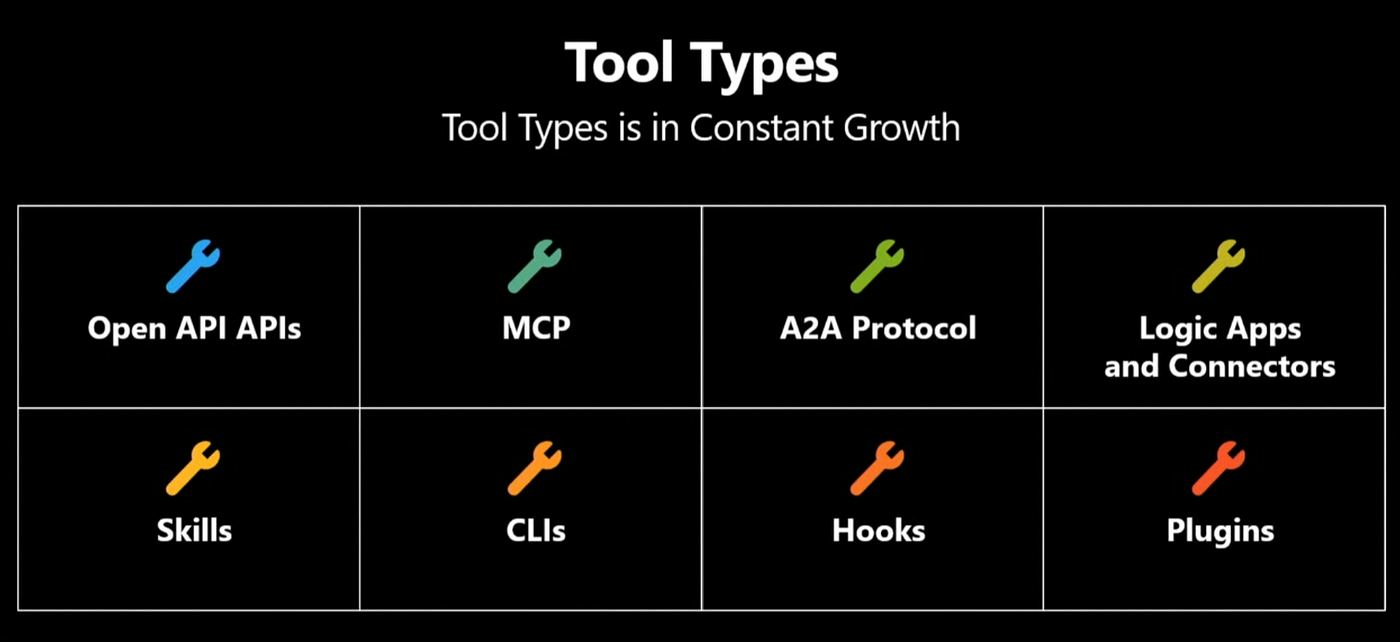
When I look at most agent projects, the model is rarely the bottleneck. Reasoning is largely a solved problem. The hard part is the plumbing. A large language model gives an agent the ability to reason; tool calling is what lets it take an action, and action is where the business value actually lives. The trouble is that the tool ecosystem has exploded. Teams that once dealt with one integration style now juggle MCP servers, skills, plugins, OpenAPI specs, connectors, command line tools, hooks, and Agent to Agent endpoints, and that list keeps growing.
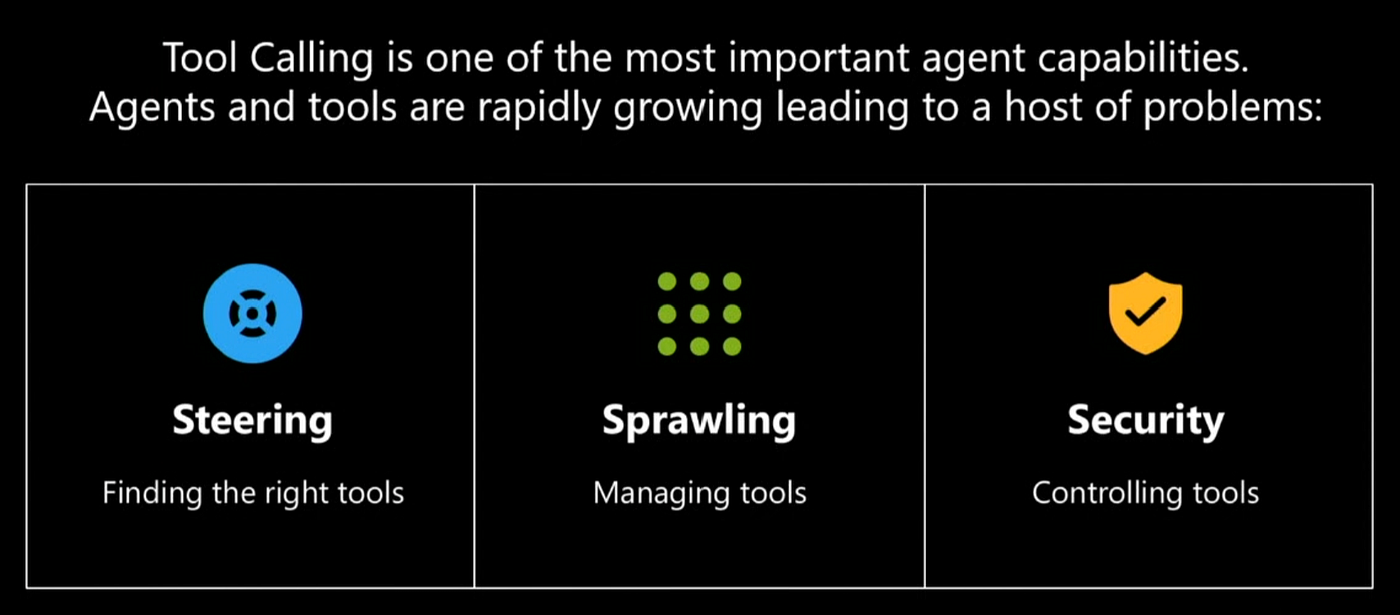
Three failure modes follow from the sprawl: steering, which is finding the right tool for a task; management, which is publishing and maintaining tools without chaos; and security, which is controlling what can reach production code, databases, and APIs.
Tools reach into real systems. They hit your databases and your APIs and return results that flow straight back into the model. So access control cannot stop at “the agent can call the tool.” It has to extend to the humans operating the agent.
The clearest way to say it: one teammate should not automatically inherit another teammate’s tool permissions just because they happen to share an agent. Governance is a people problem as much as a runtime problem.
The platform context: GitHub, Foundry, and Microsoft 365
It helps to know where these pieces sit.
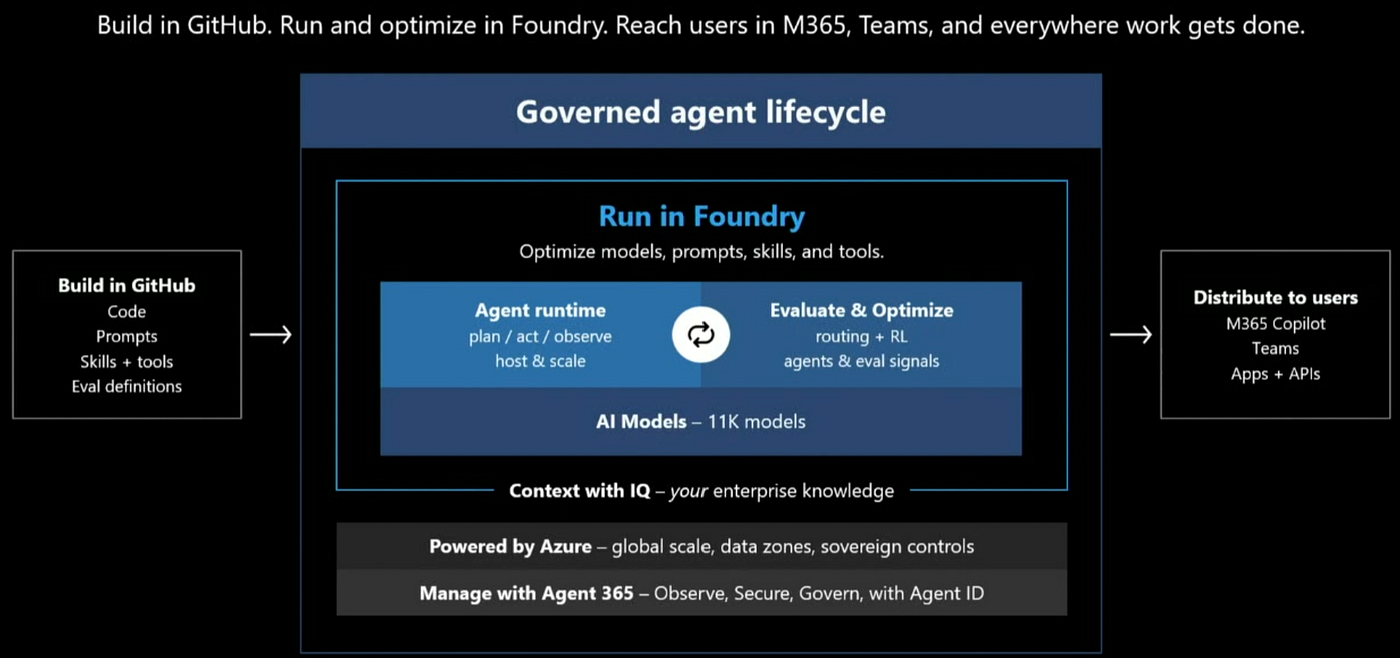
Microsoft’s agent story spans three surfaces. You build on GitHub. You run and optimize on Microsoft Foundry, which provides the agent runtime, the models, the knowledge tools, and a control plane that governs the lifecycle from cloud to edge. You distribute through Microsoft 365.
Foundry is the center of this article, and specifically Foundry Tools, the hub designed to hold prebuilt tools and third-party tools together with the kind of scalability production actually needs. The goal is easy to state and hard to deliver: one place for all your tools, regardless of tool type.
The four jobs: catalog, creation, discovery, governance
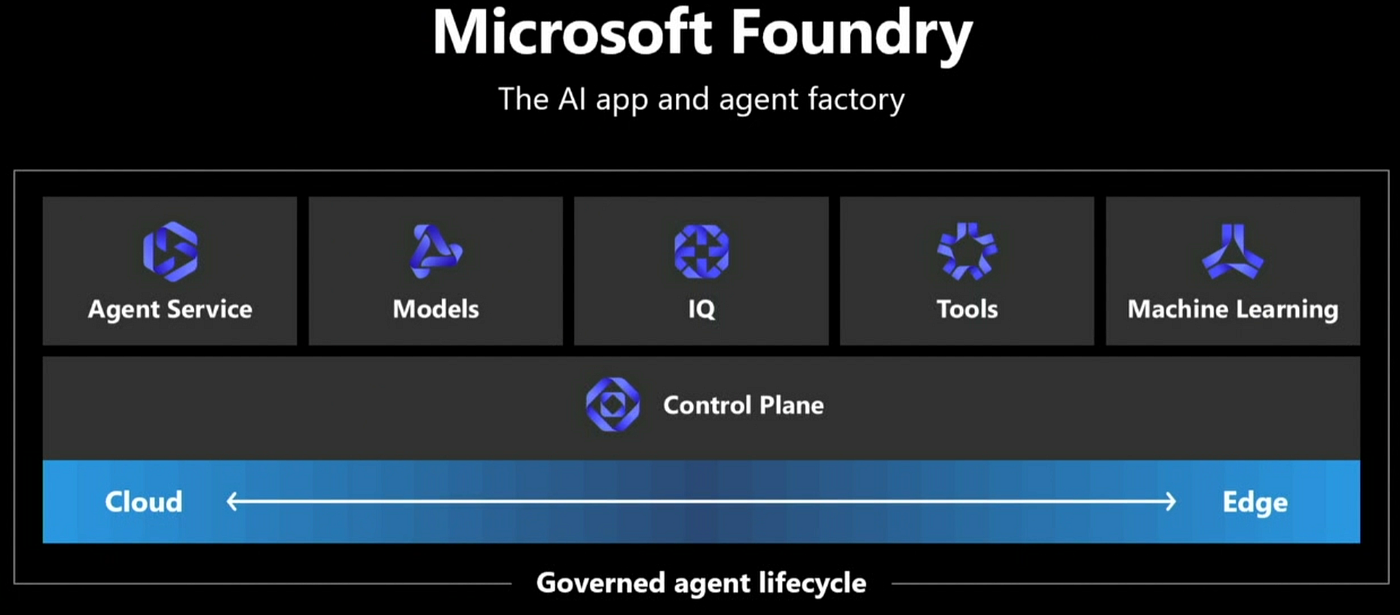
There is no single magic fix, and Microsoft is upfront about that. The tool problem breaks into four jobs. The tool catalog handles discovering, publishing, and installing tools.
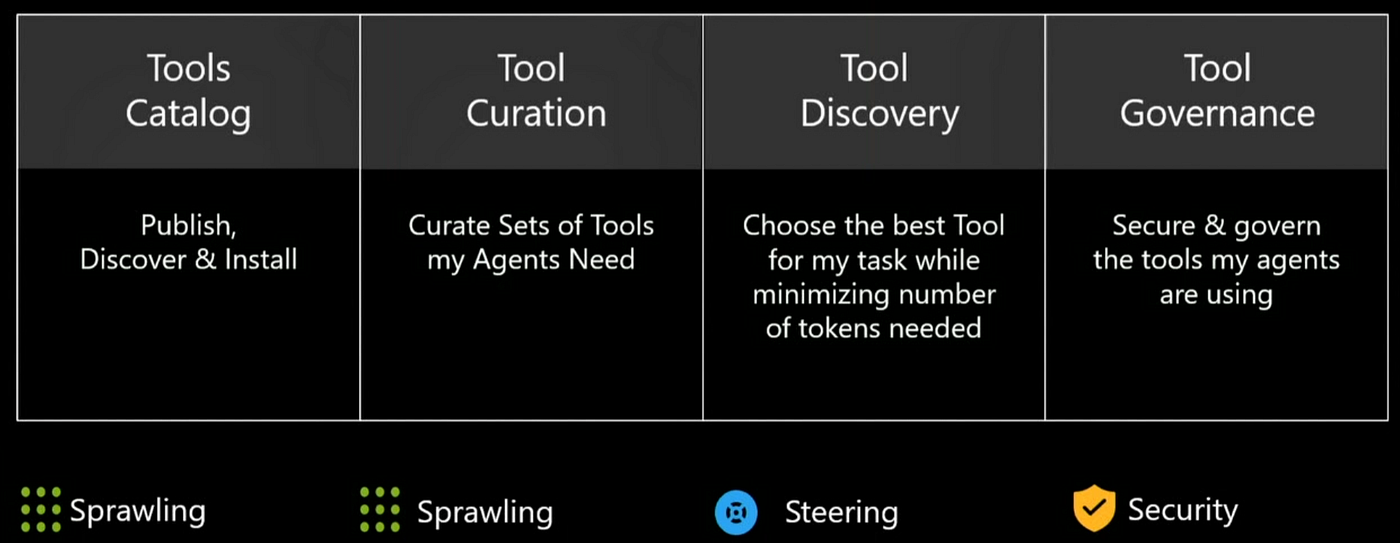
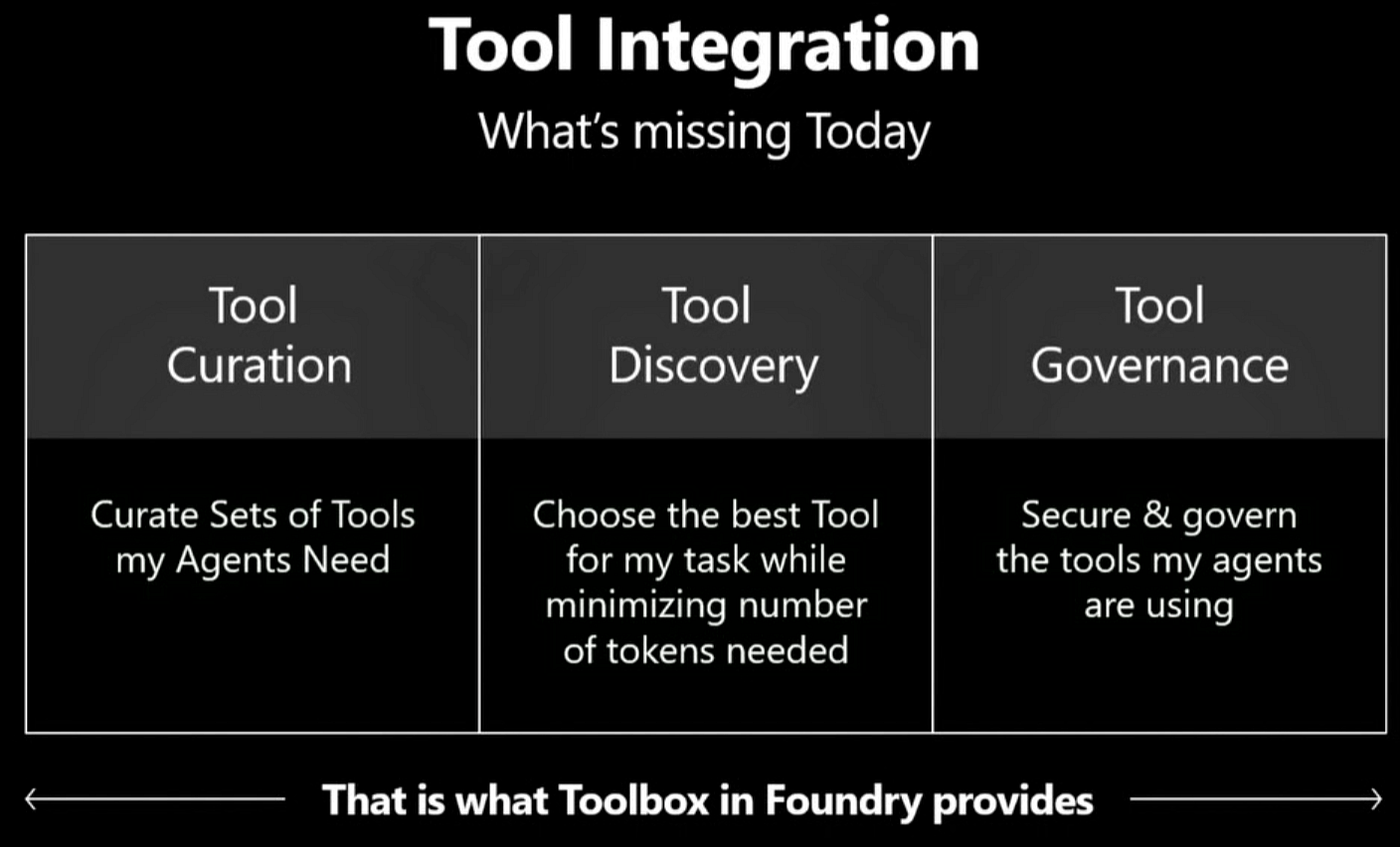
Tool creation is curating the specific set of tools an agent needs for a task and then sharing that set across every agent you run. Tool discovery is the most misunderstood of the four.
It is not “search a registry and find a tool.” It is choosing the best tool to finish a task while spending the fewest possible tokens. Tool governance is the access story, giving different people and different agents least privilege access to the same library. Keep those four jobs in mind, because the rest of the platform is essentially an answer to each one.
The tool catalog: every tool type, one place
The catalog answers the first job. Shipped in 2025, the Foundry tool catalog is built on the observation that the landscape is exploding in tool types, not just tool counts. It brings OpenAPI tools, MCP servers, A2A endpoints, Logic App connectors, skills, CLIs, hooks, and plugins into one searchable surface.
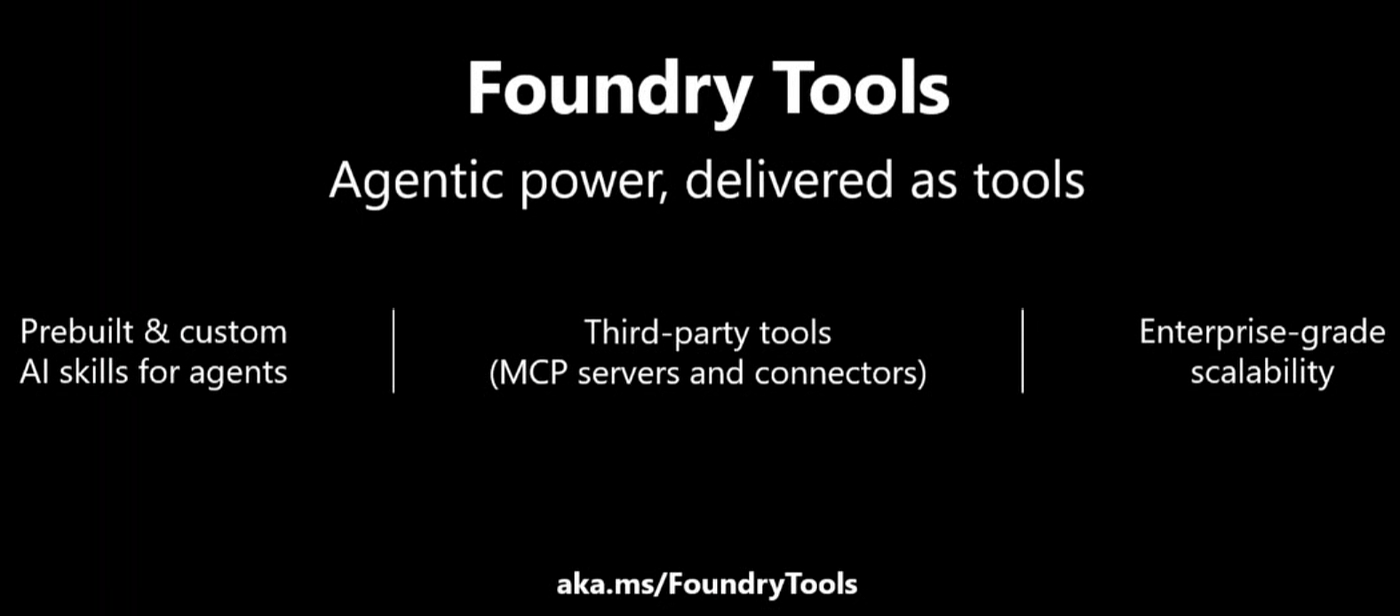
For teams that need a private, governed registry instead of the public ecosystem, Foundry pairs with Azure API Center and Azure API Management to provide that boundary. The catalog solves where your tools live. It does not, on its own, solve integration, and that gap is the whole point.
The integration tax: why six tools become hundreds
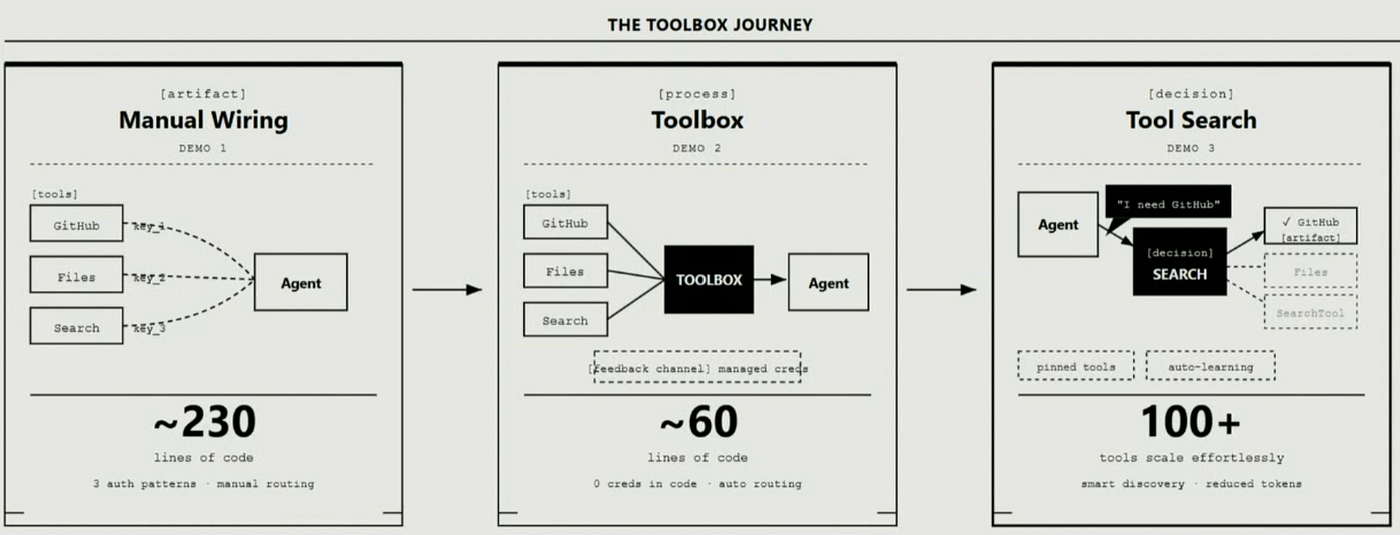
Here is the scenario that makes the problem concrete. Imagine a field operations agent with six integrations: Microsoft Entra, SharePoint, a ticketing system, your own custom MCP or API, Microsoft Teams, and Azure Search.

Sounds simple. It is not, because each of those six has its own identity, is built by a different team, speaks a different protocol, and manages credentials its own way. Now multiply that by every agent the business runs: customer support, billing, networks, inventory.
What looked like six integrations becomes hundreds, before you even count permissions, failures, and debugging.
The result is the quiet tragedy of agent work: developers spend their time on integration glue instead of building agents, which is the part that actually differentiates the product.
Microsoft makes the same point with a developer onboarding agent that creates an Entra account, grants GitHub access, provisions cloud resources, opens Azure DevOps tasks, and posts to Teams, and that single agent already spans five tool types, five auth models, and five owning teams.
Toolbox: the abstraction that collapses the chaos
Toolbox is the answer.
The definition is precise: a Toolbox is a reusable bundle of tools, managed in Foundry, that agents consume through a single consistent interface, regardless of tool type.
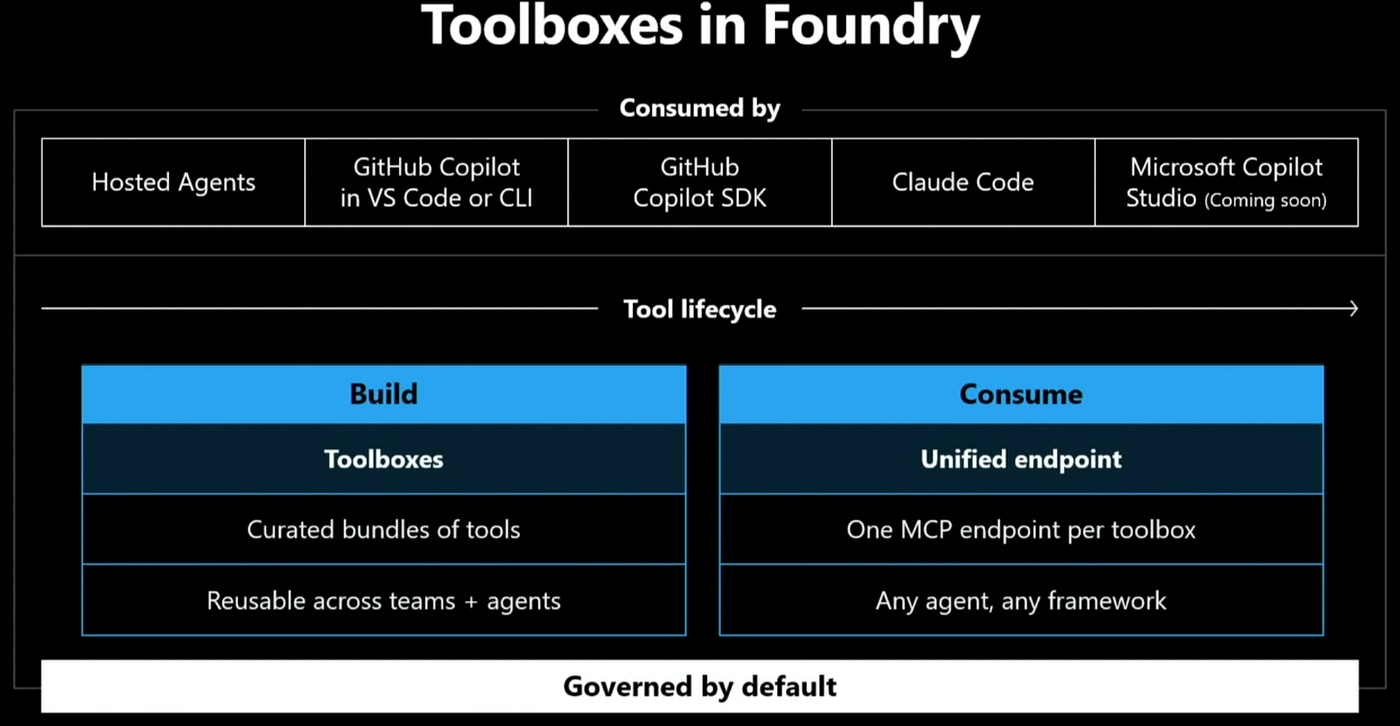
Three words carry the weight. Reusable means you build the bundle once and use it across any agent. Managed means Foundry owns the lifecycle so you do not have to. Consistent interface means your agent does not care whether a given tool is an MCP server, an OpenAPI spec, a skill, or a connector, because it sees one unified endpoint, one authentication model, and one experience.
That unified surface is an MCP compatible endpoint, and the shape is concrete. Foundry generates a per Toolbox endpoint from an account URL, a project path, the toolbox name, and an MCP suffix, so any MCP capable runtime can connect to the entire bundle at once.
Built in tools such as Web Search, Code Interpreter, File Search, and Azure AI Search sit behind it alongside MCP, OpenAPI, and A2A integrations. The platform handles credential injection, token refresh, OAuth identity passthrough, Microsoft Entra Agent Identity, and tracing for every call.
The part I find most important: this is not a lock in play. Toolboxes are created and governed in Foundry, but the consumption surface is open. Any runtime that can consume an MCP endpoint can consume a Toolbox.
The four pillars: Build, Discover, Consume, Govern
The model maps cleanly onto the four jobs, expressed as four pillars.
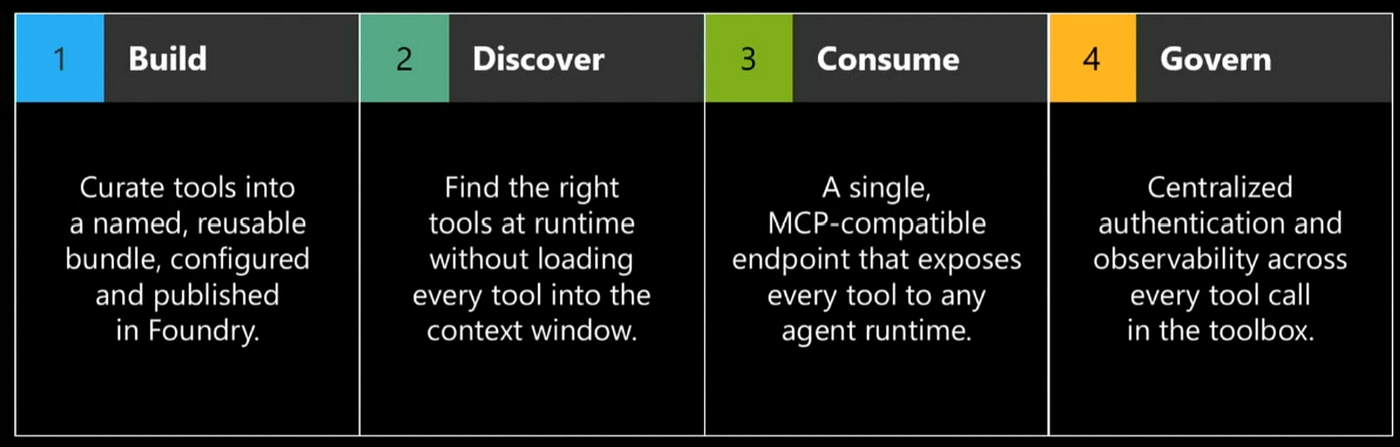
Build is creation. You assemble tools into a named, reusable bundle, configure them, and publish. Back to the field ops agent: instead of separately wiring Entra, SharePoint, and the rest, you put them in a single field ops Toolbox, regardless of tool type.
Discover is the runtime intelligence. When an agent sends a request through a prompt to the Toolbox, the Toolbox returns only the tool needed for that task rather than dumping every definition into context.
Consume is the open endpoint. A single MCP compatible endpoint exposes every tool in the bundle to any agent runtime, so the same Toolbox carries across every agent you build or operate.
Govern is centralized authentication and observability, monitoring every tool call from one place, with a richer governed dashboard on the roadmap.
In the documentation, Build and Consume are available today, with Discover and Govern still maturing. That is worth knowing before you plan a production rollout.
Tool Search: the token economics of discovery
Tool Search implements the Discover pillar, and it is the feature that pays for itself. The problem it solves is mechanical: as a Toolbox grows, sending every tool definition on every turn inflates the context window and burns tokens.
Tool Search is a tool inside the Toolbox that reads the metadata of the available tools and retrieves only the most relevant one for the request. In one walkthrough, an agent found ten tools in a Toolbox and loaded exactly one into context to complete a work order. That is the entire reason discovery is defined as token efficiency rather than registry search. You are not loading everything; you are loading the one thing the task needs.
Browser Automation: agents that act on the open web
A newer action tool worth calling out is Browser Automation, built on Playwright. It lets an agent scrape information and fill in forms on real web pages, and in a demo it auto completed a Microsoft form from a plain language request.
Architecturally, it is an MCP native tool backed by Microsoft Playwright Workspaces as the headless browser layer. Each request spins up an isolated, sandboxed browser session inside your own Azure boundary.
The model reasons over the page DOM rather than only screenshots, decides on clicks, fills, and navigations, executes each action, captures the new state, and loops until the workflow is done or the user stops it. Because it is exposed as an MCP tool, it drops straight into a Toolbox.
Skills: teaching agents how, not just what
Skills show up when you upload a reusable capability, for example, a skill that helps an agent produce better architecture diagrams, and then make it available to every agent in your project.
The easiest way to remember the distinction: tools tell an agent what it can do, and skills tell it how to do it. Skills are versioned in a project-scoped catalog and are discoverable as MCP resources, so they participate in the same unified, governed surface as everything else.
Consume anywhere: the runtime list
The open design becomes tangible in the consumption story. The same Toolbox endpoint works across Foundry Agent Service, Microsoft Agent Framework, LangGraph, the GitHub Copilot SDK and CLI, with Claude Code in progress and Microsoft Copilot Studio support coming.
In practice, two different agents, one hosted in an Azure Container App and one a separate LangGraph application, can consume the exact same MCP endpoint. That is the build once, consume anywhere claim made literal.
Architecture reference
Here is the layered mental model that ties the first half together. Read it top down as a request flows through the system.
            ┌──────────────────────────────────────────────────────┐
  RUNTIMES  │ Foundry Agent Service · Agent Framework · LangGraph  │
  (open)    │ GitHub Copilot SDK/CLI · Copilot Studio · custom code│
            └───────────────────────┬──────────────────────────────┘
                                    │  one MCP compatible endpoint
                                    │  (one auth, one experience)
            ┌───────────────────────▼──────────────────────────────┐
  TOOLBOX   │  Build · Discover (Tool Search) · Consume · Govern   │
  (Foundry) │  credential injection · token refresh · tracing      │
            └───────────────────────┬──────────────────────────────┘
                                    │  protocol translation
        ┌───────────────────────────┼───────────────────────────────┐
  TOOLS │ MCP · OpenAPI · A2A · connectors · CLIs · hooks · skills  │
        │ Web Search · Code Interpreter · File Search · AI Search   │
        │ Browser Automation (Playwright) · Microsoft IQ · FoundryIQ│
        └───────────────────────────────────────────────────────────┘
The agent talks to exactly one endpoint. The Toolbox layer, governed inside Foundry, owns identity, lifecycle, and observability, and translates between protocols so the runtime never sees the underlying tool type. Tool Search sits in the Discover pillar and keeps the context window small.
Underneath, the tool layer spans built in tools, Browser Automation, and the Microsoft IQ knowledge family. Swap this ASCII sketch for your own diagram before publishing; an original graphic reads as first hand work.
Content Understanding: the half of the problem that does not come from APIs
There is a second half to this story, and it reframes everything. Toolbox solves how agents reach tools. But in the real world, much of the content an agent needs does not live behind an API. It lives in a document, a video, a slide deck, an email.
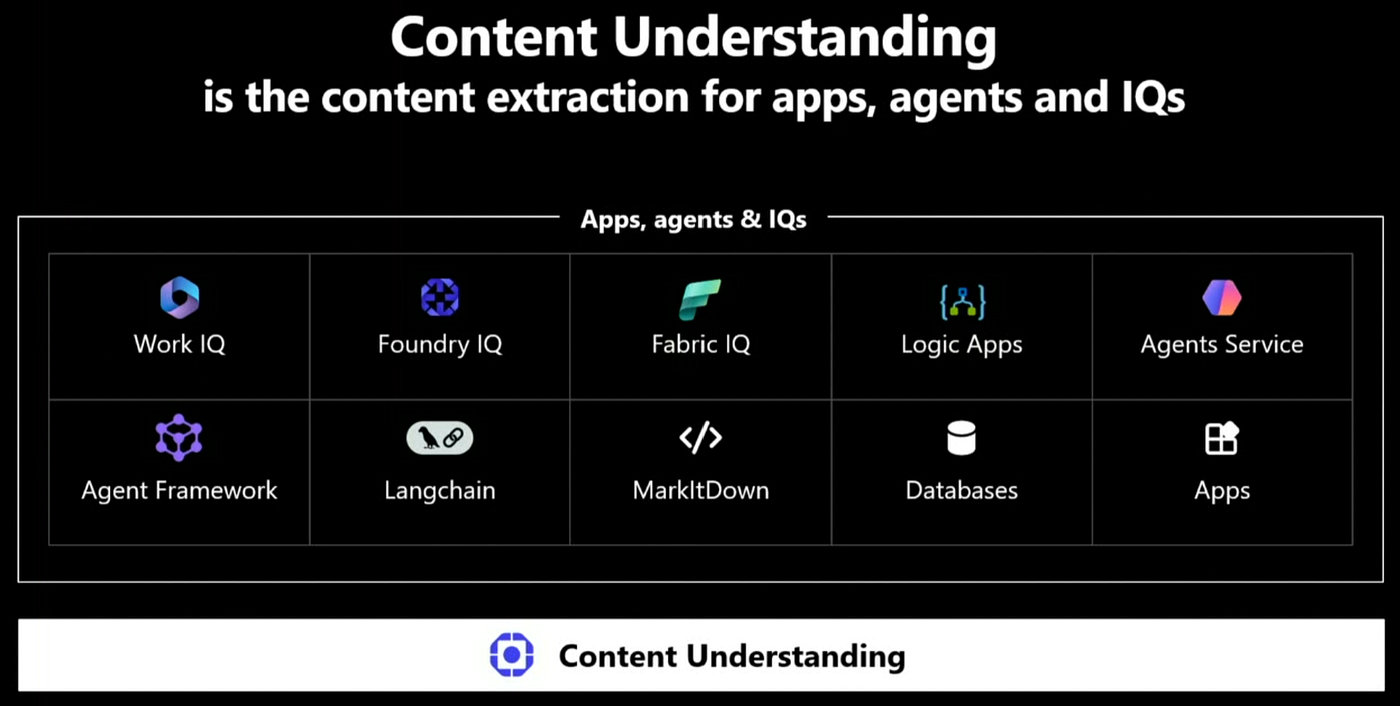
When an agent tries to crack a PowerPoint or read a table out of a PDF on its own, it scrambles, writes brittle custom code, misses content, and burns tokens. Content Understanding is built for exactly that: take messy, multimodal content and turn it into clean, structured, agent ready output, specifically high fidelity JSON with key value pairs plus Markdown that preserves what is actually in the file.
This is not a new service looking for a use case. Content Understanding has been generally available for roughly six months and in production for around a year and a half. It is the content extraction layer underneath Foundry IQ, and it is what Microsoft 365 Copilot uses when you ask a question about a document or PDF.
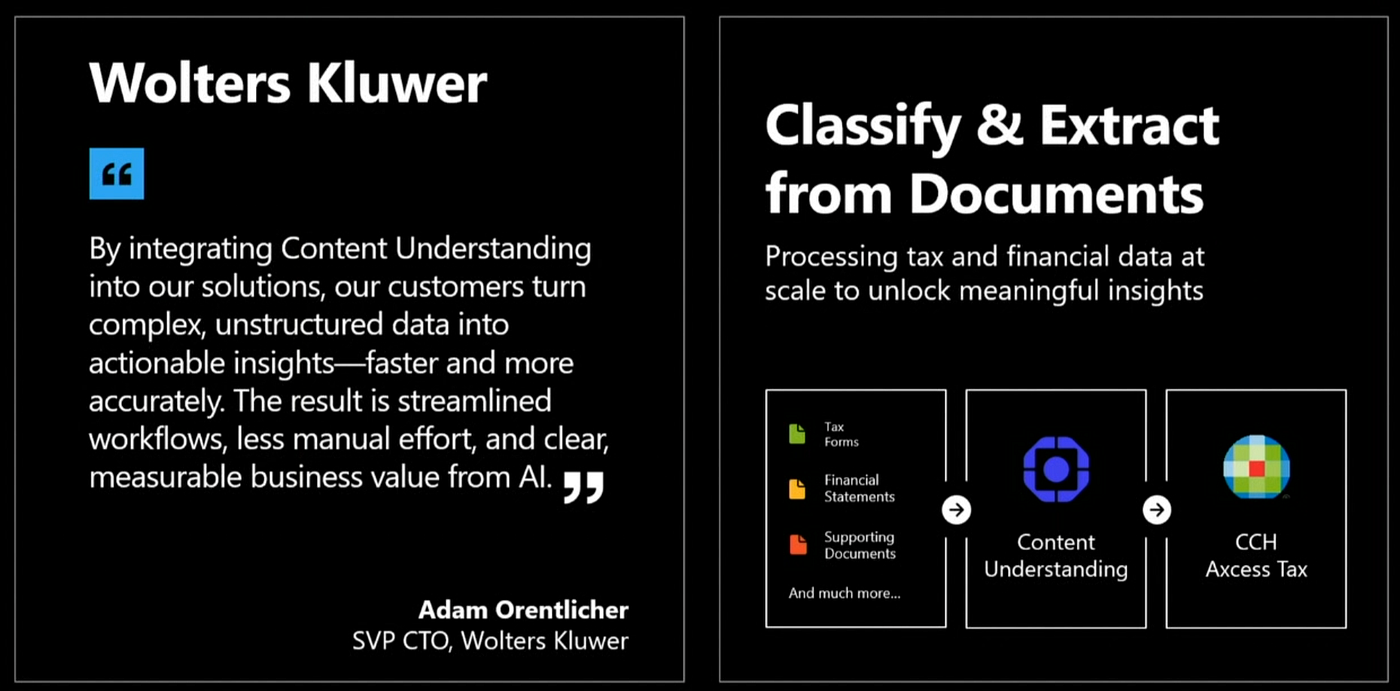
The more convincing proof is customer usage. Wolters Kluwer uses it in their CCH Access Tax product to ingest tax forms, supporting documents, and other financial paperwork into a structured format that automates tax prep end to end.
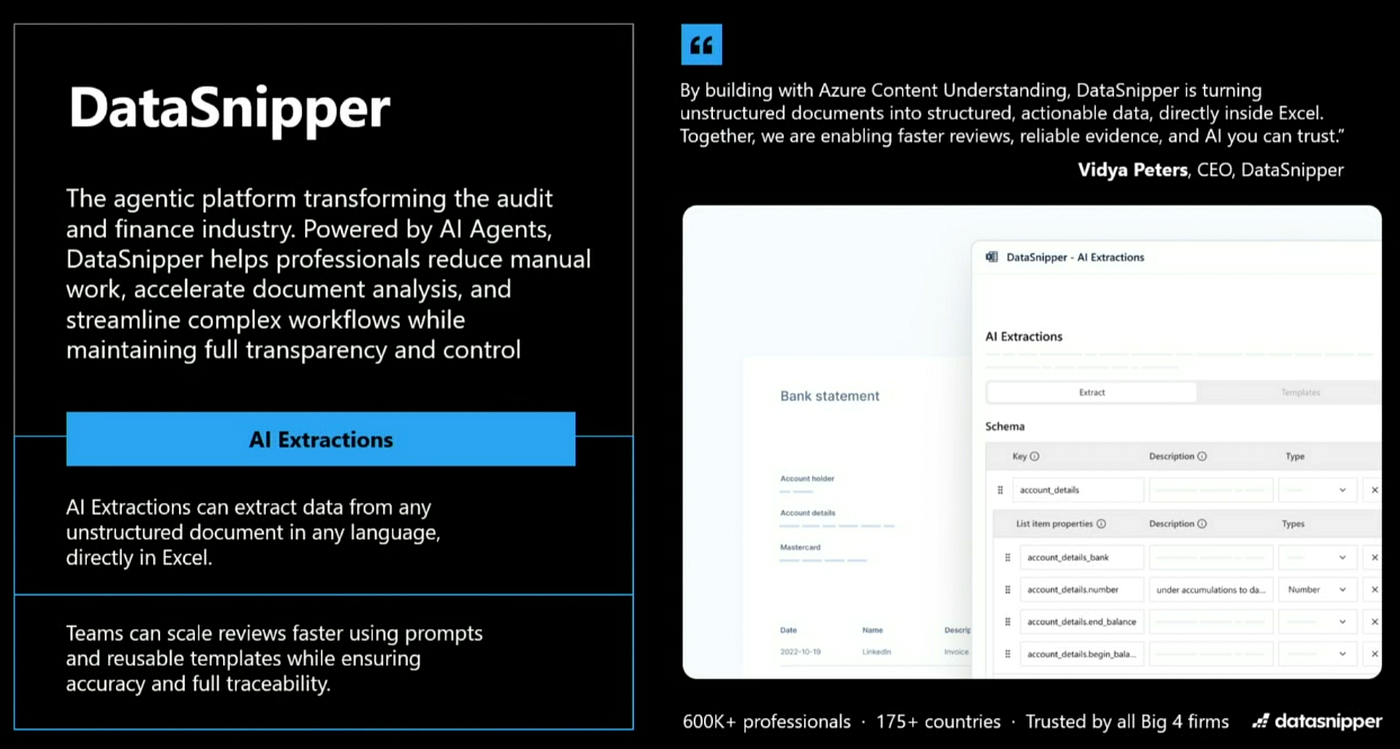
DataSnipper, an agentic platform for audit and finance, uses it to power AI extraction that pulls any document straight into Excel, where finance professionals actually work, and they frame the payoff as faster reviews, more reliable evidence, and trustworthy AI.
One pipeline: Parse, Classify, Extract
Content Understanding is a single pipeline with three stages, and the same pipeline runs for every modality: documents, images, video, PDFs, even older formats like zip and email files, with a tailored solution per file type.
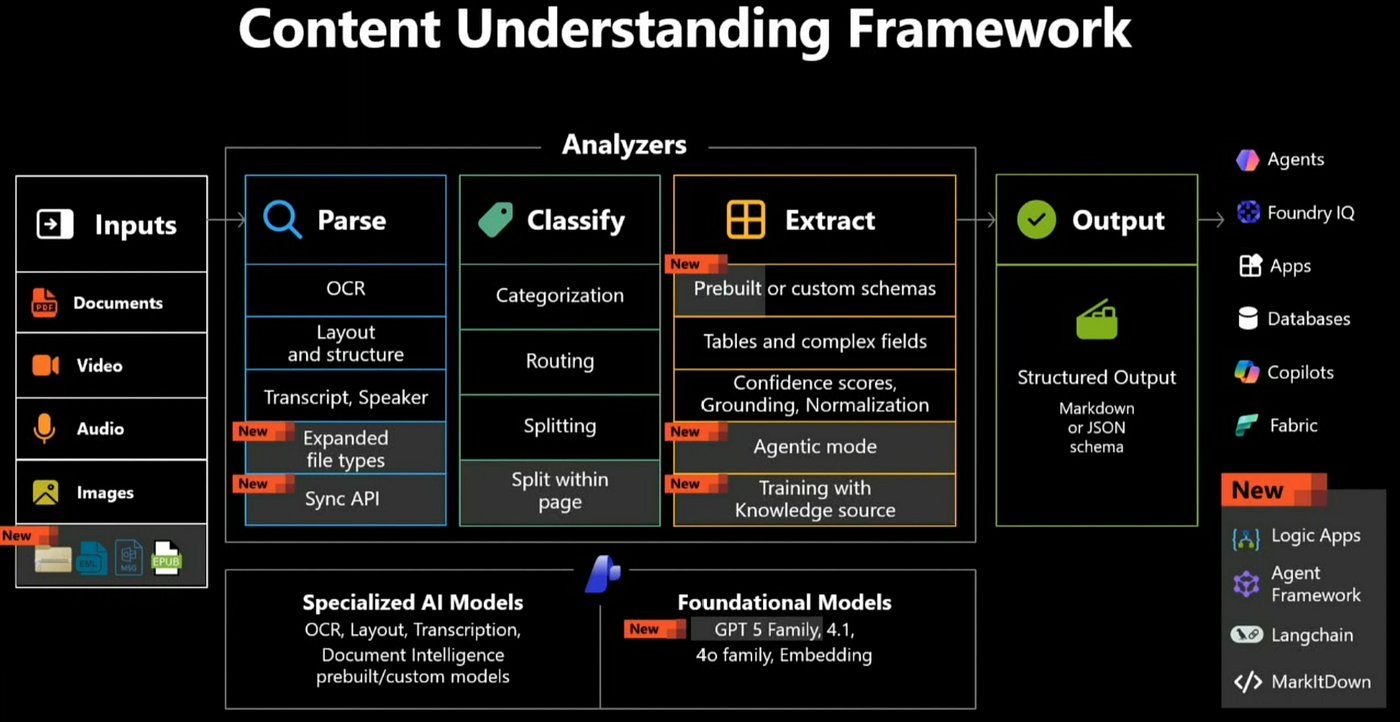
Parse takes any input document and turns it into Markdown. This is where Microsoft applies the OCR and layout technology it has refined for two decades and still treats as state of the art, including detailed table extraction, multilingual handling, and recovering text from genuinely degraded pages. Parse is the foundation of search ingestion for Foundry IQ. Newer in this wave, Parse can extract structured representations of figures, charts, and diagrams so visual content is not lost on the way into an index.

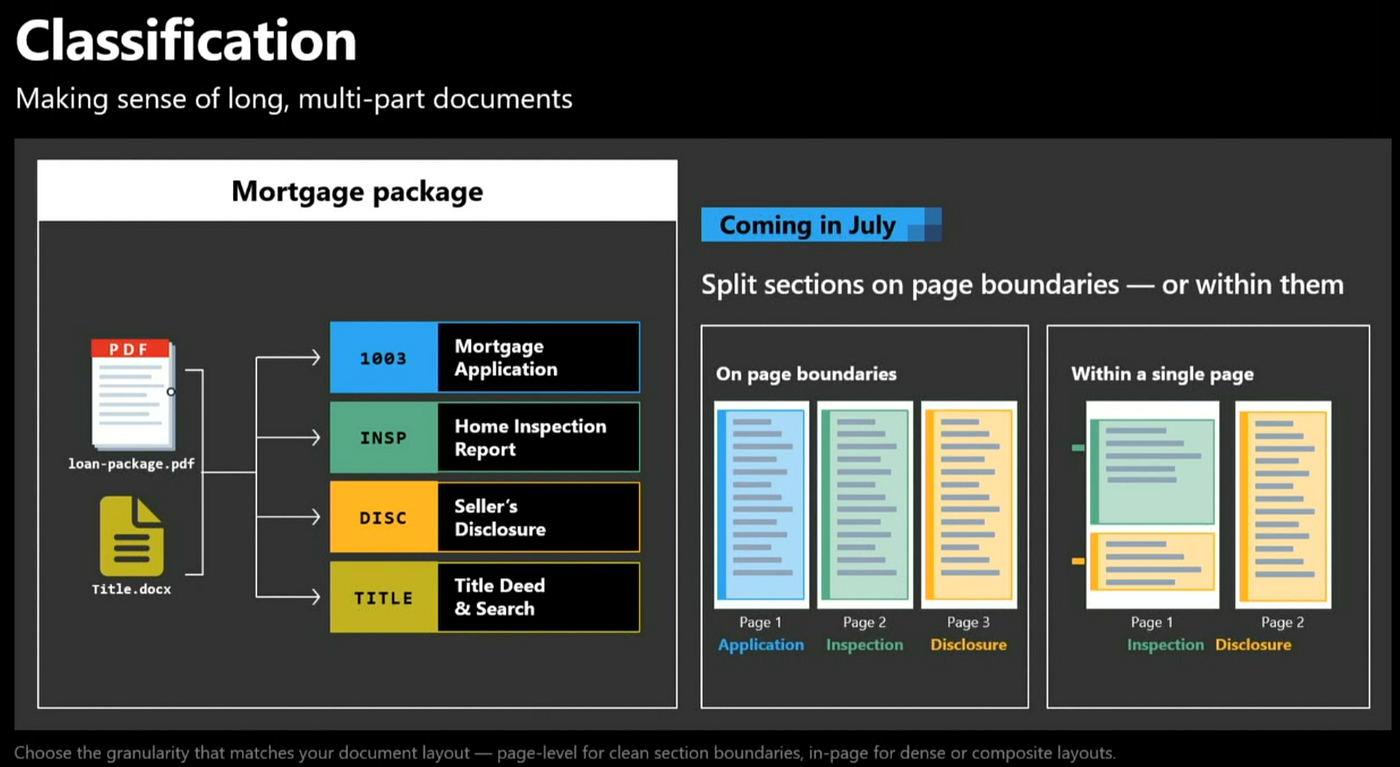
Classify decides what a document is, or breaks a long document into logical parts. This matters because enterprise documents are rarely one clean thing. A case file, an application bundle, or a tax submission is a package of different documents combined into one. Classify lets you identify the classes you care about, discard irrelevant parts, and route each piece to the right extractor. Coming in July 2026, classification can split documents on section boundaries, not just page boundaries, because real document boundaries rarely fall neatly on page breaks.
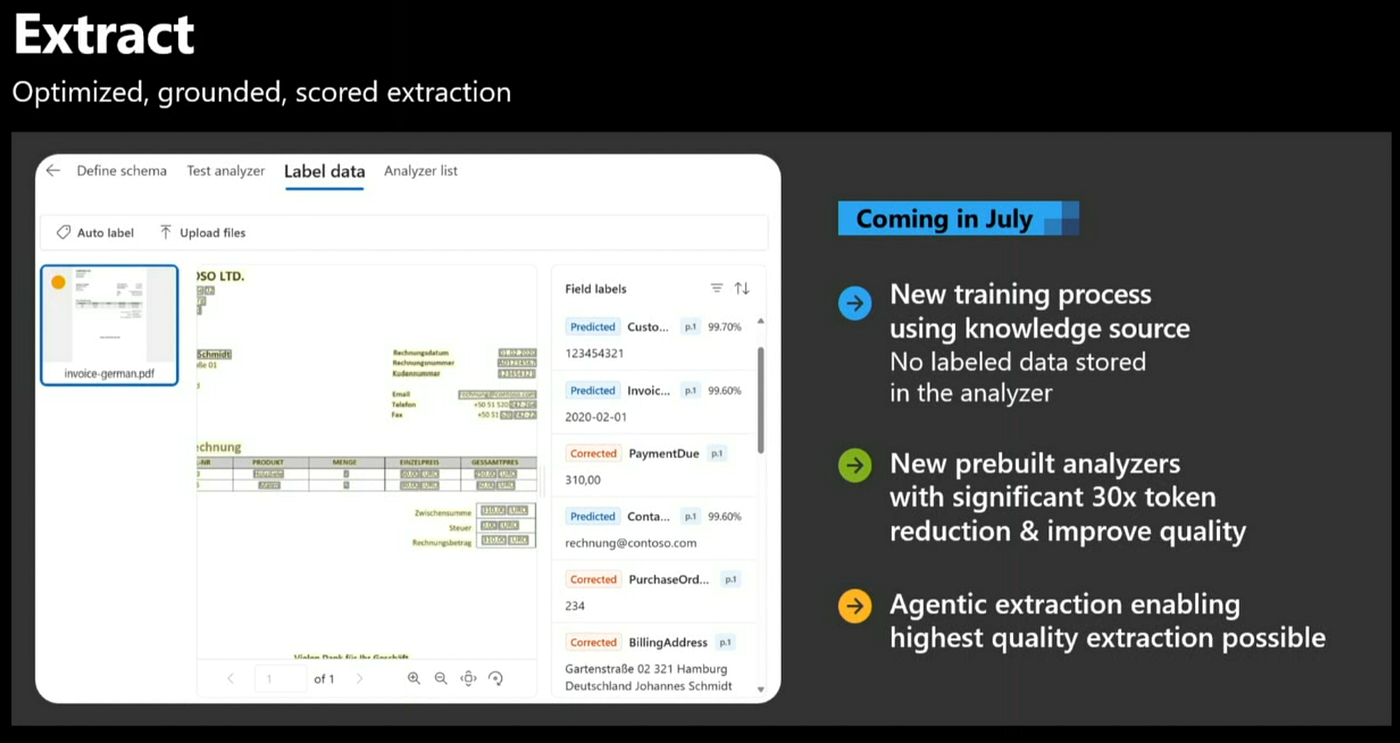
Extract turns content into structured fields. You get key value pairs, confidence scores, and grounded results. Grounding is the feature that makes automation real: each extracted field is tied back to a bounding box, a word, or a sentence in the source file, so you can jump straight to where a value came from, and the confidence score lets you auto approve high confidence results while routing low confidence ones to human review. That mechanism is what allows real production workloads to run on top of it.
Agentic mode: when the answer must be built, not found
This is the most important idea in the second half. Standard extraction is excellent at finding a value or summarizing what is in a document. But a broader, harder class of questions cannot be answered by finding a value.
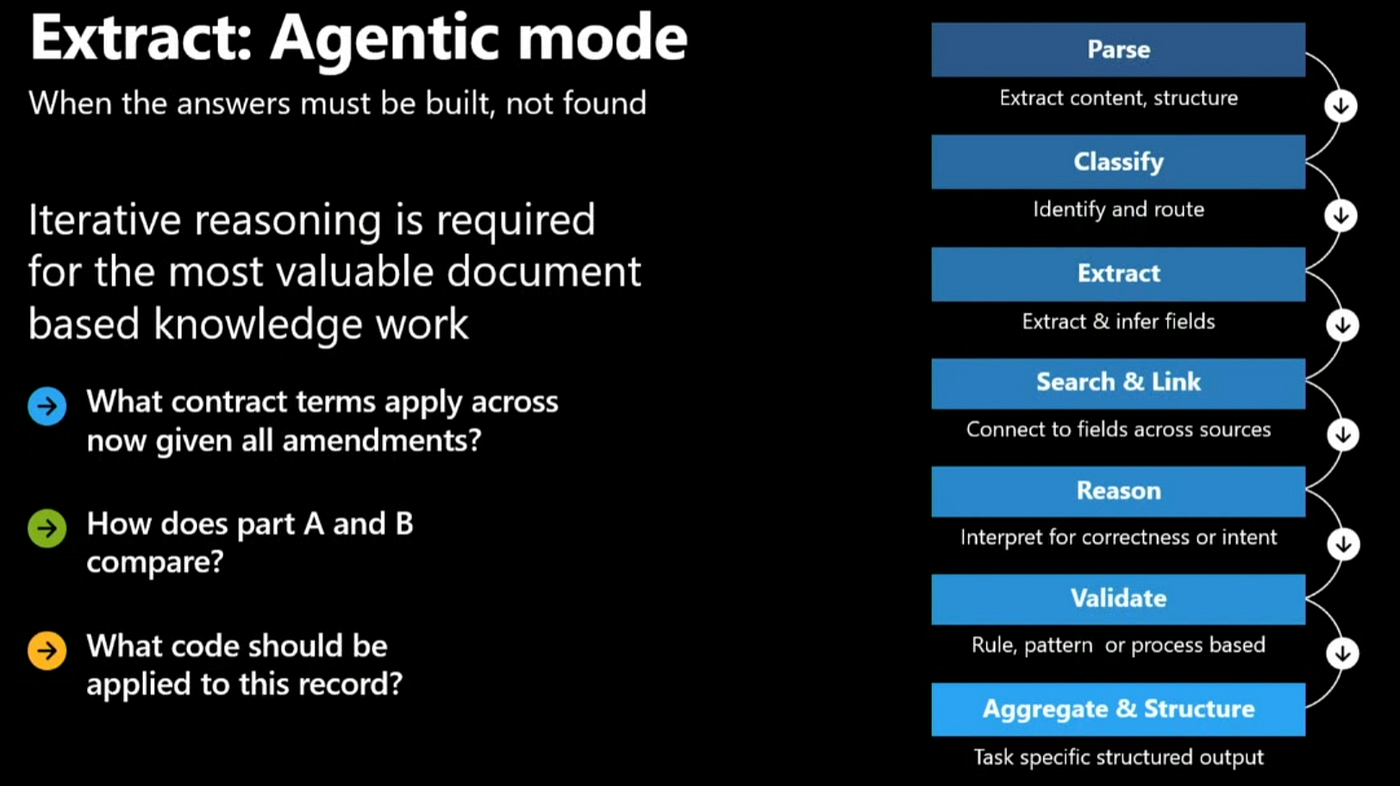
They have to be built, step by step, by reasoning across the content. “Which clause applies across this contract and its full chain of amendments?” “What is the root cause of this failure?” You cannot point at one cell for that. Agentic mode lets Content Understanding reason across a corpus to construct the answer.
A demo used a fiber optic cable failure scenario. The schema set a list of questions, what is the root cause, how much will it cost to fix, is it on budget, and agentic mode used a set of tools to loop across the evidence rather than answering in one shot.
The trace showed it finding specific evidence in the documents, asking follow up questions about images, and running calculations and code, then assembling that evidence into a grounded root cause and cost analysis. Work that would otherwise demand a pile of custom code became a configured schema.
Three ways to deploy it
There are three concrete deployment patterns, each demonstrated against the same fiber optic agent.
First, Foundry IQ ingestion. With Content Understanding turned on during indexing, the system extracts structured tables, figure descriptions, and document structure with minimal loss, so the index returns grounded answers.
The before and after is stark: a minimal parser confidently returned an invented measurement for a fiber that had no recorded value, while Content Understanding produced structured Markdown that correctly surfaced the missing value and refused to fabricate one.
Second, context provider. When you upload a file to an agent in real time, Content Understanding pre processes it and hands the agent a clean text representation. This is how you get past the narrow native file support of most agent harnesses, including unsupported docx files, and it is exposed both as an Agent Framework context provider and as a LangChain primitive. In one demo, a default low quality PDF parser reported a work order as scheduled when it was actually completed; switching on Content Understanding produced a structured table, a JSON representation of the embedded charts, and the correct status.
Third, business rules via analyzers. For genuinely ambiguous files, you encode your own logic. A classify and extract analyzer first asks “is this a work order,” then extracts the technician using explicit guidance about how to read the form. Without guidance the agent picked the site contact as the technician. With the analyzer encoding the rule that the routing field identifies the technician, it returned the correct person. That is how you turn fuzzy document interpretation into deterministic, auditable business logic.
Bringing both halves together
The two stories connect in a single trace. In a LangGraph application, the activity view shows an agent go into the Toolbox, load a skill, find ten tools, select exactly one, pull it, check the work order, and return the result. Watch what that one trace proves: Tool Search keeping the context window lean, the unified endpoint serving a non Microsoft runtime, and per call observability, all at once. Toolbox gets the agent to the right tool efficiently, and Content Understanding makes the underlying documents legible. Together they cover both halves of turning agents into action: the tools that come from APIs, and the content that does not.
How to build this yourself
Everything here is documented and has sample code. All Microsoft Learn links include the tracking parameter as full, unembedded URLs so you can copy them directly.
Toolbox, the four pillars, SDK setup, and the endpoint pattern: https://learn.microsoft.com/en-us/azure/foundry/agents/how-to/tools/toolbox?WT.mc_id=AZ-MVP-5000671
Connecting an agent to a Toolbox or MCP server endpoint, including authentication options: https://learn.microsoft.com/en-us/azure/foundry/agents/how-to/tools/model-context-protocol?WT.mc_id=AZ-MVP-5000671
Browser Automation Tool on Playwright Workspaces: https://learn.microsoft.com/en-us/azure/foundry/agents/how-to/tools/browser-automation?WT.mc_id=AZ-MVP-5000671
Foundry IQ knowledge bases connected to agents over MCP: https://learn.microsoft.com/en-us/azure/foundry/agents/how-to/foundry-iq-connect?WT.mc_id=AZ-MVP-5000671
What is Azure Content Understanding, the Parse, Classify, Extract overview: https://learn.microsoft.com/en-us/azure/ai-services/content-understanding/overview?WT.mc_id=AZ-MVP-5000671
Content Understanding classification and splitting: https://learn.microsoft.com/en-us/azure/ai-services/content-understanding/concepts/classifier?WT.mc_id=AZ-MVP-5000671
Content Understanding standard and pro modes: https://learn.microsoft.com/en-us/azure/ai-services/content-understanding/concepts/standard-pro-modes?WT.mc_id=AZ-MVP-5000671
Content Understanding skill for Azure AI Search ingestion: https://learn.microsoft.com/en-us/azure/search/cognitive-search-skill-content-understanding?WT.mc_id=AZ-MVP-5000671
Microsoft Agent Framework overview: https://learn.microsoft.com/en-us/agent-framework/overview/?WT.mc_id=AZ-MVP-5000671
Agent Framework providers, including GitHub Copilot SDK, Copilot Studio, and A2A: https://learn.microsoft.com/en-us/agent-framework/agents/providers/?WT.mc_id=AZ-MVP-5000671
GitHub repositories with working samples:
Microsoft Agent Framework source, Python and .NET: https://github.com/microsoft/agent-framework
Microsoft skills, MCP servers, custom agents, and Toolbox and Foundry IQ samples: https://github.com/microsoft/skills
Microsoft Agent Framework hands on samples, including MCP and multi agent patterns: https://github.com/microsoft/Agent-Framework-Samples
Build 2026 lab, agent ready knowledge with Foundry IQ: https://github.com/microsoft/Build26-LAB532-from-data-to-context-agent-ready-knowledge-with-foundry-iq
The fastest way to start is the Foundry portal at ai.azure.com. The July Content Understanding wave is where agentic mode ships for everyone to try.
Final Thoughts
The pattern underneath all of this is simple, and it is worth saying plainly. The hard part of building agents has shifted. Getting a model to reason is mostly handled.
The cost now lives in two quieter places: reaching the tools an agent needs, and reading the content those tasks depend on. Both of them drain your token budget and your time without ever showing up in a demo.
Toolbox tackles the first by collapsing many fragmented integrations into one governed endpoint and loading only the tools a task actually needs. Content Understanding tackles the second by turning documents, images, and other messy inputs into grounded, structured data, with reasoning across that data coming next. None of this is magic, and parts are still in preview, so test before you depend on it. But the direction is clear and genuinely useful: build a toolset once, ground your content properly, point any runtime at the same endpoint, and spend your energy on the agent logic that makes your product yours.
메타데이터
- post_id
- 678b888fa703
- slug
- inside-microsoft-foundry-toolbox-and-content-understanding-a-technical-deep-dive-678b888fa703
- url
- https://medium.com/itnext/inside-microsoft-foundry-toolbox-and-content-understanding-a-technical-deep-dive-678b888fa703
- canonical_url
- https://medium.com/itnext/inside-microsoft-foundry-toolbox-and-content-understanding-a-technical-deep-dive-678b888fa703
- author_url
- https://medium.com/@daverendon
- status
- ok
- fetched_at
- 2026-06-16 19:09:56