How I Learned to Evaluate AI-Generated Images Without Looking at Them
I run an agentic pipeline that generates AI reference images — character turnarounds, props, environments — for a video production…
How I Learned to Evaluate AI-Generated Images Without Looking at Them
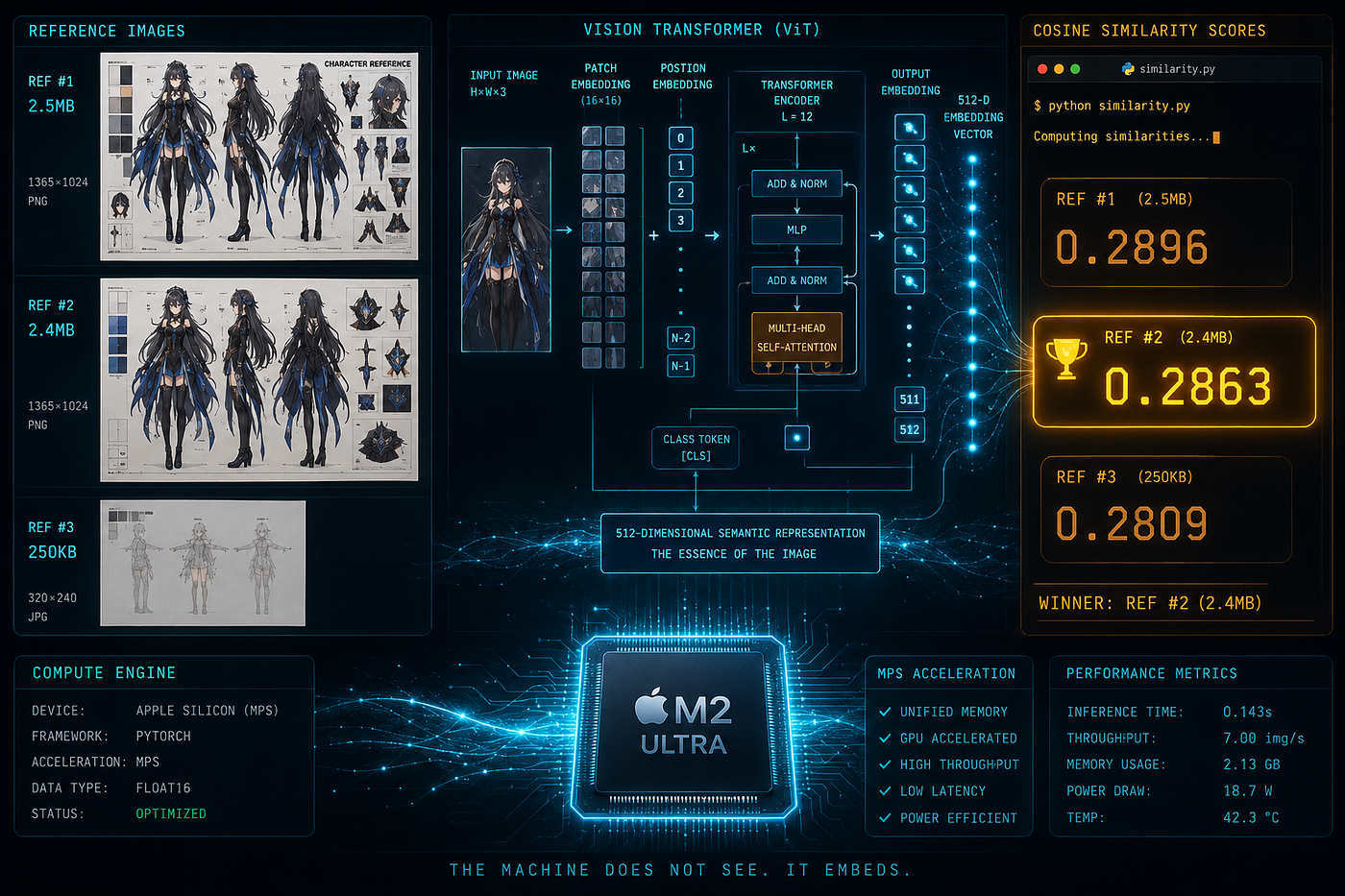
I run an agentic pipeline that generates AI reference images — character turnarounds, props, environments — for a video production workflow. The pipeline uses **Envato image-gen**, which returns 3 variants per prompt.
It is really great and appreciate to see Envato provide 3 variants for me to choose the best fit, but those 3 variants can be dramatically different in quality, how my harness should understand and choose?
One run might give you two fully-rendered 2.5MB reference sheets and one nearly-empty 250KB thumbnail. Another might have one variant drifting completely from the prompt while the others are faithful. Picking randomly isn’t good enough. Picking by file size alone isn’t reliable either.
Here are real variants from the same prompt generation example:
v1 (2.64MB):

v2 (2.54MB):

v3 (0.25MB ):

The previous approach was simple: pass all 3 variants to a vision LLM, ask it to judge which one best matches the prompt. Accurate — but expensive. The pipeline generates dozens of images per production pack, and every comparison burns tokens.
So I wondered: can a local Python script make the same call every time — no API, no tokens, just math?
That’s what I spent some time testing.
The Idea: Use CLIP as a Scoring Signal
I came across CLIP (Contrastive Language-Image Pre-Training from OpenAI) encodes both text and images into the same embedding space. Cosine similarity between a text prompt and an image tells you how well they match — no human required.
My hypothesis: if CLIP can score each variant against the generation prompt, I can pick the highest-scoring one. The only question was which CLIP model, and whether it actually agrees with what I’d pick myself.
I setup 2 groups for the experiments:
All images are of the same character “Lin Wan” — a neo-Chinese detective — generated from the same prompt.
Prompt (excerpt):
Lin Wan, age 20, 168cm, Wind-Seeking Pavilion detective. Ivory off-white oversized structured long-sleeve jacket worn open, bamboo leaf embroidery panel on back, small round emblem patches on shoulders. Black high-collar asymmetric cropped inner top, visible midriff gap. Dark olive-black high-waist wrap skirt with bamboo leaf jacquard, side slit to mid-calf, dark stockings. Black chunky lace-up combat boots. Dark leather waist belt, tactical hip pouch right side. Semi-transparent light jade-green elongated rectangular plaque pendant, matte gold cap. Color palette: #1E1E1E near-black, #3A3A36 dark olive, #D8D5C9 ivory off-white, #8A8F7A muted olive, #C4A46D warm brass gold. Neo-Chinese guofeng aesthetic, clean anime manhua line art, soft cel shading.
Group 1 — Envato 3-Variant Generation
Per above
Group 2 — GPT-image-2 Variants
ChatGPT may ask me to choose which one is the best fit for me from time to time
Images 21 and 22 below were generated by GPT-image-2. Both are high quality — the question is which one better fits the prompt. This group tests whether CLIP can distinguish between two strong generations where the difference is subtle.
Image 21:

Image 22:

I tested four via open_clip_torch:
- ViT-B/32 — ~350MB, pretrained on OpenAI data
- ViT-L-14 — ~890MB, pretrained on OpenAI data
- ViT-H-14 — ~4GB, pretrained on LAION-2B
- ViT-bigG-14 — ~10GB, pretrained on LAION-2B
One complication: my production prompts are long — way past CLIP’s 77-token limit.
The solution: chunk the prompt into ~200-char segments, score the image against each chunk, take max across all chunks. Max, not mean — because the prompt contains a lot of noise (avoid rules, metadata, color hex codes). Max finds the window that best matches the visual content.
On Apple Silicon M3 Pro, MPS is detected automatically and runs ~3–5× faster than CPU. Free speed.
Before running any model, I looked at both groups myself and made my own picks: v1 for Group 1, Image 21 for Group 2. That’s my ground truth. A model that agrees with my picks on both groups is a model I can trust to run the pipeline unsupervised.
The Results
Group 1 — three Envato variants:
- ViT-B-32: v1 0.2896, v2 0.2809, v3 0.2863 → picked v1 ✓
- ViT-L-14: v1 0.2421, v2 0.2612, v3 0.2455 → picked v2 ✗
- ViT-H-14: v1 0.3764, v2 0.3645, v3 0.3690 → picked v1 ✓
- ViT-bigG-14: v1 0.4400, v2 0.4567, v3 0.4098 → picked v2 ✗

A few things jump out immediately.
File size catches what CLIP misses. v3 at 0.25MB scored 0.2863 — right between v1 and v2. CLIP had no idea it was nearly empty. Without a file size pre-filter, any model might have picked it. This is actually the most important finding from the whole experiment: run file size filtering before CLIP, not after.
ViT-L-14 and ViT-bigG-14 both picked wrong in Group 1. They chose v2 over v1. I picked v1. ViT-B-32 and ViT-H-14 agreed with me.
Group 2 — GPT-image-2 variants:
- ViT-B-32: Image 21 at 0.2902 vs Image 22 at 0.2843, gap 0.006 → picked 21 ✓
- ViT-L-14: Image 21 at 0.2587 vs Image 22 at 0.2390, gap 0.020 → picked 21 ✓
- ViT-H-14: Image 21 at 0.4073 vs Image 22 at 0.3981, gap 0.009 → picked 21 ✓
- ViT-bigG-14: Image 21 at 0.4530 vs Image 22 at 0.4497, gap 0.003 → picked 21 ✓

Bigger isn’t more decisive. ViT-bigG-14 (10GB) had the smallest gap on Group 2 — just 0.003. ViT-B-32 (350MB) and ViT-L-14 both had clearer separations. The largest model was the least confident.
Why ViT-L-14 Got Group 1 Wrong
CLIP encodes the entire image into a single 512-dim vector. When two full reference sheets are similar enough, the scoring gap between them is tiny — a small perturbation in which model you use can flip the result.
For Group 2, there’s a structural reason why CLIP picks Image 21 over Image 22, even though Image 22 is the more complete reference sheet:
Image 21 has 4 character views dominating ~70% of the canvas. Most pixels represent the character’s outfit and silhouette — exactly what the prompt describes.
Image 22 splits the canvas across 5 additional panels: Face & Hair closeup, Accessories & Details, Material & Texture swatches, Scale & Proportions chart. The non-character content dilutes the embedding against a character description prompt.
Here’s the irony: Image 22 is the better reference sheet for an actual artist — more complete, more useful for production. But CLIP rewards prompt faithfulness, not visual richness. The model picks what matches the text, not what a human would find most useful.
That’s not a flaw — it’s what you want in an automated picker. You described what you want. CLIP finds the image that looks most like what you described.
What CLIP Actually Handles Well (and What It Doesn’t)
What it can do reliably:
- Detecting whether an image is a reference sheet at all
- Color palette matching (ivory, black, gold)
- Layout signal — turnaround format, multiple views
- Ranking near-identical variants (with the right model)
- Detecting duplicates — gap collapses to 0.000
What it doesn’t do well:
- Small accessory detail (a pendant, a clasp)
- Niche style terms like guofeng or manhua
- Detecting whether an image is blank — use file size for that
The Sweet Spot: ViT-B-32
Model alignment with my own picks:

- ViT-B-32 — agreed on both groups ✓
- ViT-L-14 — wrong on Group 1, right on Group 2
- ViT-H-14 — agreed on both groups ✓
- ViT-bigG-14 — wrong on Group 1, right on Group 2
ViT-B-32 (~350MB) and ViT-H-14 (~4GB) both agreed with me on both groups. ViT-B-32 is 10× lighter. That’s the sweet spot.
Human-model agreement, not benchmark gap size, was my evaluation criteria. A model that consistently matches your judgment can run unsupervised. Gap numbers are useful for understanding confidence — but if the model picks wrong, a larger gap just means it was wrong more confidently.
The Final Pipeline
1. Generate 3 variants
2. File size gate:
   - ref_size = max(candidate sizes + parent sizes)
   - Drop any candidate < 50% of ref_size → SKIPPED
   - All dropped? → exit 1 (regenerate)
3. CLIP score (ViT-B-32, MPS):
   - text_similarity = max over prompt chunks
   - If parent images exist: score = 0.6 × text + 0.4 × avg(parent cosine)
   - Parents are reference-only, never selectable as winner
4. Verification gate: score ≥ 0.20 → pass, else exit 1 (regenerate)
A note on the 0.20 threshold: CLIP cosine similarity between image-text pairs lands in a narrow band in practice.
In practice, scores cluster like this:
- 0.10–0.15 — completely unrelated
- 0.20–0.25 — weak match, right general category
- 0.25–0.35 — good match, correct subject, style, outfit
- 0.35+ — strong match (larger models tend to score higher overall)
Correct images in these experiments scored 0.24–0.26 with ViT-B-32. The 0.20 gate isn’t picking the best variant — that’s what the CLIP scorer does. It’s a final sanity check: if the chosen image falls below 0.20, something went wrong and the pipeline regenerates.
The “parent” concept: some images in the production flow are generated with reference to a previously approved anchor — a character sheet that all subsequent shots should stay visually consistent with. When a parent exists, the script scores each candidate against both the text prompt and the parent image. Parents influence the score but are never selectable as winners. This keeps the visual anchoring consistent across the whole pack without drifting.
Why This Matters To Me:
- No token cost per generation — the vision LLM comparison step is gone entirely; CLIP runs locally with no API calls
- File size gate eliminates garbage before inference — the 250KB thumbnail never reaches CLIP; it’s filtered in milliseconds
- Parent-aware scoring — later images in a series stay visually consistent with anchor images without human review
- Runs in seconds on Apple Silicon — MPS acceleration makes this practical to run inside an automated flow, not just as a one-off script
- Human-validated model choice — ViT-B-32 wasn’t chosen by benchmark; it was chosen because it agreed with my own picks on real production images
The Final
The pipeline now picks the best variant from every generation — no tokens, no API calls, no human review in the loop. Even if this only ever serves my own video workflow, it already removes a manual decision I was making dozens of times per pack. That’s good enough for me.
메타데이터
- post_id
- 67c87131b934
- slug
- how-i-learned-to-evaluate-ai-generated-images-without-looking-at-them-67c87131b934
- url
- https://medium.com/@ywian/how-i-learned-to-evaluate-ai-generated-images-without-looking-at-them-67c87131b934
- canonical_url
- https://medium.com/@ywian/how-i-learned-to-evaluate-ai-generated-images-without-looking-at-them-67c87131b934
- author_url
- https://medium.com/@ywian
- status
- ok
- fetched_at
- 2026-06-10 09:45:17





