Create a Search Service with Spring Boot and Apache Solr
This tutorial is the last component for our movies catalog which will expose a search endpoint in which we are going to be able to send a…
Create a Search Service with Spring Boot and Apache Solr
This tutorial is the last component for our movies catalog which will expose a search endpoint in which we are going to be able to send a query(text to search) and apply additional filters.
Tools used in this tutorial:
- macOs 26.5.2
- openjdk 21.0.10
- Spring Boot 4.0.0.
- Apache Solr 9.4.1
- Podman version 5.8.1
- Docker Compose version 5.3.1
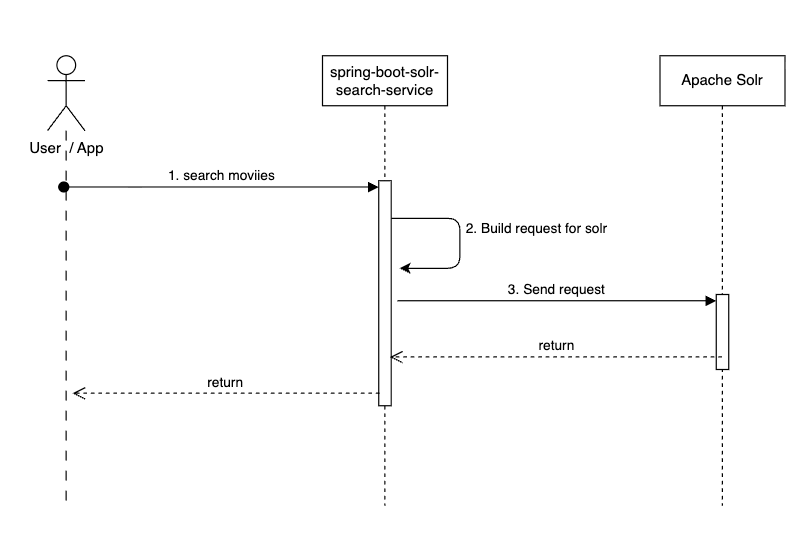
As explained above this service is basically a REST API which allows a client app to execute searches in the movies that we have in apache solr, as you may know apache solr supports multiple fields that are used to manipulate your documents, but for the case of this tutorial we only focus in 2 of them:
- q (Query): Free text search terms
- fq (Filter Query): Used to narrow the search results.
The idea is that the client app will send a request payload like this one:
{
 "query": "Future",
 "filters": [
   {
     "field": "genres",
     "operator": "IN",
     "values": ["Comedy","Drama"]
   },
   {
     "field": "title",
     "operator": "EQUALS",
     "value": "Future"
   },
   {
     "field": "tomatoes.critic.rating",
     "operator": "RANGE",
     "from": "7",
     "to": "8"
   }
 ]
}
Our search service will process this payload and translate it into a valid Apache solr request, this is done by the following class:
org.learning.spring.spring_boot_solr_search_service.service.SearchServiceIn other words the search request payload is used to populate the solr “q” and “fq” fields and then execute the search request for solr, the benefit of this approach is that you are not exposing how the actual request to apache solr is made and in addition to that is more user friendly, by looking at the request body it is easy to know what are you doing, so in this request payload the idea is to search all the movies that includes the word “Future” in the searchable fields:
spring-boot-solr-search-service/src/main/resources/application.yaml
property: solr_searchable_fields
and then apply the corresponding filters. Once that we get the response from solr we need to map that response to our search service response object and this is done by a library called mapstruct that allows you to map a the properties from a source object to the properties from a target object, here is the class that it is in charge of that:
org.learning.spring.spring_boot_solr_search_service.mapper.MovieMapperActually that it is an interface but when you build the project with maven, the mapstruct library generates an implementation class which is this one:
org.learning.spring.spring_boot_solr_search_service.mapper.MovieMapperImplIn this case we are mapping a list of SolrDocument object to our list of Movie objects which are used for our search service response.
Now that we know the whole context of how this work you can start this service by running the following command in a terminal:
podman compose up --build -d spring-boot-solr-search-serviceOnce that the containers are up and running you can hit the search endpoint by running this curl command:
curl -X POST -H "Accept:application/json" -H "Content-Type:application/json" http://localhost:7070/api/movies -d @./spring-boot-mongodb/requests/create-movie-request-payload.jsonYou should get a response like this one:
{
  "movies": [
    {
      "awards": {
        "nominations": 1,
        "wins": 3,
        "text": "3 wins & 1 nomination."
      },
      "imdb": {
        "rating": 7.4,
        "imdbId": 2245195,
        "votes": 1905
      },
      "runtime": 86,
      "cast": [
        "Nils d'Aulaire",
        "Jay Klaitz",
        "Julie Ann Emery",
        "April L. Hernandez"
      ],
      "countries": [
        "USA"
      ],
      "directors": [
        "John Mitchell",
        "Jeremy Kipp Walker"
      ],
      "genres": [
        "Comedy",
        "Music",
        "Sci-Fi"
      ],
      "languages": [
        "English",
        "Spanish"
      ],
      "writers": null,
      "id": "573a13d9f29313caabda9530",
      "fullPlot": "Two aliens from the planet Hondo have come take over our planet. But when they discover an amazing human invention called \"music\", they immediately abandon their mission, head to a tiny Brooklyn bar, and start the universe's first Hondonian bluegrass duo: Future Folk!",
      "plot": "The possibly exaggerated origin story of the real life alien bluegrass band, Future Folk, that has been playing for NYC audiences for the better part of a decade.",
      "poster": "https://m.media-amazon.com/images/M/MV5BNzA3MDI3MzAxMl5BMl5BanBnXkFtZTcwNDY2Mjc0OQ@@._V1_SY1000_SX677_AL_.jpg",
      "rated": null,
      "released": "Fri May 31 00:00:00 UTC 2013",
      "title": "The History of Future Folk",
      "type": "movie",
      "year": "2012",
      "lastUpdated": null,
      "tomatoes": {
        "critic": {
          "rating": 7.2,
          "meter": 94,
          "numReviews": 31
        },
        "fresh": 29,
        "rotten": 2,
        "lastUpdated": "Wed Sep 02 19:39:01 UTC 2015",
        "viewer": {
          "rating": 4.1,
          "meter": 86,
          "numReviews": 1137
        }
      }
    }
  ],
  "numOfMoviesFound": 1
}
You can find additional examples in this file:
spring-boot-mongodb-debezium-solr-example/REQUESTS-SPRING-BOOT-SOLR-SEARCH-SERVICE.md
I hope that this helps you with your use case.
Here you can find the github url to whole project:
메타데이터
- post_id
- 67d05b810b72
- slug
- create-a-search-service-with-spring-boot-and-apache-solr-67d05b810b72
- url
- https://medium.com/@mpedroza-mx/create-a-search-service-with-spring-boot-and-apache-solr-67d05b810b72
- canonical_url
- https://medium.com/@mpedroza-mx/create-a-search-service-with-spring-boot-and-apache-solr-67d05b810b72
- author_url
- https://medium.com/@mpedroza-mx
- status
- ok
- fetched_at
- 2026-08-06 21:42:47