Azure DevOps → ACR: Federated service connections vs. client-secret SPs (and the roles you need)
Goal: let your Azure Pipelines build and push/pull images to Azure Container Registry (ACR) securely and with least privilege.
Azure DevOps → ACR: Federated service connections vs. client-secret SPs (and the roles you need)
Goal: let your Azure Pipelines build and push/pull images to Azure Container Registry (ACR) securely and with least privilege.
The two Service Connection Types That Matter
When connecting Azure DevOps to ACR, most engineers hit a fork in the road without realizing it:
Azure Resource Manager (ARM): Deploy Bicep/ARM, run az cli, manage Azure resourcesVia az acr login
Docker Registry: Native Docker@2 task authentication
They are not interchangeable , but both can get your images moving. Choosing wrong is where most failed builds and 401 Unauthorized errors come from.
Two ways to authenticate
1) Workload Identity Federation (OIDC) — recommended
- Azure DevOps issues a short-lived OIDC token to the job.
- Microsoft Entra ID (Azure AD) trusts that token via a federated credential on an app registration (created for you by the service connection UI).
- No secrets are stored in DevOps; nothing to rotate or leak.
- Tokens only work from the exact pipeline/service connection you allowed.
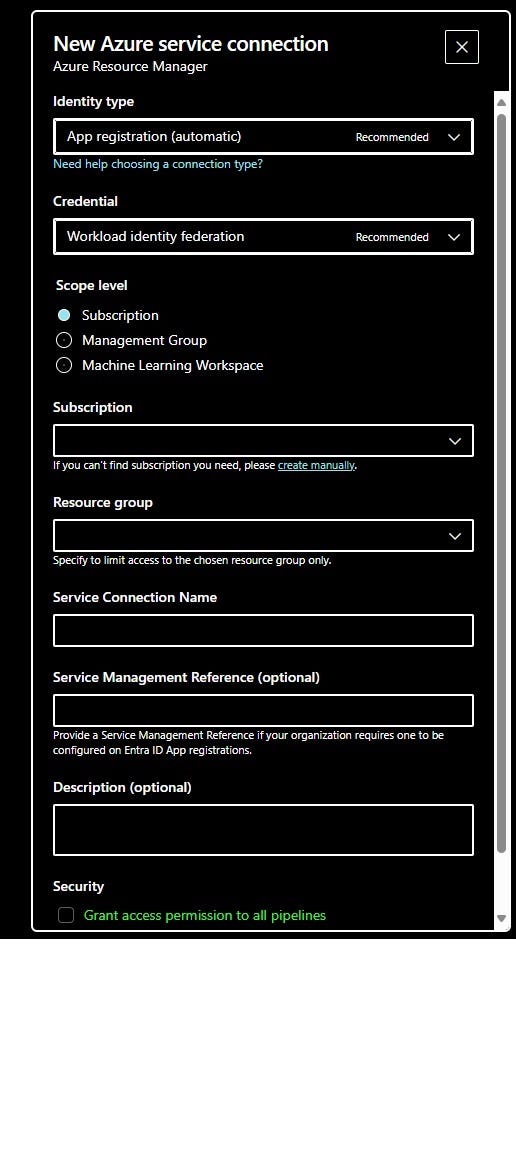
FIgure 1: Creating Service Connection from Azure Devops
In the “New Azure service connection → Azure Resource Manager” screen choose Identity type: App registration (automatic), Credential: Workload identity federation (as in your screenshots).
2) Client-secret Service Principal (legacy)
- You create an app registration + client secret and paste it into an Azure DevOps service connection (often the “Docker Registry (ACR)” type).
- Works everywhere, but you must store/rotate the secret and protect it carefully.
- If leaked, it can be used outside your pipeline until it expires.

Figure 2: As you see tokens tend expire a lot giving you the responsibility to manage them and store them usually in Key Vaults adding extra work and costs.
Minimum permissions on ACR
Assign roles at the registry scope (principle of least privilege):
- AcrPull → allows pulling artifacts (e.g., running containers, FROM base images).
- AcrPush → includes AcrPull and allows pushing new tags/layers.
- (Optional) AcrDelete → only if your pipeline deletes images/tags.
You don’t need Contributor/Owner on the subscription to push images — just the ACR data-plane roles above, scoped to the target registry.
Quick setup (OIDC/federated)
- Create the service connection Project Settings → Service connections → New → Azure Resource Manager Identity type: App registration (automatic) → Credential: Workload identity federation. Scope level: Subscription or Resource group (either is fine; it only affects what you can browse in tasks).
- Grant ACR roles to the created app/service principal ACR → Access control (IAM) → Add role assignment → pick AcrPush (or AcrPull) → select the service principal that matches your service connection name.
- Use it in a pipeline
# Build and push using federated ARM connection
trigger: none
variables:
acrName: myregistry
image: myapp
tag: $(Build.BuildId)pool:
vmImage: 'ubuntu-latest'steps:
- task: AzureCLI@2
displayName: 'Login to Azure & ACR'
inputs:
azureSubscription: 'SC-azure-oidc' # your ARM federated service connection
scriptType: bash
scriptLocation: inlineScript
inlineScript: |
az acr login -n $acrName
REG=$(az acr show -n $acrName --query loginServer -o tsv)
docker build -t $REG/$image:$tag .
docker push $REG/$image:$tag(The AzureCLI task uses the federated token automatically. No secrets involved.)
If you must use a client-secret SP
- Create an ACR Docker Registry service connection (or a generic ARM connection with a secret).
- In Entra ID, create an app registration + client secret.
- Grant the app AcrPush/AcrPull on the registry.
- Reference that connection in
Docker@2tasks (DevOps will inject the secret at runtime).
Pros & cons (at a glance)
Federated (OIDC) service connections are the safer default for Azure DevOps talking to Azure Container Registry. Instead of storing a long-lived secret, the pipeline gets a short-lived token at job runtime. There’s nothing to rotate, nothing to leak, and the blast radius is small because the token is bound to the exact pipeline/service connection you allowed.
Client-secret service principals
The familiar, legacy approach. They’re quick to wire up and work with almost any tool, including older Docker tasks that just want a service principal ID and secret. But you’re now responsible for creating, storing, and rotating that secret.
Common gotchas
- After creating a federated service connection, don’t forget the ACR role assignment — without AcrPush/AcrPull you’ll get 401/403 errors.
- Assign roles at the registry (or resource-group) scope, not subscription, unless you truly need broader access.
- If your pipeline needs to delete images, add AcrDelete explicitly.
Regardless of the method, ACR permissions are simple:
- Use AcrPull if the pipeline only pulls images.
- Use AcrPush when it needs to push (it includes pull).
- Add AcrDelete only if the pipeline cleans up
ARM Service Connection: BYO SP vs. Auto-Created Identity
When you create an ARM service connection, DevOps gives you two identity paths:
Option A , App Registration (Automatic) Recommended for Most Teams
DevOps creates the app registration, configures the federated credential, and links it automatically. You only need to assign the right roles afterward.
Project Settings → Service connections → New → Azure Resource Manager
Identity type: App registration (automatic)
Credential: Workload identity federation
Use this when: you don’t have a pre-existing app registration and want the fastest path with no manual federation setup.
Option B App Registration or Managed Identity (Manual) BYO SP
You bring an existing app registration (e.g., ar-portalxm-prd-01 created by your team's IaC or governance process). DevOps generates the Issuer and Subject Identifier — you paste those into the app registration's federated credentials in Entra ID.
Project Settings → Service connections → New → Azure Resource Manager
Identity type: App registration or managed identity (manual)
Then in Entra ID → App Registrations → your app → Certificates & secrets → Federated credentials → Add:
Scenario:   Other issuer
Issuer:     https://login.microsoftonline.com/<tenant-id>/v2.0
Subject:    /eid1/c/pub/t/.../sc/<project-id>/<connection-id>
Name:       sc-portalxm-prd-02
Use this when:
- Your organization has governance controls requiring pre-approved app registrations
- You want to reuse a single SP across multiple service connections
- Your IaC (Bicep/Terraform) manages the identity lifecycle, not DevOps
Gotcha: After creating the connection, DevOps will try to validate by calling Microsoft.Resources/subscriptions/read. Your SP needs at minimum Reader on the subscription scope for verification to pass — even if the actual work only touches AC🌐 Connect with me
Thanks for reading! I share insights on Azure, multi-cloud architecture, and Python automation for data & AI systems.
💻 [GitHub: datatomas](datatomas (Tomas Suarez))
🔗 [LinkedIn: Tomas Suarez] (Link)
📰 [Medium: @datatomas] (Link)
메타데이터
- post_id
- 67e8a58f3d2f
- slug
- azure-devops-acr-federated-service-connections-vs-client-secret-sps-and-the-roles-you-need-67e8a58f3d2f
- url
- https://medium.com/@datatomas/azure-devops-acr-federated-service-connections-vs-client-secret-sps-and-the-roles-you-need-67e8a58f3d2f
- canonical_url
- https://medium.com/@datatomas/azure-devops-acr-federated-service-connections-vs-client-secret-sps-and-the-roles-you-need-67e8a58f3d2f
- author_url
- https://medium.com/@datatomas
- status
- ok
- fetched_at
- 2026-07-13 19:05:09