WHIP & WHEP Explained: The Simple Guide to Ultra-Low-Latency Live Streaming
If you’ve ever wanted to stream video into an app (like from OBS, a mobile device, or a camera) and have people watch it in real time with…
WHIP & WHEP Explained: The Simple Guide to Ultra-Low-Latency Live Streaming
If you’ve ever wanted to stream video into an app (like from OBS, a mobile device, or a camera) and have people watch it in real time with ultra-low delay, you’ve probably run into complex streaming setups.
WHIP and WHEP are modern standards that make this much easier — especially for WebRTC-based live streaming.
This guide explains everything from first principles, in simple language.
What Problem Do WHIP and WHEP Solve?
Traditional live streaming (RTMP, HLS, etc.) has problems:
- ❌ High latency (5–30 seconds delay)
- ❌ Complex setup
- ❌ Hard to integrate real-time interaction
- ❌ Requires custom servers or pipelines
WebRTC solves latency but integrating WebRTC into apps is hard.
👉 WHIP and WHEP simplify WebRTC streaming using normal HTTP requests.
How Live Streaming Works
At the most basic level, live streaming has two parts:
- Sending video (Ingestion) : Camera → Internet → Streaming system
- Receiving video (Playback): Streaming system → Viewer devices
What is WHIP?
WHIP = WebRTC-HTTP Ingestion Protocol
Think of WHIP as:
👉 A simple way to SEND live video into a system using WebRTC
Instead of complex signaling, you just send your stream to an HTTP endpoint.
In simple terms:
WHIP lets your device act like a live broadcaster.
Example sources that can use WHIP:
- OBS Studio
- Mobile apps
- Cameras
- Hardware encoders
- IoT devices
- Custom apps
What is WHEP?
WHEP = WebRTC-HTTP Egress Protocol
This is the opposite of WHIP.
👉 WHEP lets viewers RECEIVE the live stream via WebRTC.
In simple terms:
WHIP = Upload stream WHEP = Watch stream
Step-by-Step Guide
- OBS Studio: Download and install OBS Studio
- VideoSDK Token: Generate a token from the VideoSDK Dashboard
- Room ID: Create or use an existing VideoSDK room
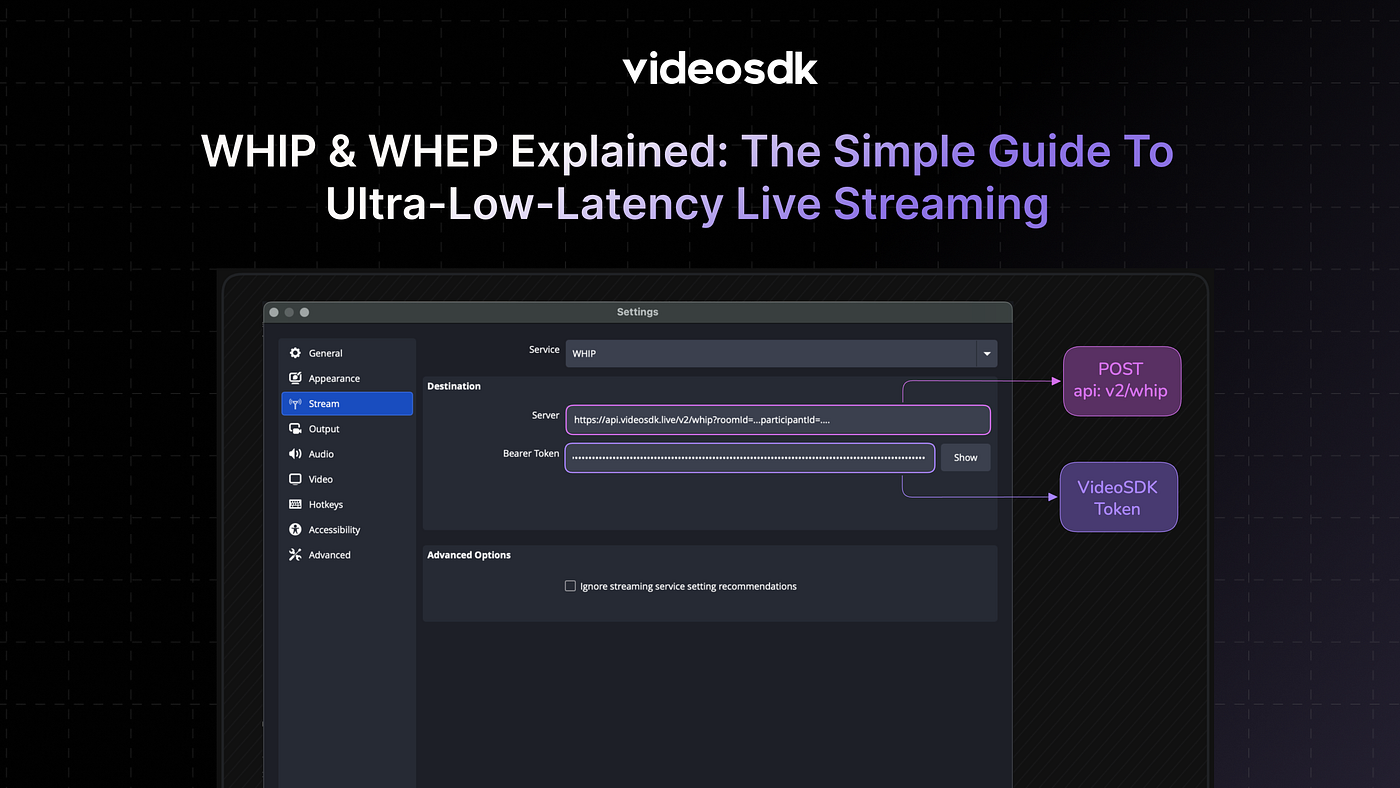
Step 1: Configure OBS Studio
- Open OBS Studio
- Navigate to Settings → Stream
- Select Custom as the service type
- In the Server field, enter:
https://api.videosdk.live/v2/whip?roomId=YOUR_ROOM_ID&participantId=YOUR_PARTICIPANT_ID- Replace:
YOUR_ROOM_IDwith your actual VideoSDK room ID (e.g.,zfww-680a-dzen)YOUR_PARTICIPANT_IDwith a custom participant ID (optional, will be auto-generated if not provided)
- In the Stream Key field, enter your VideoSDK token

Step 2: Start Streaming
- Click Start Streaming in OBS Studio
- Your OBS stream will be ingested into the VideoSDK meeting
- The stream will appear as a participant in the VideoSDK room
Step 3: Verify the Connection
You can verify the connection by:
- Viewing the VideoSDK meeting using any VideoSDK client SDK
- Checking the participant list to see your WHIP stream participant
- Monitoring the stream quality and latency
What is an SDP Offer?
An SDP (Session Description Protocol) offer is a text-based description of the media capabilities that your WebRTC client wants to send or receive. It contains information about:
- Media types (audio, video)
- Codecs supported (e.g., Opus for audio, VP8/VP9/H264 for video)
- Network information (IP addresses, ports)
- ICE candidates for establishing the connection
- Security parameters (DTLS fingerprints, ICE credentials)
When you create a WebRTC connection, your client generates an SDP offer describing what it can do. The server responds with an SDP answer that confirms the media parameters and establishes the connection.
Example SDP Offer:
v=0
o=- 1495799811084970 1495799811084970 IN IP4 0.0.0.0
s=-
t=0 0
a=msid-semantic: iot
a=group:BUNDLE audio
m=audio 9 UDP/TLS/RTP/SAVP 111
a=rtpmap:111 opus/48000/2
a=ssrc:6 cname:webrtc-opus
a=sendrecv
a=mid:audio
c=IN IP4 0.0.0.0
a=rtcp-mux
a=fingerprint:sha-256 72:7E:06:D6:D0:9C:2E:30:75:22:AD:01:75:D6:5B:2B:D7:FB:00:A2:CD:60:20:49:5B:B0:62:63:A6:5F:A7:B4
a=setup:passive
a=ice-ufrag:a3oo
a=ice-pwd:a3ooPQLUll7W9HOfLpF1GlLT
a=candidate:0 1 UDP 2129213695 10.144.33.135 59704 typ host
a=candidate:2 1 UDP 1693006079 115.246.27.117 59704 typ srflx raddr 0.0.0.0 rport 0
Key parts of this SDP offer:
m=audio 9 UDP/TLS/RTP/SAVP 111: Media line indicating audio supporta=rtpmap:111 opus/48000/2: Opus codec at 48kHz with 2 channelsa=fingerprint:sha-256 ...: DTLS fingerprint for secure connectiona=ice-ufraganda=ice-pwd: ICE credentials for NAT traversala=candidate: Network candidates for establishing the connection
This SDP offer is automatically generated by your WebRTC client (like OBS Studio, a browser, or a mobile SDK) when you initiate a connection.
curl -X POST \
'https://api.videosdk.live/v2/whip?roomId=zfww-680a-dzen&participantId=whip-broadcaster' \
-H 'Authorization: YOUR_TOKEN' \
-H 'Content-Type: application/sdp' \
--data-binary @sdp-offer.txt
API Reference
For detailed API documentation, including request/response examples and all available endpoints, refer to:
- Create WHIP Session API — Create a WHIP session to ingest media streams into a VideoSDK meeting
- Create WHEP Session API — Create a WHEP session to receive media streams from a VideoSDK meeting
Next Steps and Resources
- Read more about how to do live streaming with whip/whep in videosdk.
- 👉 Share your thoughts, roadblocks, or success stories in the comments or join our Discord community ↗. We’re excited to learn from your journey and help you build even better AI-powered communication tools!
메타데이터
- post_id
- 68001b84cd5b
- slug
- whip-whep-explained-the-simple-guide-to-ultra-low-latency-live-streaming-68001b84cd5b
- url
- https://medium.com/@chaitrali_1539/whip-whep-explained-the-simple-guide-to-ultra-low-latency-live-streaming-68001b84cd5b
- canonical_url
- https://medium.com/@chaitrali_1539/whip-whep-explained-the-simple-guide-to-ultra-low-latency-live-streaming-68001b84cd5b
- author_url
- https://medium.com/@chaitrali_1539
- status
- ok
- fetched_at
- 2026-07-13 06:23:13




