Spring into Integration Testing: Building Robust Spring Boot Applications
Integration testing is a crucial aspect of developing robust and reliable Spring Boot applications. It ensures that the various components…
Spring into Integration Testing: Building Robust Spring Boot Applications
Integration testing is a crucial aspect of developing robust and reliable Spring Boot applications. It ensures that the various components of your application work together as expected, identifying issues that may not surface during unit testing.
Why Integration Testing in Spring Boot?
Integration testing verifies the interactions between different parts of your application. In a Spring Boot context, it ensures that your services, controllers, and data repositories work together seamlessly. Here are some reasons why integration testing is essential:
- Real-World Testing: Integration tests mimic how your application will operate in a real-world environment, allowing you to catch issues that may not appear during unit testing.
- Data Layer Validation: You can validate the integration of your application with databases, external APIs, and other components, ensuring data flows correctly.
- Controller and Endpoint Testing: It’s an effective way to test your REST APIs and endpoints to guarantee that they respond correctly to various requests.
In a real world application, you would have REST API that is secured, call external microservices , and finally store / retrieve information from database.
I would like to write integration testing covering all the scenarios in one application. The source code is available **here**.
Tech Stack:
- Java 17
- Spring boot 2.8
- Spring security
- H2 database
- Wiremock (to simulate external calls in integration testing)
- Junit 5
Real World Use case
An API /patient/create is called with basic authentication. The payload is simple JSON with patient informaiton. The API once authenticated, calls an external API (**https://jsonplaceholder.typicode.com/users/1**) to get some information. This data along with information passed in the payload is stored in the database.
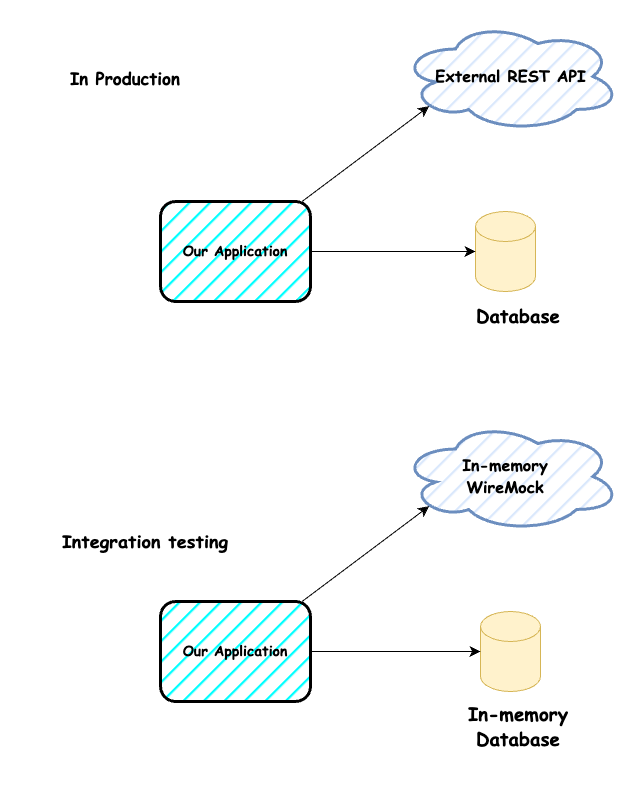
In sample code, I have used both prod and test profiles to use In-memory H2 database. But in real world prod profile can use any database. For unit and integration testing is better to use In-memory databases for speed. Similarly prod profile uses Open Feign to make external calls. In the integration testing, I am using wiremock to simulate the request and response to external API — hence we can write testing use cases for multiple scenarios.
Integration Test setup
- Add necessary dependancies in pom.xml
......
 <parent>
  <groupId>org.springframework.boot</groupId>
  <artifactId>spring-boot-starter-parent</artifactId>
  <version>2.7.16</version>
  <relativePath />
 </parent>
....
 <dependency>
   <groupId>org.springframework.boot</groupId>
   <artifactId>spring-boot-starter-test</artifactId>
   <scope>test</scope>
  </dependency>
..... other necessary spring cores
<dependency>
   <groupId>org.springframework.cloud</groupId>
   <artifactId>spring-cloud-contract-wiremock</artifactId>
   <version>4.0.4</version>
   <scope>test</scope>
  </dependency>
- Application.yaml — test profile
spring:
  profiles: test
  datasource:
    url: jdbc:h2:mem:testDB
    username: sa
    password: password
    driverClassName: org.h2.Driver
  jpa:
    spring.jpa.database-platform: org.hibernate.dialect.H2Dialect
    show-sql: true
    generate-ddl: true

  h2:
    console:
      enabled: true
      path: /h2-console

spring.data.jpa.repositories.bootstrap-mode: default
external-user-url: http://localhost:3434/
When you run the application as integration testing you would see the complete spring context. Data layer is also initialized with testDB (instead of prod DB) as printed in the logs
2023–10–17 17:48:33.707 INFO 13747 — — [ main] o.s.b.a.h2.H2ConsoleAutoConfiguration : H2 console available at ‘/h2-console’. Database available at ‘jdbc:h2:mem:testDB’
[embed]CODE SNIPPET 1 Above configuration enables Wiremock to run in-memory and accessible through **http://localhost:3434/users/1**
[embed]CODE SNIPPET 2 Above WebSecurity configuration executes only when in “test” profile
Let us dive into creating end-end integration testing for the following service layer code.
[embed]CODE SNIPPET 3 — Application Code to call external service and persist the data
[embed]CODE SNIPPET 4 — “Prod” uses Real External call where “Test” uses WireMocked call
[embed]CODE SNIPPET 5 — Positive Testcase
- In line 30, a stub is created with wiremock i.e any calls made to http://localhost:3434/users/1 would give the mocked response.
- Line 31 — test the API endpoint /patient/create with payload.
- Line 35 — call get the /patient/get API to see whether record created previous step is saved
- Line 37, 38 — assert that response is successful and returned payload is the expected result
Now let us consider a negative timeout scenario of the external API call. Since we are using wiremocks, we can configure the wiremock to timeout.
[embed]CODE SNIPPET 6 — Negative (External API Timeout) Scenario
We can simulate that in the createStubforExternal_timeoutResponse() method with 10 seconds delay. Since feign is configured to fail in 5 seconds, this should throw an timeout error which is captured in the controller and response as “User Info Failed”
This is asserted in the line 17.
Incase you wonder that the test cases did not pass security credentials (see Code Snippet 2) , it is configured as a bean in AppTestConfiguration.class as show below.
@TestConfiguration
public class AppTestConfiguration {

 @Bean
 TestRestTemplate configureTestRestRemplate() {
  return new TestRestTemplate("test", "password");
 }
}
We can also use withBasicAuth(String username,String password) method available in TestRestTemplate.
The source code of the entire application is present in **here.**
Conclusion
Through this blog, we’ve explored the concepts of integration testing in Spring Boot , learned how to set up a test environment, and discovered various testing strategies, testing a secured endpoint and using mock external calls and in-memory databases.
Thank you for taking the time to read this far in the blog.
My previous blogs talks about basic unit testing and also how to mock static methods in mockito. Please check them too.
[embed]Basic Unit Testing using Mockito & Junit 5 Overviewmedium.com
메타데이터
- post_id
- 6820aa8dc28e
- slug
- spring-into-integration-testing-building-robust-spring-boot-applications-6820aa8dc28e
- url
- https://medium.com/@priyan.prabhu/spring-into-integration-testing-building-robust-spring-boot-applications-6820aa8dc28e
- canonical_url
- https://medium.com/@priyan.prabhu/spring-into-integration-testing-building-robust-spring-boot-applications-6820aa8dc28e
- author_url
- https://medium.com/@priyan.prabhu
- status
- ok
- fetched_at
- 2026-08-06 10:19:58