I built an alarm app that charges you for snoozing. Apple killed it in one email.
Eight weeks of building. A real device. Real Stripe charges. Then two paragraphs from Cupertino.
I built an alarm app that charges you for snoozing. Apple killed it in one email.
Eight weeks of building. A real device. Real Stripe charges. Then two paragraphs from Cupertino.
My phone was in my hand. The alarm was firing—on my actual iPhone, not the simulator—and behind the Snooze button was a real Stripe charge. I watched it happen, eight weeks of building collapsed into a single moment, and it worked.
An hour later, I got an email from Apple that ended the project in three sentences.

SnoozePay: the alarm clock that charges you for hitting snooze.
The idea was simple enough that I assumed someone had already done it: an alarm clock that charges your credit card every time you hit snooze. Not a points system, not a stern notification — actual money, gone, because you couldn’t get out of bed. I called it SnoozePay.
I’m a chronic snoozer. The science on this isn’t flattering — snoozing is basically just repeatedly traumatizing your sleep cycle for no real benefit. But knowing that has never once helped me get out of bed. What I needed was a consequence that had actual teeth.
The core mechanic was straightforward: set your alarm, attach a snooze cost (minimum $1.99), and when it fires you get two choices — Dismiss for free, or Snooze and pay. Hit snooze enough times and you hit a daily cap you set yourself. Simple, a little mean, hopefully effective.
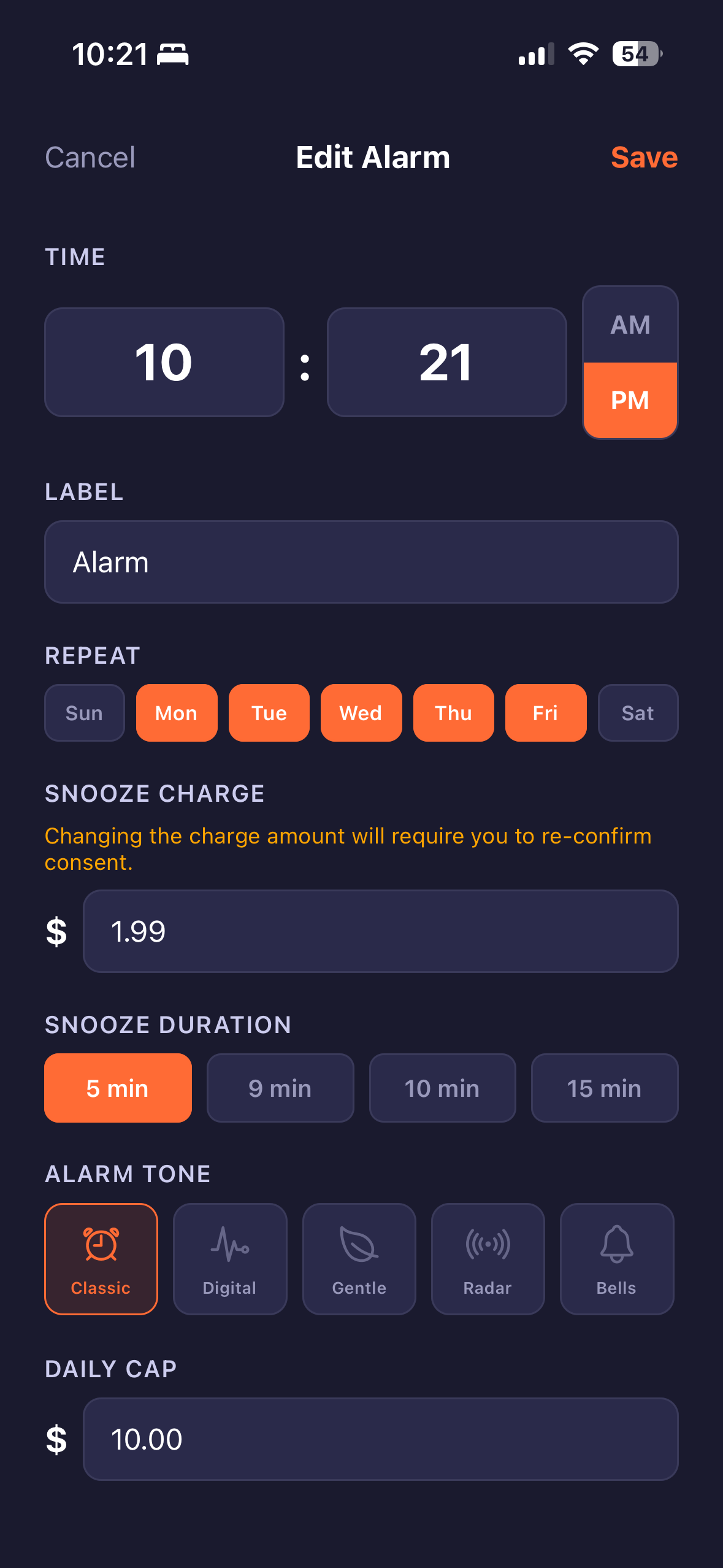
Snooze charge, duration, tone, daily cap — all set before the alarm ever fires.
The stack
- React Native + Expo (TypeScript)
- Firebase — Firestore, Cloud Functions, Auth
- Stripe — Payment Intents, SetupIntent, Webhooks
- SendGrid for transactional email
- EAS for builds
I chose Expo because I wanted cross-platform coverage without the bare React Native build nightmare. Firebase because I already knew it. Stripe because it’s the only payment processor I’d trust not to quietly eat my users’ money.
The $1.99 minimum wasn’t arbitrary. After Stripe’s 2.9% + $0.30 fee, anything lower nets you less than a dollar— which felt embarrassing for an app whose entire premise is consequences.
I used Claude as a coding partner throughout—less as a crutch, more like a fast senior engineer who never gets annoyed at dumb questions. Scaffold, review, adjust, move on. We went fast.
Eight weeks
Weeks 1–2 came together cleaner than I expected. Firestore schema, Firebase Auth, Cloud Functions for the payment flow. The alarm creation screen — time picker, repeat days, snooze cost, daily cap, tone selection, and label. The full-screen takeover when an alarm fires, with the Dismiss vs. Snooze ($) choice front and center. A consent screen so users legally acknowledge what they’re signing up for. A payment setup screen using Stripe’s SetupIntent flow—save the card first, charge it later.
I deployed seven Cloud Functions in those two weeks: payment setup, charge on snooze, Stripe webhook handler, consent logging, failed charge retry, account deletion, and a scheduled daily cap reset.
Week 3 was polish, which is where solo projects usually go to die. Fixed 24h → 12h AM/PM display. Added swipe-left to delete alarms with confirmation. Alarm sound previews. Five custom tones: classic, digital, gentle, radar, bells. A new icon — dark navy, orange alarm clock. It started feeling like a real product.
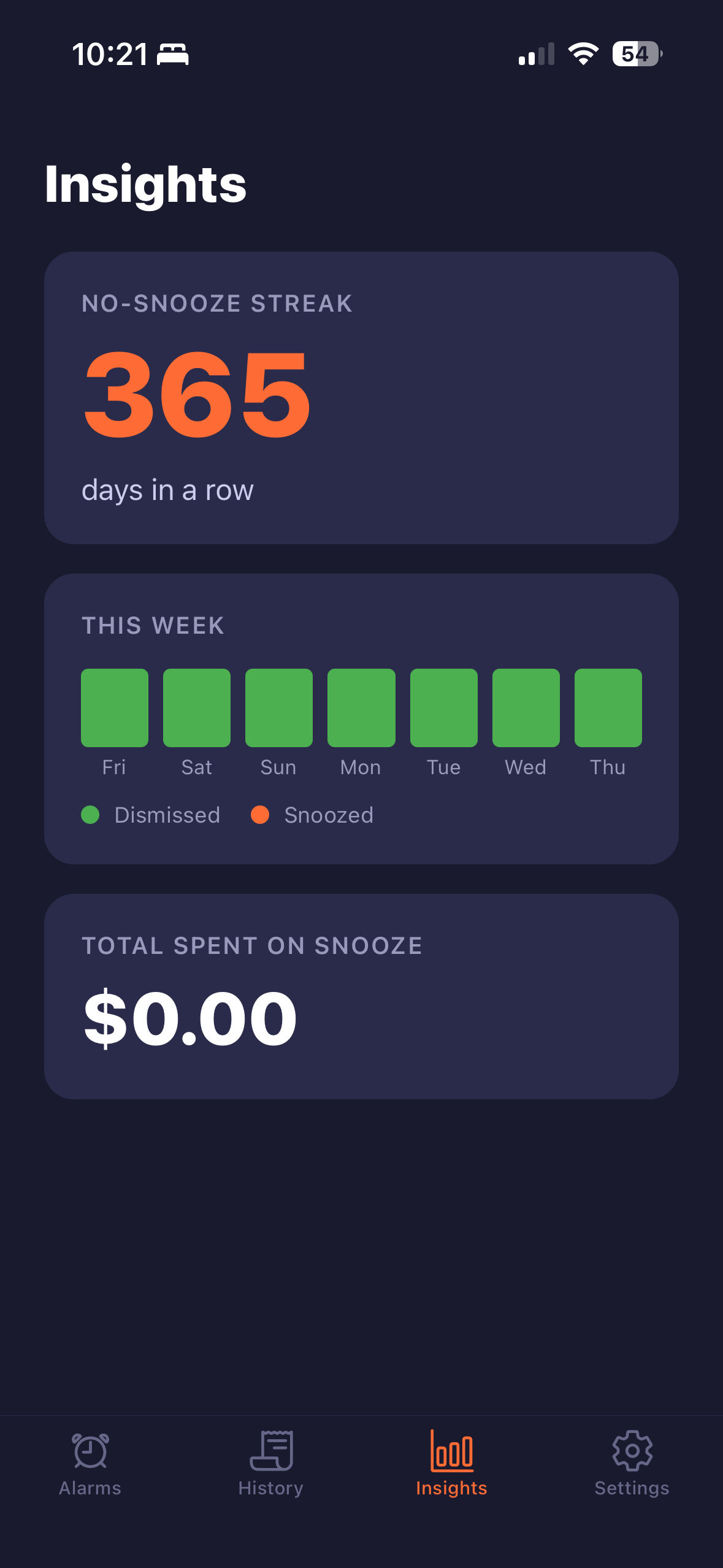
365-day no-snooze streak. $0.00 spent. The app working exactly as intended.
One thing worth noting if you’re building with Expo: custom alarm tones are completely silent in Expo Go during development. That’s expected behavior — they only work in an actual build, which isn’t obvious until you’re already there.
Week 4 was the going-live gauntlet. Switched Stripe from test to live keys. Moved all secrets to Firebase Secret Manager — the right way, not .env files in production. Registered the live webhook pointing to the deployed Cloud Function URL. Enrolled in the Apple Developer Program, created the EAS project, linked it to my Apple account, registered my iPhone as a test device, and kicked off the first real build.
When the preview IPA installed on my actual device and the alarm fired with a real Stripe charge behind the Snooze button, that was the moment I’d been building toward. Eight weeks of work, working.
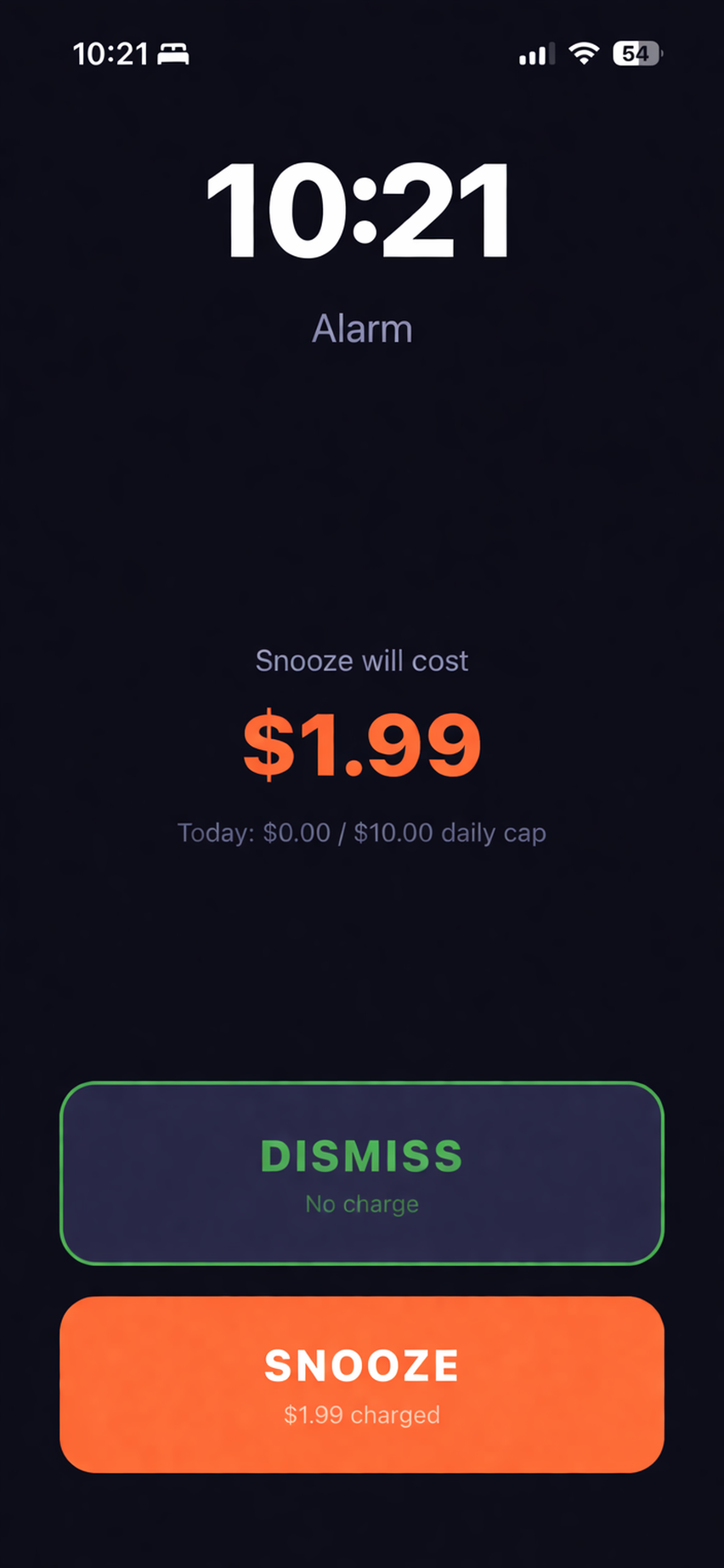
The moment of truth — Dismiss for free, or Snooze and pay.
The wall nobody tells you about
iOS alarms are not like Android alarms.
On Android, you can build a reasonably reliable alarm with background tasks. On iOS, Apple’s App Store guidelines and power management systems make alarm reliability genuinely hard unless your app is in the foreground. For SnoozePay, the existential question was, "What happens when the phone is on Do Not Disturb or in Focus mode?" An alarm that can be silenced by DND isn’t really an alarm — it’s a suggestion.
I applied the Time Sensitive interruption level first. It gets partial relief, breaking through Focus modes if the user has allowed it, but “if the user allows it” is a soft guarantee at best. The real solution is Critical Alerts: a special entitlement that lets notifications play sound even when the phone is fully silenced.
I applied for it. Request ID: 89H3X7THGB. Then I waited.
The email
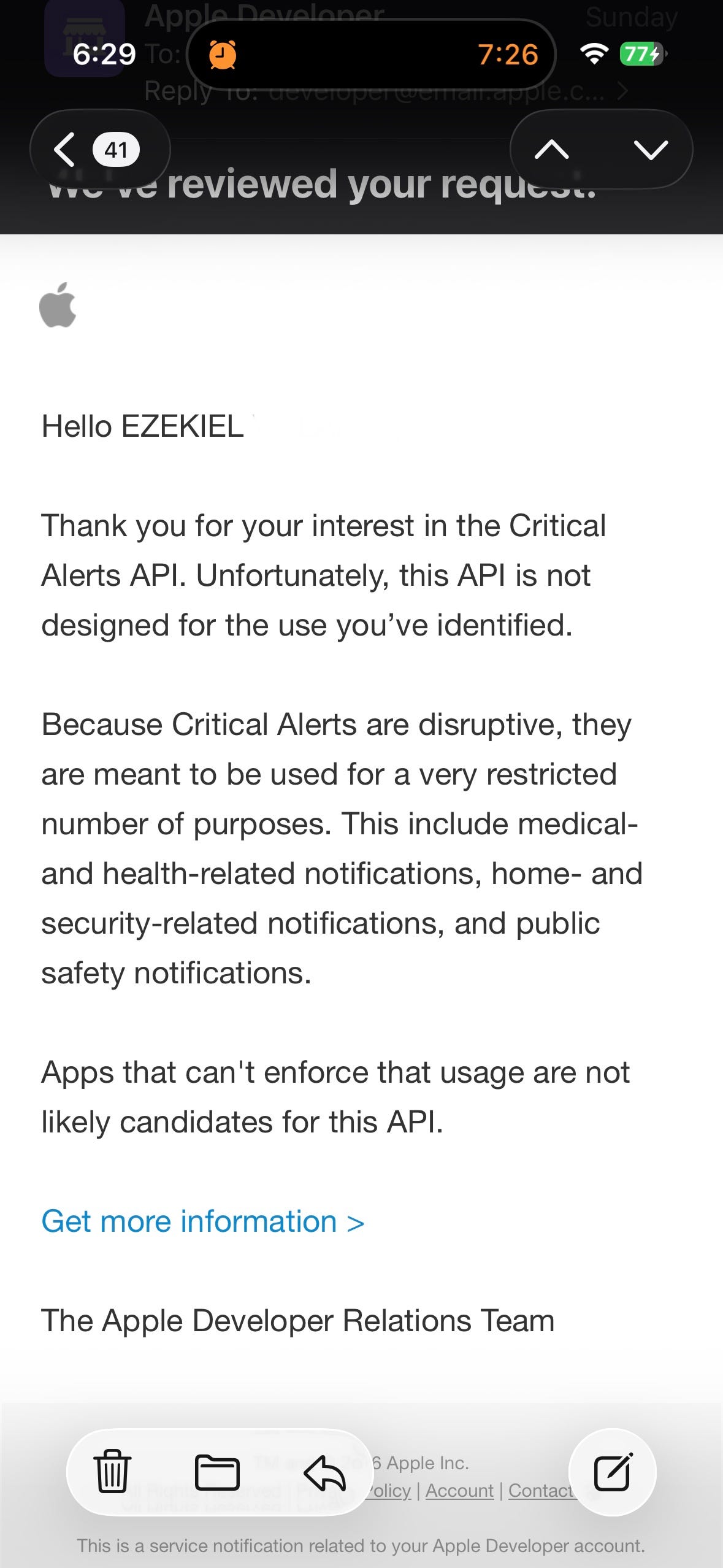
Three paragraphs. Project over.
They’re not wrong, and I knew it reading it. Critical Alerts exist for your blood sugar monitor, your home security system, and your cardiac pacemaker companion app—not for “please wake up, also you owe us money.” I’d flagged iOS background alarm reliability as my highest technical risk in week one. I’d hoped the use case was compelling enough to argue through. It wasn’t.
There are workarounds. VoIP push notifications have fewer restrictions. You could build a companion app that technically qualifies for a medical or safety use case. People have found creative paths through this. But every one of them is a hack with real maintenance burden and platform risk, and I’m a solo builder with other things to build.
What I’m keeping
SnoozePay is going into the archive. The Firebase project is getting torn down, and the code is staying on my machine in case I ever revisit it with a different platform strategy or a co-founder who wants to fight the Apple battle.
But the build taught me things worth writing down.
Stripe’s SetupIntent flow for saving cards before charging is genuinely good UX — worth knowing regardless of what you’re building. Firebase Secret Manager is the correct way to handle production secrets; .env files in production are not. EAS handles iOS signing and provisioning in a way that would have taken me a week to sort out manually. And Claude as a coding partner is legitimately fast — not magic, but it compresses the gap between “I want this to work” and “this works” in a way that changes how solo projects feel.
The bigger takeaway: if your app depends on sound playing through Do Not Disturb or silent mode, you need Critical Alerts. Apple grants them to medical, security, and public safety apps only. That constraint is worth validating before you write a line of payment integration—not after eight weeks of building. I put it on the list as my highest risk and still waited too long to hit it head-on.
The thing that ended SnoozePay wasn’t the code or the idea — it was a platform policy, which is a genuinely different kind of failure. You can debug your way out of a technical problem. You can’t PR your way past the Apple Developer Relations Team.
On to the next one.
Built with Expo, Firebase, Stripe, and Claude. Killed by Apple. 2026.
메타데이터
- post_id
- 682a6516becb
- slug
- i-built-an-alarm-app-that-charges-you-for-snoozing-apple-killed-it-in-one-email-682a6516becb
- url
- https://medium.com/design-bootcamp/i-built-an-alarm-app-that-charges-you-for-snoozing-apple-killed-it-in-one-email-682a6516becb
- canonical_url
- https://medium.com/design-bootcamp/i-built-an-alarm-app-that-charges-you-for-snoozing-apple-killed-it-in-one-email-682a6516becb
- author_url
- https://medium.com/@ezg3
- status
- ok
- fetched_at
- 2026-06-09 15:37:30