Artist Color Mixer for Art Teachers: A Practical Color Theory Teaching Tool
Color theory is easier to understand when students can see cause and effect. A teacher can explain hue, value, saturation, complements, and…
Artist Color Mixer for Art Teachers: A Practical Color Theory Teaching Tool
Color theory is easier to understand when students can see cause and effect. A teacher can explain hue, value, saturation, complements, and neutralization on a board, but the ideas become much more memorable when students watch a target color turn into a real paint recipe.
Artist Color Mixer can be used as a classroom demonstration tool and as a hands-on studio companion. It helps art teachers connect traditional color theory with the practical decisions students make when they mix oil, acrylic, gouache, or watercolor.
Why Use Color Mixing Software in an Art Class?
Students often understand color vocabulary before they can apply it. They may know that complements neutralize each other, but still make muddy mixtures when they add too much paint. They may know that value is important, but continue correcting hue when the real problem is lightness or darkness.
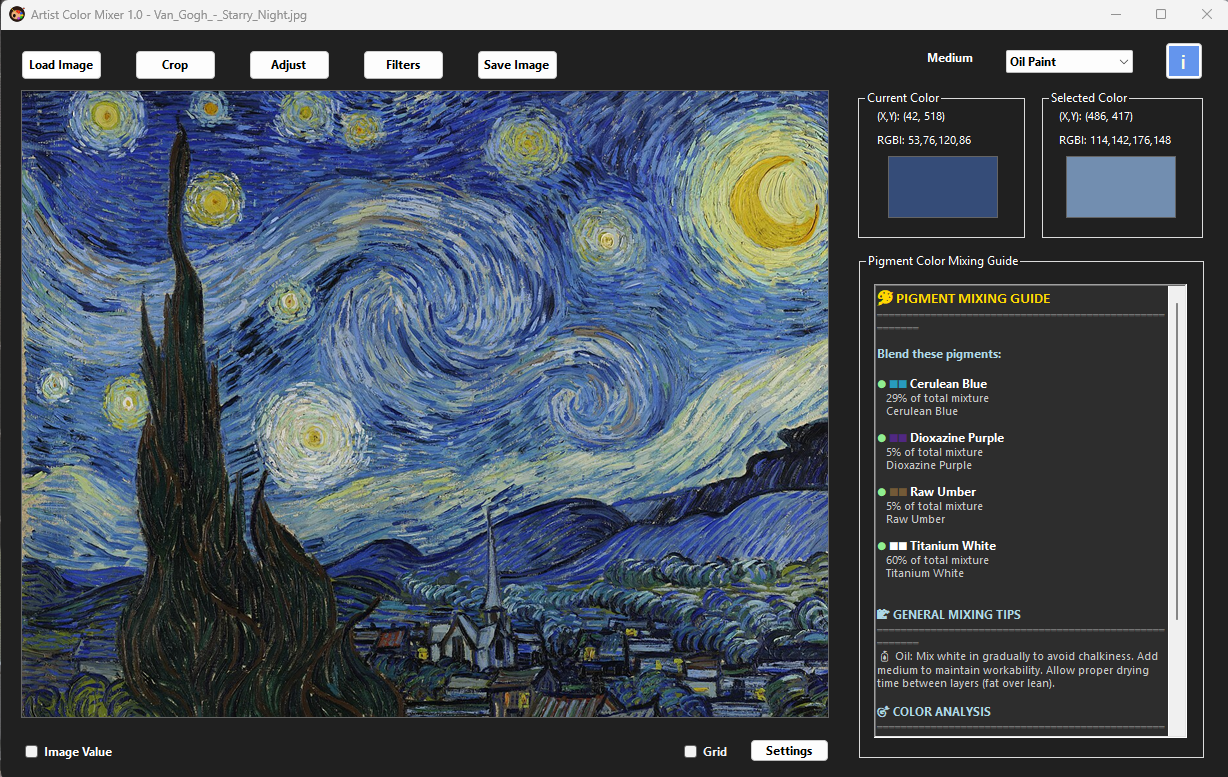
Artist Color Mixer gives teachers a visual way to separate those ideas. A teacher can sample a color, show its value and saturation, generate a recipe, and then demonstrate how small changes affect the final mixture.
- Show hue, value, and saturation as separate properties students can observe and discuss.
- Demonstrate complementary mixing without wasting large amounts of classroom paint.
- Compare limited palettes before students begin a project.
- Connect photos to paint by sampling reference images and creating realistic mixing targets.
Classroom Lesson Ideas
For a color wheel lesson, use Artist Color Mixer to show how primary, secondary, and tertiary colors shift when different pigments are selected. Students can compare a bright modern primary palette with an earth-color palette and see why pigment choice matters.
For a neutral-color lesson, sample a saturated color and gradually add its complement. Ask students to predict when the color will become useful, dull, or muddy. Then mix small physical swatches so they can compare the software preview with real paint.
For a reference-photo lesson, open a photo and sample several color notes: light, shadow, halftone, reflected light, and accent. Students can learn that a painting is not made from every pixel in a photo, but from a simplified set of color relationships.
Student Exercises With Artist Color Mixer
- Ask each student to sample three colors from a reference photo and label the hue, value, and saturation of each.
- Have students generate paint recipes from a limited classroom palette.
- Let them mix small swatches and compare the result to the target color.
- Ask students to adjust only one property at a time: warmer, cooler, lighter, darker, cleaner, or more neutral.
- Save successful recipes as a class mixing library for future projects.
Teaching tip
Use the app as a discussion tool, not a replacement for observation. Ask students why a recipe works, what changed, and how they would adjust it on a real palette.
Free License to Teachers and Artists in Need
Able Software wants Artist Color Mixer to be useful in classrooms and accessible to artists who need support. We offer a free license to teachers and artists in need so cost does not prevent them from using the tool for learning, teaching, and creative work.
Art teachers and artists in need can contact Able Software to request a free Artist Color Mixer license. Include a short note about your teaching role, classroom use, or artistic need, and we will be happy to help when possible.
Why This Helps Students Learn Faster
When students can compare a target, a recipe, a swatch, and a final painting, they begin to see color mixing as a set of understandable choices. That confidence matters. It turns color theory from a memorized chart into a practical studio skill.
Artist Color Mixer gives teachers a way to slow down the invisible thinking behind color decisions. Students can see why a mixture failed, how to correct it, and how to repeat a successful result later.
메타데이터
- post_id
- 684f08d0b91b
- slug
- artist-color-mixer-for-art-teachers-a-practical-color-theory-teaching-tool-684f08d0b91b
- url
- https://medium.com/@ytedwu/artist-color-mixer-for-art-teachers-a-practical-color-theory-teaching-tool-684f08d0b91b
- canonical_url
- https://medium.com/@ytedwu/artist-color-mixer-for-art-teachers-a-practical-color-theory-teaching-tool-684f08d0b91b
- author_url
- https://medium.com/@ytedwu
- status
- ok
- fetched_at
- 2026-06-29 22:44:20





