From Any Source to One Agentic Web App: A Practical WebMCP Integration Pattern
Most teams have the same problem when adding AI to workflows:
From Any Source to One Agentic Web App: A Practical WebMCP Integration Pattern
Most teams have the same problem when adding AI to workflows:
Users ask from many places, but execution logic lives in one place.
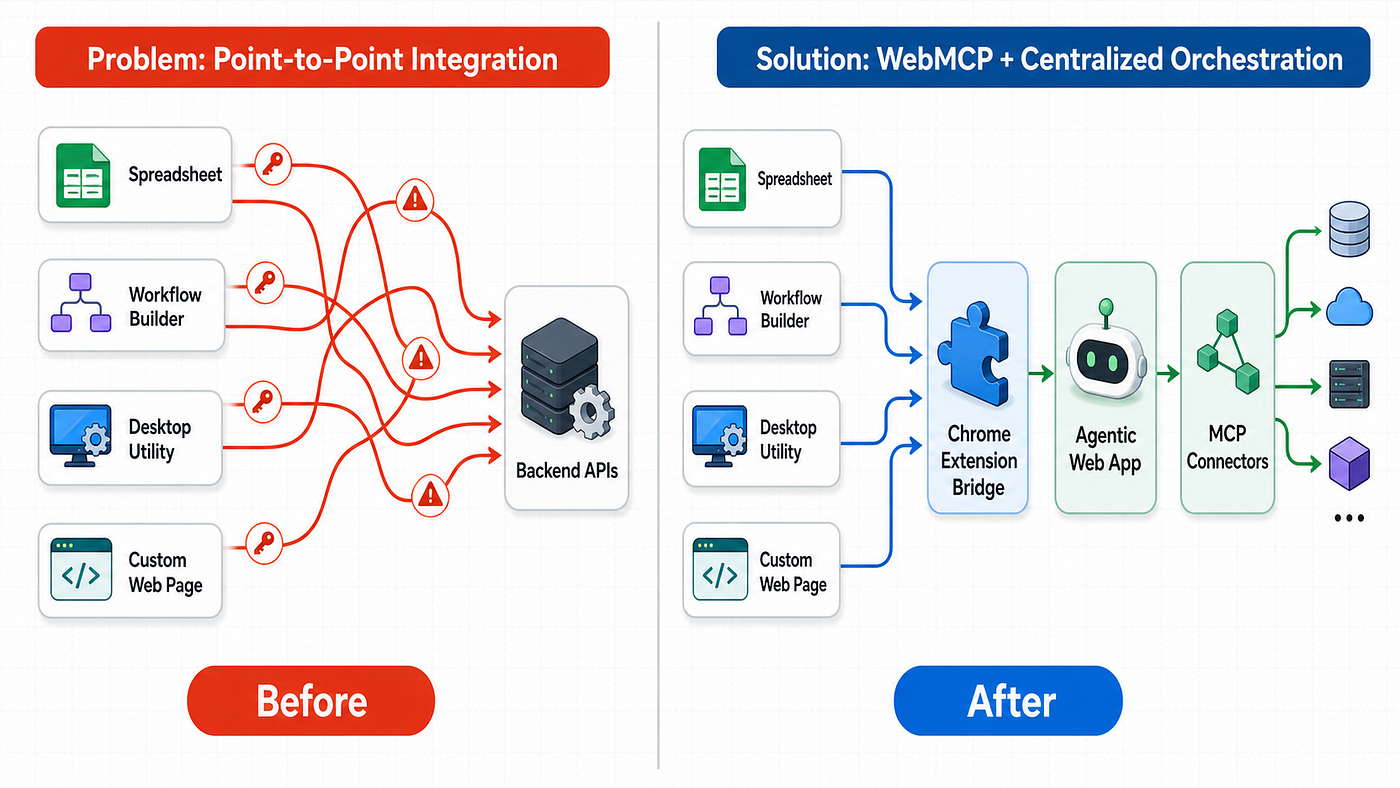
Requests may start from a spreadsheet, a workflow builder, a desktop utility, or a custom web page. If each source integrates directly with backend APIs, teams quickly create a fragile mesh of credentials, protocol adapters, and duplicated business logic.
This article describes a cleaner pattern using Google WebMCP and a browser extension bridge:
- Sources stay lightweight.
- One web app remains the control plane.
- MCP connectors stay centralized.
- No direct HTTP or WebSocket coupling from every source to every backend service.
The problem statement
In real operations, users do not work in one UI. They move across:
- Google Workspace extensions and side panels
- Desktop or CLI companions
- Custom web pages (for example, workflow editors or internal portals)
Yet teams often want a single agentic experience: shared memory, shared governance, and shared tool access.
The naive approach is point-to-point integration. Each source calls the app backend directly, manages auth separately, and retries on its own. This creates avoidable failure modes:
- API keys scattered across clients
- Inconsistent session and permission behavior
- Prompt/response formats drifting between integrations
- Harder auditing and security review
- Slower product iteration because every source must be updated
The architecture pattern
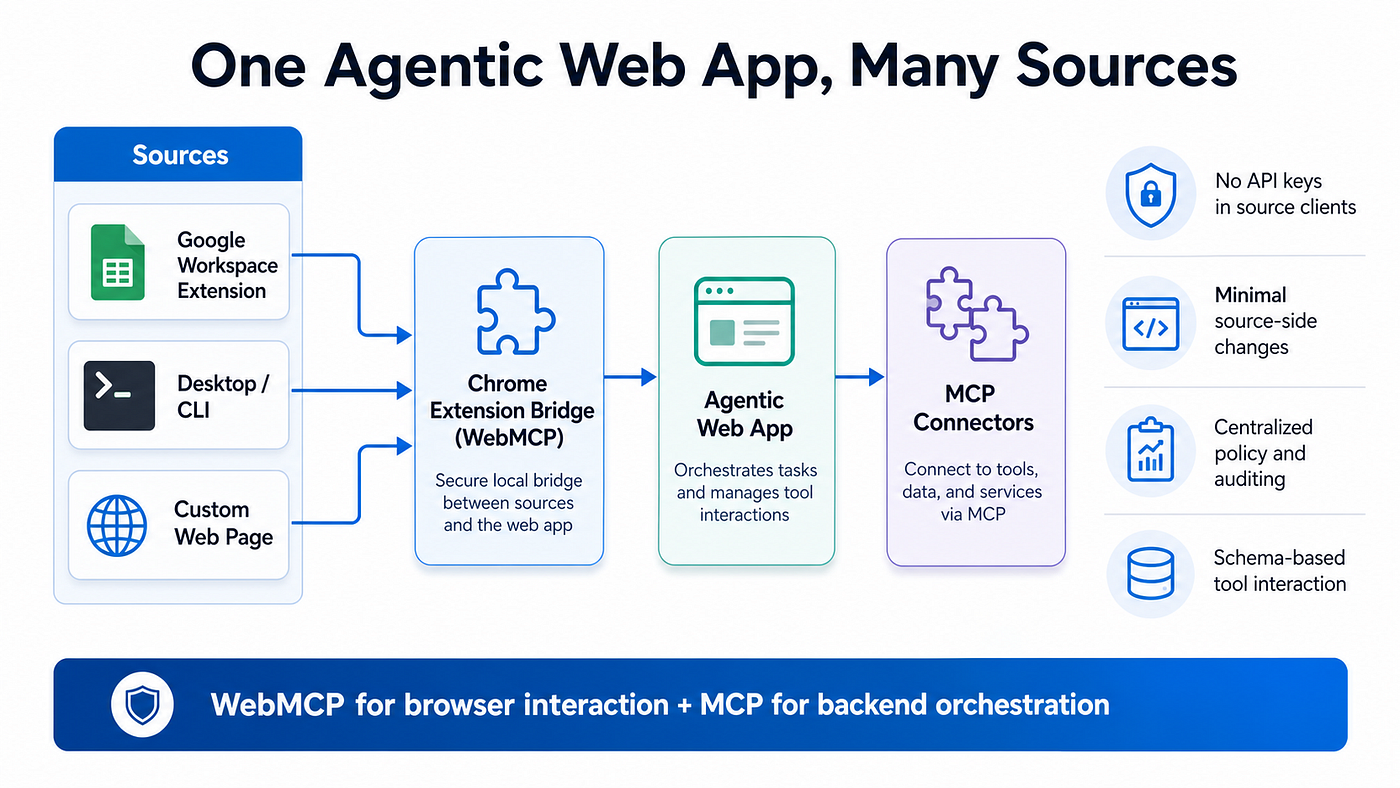
Use WebMCP in the browser as the interaction layer, then route intent through one web app that owns orchestration.
[Google Workspace Extension] \
[Desktop / CLI Companion] ----> [Chrome Extension Bridge] <--> [Agentic Web App] <--> [MCP Connectors]
[Any Custom Web Page]      /
Why this pattern works
- Browser-native bridge: source surfaces only pass user intent and context.
- Centralized orchestration: one app handles policy, routing, memory, and tool execution.
- Structured interaction: WebMCP tools expose clear schemas for reliable agent actions.
- Minimal source complexity: sources do not need full backend protocol awareness.
Why WebMCP is the right frontend layer
According to Chrome’s WebMCP documentation, WebMCP is a proposed web standard for exposing structured tools from pages so agents can interact more reliably with UI features. It supports:
- Tool discovery
- JSON-schema-based input/output contracts
- Page-aware context in a live browser tab
This is exactly what multi-source architectures need at the frontend edge: predictable, schema-driven interaction instead of brittle UI guessing.
It is also important to frame this correctly:
- WebMCP is not a replacement for MCP.
- WebMCP complements MCP.
MCP remains the cross-platform backend protocol layer, while WebMCP gives browser agents reliable access to live website capabilities.
End-to-end request lifecycle
- A user submits a request from any source surface.
- The source sends normalized intent (and optional context like page URL or selected text) to the browser bridge.
- The bridge relays into the web app running in the user’s authenticated browser session.
- The web app applies policy, selects tools, and executes through MCP connectors.
- The web app returns a structured answer to the source.
- The source renders only the final user-facing output.
Design this as an intent contract, not a transport contract. That means sources send clean intent payloads, and only the web app owns orchestration logic.
Security and compliance by design
A strong implementation should include:
- No persistent API secrets in source clients.
- Session-bound execution in browser context.
- Explicit allowlists for trusted origins where tools are exposed.
- Read-only hints for non-mutating tools.
- Untrusted-content hints for externally sourced payloads.
- User confirmation for sensitive or write operations.
- Full audit logging at the web app orchestration layer.
From Chrome’s current guidance, WebMCP security needs explicit handling of prompt-injection risk. Treat every external string as potentially hostile and keep schemas strict and concise.
Reliability and product velocity
This pattern improves both operations and iteration speed:
- New source integrations become thin adapters, not full clients.
- Tool behavior changes in one place (the web app), not in every source.
- Shared conversation identity and request correlation prevent mixed responses under concurrency.
- Progressive rollout is easier: canary one source, then expand.
If your team has struggled with jumbled async responses across spreadsheet formulas, workflow automations, and custom pages, centralized orchestration plus correlation IDs is the fix.
Implementation checklist
- Define a normalized request envelope used by all sources.
- Build a browser bridge extension that forwards intent and receives structured results.
- Keep source UIs “dumb”: input capture + result render only.
- Implement WebMCP tools in the web app with strict JSON schemas.
- Route tool execution through MCP connectors behind policy gates.
- Add request IDs, thread IDs, and idempotency keys for concurrency safety.
- Add explicit consent points for state-changing actions.
- Log every invocation with source, tool, actor, and outcome metadata.
What to avoid
- Duplicating tool-routing logic in each source client
- Sending internal system prompts from source surfaces
- Returning raw orchestration JSON to end users
- Allowing unrestricted cross-origin tool exposure
- Treating WebMCP as a backend replacement
A practical rollout sequence
- Start with one read-heavy use case from a single source.
- Add one write-capable workflow with explicit user confirmation.
- Extend to additional sources using the same request envelope.
- Enforce common observability and policy gates before scaling.
With this order, teams gain confidence without overcommitting architecture early.
Final takeaway
If users work across many interfaces but your agentic intelligence should stay consistent, use a browser bridge + WebMCP + centralized web-app orchestration.
You get:
- One control plane
- Many source surfaces
- Cleaner security boundaries
- Lower integration maintenance
- Better long-term reliability
That is the difference between “AI added everywhere” and “one agentic system that works everywhere.”
References
메타데이터
- post_id
- 685ea77e855c
- slug
- from-any-source-to-one-agentic-web-app-a-practical-webmcp-integration-pattern-685ea77e855c
- url
- https://medium.com/@djajafer/from-any-source-to-one-agentic-web-app-a-practical-webmcp-integration-pattern-685ea77e855c
- canonical_url
- https://medium.com/@djajafer/from-any-source-to-one-agentic-web-app-a-practical-webmcp-integration-pattern-685ea77e855c
- author_url
- https://medium.com/@djajafer
- status
- ok
- fetched_at
- 2026-06-20 20:29:01