AI Agents Explained Like You’re an Engineer: A Beginner’s Guide to How Modern AI Actually Works
From Chunking and Embeddings to Reasoning, Planning, and Autonomous AI
AI Agents Explained Like You’re an Engineer: A Beginner’s Guide to How Modern AI Actually Works
From Chunking and Embeddings to Reasoning, Planning, and Autonomous AI

If you’ve spent even a few days exploring AI, you’ve probably encountered terms like:
- AI Agents
- Agentic AI
- Autonomous Systems
- Reasoning
- Planning
- Memory
- Embeddings
- Vector Databases
- RAG
- Multi-Agent Systems
For many engineers, these terms feel overwhelming.
The problem is that most AI articles assume you already understand the basics.
They jump directly into frameworks, models, vector databases, and agent architectures without explaining how everything fits together.
When I first started exploring AI systems, I found that the easiest way to understand them was to stop thinking about AI as magic and start thinking about AI as another software system.
Just like a Kubernetes cluster has multiple components working together, modern AI systems are also composed of multiple building blocks.
This article explains those building blocks in simple engineering terms.
By the end, you’ll understand the complete flow that powers modern AI Agents.

The Biggest Misconception About AI
Most people imagine AI works like this:
Question
   ↓
AI
   ↓
Answer
That’s how ChatGPT appears from the outside.
But modern AI systems often work more like this:
Goal
 ↓
Gather Information
 ↓
Find Relevant Knowledge
 ↓
Think About Problem
 ↓
Create Plan
 ↓
Use Tools
 ↓
Take Actions
 ↓
Evaluate Results
 ↓
Adjust Strategy
 ↓
Return Answer
The answer is actually the final step.
Most of the work happens before that.
Let’s walk through the complete journey.
Step 1: Understanding the Goal
Everything starts with a goal.
Example:
Why is my application failing?Humans naturally understand the intent.
The AI must do the same.
The system first translates the request into an objective.
Instead of seeing:
A questionIt sees:
Diagnose application failureUnderstanding the goal is important because every future decision depends on it.
Think of it like opening a Jira ticket.
Before solving the issue, you need to understand what problem you’re trying to solve.
Step 2: Observation
Imagine a production incident.
What is the first thing an SRE does?
Usually:
- Check logs
- Check dashboards
- Check alerts
- Check metrics
Nobody starts fixing things blindly.
They gather information first.
AI systems behave similarly.
They observe their environment.
For example:
Check Kubernetes Pods
Check Prometheus Metrics
Check Application Logs
Observation answers a simple question:
What is happening right now?
Without observation, decisions become guesses.
Step 3: Memory
Humans rarely solve problems from scratch.
When a database outage occurs, experienced engineers often say:
This looks similar to what happened last month.That is memory.
AI systems also need memory.
Memory can store:
Preferred Cloud Provider: AWSUses TerraformUses KubernetesPrevious Incident:
Database connectivity issueMemory provides context and history.
Without memory, every interaction feels like the first day on the job.
Step 4: Chunking
Now we enter one of the most important concepts in AI.
Suppose your company has:
- Runbooks
- Wiki pages
- Incident reports
- Architecture documents
Thousands of pages of information.
Can an AI read all of that every time someone asks a question?
Not realistically.
Instead, documents are broken into smaller pieces.
This process is called Chunking.
Example:
Kubernetes Guidebecomes:
Chunk 1:
Architecture
Chunk 2:
NetworkingChunk 3:
StorageChunk 4:
SecurityThink of chunking like splitting a large book into individual chapters.
It becomes much easier to find information later.
Step 5: Embeddings
This is the concept that confuses most newcomers.
Let’s simplify it.
Computers don’t understand language.
Computers understand numbers.
An embedding converts text into numbers.
Example:
Kubernetes manages containersbecomes:
[0.24, -0.91, 0.72, ...]You don’t need to understand the mathematics.
The important idea is:
Embeddings convert meaning into a format computers can compare.
Imagine Google Maps.
Every location has coordinates.
Embeddings are similar.
Except instead of mapping physical locations, they map meaning.
Similar ideas end up close together.
Different ideas end up far apart.
Step 6: Retrieval
Once embeddings exist, AI can find relevant information.
Suppose someone asks:
Why can't my application connect to PostgreSQL?The system searches through stored knowledge.
Instead of looking for exact words, it looks for similar meaning.
It may retrieve:
Database Connectivity Runbookeven if the user’s words don’t exactly match.
This process is called Retrieval.
This is the foundation of RAG (Retrieval-Augmented Generation).
Step 7: Reasoning
Reasoning is another term that sounds more complicated than it is.
Reasoning simply means:
Breaking a problem into smaller decisions.
Consider an experienced engineer diagnosing an outage.
They might think:
Could it be DNS?

Could it be networking?

Could it be database connectivity?

Could it be application configuration?
AI systems perform a similar process.
They generate possibilities and evaluate them.
Reasoning is structured problem-solving.
Step 8: Planning
After identifying possibilities, the system creates a plan.
Example:
1. Check logs

2. Check database

3. Verify credentials

4. Validate network access
Think of planning like creating an implementation plan before starting a project.
The larger the goal, the more important planning becomes.
Without planning, systems often take random actions.
With planning, actions become organized and purposeful.
Step 9: Tool Usage
This is where AI becomes useful.
A Large Language Model by itself cannot:
- Access AWS
- Query Kubernetes
- Read GitHub
- Check Slack
It only generates text.
Tools provide access to external systems.
Examples:
kubectlAWS SDKGitHub APIJira APISlack APITools are the hands of the AI system.
Without tools, AI can talk.
With tools, AI can work.
Step 10: Action
After selecting a tool, the AI performs an action.
Examples:
Check Pod StatusRetrieve LogsCreate TicketDeploy ApplicationThis is where theory becomes reality.
Actions generate real-world results.
Without actions:
Knowledge OnlyWith actions:
Knowledge + ExecutionStep 11: Reflection
Humans review their work.
Good engineers don’t deploy code and immediately leave.
They verify results.
AI systems can do the same.
Example:
Did the deployment succeed?Did the fix resolve the issue?Does the output meet requirements?Reflection acts like an internal quality review process.
It helps reduce mistakes and improve reliability.
Step 12: Adaptation
Not every plan works.
Imagine:
Check Databasereturns:
Access DeniedThe original plan no longer works.
The AI must adapt.
New plan:
Check Application LogsReview MetricsAnalyze Network PoliciesAdaptation allows the system to change direction based on new information.
This is one of the characteristics that makes modern AI systems powerful.
Step 13: Autonomous Decision Making
Now we reach the concept everyone talks about.
Autonomy.
Autonomy does not mean self-awareness.
Autonomy simply means:
The system chooses the next step without waiting for human instructions.
Instead of:
Human:
Check Logs
Human:
Check MetricsHuman:
Check DatabaseThe AI decides:
Check LogsThen MetricsThen Databasebased on what it learns.
This is autonomous behavior.
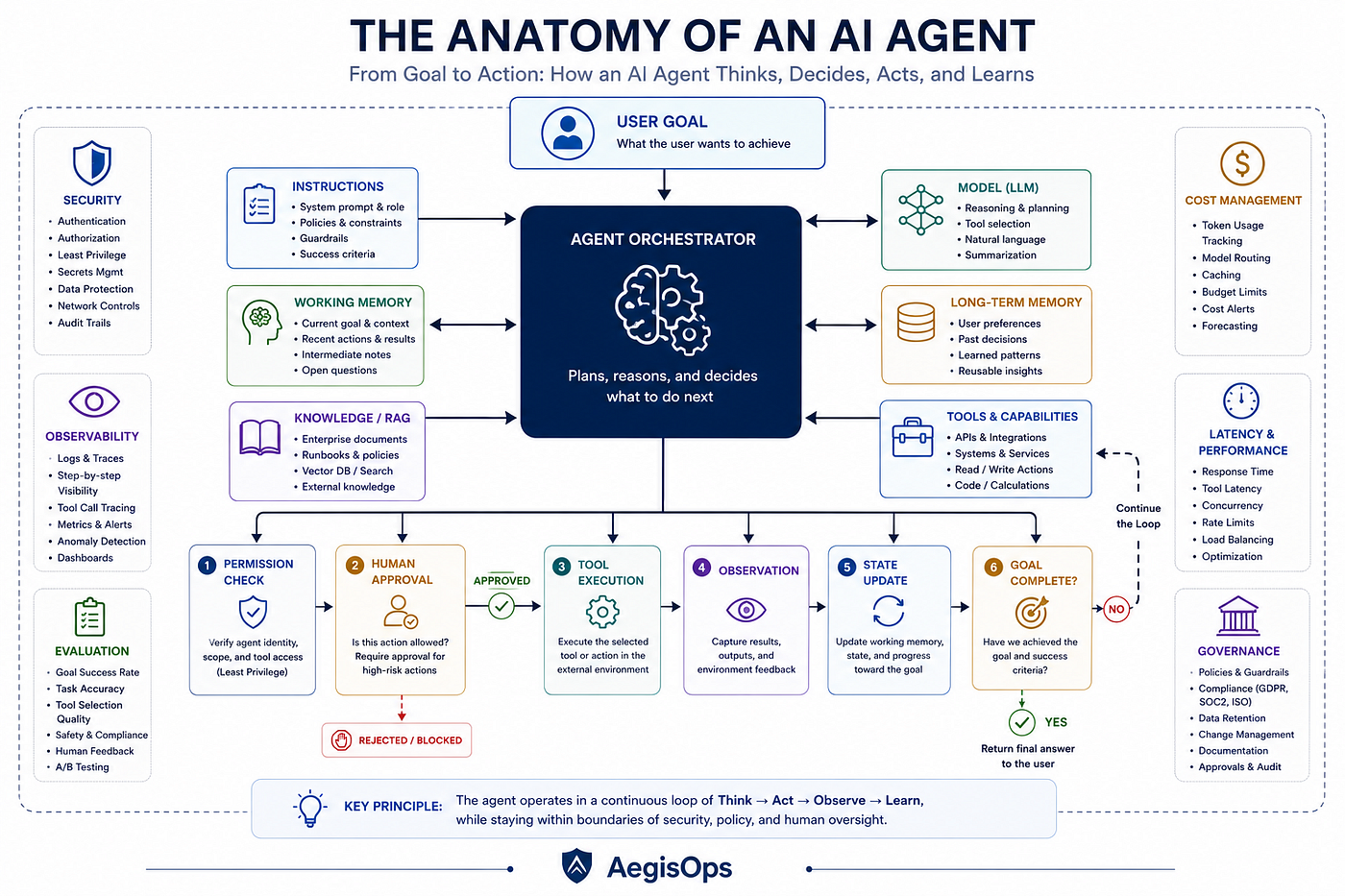
Step 14: The Agentic Loop
All previous steps form a continuous cycle.
Observe
 ↓
Reason
 ↓
Plan
 ↓
Act
 ↓
Reflect
 ↓
Adapt
 ↓
Observe Again
This cycle continues until:
Problem Solvedor
Human Assistance NeededThis repeated loop is called Agentic Execution.
This is what separates AI Agents from traditional chatbots.
Step 15: Response Generation
Finally, after gathering information, reasoning through possibilities, executing actions, and evaluating results, the system generates a response.
Example:
Root Cause:
Database Connectivity Failure
Evidence:
- Application logs show connection timeout
- Database endpoint unreachable
- Pod restart failures observedRecommended Fix:
Restore network connectivity between application and database.The response is simply the summary of everything that happened before it.
So What Is an AI Agent?
Now that we’ve covered all fifteen steps, defining an AI Agent becomes much easier.
An AI Agent is not just an LLM.
An AI Agent combines:
- Goal Understanding
- Observation
- Memory
- Chunking
- Embeddings
- Retrieval
- Reasoning
- Planning
- Tools
- Actions
- Reflection
- Adaptation
- Autonomous Decision Making
into a continuous execution loop.
Think of it this way:
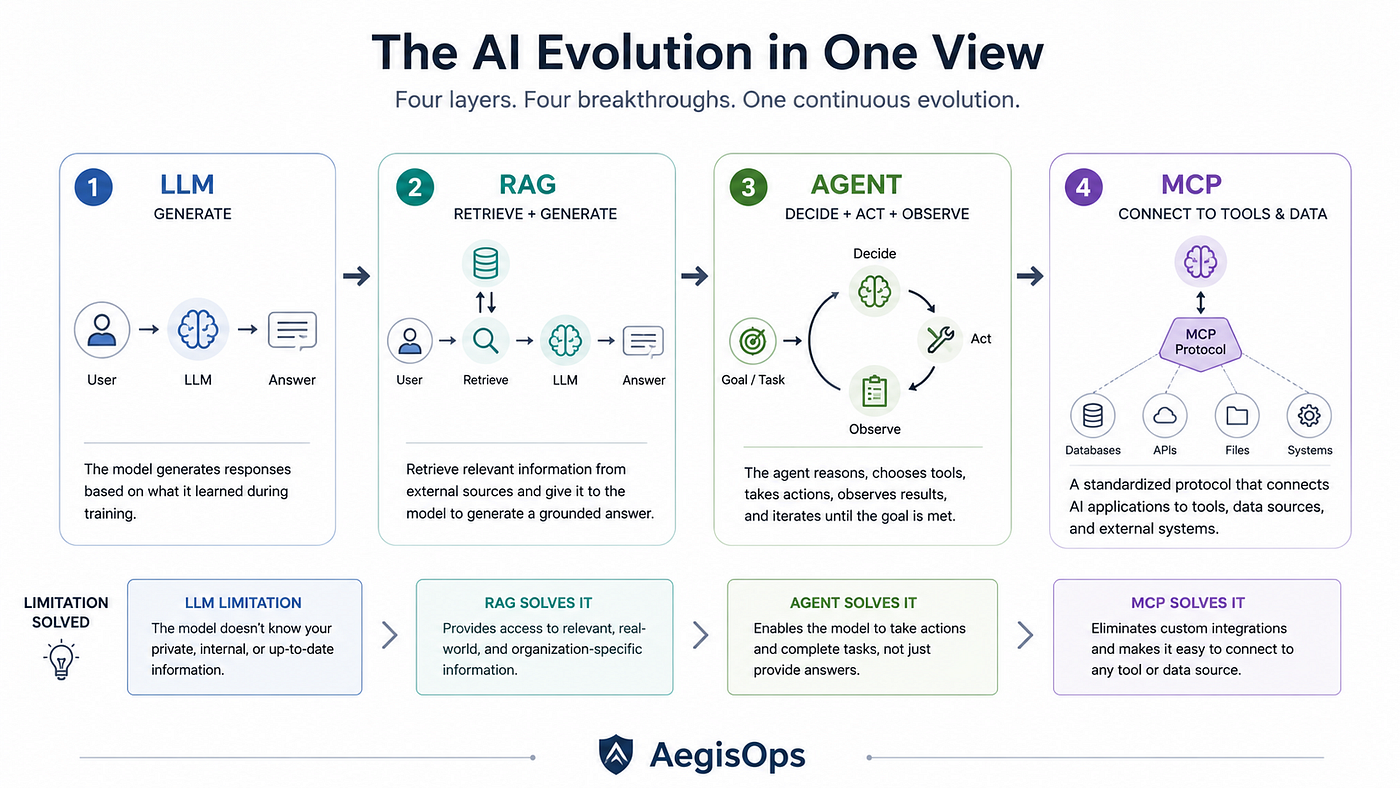
LLM = KnowledgeRAG = Knowledge + ContextAgent = Knowledge + Context + ActionsThat progression explains much of the current evolution of AI systems.
Final Thoughts
The AI industry often introduces complicated terminology before explaining the fundamentals.
As engineers, we don’t need mystery.
We need systems thinking.
Once you understand the flow:
Goal
 ↓
Observe
 ↓
Retrieve Knowledge
 ↓
Reason
 ↓
Plan
 ↓
Act
 ↓
Reflect
 ↓
Adapt
 ↓
Repeat
modern AI systems become much easier to understand.
Every advanced concept you’ll encounter next, whether it’s RAG, AI Agents, MCP, Agentic Workflows, or Multi-Agent Systems, is ultimately built on top of these same foundational building blocks.
Master these concepts first, and the rest of the AI landscape starts to make a lot more sense.
AIAgents #AgenticAI #ArtificialIntelligence #GenerativeAI #LLM #RAG #Embeddings #MCP #AIEngineering #PlatformEngineering #DevOps #SRE #Kubernetes #CloudNative #SoftwareArchitecture #CloudComputing #EnterpriseAI #AIOps #TechLeadership #AegisOps
메타데이터
- post_id
- 68de4c190dc2
- slug
- ai-agents-explained-like-youre-an-engineer-a-beginner-s-guide-to-how-modern-ai-actually-works-68de4c190dc2
- url
- https://medium.com/aegisops/ai-agents-explained-like-youre-an-engineer-a-beginner-s-guide-to-how-modern-ai-actually-works-68de4c190dc2
- canonical_url
- https://medium.com/aegisops/ai-agents-explained-like-youre-an-engineer-a-beginner-s-guide-to-how-modern-ai-actually-works-68de4c190dc2
- author_url
- https://medium.com/@cloudsignal
- status
- ok
- fetched_at
- 2026-06-25 07:00:49