Massive Parallel Processing with Lambda functions and when not to use it.
by Navdeep, Mayur
Massive Parallel Processing with Lambda functions and when not to use it.
Recently a lot of people have been going gaga about the Serverless and why shouldn’t they, Serverless have been solving a lot of problems like
- Out of the box scaling
- Almost zero downtime
- Efficient deployment(blue-green/canary)
- DevOps can sleep on both ears and developers can focus on application logic
- Best practices enforced by design for example, make your webservers stateless, using the just amount of resources, no on-instance local writes
- And above all on-demand as well pay as you go pricing.
Serverless has not only to find its application in processing but databases too(Dynamodb etc). But today we will be focusing on processing and not just normal processing, massively parallel processing
Let me explain the use-case
We had the task of getting lots of information on the internet about people profiles present in Linkedin, Facebook, Crunchbase, Apollo.io, so to summarise professional data about people.
In this exercise, we end up collecting around 100 million profile URLs, we got a hands on a pattern and were able to generate these profiles URLs. So within some 15 minutes we were able to populate our SQS queue by whopping 100 million URLs.
Little bit about SQS, SQS is a AWS general queue which scales on-demand and consumers need to pull the messages instead of traditional push-based subscription queues, along with this, SQS allows you to have unlimited number of producers and consumers.
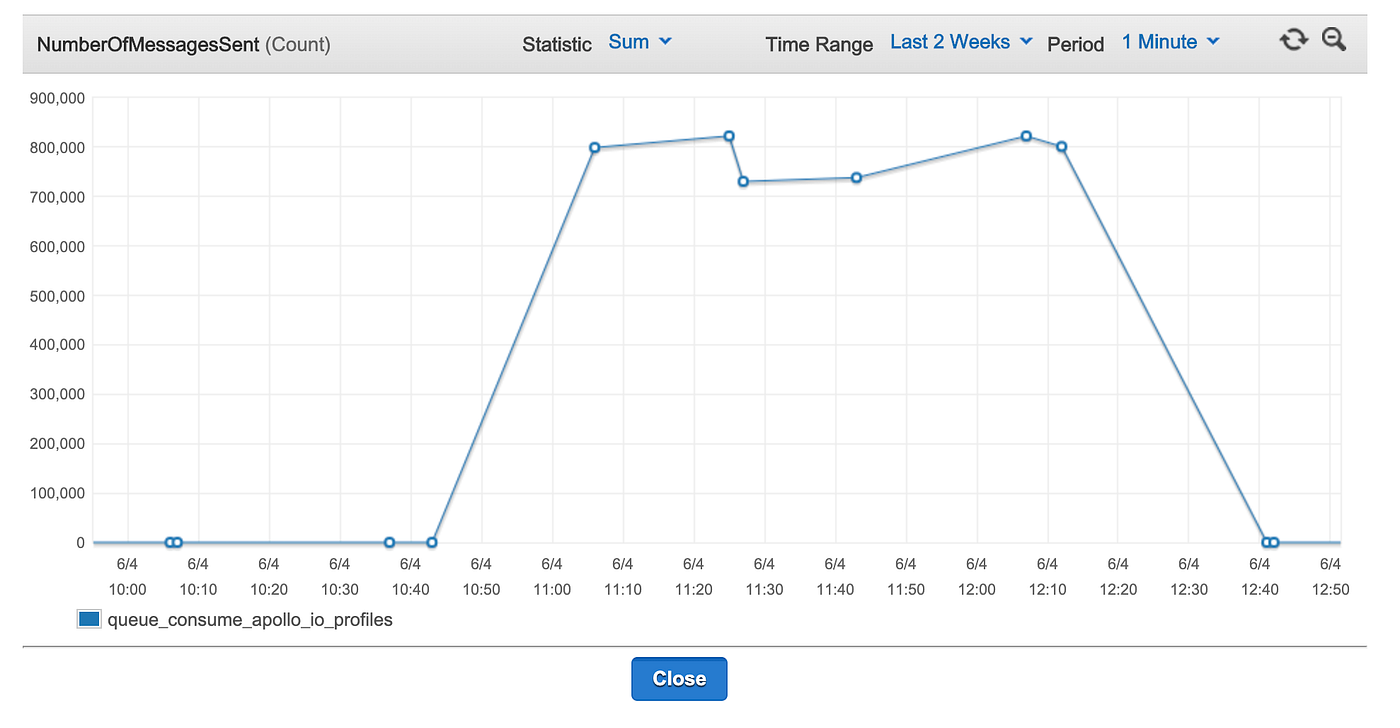
To push these messages in such short interval we used a lambda function utilising thread pool of 25+ threads running in each separate lambda function. So our lambda functions were able to push messages at good pace of 11k messages per second consistently for 2 hours.
Below cloudWatch graph shows how we kept a steady flow of around 800k per minute events for two hours.
Cost Spent for above exercise: $45(SQS + Lambda) (i will keep mentioning this for each step, to actually conclude on second part of the Title)
But one second, how did our producer(lambda function) know where to start pushing from, because lambda has limitation of 15 minutes, so since our pushing is expanding beyond 15 minutes, next lambda need to know where to start from?
Answer: When a lambda starts it looks up for a cursor we are maintaining in dynamodb and it commits the cursor at that end the of lambda(there is a timer which we are utilising at the start of function which helps in knowing when it our lambda going to end). Another application of Serverless → Serverless state management
Second Question: how are you triggering lambda at each 15 minutes
Answer: AWS Cloudwatch Eventbridge, we are creating a trigger at every 16 minutes to call the same lambda , once after another. This is one of the really cool functionality AWS just give it away at your disposal at dirt cheap rate.(Other cloud providers GCP(Cron), Azure(Time trigger) are still catching up)
Ok. What we have now is, around 100 million profile urls in SQS. Now we need to act quick, because SQS has maximum retention of 14 Days.
Our next target is to hit each url, fetch http and push the parsed content into some place safe(Psst, SQS again).
Consumer part
What we wrote is another lambda function whose trigger is a SQS message. Now things are getting interesting and super scale is coming into the picture.
AWS allows you to trigger lambda for each message or batch of messages and lambda just scales like anything until no messages are left in SQS. To give an example, below graph shows how many concurrent lambda grows when number of triggers(in this case SQS messages but can be http calls too) becomes overwhelming.
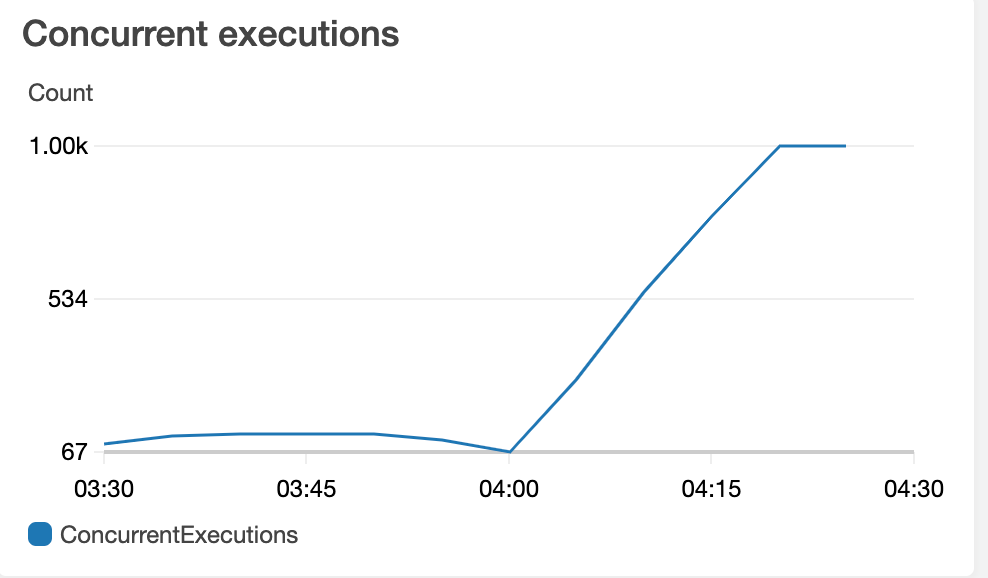
We touched maximum concurrency in less than 15 minutes and we were running 1000 parallel processors with 5 threads in each lambda function meaning 5000 request at a time.
To give more perspective of feat that nowadays cloud providers are providing to us
For each lambda function 1 GB(though it’s available till 10 GB) of RAM and 2 CPU are available for execution. So at maximum concurrency we are utilising
Around 1 TB of RAM and 2000 CPUS for our execution. Only a decent Hadoop environment(with around 50–60) nodes can match this feat and this is available to you without any fuss. Crazy ?
We didn’t stopped here, what we saw our processing was slow(yes 1000 concurrency was just not cutting it 😜), and our end scraping targets were still responding with good success rate. We thought how could we increase our throughput much further. But here i will mention one more tool(if you didn’t know about this, this could be watershed moment in your devops journey). Drumroll → Terraform
At DataOrc, we swear by infrastructure as code, any config, resource, any stitching and everything else in AWS, GCP is done via Terraform, so there is
- always versioning of anything we deploy.(So its easy to revert if required)
- we don’t repeat ourself(DRY principal)
- resources are quick to locate, amend or delete for any matter.
To deploy above function we used terraform and integration with SQS. Example code is below
[embed]
Resource aws_lambda_function creates a lambda function and resource aws_lambda_event_source_mapping enabled connecting sqs to lambda defined.
now coming back to original question how we increased the concurrency to more than 1000, we created another function with name suffixed with instance_number(observe _2 in above snippet) and connected to same SQS queue.
We just doubled the concurrency, now we are utilising 2TB of RAM and 4000 CPUs
We added another(third) lambda function and you know the maths. At this point we were practically DDOSing the scraping endpoints, we didn’t went much further than 3 number of lambdas at their full capacity, since we brought down the endpoint 🤫 at forth lambda deployment.
This is power of cloud provider and infrastructure of code combined. but now comes the pain.
Earlier our scraping targets were responding at good latency below 2 second, but as we start to push the limit of website it started to become slow and hence the response time. Little bit about lambda pricing
Lambda charges you for GB/sec meaning how many 1 GB of memory you spend in 1 second, now the cost of one execution is $0.0000166667, meaning if you are using 1 GB lambda and your execution time is 1 second, when you hit 100 k calls you will get the invoice of 1$, now you would think 100k calls are extremely high, normal website don’t hit that much. You are partially right.
Let talk about where we went wrong , we didn’t put any time of execution limit on lambda(default is 900 seconds), considering that there might be some fluctuations. So our time of execution starts hitting 40 seconds when website was down or slow, so with simple calculations our cost just went 40x. just like that. now we were spending money at an rate of $40 per 100 k calls , now lets extrapolate for our actual numbers, we had 100 million records, worst case we would have spent $40 * 900 = $3600 that alone, but we got the invoice of $5400 whopping Dollars. wait wait , thats 80 feet below than worse case 😝.
Let me explain
- when website went down, function did not return success code and SQS message were sent back to same queue and retries happen, and its not like it wont be tried again, rate at which we were processing, a day of overlook caused the same message to be processed again couple of times
- Not all scenarios in code were covered for all kind of errors, 4xx, 5xx
- These led to multiple retries when website is down, blocking us etc
- And we had a Brobdingnagian bill
Learnings
- Always always keep upper limit of function execution time limit.
- Keep dead letter queue for scenarios unknown, for known just push it to same queue.
- Budget alerts to everyone in your family 😂
- Keep tuning with memory given to function, observe for couple of days to know the usage
- Do it in batch → meaning take sqs messages in batch and process internal in multiprocess/multi thread fashion. use the resources to the max
If you have lambda are always up and running by more than half a time a EC2 you better switch to EC2.
With above tweaks and precautions we were able to bring the cost down by almost 80% and that pipeline is still running.
I would mention about our friend in AWS about this little instance, AWS was quiet supportive during fiasco and we explain it well to them. They were generous enough to waive off 50% of our bill and also made us learnt about the budget and what are they for. But i guess we learnt the hard way.
So our story of Lambda is full of learning and tears 😛.
But this instance made us more comfortable around lambda and how to use and when not. Currently at Dataorc we have more than 100+ lambda being used for Web Servers, event processing, cron executions, email handling pipelines and much more.
Do reach out to us if lambda have been troubling you or want to invest in.
Now a little bit about us.
At Dataorc we always design solutions with scale and cost-effectiveness in mind. With the experience of building data platforms from scratch for enterprises as well as startups, we believe in giving solutions that grow with your business as well as make it grow. Do reach out to us for free sessions of open consulting with our tech team.
메타데이터
- post_id
- 69569e54f00a
- slug
- massive-parallel-processing-with-lambda-functions-and-when-not-to-use-it-69569e54f00a
- url
- https://medium.com/dataorc/massive-parallel-processing-with-lambda-functions-and-when-not-to-use-it-69569e54f00a
- canonical_url
- https://medium.com/dataorc/massive-parallel-processing-with-lambda-functions-and-when-not-to-use-it-69569e54f00a
- author_url
- https://medium.com/@dataorc
- status
- ok
- fetched_at
- 2026-06-10 08:17:25