How to Write an OCI Service Request That Actually Gets Resolved Fast
A practitioner’s guide — with real-world examples — for OCI Administrators, Architects, and Developers
How to Write an OCI Service Request That Actually Gets Resolved Fast
A practitioner’s guide — with real-world examples — for OCI Administrators, Architects, and Developers
You’ve hit a wall. Something in OCI is broken — or at least behaving in a way you didn’t expect. After spending hours ruling things out, you open a Service Request. And then… silence. A day passes. You get a generic reply asking for information you already provided. Another day. Another clarifying question. Meanwhile, your pipeline is down, your team is blocked, and your confidence in the support process is eroding fast.
Sound familiar?
Here’s the thing: the quality of your SR is often the single biggest factor in how fast it gets resolved. Oracle Support engineers are skilled, but they’re working from what you give them. A vague SR puts them in detective mode. A great SR puts them straight into solution mode.
I’ve been through this process enough times — on both sides — to know the difference. In this post I’m going to walk you through exactly what makes an OCI SR effective, using three types of real-world scenarios. By the end, you’ll have a repeatable framework you can apply to any SR you write.
The Anatomy of a Great OCI SR
Before we get into examples, let’s break down the key components. Think of your SR as a technical document with a very specific job: give a support engineer everything they need to understand your problem, reproduce it, and resolve it — without a single back-and-forth.
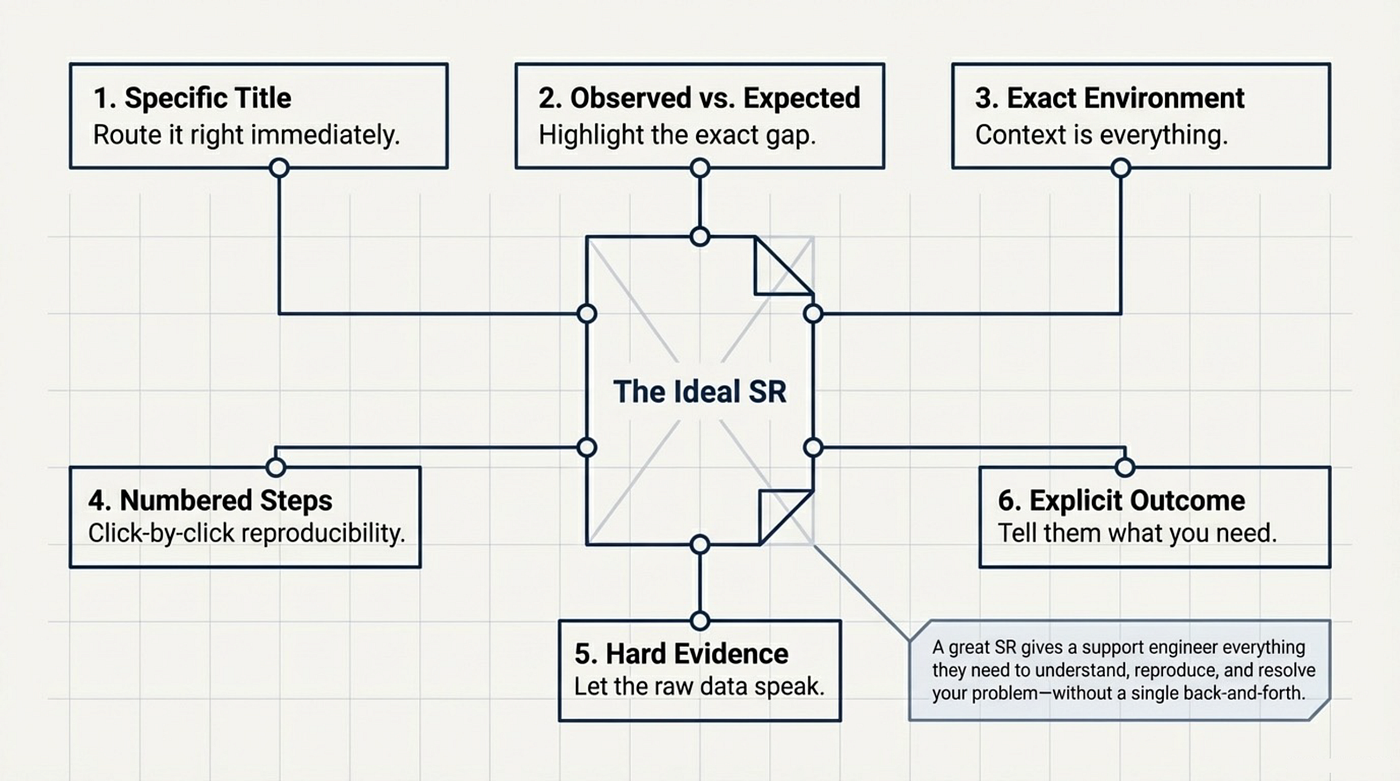
Title: Be Specific
Your title is the first thing support sees. It sets expectations and helps route your SR to the right team.
❌ ADB not working
✅ Autonomous Database — APEX workspace creation fails with ORA-01017 on Private Endpoint (eu-frankfurt-1)
The good title tells us: what service, what feature, what behaviour, and what environment — before the engineer even opens the SR. That specificity matters.
Problem Description: Observed vs. Expected
State clearly what you expected to happen and what actually happened. Include exact error messages — copy-paste them, don’t paraphrase. If there’s an incorrect value (like a wrong URL or an unexpected status code), show both the wrong value and the correct one side by side.
Environment: Every Detail Counts
In OCI, environment context is everything. Most people are in the commercial cloud (oc1), with regions like eu-frankfurt-1, us-ashburn-1, or ap-sydney-1. But OCI runs across several realms, each with its own domain, feature availability, and support scope. Always include:
- Region (e.g.
eu-frankfurt-1) - Realm (e.g.
oc1for commercial — see table below) - Service name (exact — e.g. “OCI Container Instances”, not just “Compute”)
- Compartment name and OCID
- Relevant resource OCIDs (pipeline, container instance, database, etc.)
Know your realm — here’s a quick reference:
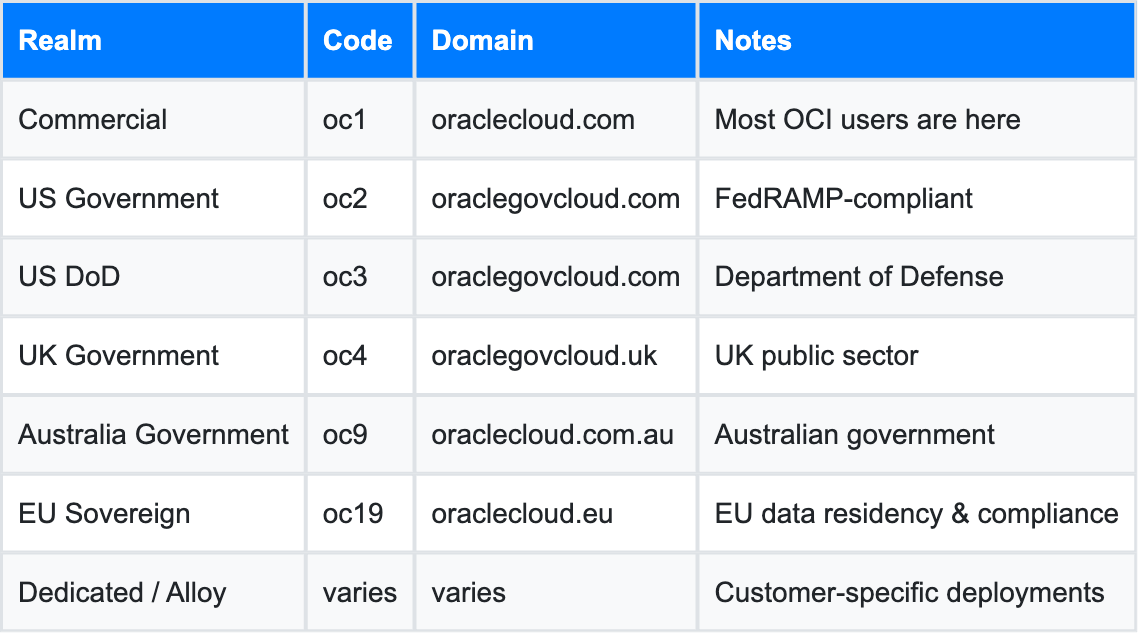
Support engineers assume oc1 unless you tell them otherwise. If you're in any other realm, say so explicitly — feature availability, API endpoints, and even console behaviour differ between realms. Not mentioning the realm is like telling a doctor you have a headache without mentioning you just flew back from altitude. Context changes everything.
Steps to Reproduce: Make It a Numbered List
If support can reproduce it, they can fix it. If they can’t, you’re going to spend days exchanging messages. Write your reproduction steps as a numbered list, in the exact order you performed them. Include the exact buttons clicked, values entered, and options selected.
Evidence: Let the Data Speak
This is where most SRs fall short. Don’t just describe what happened — attach proof:
- Audit log entries (export as JSON, filter by time range and resource OCID)
- CLI output (
ocicommand + full response) - Screenshots of the console state
- Error messages (verbatim, not summarised)
- HAR file (HTTP Archive) — for any console-related issue, this is often the single most useful thing you can attach
For console bugs in particular, Oracle Support will almost always ask for a HAR file. It captures every network request the browser made — request headers, response bodies, status codes, timing — and gives support engineers the raw signal they need to diagnose what went wrong on the client side.
How to capture a HAR file in Chrome (or any Chromium-based browser):
- Open Chrome DevTools (
F12orCmd+Option+Ion Mac) - Go to the Network tab
- ✅ Check “Preserve log” — this is critical. Without it, the log clears on every page navigation and you’ll lose exactly the requests that matter most
- Reproduce the issue (navigate to the page, trigger the action that fails)
- Right-click anywhere in the Network tab → Save all as HAR with content
- Attach the
.harfile to your SR
💡 Tip: HAR files can contain session tokens and other sensitive data. Oracle Support handles these securely, but it’s good practice to mention it when you attach the file — especially in Sovereign Cloud environments with strict data handling requirements.
If you’ve already done verification steps (e.g. confirmed networking is correct, verified IAM policies, confirmed the image exists in the registry), say so explicitly. This prevents support from sending you on a troubleshooting detour you’ve already completed.
Questions / Expected Outcome: Tell Support What You Need
End your SR with explicit questions or a clear statement of what you want. Don’t make support guess whether you’re looking for a bug fix, a workaround, a confirmation of expected behaviour, or architectural guidance.
Link Related SRs
If this issue is related to or caused by a previous SR, reference it by number. This is especially important when the same root cause surfaces in a different service or workflow. It saves everyone time and helps Oracle’s engineering teams track impact breadth.
SR Type 1 — The Console Bug
Scenario: You’re creating a Container Instance in OCI EU Sovereign Cloud (eu-frankfurt-2, oc19 realm). You pick your image from OCI Container Registry using the console image picker — and the URL it generates is wrong. The container fails to start, and the error message doesn’t point you to the real problem.
📍 This example comes from a real-world encounter in EU Sovereign Cloud (oc19). The same type of console bug can happen in any realm — the principles of writing the SR apply regardless.
Here’s what an effective SR looks like for this type of problem:
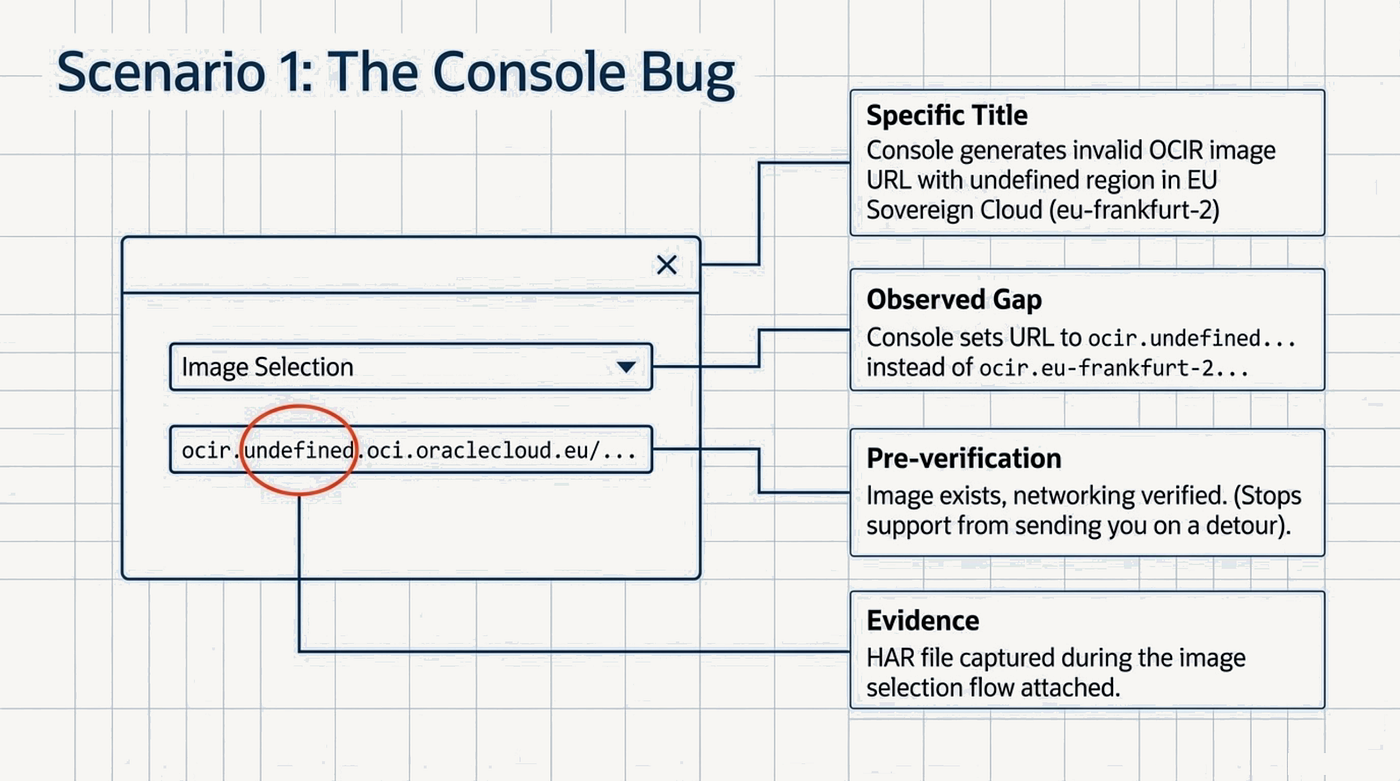
Title: OCI Container Instance — Console generates invalid OCIR image URL with
undefinedregion in EU Sovereign Cloud (eu-frankfurt-2)
Problem description: When creating a Container Instance in the OCI Console (eu-frankfurt-2, oc19 realm) and selecting an image from OCI Container Registry using the image picker, the console auto-populates an incorrect image URL where the region identifier is replaced with the string
undefined.
Generated URL (incorrect):
ocir.undefined.oci.oraclecloud.eu/<namespace>/myapp:latest
Expected URL:
ocir.eu-frankfurt-2.oci.oraclecloud.eu/<namespace>/myapp:latest
Because of this invalid hostname, the container instance fails to start with:
"A container's image could not be pulled due to inadequate network configuration"
Steps to reproduce:
- Open OCI Console → Compute → Container Instances
- Create a new Container Instance
- In “Configure Containers”, click “Select Image”
- Choose OCI Container Registry
- Select your compartment
- Select a private repository 7)Select an image tag
- Click “Select image” → Console sets the URL to
ocir.undefined.oci.oraclecloud.eu/...
Verification performed:
- Image exists in OCIR and was successfully pushed using the Docker CLI with the correct URL
2)Networking (Internet Gateway, Service Gateway, security rules) has been verified and is functional
- The issue is reproducible with multiple repositories in this region
Attachments: Screenshot of the incorrectly populated URL field, HAR file captured during the image selection flow.
Expected outcome: Confirmation this is a console bug, a workaround to unblock our deployment, and an estimated fix timeline.
Why this SR works:
- The title names the service, the symptom, and the environment
- Wrong vs. correct values are shown side by side — support doesn’t have to guess what the correct state should be
- Numbered repro steps are click-by-click reproducible
- Pre-verification is documented — support won’t waste your time asking “have you checked networking?”
- The expected outcome is explicit: workaround + timeline
SR Type 2 — The Misleading Error Message
This is the trickier scenario. The error message you’re seeing points in one direction, but the actual root cause is somewhere else entirely. This is where most engineers get stuck — and where most SRs stall.
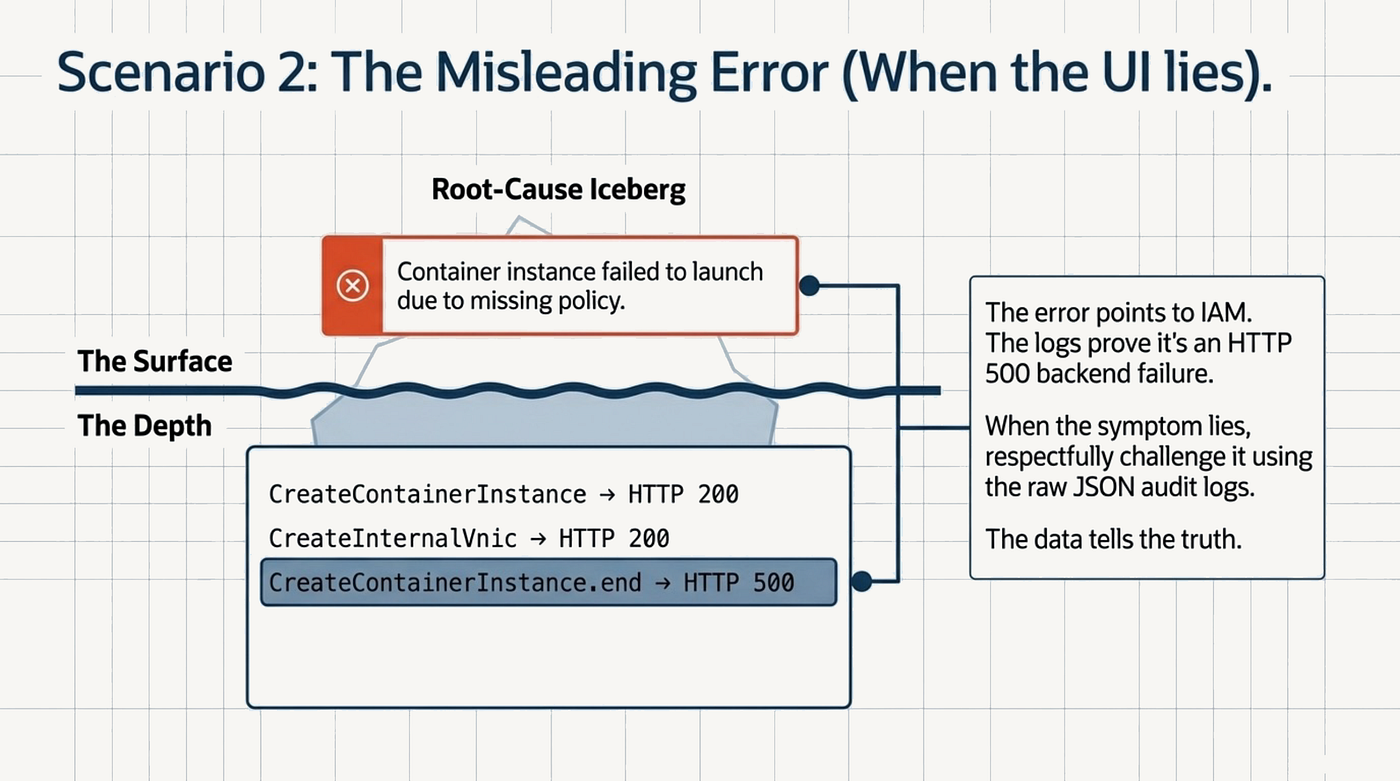
Scenario: Your OCI DevOps Deploy Pipeline fails in EU Sovereign Cloud (eu-frankfurt-2, oc19). The pipeline’s own error message says: “Container instance failed to launch due to missing policy.” You spend time reviewing IAM, policy attachments, and dynamic groups — everything looks correct. But the pipeline keeps failing.
The real cause? The same ocir.undefined platform bug from SR Type 1 — now also affecting the internal runner images that OCI DevOps uses under the hood. The "missing policy" error is a secondary symptom that masks the actual root cause.
📍 This example comes from a real-world encounter in EU Sovereign Cloud (oc19), directly linked to the console bug in SR Type 1. The technique — let the audit logs speak, reference related SRs, and challenge the misleading error — applies in any realm.
Here’s how to write this SR in a way that cuts through the noise:
Title: DevOps Deploy Pipeline Shell Stage fails with HTTP 500 on Container Instance launch — misleading “missing policy” error (eu-frankfurt-2)
Problem: Every OCI DevOps Deploy Pipeline Shell stage run fails. The pipeline reports: “Container instance failed to launch due to missing policy.”
However, audit log analysis confirms this is not a policy issue. There are no HTTP 403 responses anywhere in the audit trail. The failure is an HTTP 500 on
CreateContainerInstance.end.
Audit log evidence (UTC):
- CreateContainerInstance→ HTTP 200 ✅- CreateInternalVnic→ HTTP 200 ✅- CreateContainerInstance.end→ HTTP 500 ❌- lifecycleState: FAILED
IAM status: All required policies have been verified correct. No 403s appear anywhere in the audit log for this time window.
Hypothesis: This appears to be the same root cause as SR 11-XXXXXXX (“Console generates invalid OCIR image URL with undefined region”). OCI DevOps uses Container Instances for its internal runner images and likely generates the same malformed registry URL in this realm (oc19, eu-frankfurt-2). The
AGENT_CONTAINERandCOMMAND_STEP_CONTAINERimages may be resolving with an invalid hostname.
Relevant OCIDs:
- Deploy pipeline:
ocid1.devopsdeploypipeline.oc19.eu-frankfurt-2.<unique-id>
- Failed container instance:
ocid1.computecontainerinstance.oc19.eu-frankfurt-2.<unique-id>
Attachments: Audit log JSON export, deployment run log, IAM policy screenshot.
Expected outcome: Confirmation of root cause (is this the same registry URL bug?), a workaround to unblock our pipelines, and escalation to engineering if confirmed as a platform defect.
Why this SR works:
- The title flags both the symptom and the misleading error — support immediately knows not to chase the “policy” lead
- Audit log data is presented as structured evidence, not a vague description
- The writer does the diagnostic work in the SR — the HTTP status codes tell the story
- The related SR is referenced by number, giving support a head start
- The hypothesis is offered respectfully but clearly, saving time without overstepping
The core lesson here: When the error message lies, let the audit logs speak. Always export and attach your audit log for the relevant time window and resource OCID. That JSON will tell the truth even when the UI doesn’t.
SR Type 3 — The Architecture / Design Question
Not every SR is a bug report. Sometimes you’re not sure whether what you’re seeing is a bug, a feature limitation, a configuration gap, or expected behaviour for your environment. This type of SR is a design consultation, and it needs to be framed differently.
Scenario: You’re deploying an Autonomous Database (ADB) on a private endpoint in EU Sovereign Cloud (eu-frankfurt-2, oc19). You’re fronting it with an OCI Load Balancer using a custom domain, and clients are hitting a TLS/SNI hostname mismatch because the ADB certificate doesn’t match your custom domain. You navigate to the “Vanity URL” option in the ADB console — and it’s greyed out. Is this a bug? A Sovereign Cloud limitation? A missing prerequisite? You need a clear answer before you can finalise the architecture.
📍 This example comes from a real-world encounter in EU Sovereign Cloud (oc19). The ADB private endpoint + Vanity URL question applies in any realm — but the answer may differ per realm. The SR structure shown here works universally.
This is exactly the kind of SR where structured questions make all the difference.
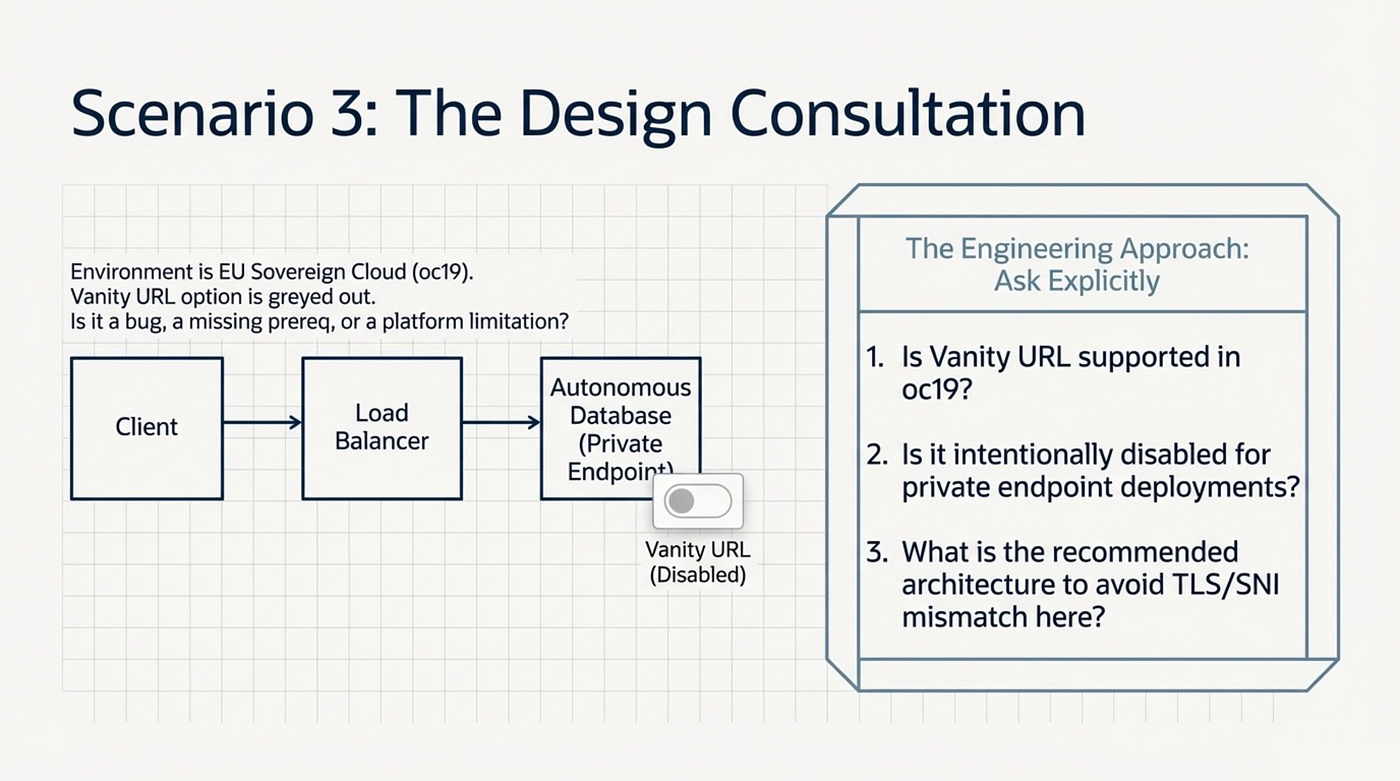
Title: ADB Vanity URL option disabled for Private Endpoint deployment in EU Sovereign Cloud (eu-frankfurt-2) — by design or limitation?
Context / Architecture: Service: Autonomous Database (Serverless) Endpoint type: Private Endpoint Region: eu-frankfurt-2 (EU Sovereign Cloud, oc19 realm) Custom domain via OCI Load Balancer:
apex.example.com
Traffic flow:
Client → Load Balancer → ORDS on Compute → ADB (Private Endpoint)
Observed behaviour: The “Vanity URL” option in the ADB console is disabled. There is no option to configure a custom domain or upload a certificate at the database level.
Impact: ADB presents a certificate for `.oraclecloud.eu`. Using a custom domain on the Load Balancer results in a TLS/SNI hostname mismatch between the LB hostname and the ADB certificate. This limits our ability to implement end-to-end custom domain enforcement in this private architecture.*
Reference: In a related SR, the OCI team indicated that public DNS zones are not available in EU Sovereign Cloud. This may be a related constraint.
Questions:
- Is Vanity URL supported in OCI EU Sovereign Cloud (eu-frankfurt-2)?
- Is it intentionally disabled for private endpoint ADB deployments?
- Are there specific prerequisites (public DNS zone, certificate type, network endpoint type) required to enable this feature?
- What is the recommended architecture to avoid TLS/SNI mismatch in this scenario?
- Are there any planned enhancements for Vanity URL support in sovereign regions?
Expected outcome: Confirmation of whether this behaviour is by design, and guidance on supported alternatives or recommended architecture patterns for this use case.
Why this SR works:
- The architecture context is clearly laid out — including the traffic flow — so support can visualise the deployment without asking
- The impact is concrete: TLS/SNI mismatch, not just “it doesn’t work”
- The five numbered questions are explicit — support knows exactly what to answer
- The expected outcome frames this as a design consultation, not just a bug report
- The related SR reference adds context and avoids duplicating investigation
The core lesson: When you’re not sure if it’s a bug or by design, don’t guess — ask explicitly. Structure your uncertainty as clear questions, and give support everything they need to give you a useful answer.
Common SR Mistakes (and How to Avoid Them)
Even experienced engineers make these. Here’s what to watch out for:
1. Vague titles
"Container instance not working" tells support nothing. Spend two minutes on a specific title. It routes your SR faster and signals that you've done your homework.
2. Missing region and realm
Most people are in commercial cloud (oc1) and support engineers assume oc1 by default. But feature availability and console behaviour can differ between regions even within oc1 — and the differences become even more significant across realms (oc2, oc4, oc19, etc.). Always state both the region (e.g. eu-frankfurt-1) and the realm (e.g. oc1). Don't make support guess.
3. No evidence Describing what happened is not the same as showing it. Attach your audit log export. Include CLI output. Add a screenshot. Evidence is the difference between “we’ll investigate” and “here’s your fix.”
4. Mixing two unrelated issues in one SR One SR, one problem. If you have two issues, open two SRs. Mixing them confuses routing, delays both resolutions, and makes it harder to track each issue separately.
5. Wrong severity Severity 4 (“general question”) for a production-blocking issue is a common mistake. Use Severity 1 or 2 if your environment is impacted. Oracle’s SLA response times are tied to severity — and support engineers prioritise accordingly.
6. Not linking related SRs If this is the third time you’ve seen a variant of the same issue, say so. Reference the previous SR numbers. This helps support (and Oracle engineering) track the breadth and recurrence of a platform-level problem.
Pro Tips for the Follow-Up
Writing a great SR is only half the story. What you do after you submit matters too.

Add evidence early, not when asked If you discover new information — a new audit log entry, a second affected resource, a workaround that half-works — add it as a note immediately. Don’t wait to be asked. The more complete your SR is at any given moment, the faster support can act.
Know when to escalate severity If your situation changes (a workaround stops working, more services are affected, a deadline is approaching), update the severity. You can do this from the SR console. If you feel your SR isn’t progressing appropriately, you can also ask your Oracle account team or TAM to flag it.
Request a screen share when text isn’t enough Some issues are much faster to diagnose live. If you’ve been going back and forth for more than two or three exchanges without resolution, politely ask: “Would it be possible to schedule a screen share to walk through this together?” Many support teams will accommodate this, especially for complex architectural questions.
Treat your SR as documentation A well-written SR — with its timeline of updates, evidence, and resolution — is a valuable document. Your future self, your teammates, and the broader OCI community all benefit from it. Some of the best OCI troubleshooting blog posts (including this one) start life as SRs. Write accordingly.
Conclusion
A great OCI Service Request is an act of engineering. You’re not just asking for help — you’re packaging your problem in a way that gives a support engineer everything they need to solve it efficiently. The title, the evidence, the structured questions, the linked SRs: every element reduces friction and accelerates resolution.
The three SR types we covered — the console bug, the misleading error, and the architecture question — each require a slightly different approach. But the underlying principle is the same: be specific, be evidenced, and be explicit about what you need.
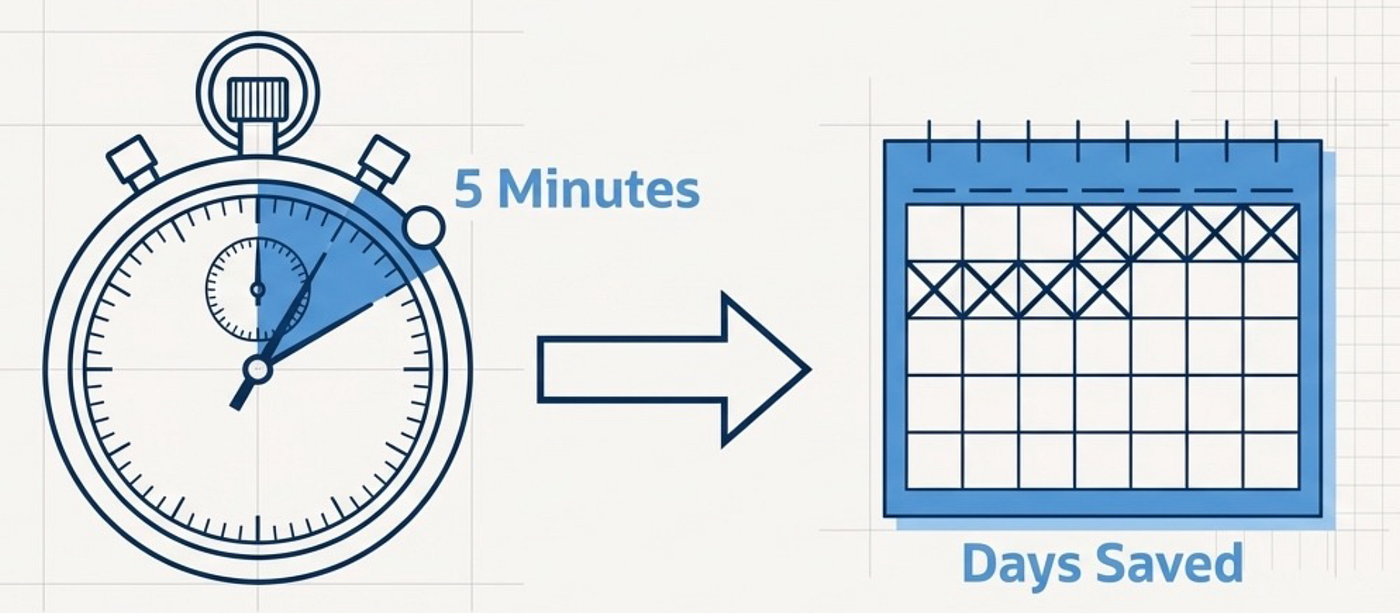
The next time you’re about to open an SR and type something like “service X isn’t working”, take five more minutes. Write the specific title. Include the region and realm. Attach the audit log. Number your reproduction steps. Ask your questions explicitly. That five minutes will save you days.
In Part 2, I’ll cover the other side of the SR lifecycle: how to respond effectively when Oracle Support asks you a question, and how to ask for a status update in a way that keeps your SR moving forward — without burning bridges.
Tags: #OCI #Oracle #OracleCloud #OracleACE #CloudEngineering #SupportTips #OracleCloudInfrastructure
Written by Robert van Molken — Oracle ACE Pro | OCI Architect | Cloud Engineer
메타데이터
- post_id
- 697bb08097a3
- slug
- how-to-write-an-oci-service-request-that-actually-gets-resolved-fast-697bb08097a3
- url
- https://medium.com/@robertvmolken/how-to-write-an-oci-service-request-that-actually-gets-resolved-fast-697bb08097a3
- canonical_url
- https://medium.com/@robertvmolken/how-to-write-an-oci-service-request-that-actually-gets-resolved-fast-697bb08097a3
- author_url
- https://medium.com/@robertvmolken
- status
- ok
- fetched_at
- 2026-08-05 17:05:23





