When Elasticsearch Says “Nested” — And Your Parser Doesn’t Listen
The ones that don’t fail — they lie.
When Elasticsearch Says “Nested” — And Your Parser Doesn’t Listen
The ones that don’t fail — they lie.
Your system returns results confidently. They look correct. They pass tests.
And weeks later, you realize… they’re wrong.
This post is about one such bug in Elasticsearch — and how fixing it required understanding one of its most misunderstood features: nested fields.
TL;DR
If you query nested data in Elasticsearch without using a nested query,
you can get logically incorrect results.
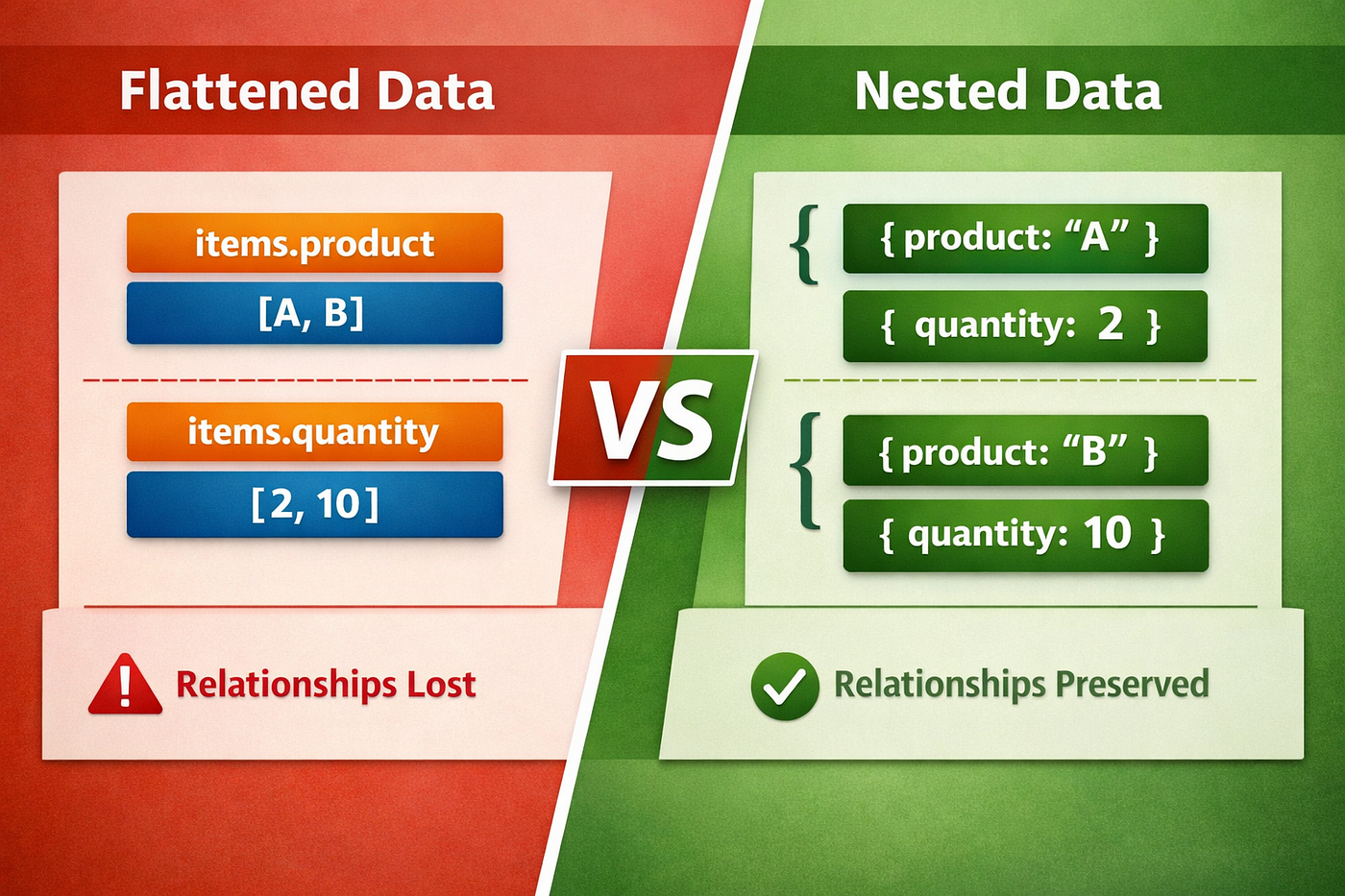
Because Elasticsearch flattens objects by default, relationships between fields are lost.
I explored this while contributing to Foundatio.Parsers, an open-source .NET library for building Elasticsearch queries.
The Setup
Foundatio.Parsers converts simple query strings like:
items.product:A items.quantity:>5into Elasticsearch DSL queries and aggregations.
It handles:
- Query parsing
- Aggregation building
- Field mapping
- AST transformations
It’s well-structured — but nested field support wasn’t implemented yet. Nested fields were ignored
The Problem: Flattening Breaks Reality
{
  "items": [
    { "product": "A", "quantity": 2 },
    { "product": "B", "quantity": 10 }
  ]
}
Query:
items.product:A AND items.quantity:10👉 This should NOT match.
But Elasticsearch matches it.
Why?
{
  "items.product": ["A", "B"],
  "items.quantity": [2, 10]
}
👉 The relationship between product and quantity is lost.
While this behavior is documented in Elasticsearch’s official nested field documentation (https://www.elastic.co/docs/reference/elasticsearch/mapping-reference/nested), it’s easy to overlook when working through abstractions — which is where subtle bugs begin.
⚠️ The Dangerous Part
Elasticsearch:
- Does not throw an error
- Does not warn
👉 It just returns wrong results
The Fix: Nested Query
❌ Before
{
  "bool": {
    "must": [
      { "term": { "items.product": "A" }},
      { "term": { "items.quantity": 10 }}
    ]
  }
}
✅ After
{
  "nested": {
    "path": "items",
    "query": {
      "bool": {
        "must": [
          { "term": { "items.product": "A" }},
          { "term": { "items.quantity": 10 }}
        ]
      }
    }
  }
}
👉 Now both conditions apply to the same object
Aggregations: The Same Bug, Bigger Impact
This issue also affected aggregations.
❌ Before Fix
{
  "aggs": {
    "products": {
      "terms": {
        "field": "items.product"
      }
    }
  }
}
👉 Runs on flattened data → mixes unrelated values
✅ After Fix
{
  "aggs": {
    "items_nested": {
      "nested": {
        "path": "items"
      },
      "aggs": {
        "filtered_items": {
          "filter": {
            "range": {
              "items.quantity": { "gt": 5 }
            }
          },
          "aggs": {
            "products": {
              "terms": {
                "field": "items.product"
              }
            }
          }
        }
      }
    }
  }
}
👉 Now:
- Aggregation respects object boundaries
- Filtering and aggregation happen in the same scope
What the Fix Involved
At a high level:
Detect nested fields → group them → wrap them correctly
Detecting Nested Fields
Initial logic:
int dotIndex = fieldName.IndexOf('.');⚠️ Limitation
status.keywordis NOT nested- Dot ≠ nested
👉 Mapping-based detection is a better long-term fix
Where DFS Came In (And What I Actually Did)
One interesting part of the fix was understanding how aggregation trees were already being traversed.
I didn’t introduce DFS — 👉 the library already used a Depth-First traversal.
My work involved:
- Understanding this traversal
- Extending it for nested aggregations
- Ensuring correctness across all levels
Understanding the Aggregation Tree (Real Example)
Root
 └── Nested (items)
      └── Filter (quantity > 5)
           └── Terms (product)
How Traversal Happens (DFS)
Traversal order:
Root → Nested → Filter → Terms👉 Go deep first, then backtrack.
Mapping This to Code
if (agg.Nested != null)
{
    target.Nested(name, n => n
        .Path(agg.Nested.Path)
        .Aggregations(a => CopyAggregations(a, agg.Nested.Aggregations)));
}
Why DFS Was Critical
Because aggregations are recursive:
- Nested contains Aggregations
- Those contain more Aggregations
Without proper traversal:
❌ Inner aggregations would be skipped ❌ Query would be incomplete
Edge Cases
1. .keyword Collision
Dot-based detection misclassifies fields like:
status.keyword
2. AND vs OR Issue
Nested groups default to AND, which can break logical intent.
3. Limited Aggregation Coverage
Some aggregation types were not handled:
- This fix focused on making nested aggregations work correctly for supported types like Terms, Nested, Max.
- More advanced aggregations such as DateHistogram, Avg, or Sum would require additional handling and were intentionally left as future improvements.
What I Learned
1. Mapping vs Query Is a Hidden Gap
Elasticsearch won’t protect you.
👉 You get wrong results — silently.
2. Abstractions Must Preserve Truth
Libraries like Foundatio.Parsers simplify query building.
But they must ensure correctness.
3. Understanding Existing Code Matters More Than Writing New Code
This fix wasn’t about adding complexity.
It was about:
- Understanding traversal
- Extending it correctly
Final Thought
If you’re using nested data in Elasticsearch:
👉 Double-check your queries and aggregations.
Because the worst bugs aren’t the ones that crash your system…
They’re the ones that quietly lie to you.
The full fix can be seen in this pull request: https://github.com/FoundatioFx/Foundatio.Parsers/pull/145 Big thanks to the maintainer for the review and guidance during this change.
메타데이터
- post_id
- 698e83e57295
- slug
- when-elasticsearch-says-nested-and-your-parser-doesnt-listen-698e83e57295
- url
- https://medium.com/@veeraagandhi/when-elasticsearch-says-nested-and-your-parser-doesnt-listen-698e83e57295
- canonical_url
- https://medium.com/@veeraagandhi/when-elasticsearch-says-nested-and-your-parser-doesnt-listen-698e83e57295
- author_url
- https://medium.com/@veeraagandhi
- status
- ok
- fetched_at
- 2026-06-20 20:29:01




