Bringing People Together in Virtual Spaces with Live 3D Collaboration
#threejs #yjs #webrtc #collaboration #javascript
Bringing People Together in Virtual Spaces with Live 3D Collaboration
threejs #yjs #webrtc #collaboration #javascript
Introduction
Imagine a fully interactive 3D space where multiple users can collaborate, chat, and manipulate objects in real time. Traditional design workflows often require exporting files, reviewing them separately, and then sharing feedback. But what if all of this could happen live, with every user seeing updates instantly?
This is exactly what we achieve using Three.js for 3D graphics, Yjs for data synchronization, and WebSockets for real-time communication. Whether you’re building a multiplayer tool, a virtual showroom, or a collaborative architectural space, this technology stack allows users to work together in the same environment without delays.
Why Real-Time Collaboration Matters?
Today, tools like Google Docs, Figma, and Miro have revolutionized digital collaboration, allowing multiple users to work together synchronously. However, when it comes to 3D modeling and design, collaboration remains fragmented — often requiring static exports, asynchronous updates, and manual refreshes.
With real-time 3D collaboration, teams can:
- 🚀 Modify and interact with 3D models dynamically.
- 🗣️ Communicate instantly via chat within the same session.
- 🔄 Sync camera movements to ensure a shared viewing experience.
- 🔗 Invite participants via a simple link, making onboarding easy.
Tech Stack Overview
To achieve real-time collaboration, we use:
✅ Three.js — Handles 3D rendering and interaction.
✅ GLTFLoader — Loads dynamic 3D models.
✅ OrbitControls — Enables smooth camera navigation.
✅ Yjs — Provides optimized state synchronization.
✅ WebSocketProvider — Ensures live data flow across multiple users.
Setting Up the 3D Scene with Three.js
Before implementing collaboration features, let’s first create a basic 3D scene and load a model using Three.js..
import * as THREE from "three";
import { GLTFLoader } from "three/examples/jsm/loaders/GLTFLoader";
import { OrbitControls } from "three/examples/jsm/controls/OrbitControls";

const scene = new THREE.Scene();
const camera = new THREE.PerspectiveCamera(70, window.innerWidth / window.innerHeight, 0.01, 20);
camera.position.set(0, 0.5, 2);

const renderer = new THREE.WebGLRenderer({ antialias: true, alpha: true });
renderer.setSize(window.innerWidth, window.innerHeight);
document.body.appendChild(renderer.domElement);

const controls = new OrbitControls(camera, renderer.domElement);
controls.target.set(0, 0.1, 0);
controls.update();

const loader = new GLTFLoader();
loader.load("./models/sample.glb", (gltf) => scene.add(gltf.scene));

function animate() {
  requestAnimationFrame(animate);
  controls.update();
  renderer.render(scene, camera);
}
animate();
Here’s what’s happening:
- We initialize the Three.js scene, camera, and renderer.
- We load a GLTF model dynamically.
- We add OrbitControls to allow users to navigate the scene.
- The
animate()function renders the scene in a loop, ensuring smooth interaction.
Adding Collaboration with Yjs & WebSockets
Now that we have the 3D environment set up, let’s synchronize chat messages and camera movements across all users.
Live Chat Synchronization
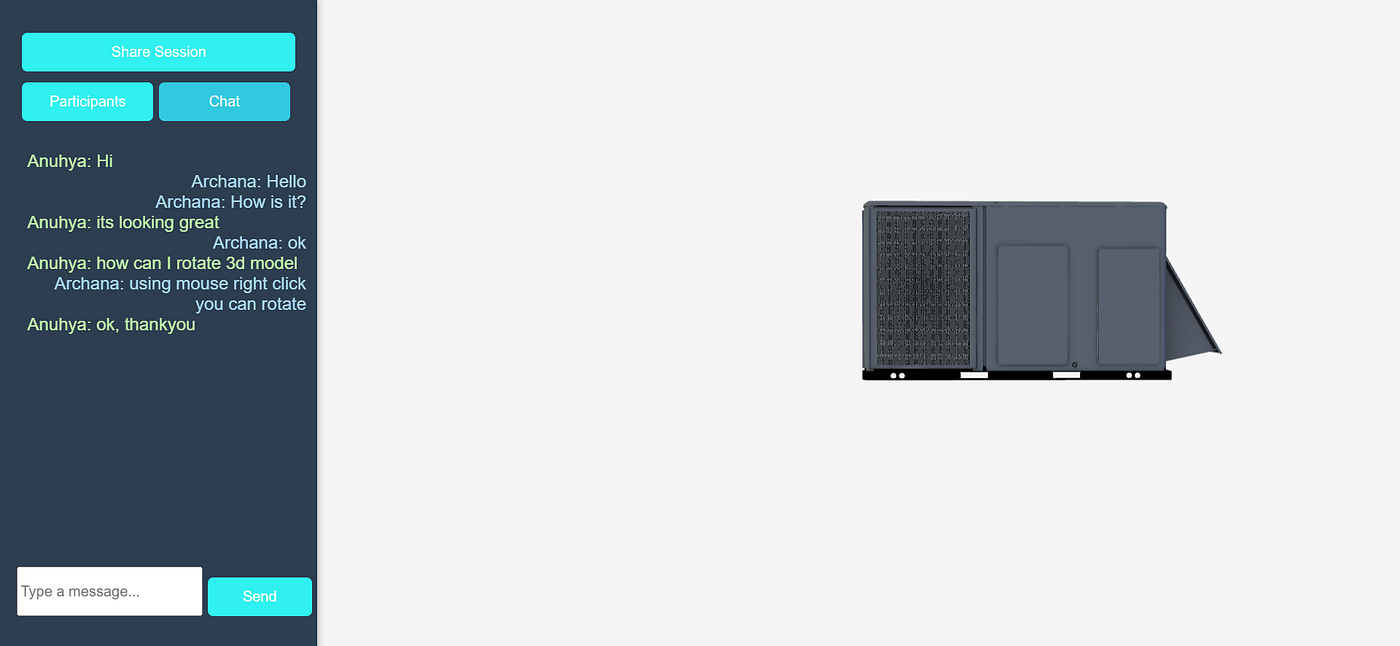
To enable real-time messaging, we use Yjs, which provides fast and efficient state synchronization.
import * as Y from "yjs";
import { WebsocketProvider } from "y-websocket";

const ydoc = new Y.Doc();
const yText = ydoc.getText("chatMessages");
new WebsocketProvider("ws://localhost:5173/", "chat-room", ydoc);

document.getElementById("send-btn").addEventListener("click", () => {
  const inputField = document.getElementById("chat-input");
  yText.insert(yText.length, `User: ${inputField.value}\n`);
  inputField.value = "";
});

yText.observe(() => {
  document.getElementById("chat-box").innerText = yText.toString();
});
Whenever a user types a message, Yjs updates the data across all clients instantly. The observer function ensures that all connected users see real-time updates.
Camera Position Synchronization
Sharing a unified camera view ensures that all users see the same perspective while interacting with the 3D scene.
const cameraState = ydoc.getMap("cameraState");
cameraState.set("position", { x: camera.position.x, y: camera.position.y, z: camera.position.z });

controls.addEventListener("change", () => {
  cameraState.set("position", { x: camera.position.x, y: camera.position.y, z: camera.position.z });
});

cameraState.observe(() => {
  const pos = cameraState.get("position");
  camera.position.set(pos.x, pos.y, pos.z);
  controls.update();
});
Whenever a user moves the camera, their position syncs across all participants, creating a shared experience. This is especially useful for design reviews, gaming, or collaborative editing.
Key Features & Benefits
🟢 Instant 3D Model Interaction — Modify and explore scenes dynamically.
🟢 Real-Time Chat Integration — Keep communication seamless.
🟢 Live Camera Syncing — Ensure a unified viewing experience.
🟢 Session-Based Collaboration — Invite users via a simple shareable link.
Future Enhancements
If you’re looking to take this further, consider adding:
- 🎤 Voice chat integration for enhanced communication.
- 🎨 Annotations on 3D models to highlight design elements.
- 🕶️ AR/VR compatibility for immersive collaboration.
Final Thoughts
Creating a real-time 3D collaboration tool is not just about sharing visuals — it’s about building an interactive ecosystem that makes teamwork seamless. Whether for multiplayer gaming, design projects, or remote education, this technology unlocks new ways to work together.
메타데이터
- post_id
- 6a1a255d02dc
- slug
- bringing-people-together-in-virtual-spaces-with-live-3d-collaboration-6a1a255d02dc
- url
- https://medium.com/@archanapatukuri/bringing-people-together-in-virtual-spaces-with-live-3d-collaboration-6a1a255d02dc
- canonical_url
- https://medium.com/@archanapatukuri/bringing-people-together-in-virtual-spaces-with-live-3d-collaboration-6a1a255d02dc
- author_url
- https://medium.com/@archanapatukuri
- status
- ok
- fetched_at
- 2026-06-21 09:28:28



