What One Malware Hash Revealed: A Full Threat Intelligence Breakdown
OVERVIEW
What One Malware Hash Revealed: A Full Threat Intelligence Breakdown
OVERVIEW
The starting point of investigating malware (Threat Intelligence) often relies on the hash to discover adversarial malicious intent, malicious behavior and mapping findings to threat intelligence and attacker’s infrastructure.
This malware hash analysis evaluates the malware detection footprint across major security vendors, extract relevant metadata, and assess behavioral, network indicators associated with the file and all indicators of compromise (IOCs) that security analyst can use as attributes in creating detection rules such as Yara, Suricata or Sigma rules to protect potential targets.
Objectives
Identify the malware family
Analyze behavioral characteristics, and
Map the findings to MITRE ATT&CK techniques.
Threat Intelligence Discovery and Findings
Malware Hash: 9001567e2025f83c936b8746fd3b01e44572f70d8ddec39b75b9459f7e5089c8
- Detection analysis
This step determines and provides the first insight into whether the hash is malicious, suspicious, or benign. In virus total, a total of 62/72 security vendors flagged this hash as malicious and referred to is as a trojan. In Hybrid analysis, the malware was labeled Trojan.Ransom.Loki and had a 92% Anti-virus detection. Both platforms labeled this hash a malicious file that belongs to the Trojan malware family.
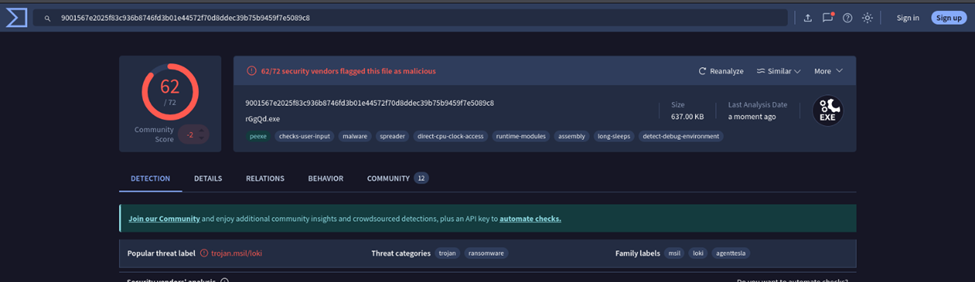
VirusTotal hash summary page (detection results).

2. Identification of Hash and Metadata
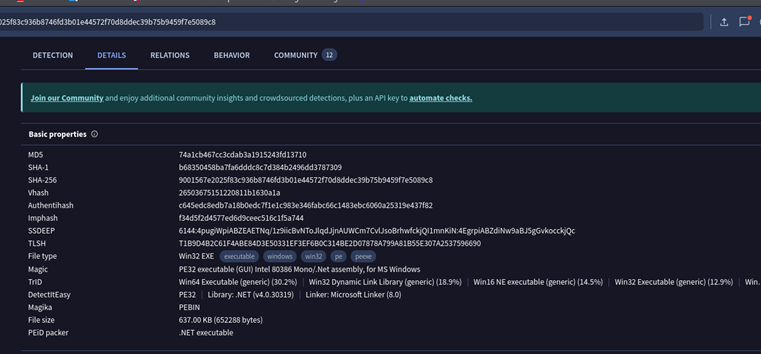
2.1 File Hashes: Identifying the hashes of a malware is important as it serves as a digital footprint. This helps analyst, intelligence platform s and security tools to quickly and uniquely identify malicious files.
· MD5: 7481cb467cc3cdab5a19b5243613710
· SHA-1: b68350458ba7f6edddc8c74384b249e4d3787309
· SHA-256: 9001567e2025f83c936b8746fd3b01e44572f70d8ddec39b75b9459f7e5089c8
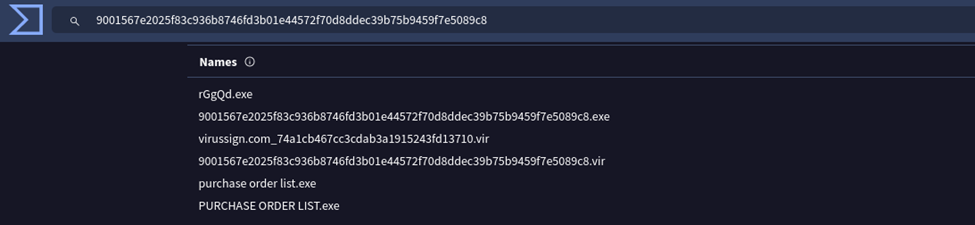
2.2 File Names: The hash exhibited multiple file names attackers have used to carryout exploits in different attacks. This change in the names is an evasion technique used by attackers to bypass rules set by either firewall, EDR, static rules or security signatures.
- rGgQd.exe
- 9001567e2025f83c936b8746fd3b01e44572f70d8ddec39b75b9459f7e5089c8.exe
- virussign.com_74a1cb467cc3cdab3a1915243fd13710.vir
- 9001567e2025f83c936b8746fd3b01e44572f70d8ddec39b75b9459f7e5089c8.vir
- purchase order list.exe
- PURCHASE ORDER LIST.exe
2.3 File Type:
· Win32 EXE executable (PE32): This file types identified for this malware indicates that the malware is windows executable that follows portable executable format (.exe) built in a 32bits windows environment.
· .NET executable: The malware was written in .NET language, which means it runs on the .NET framework and not directly on the processor.
2.4 Magic Byte: This the signature at the beginning of the file that identifies its type
· PE32 executable: This verifies that the file is not spoofed and it is not obfuscated. This technique is used to ensure that the malware has not been corrupted or tampered with.
2.5 File Size: 637.00 KB (652,288 bytes)
The file size of a malware is important in threat intel because it is an early indicator that may identify that a malware is packed or compressed, containing hidden codes (payloads) that can be released once executed.
2.6 Signature Information:
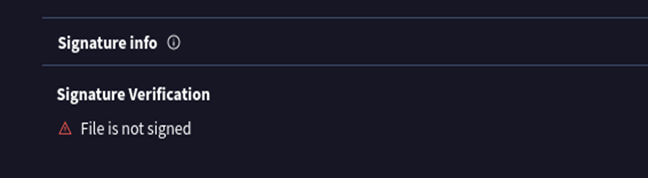
- File is NOT signed (Unsigned executable): The lack of a signature increases suspicion, as legitimate software typically carries a verifiable digital certificate.
- Behavioral Indicators
Execution Parents:
Parent File: RAR file named PURCHASE ORDER LIST:00
Scan Date: 2023–03–04
Detection: 48/60 engines flagged it
This information tells analyst that the malware was delivered inside a RAR archive (a compressed file) named PURCHASE ORDER LIST:00. This makes the file look like a business document.
This is a common delivery method for phishing and business-email compromise (BEC) attacks, that attackers use to trick employees into opening the archive. → Social engineering → user opens RAR → malware executes.
4. Network Behavior Indicators
4.1 Contacted Domains (Suspicious): In malware analysis, outbound connections indicate malicious behaviors. This is often the case when connections are made with Command and control (C2), Downloading additional payloads or sending stolen credentials.
· blockchaincso.com (6/95 detections, created 2024–05–13)
· chacharen.com (1/95 detections, created 2020–07–16)
· datemere.online (2/95 detections, created 2017–09–11)
· 0t1ninewhen.loan (0 detections but suspicious top-level domain)
Also contacts legitimate domains: api.msn.com; dns.google; c.pki.goog
4.2 Contacted IP Addresses:
Multiple IPs across different countries (US, CN, HK)
Notable: 114.114.114.114 (Chinese public DNS)

4.3 Contacted URLs:
All URL patterns exhibit a consistent structure: /kdz/? With encoded parameters. These encoded requests strongly suggest C2 beacons, data exfiltration, or system fingerprinting.
Examples:
- http://www.mariannevaatstra.com/kdz/
- http://www.blockchaincso.com/kdz/
- http://www.chacharen.com/kdz/
- http://www.zljrlm.com/kdz/
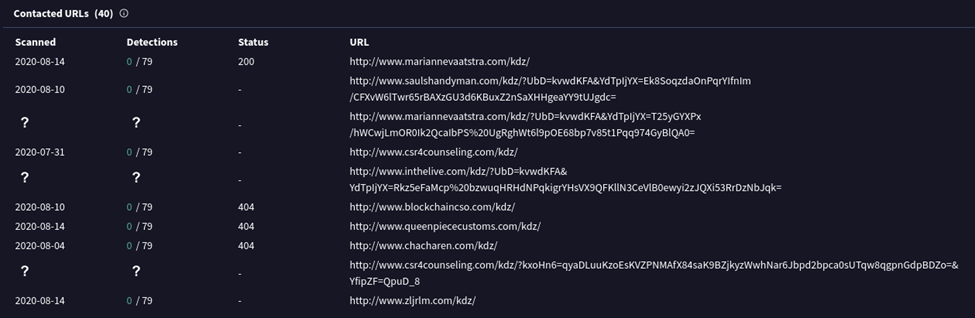
VirusTotal “Relations” tab showing contacted URLs
Indicators of Compromise (IOCs)
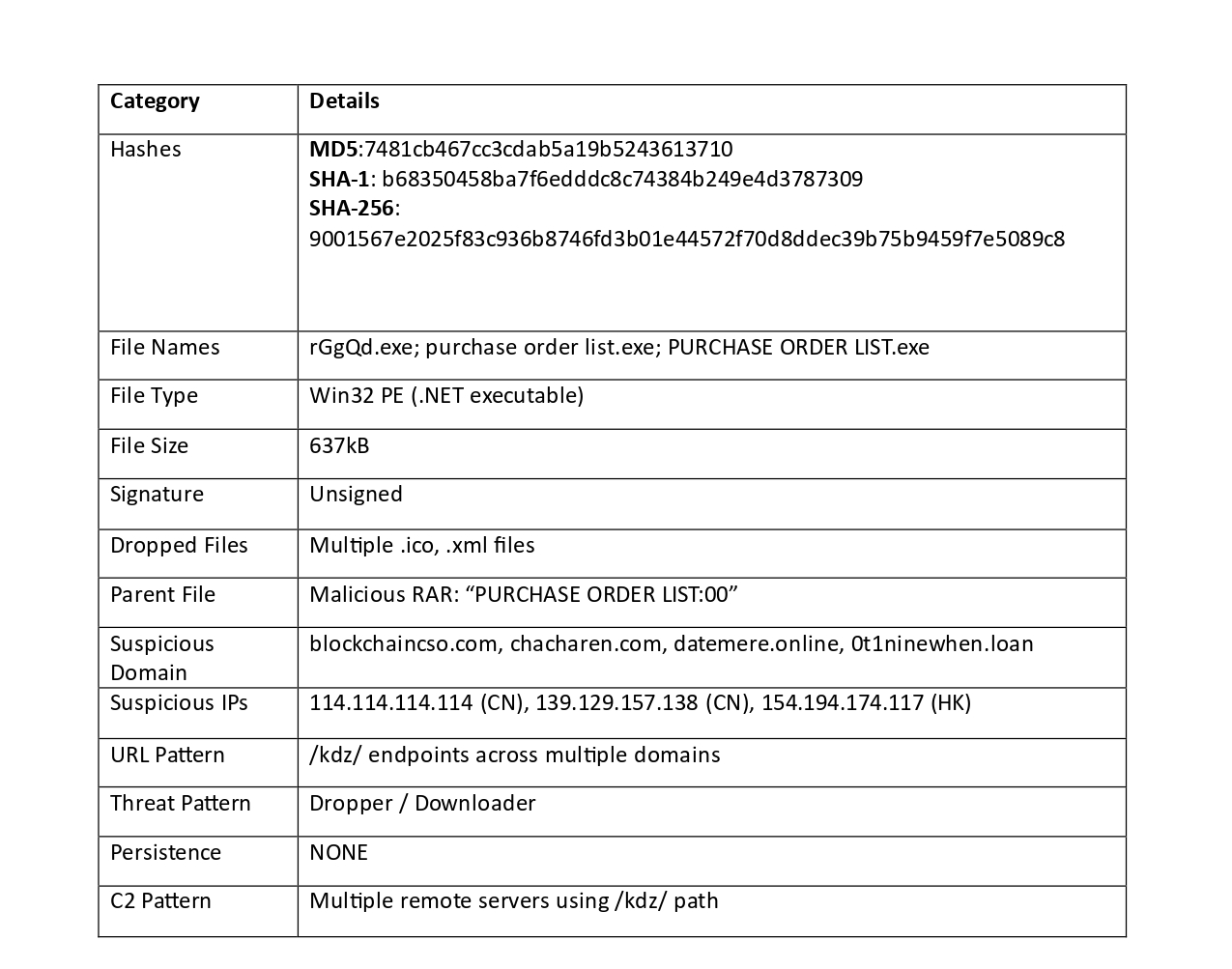
Mitre Att&ck Techniques
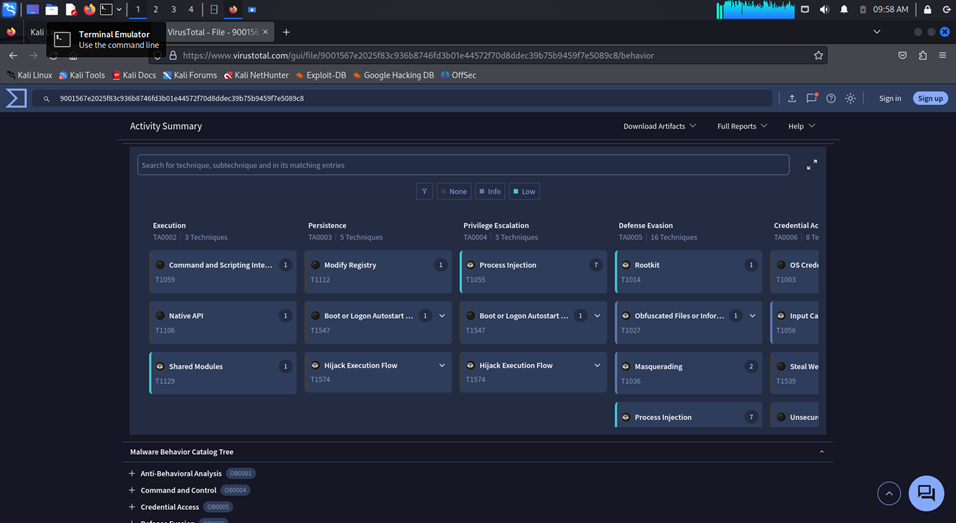
Stage 1: Execution
The malware started by running its code discreetly. It used low-level Windows system called Native API (T1106) and hid within legitimate system processes using Shared Modules (T1129) to avoid raising initial alarms.
Stage 2: Privilege Escalation
To gain higher system access, the malware injected its code into trusted, already-running processes using Process Injection (T1055). This allowed it to operate with administrative rights, which are needed to access protected system areas.
Stage 3: Defense Evasion
The malware actively worked to stay hidden. It checked if it was being run inside a security researcher’s virtual machine or sandbox with Virtualization/Sandbox Evasion (T1497), and would stop if detected. It also used Reflective Code Loading (T1620) to run directly from memory and avoid leaving files on disk, and attempted to disable security tools via Impair Defenses (T1562).
Stage 4: Discovery
Before stealing data, the malware explored the system. It gathered computer details with System Information Discovery (T1082), listed all running programs with Process Discovery (T1057), and scanned files and folders with File and Directory Discovery (T1083) to understand what information was available.
Stage 5: Credential Access
The malware then focused on stealing login information. It extracted password hashes from system memory using OS Credential Dumping (T1003) and searched for unprotected passwords or keys with Unsecured Credentials (T1552) stored in files and settings.
Stage 6: Collection
After obtaining credentials, it collected additional valuable data from the local drives using Data from Local System (T1005), including documents and email files via Email Collection (T1114), preparing everything for theft.
Stage 7: Command & Control
Finally, the malware communicated with the attacker’s server using normal-looking web traffic with Application Layer Protocol (T1071), sending the stolen data over an Encrypted Channel (T1573) to avoid detection during transmission.
Threat intelligence is a foundational element of modern cybersecurity. It enables organizations to stay ahead of attackers rather than merely reacting to threats as they happen. Here are some key reasons it’s indispensable for security teams:
- Enhanced Security Training and Awareness: Intelligence provides real-world examples of attacker behavior that can be used to train staff. Teams learn to recognize phishing trends, malware campaigns, and social engineering tactics based on current threat activity.
- Proactive Defense: Threat intelligence provides early insights into emerging attack techniques, malware, and actively exploited vulnerabilities. This allows teams to apply patches, adjust security controls, and block malicious indicators before an incident occurs.
- Supply Chain and Third-Party Risk Awareness: Threat intelligence helps organizations monitor risks coming from partners, vendors, or external services. It highlights compromised suppliers, malicious domains, or breaches that could indirectly affect the organization.
- Accelerated Incident Response: When alerts are triggered, intelligence adds valuable context — identifying potential threat actors, their motives, and their known tactics. This helps analysts prioritize cases, determine the scope of an attack, and respond more efficiently.
- Enhanced Security Tools: Integrating threat intelligence with SIEM, EDR, firewalls, and other security solutions sharpens detection capabilities, decreases false positives, and ensures defenses remain aligned with real-world threat activity.
- Improved Threat Hunting: With high-quality intelligence, hunters can look for specific attacker behaviors, indicators, and patterns inside the network. This shifts hunting from guesswork to focused, data-driven investigations.
In summary, threat intelligence turns raw data into actionable knowledge — enabling smarter defense, faster response, stronger collaboration, and more informed long-term security decisions.
Project Concieved by Ezechi Jeremiah Chigozie
메타데이터
- post_id
- 6a2e8d131ab1
- slug
- what-one-malware-hash-revealed-a-full-threat-intelligence-breakdown-6a2e8d131ab1
- url
- https://medium.com/@AishaBB/what-one-malware-hash-revealed-a-full-threat-intelligence-breakdown-6a2e8d131ab1
- canonical_url
- https://medium.com/@AishaBB/what-one-malware-hash-revealed-a-full-threat-intelligence-breakdown-6a2e8d131ab1
- author_url
- https://medium.com/@AishaBB
- status
- ok
- fetched_at
- 2026-06-23 17:05:31