Optimizing react-native-calendars : A Guide to Smooth Scrolling Without Blank Spaces
When building the flight booking feature for Super.money, we needed a calendar component that could handle complex custom day cells…
Optimizing react-native-calendars : A Guide to Smooth Scrolling Without Blank Spaces
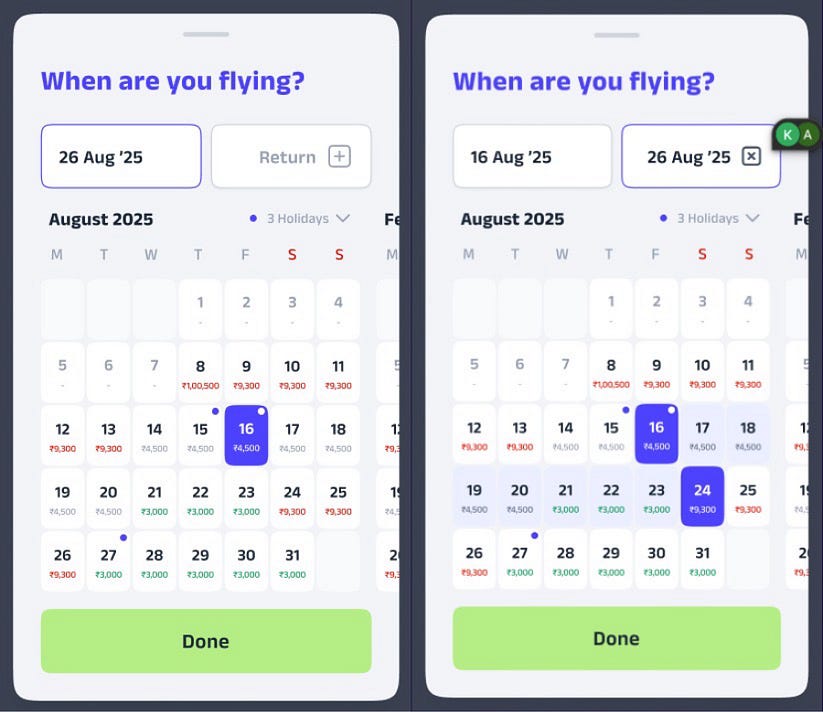
For Super.money’s flight booking feature, we had to build a calendar that could handle complex, data-rich day cells showing flight prices, selection states and holiday lists. We chose **react-native-calendars** — the most widely recommended library in the ecosystem — which gave us all the flexibility needed for our custom UX. However, it also introduced a critical performance challenge we had to solve.
The Performance Challenge
After implementing our custom UI components and conducting thorough testing on mobile devices, we encountered significant performance issues during scroll — specifically laggy animations and intermittent blank spaces where calendar grids should render. These problems were particularly pronounced on Android devices and became more noticeable with our complex day components.

Before Optimization
Upon investigating these issues, we discovered that similar performance problems had been reported by other developers in the community, with multiple GitHub issues and Stack Overflow discussions highlighting the same scroll performance bottlenecks with the CalendarList component.
The Decision to Optimize Rather Than Replace
After identifying the performance bottlenecks, I conducted a comprehensive evaluation of alternative calendar libraries. My analysis revealed that most alternatives either lacked the flexibility required for our custom day component requirements, exhibited similar underlying performance limitations, or showed concerning signs of reduced maintenance activity and community support.
Rather than starting over with a different library or building a custom solution from scratch — which would have required significant development time and introduced new risks — I decided to investigate the root cause of these performance issues and optimize the existing implementation.
By analyzing the underlying CalendarList implementation, I identified that the component relies on React Native’s standard FlatList for virtualization, which has inherent limitations when rendering complex, custom day components at scale.
import { CalendarList } from 'react-native-calendars';

<CalendarList
  horizontal
  pagingEnabled
  // ... other props
/>
The Solution: Replacing CalendarList with FlashList
The most impactful change was rebuilding the list using **@shopify/flash-list**. This wasn’t just swapping one component for another; it was a fundamental upgrade in how the list was virtualized.
There are two key reasons this was so effective:
- Superior Virtualization with View Recycling: While FlatList unmounts components that scroll off-screen, FlashList goes a step further by recycling them. It reuses the underlying native views for new items scrolling into view. This prevents memory churn and reduces the work the UI thread has to do, which is a major cause of stuttering during fast scrolls. It’s simply a more advanced virtualization engine.
- Fine-Tuned Performance Props: By using FlashList directly, we unlocked a suite of powerful performance props that the *CalendarList* component doesn’t expose. This allowed for much deeper optimization.
- estimatedItemSize & estimatedListSize : This is crucial. Giving FlashList a size hint for each month helps it calculate the layout without having to render the item first.
- drawDistance: This prop determines how far beyond the visible screen area FlashList should render items. Think of it as creating a “buffer zone” of ready-to-display content. When a user scrolls quickly, the next items are already rendered and waiting, leading to a much smoother experience. The Trade-off: There’s a balance to strike here. A larger drawDistance makes scrolling feel more responsive but increases the amount of work done upfront, which can slightly delay the initial render of the list. It’s a matter of tuning this value to prioritize either initial load speed or fast-scroll performance.
- disableHorizontalListHeightMeasurement: A specific optimization for horizontal lists that prevents extra, unnecessary measurement passes. This is safe to use when your list has a fixed, predetermined height (like our calendar), as it tells FlashList to skip its default behaviour of rendering an extra item just to calculate the list’s height.
- decelerationRate: This prop fine-tunes the “friction” of the scroll. By setting a lower value (0.89 in this case), the list stops more quickly, which creates a crisper and more decisive snapping effect when paired with snapToInterval
import { FlashList } from '@shopify/flash-list';

<FlashList
        data={allCalendarMonths}
        renderItem={renderCalendarItem}
        keyExtractor={keyExtractor}
        horizontal
        estimatedItemSize={calendarWidth}
        estimatedListSize={{
          width: calendarWidth,
          height: calendarHeight,
        }}
        drawDistance={2 * calendarWidth} // Pre-render 2 calendar months ahead
        disableHorizontalListHeightMeasurement
        snapToInterval={calendarWidth}
      />
This was the real performance game-changer in terms of faster scroll with seamless Calendar UI without blanks.

After optimization
Problem 2: Delayed Click interaction for Date Selection
After fixing the scroll, noticed another issue: tapping a date felt sluggish. There was a noticeable delay between my touch and the selection circle actually appearing on screen. This is a classic sign that React’s JavaScript (JS) thread was too busy doing unnecessary work to respond to the user’s touch immediately.
The root cause was a chain reaction. When a date was selected, the component’s state would update, creating a brand new markedDates object. This new object was passed as a prop to the current month’s calendar component. Because the prop was a new object, React would re-render the entire month. By default, this meant it would also try to re-render all 30+ day cells inside that month, even though only one or two had actually changed.
The Fix — 1 : Stopping Wasted Renders with React.memo
A common performance killer in React is unnecessary re-renders. Our old dayComponent was an inline function, which meant every visible day cell would re-render every time the calendar’s state updated — even if that specific day hadn’t changed.
Fixed this by extracting the day cell into its own component and wrapping it in React.memo. This tells React: “Don’t re-render this unless its props have actually changed.”
I created a StableDateCell and gave it a custom check to decide if it really needs to re-render.
const StableDateCell = memo(
  // The component logic...
  (props) => <DateCellComponent {...props} />,

  // Custom comparison: only re-render if the background
  // (selection state) or date string changes.
  (prevProps, nextProps) => {
    const prevBg = prevProps.marking?.customStyles?.container?.backgroundColor;
    const nextBg = nextProps.marking?.customStyles?.container?.backgroundColor;

    if (prevBg !== nextBg) return false; // Background changed, so re-render.
    return true; // Otherwise, don't!
  },
);
The Fix — 2: Stabilizing Props with useCallback and useMemo
Using React.memo is only effective if the props you pass to it are stable. To complete the optimization, used two other essential hooks:
- useCallback: This hook prevents functions from being recreated on every render. I wrapped all functions being passed as props, like renderItem and onDaySelect, in useCallback. This ensures that child components don’t receive a “new” function every time, which would needlessly break the memo optimization.
// Stabilizing the renderItem function with useCallback
const renderCalendarItem = useCallback(
  ({ item }) => {
    return (
      <View style={styles.calendarItemContainer}>
        <MonthCalendar
          monthData={item}
          markings={updatedMarkedDates}
          onDayPress={onDaySelect}
          // ... other props
        />
      </View>
    );
  },
  // This function is only recreated if one of these dependencies changes.
  [updatedMarkedDates, onDaySelect, renderDay],
);- useMemo: This hook does the same thing as useCallback, but for values instead of functions. For example, the list of all calendar months was being generated by a function. By wrapping it in useMemo, I ensured this calculation runs only once, instead of on every single render. The result is “memoized” (remembered), preventing unnecessary work.
// Calculating the list of months only once with useMemo
const allCalendarMonths = useMemo(
  // This function runs just one time.
  () => generateCalendarMonths(13),

  // The empty array [] means it has no dependencies and never needs to re-run.
  [],
);
Conclusion: From Performance Bottleneck to Fluid Experience
Optimizing performance in React Native applications can present significant challenges, but as demonstrated in this case study, strategic, targeted changes can transform a frustrating user experience into a fluid and responsive one.
What began as a slow, janky calendar with delayed touch feedback evolved into a high-performance component by addressing the problem from two complementary optimization angles:
Macro-Optimization: Addressed the primary bottleneck by replacing the standard FlatList-based calendar implementation with the far more efficient @shopify/flash-list. This architectural change alone eliminated blank screens and sluggish scrolling by fundamentally improving how the list was virtualized and rendered.
Micro-Optimization: Then fine-tuned the component’s render performance by implementing React.memo to interaction delays. I supported this optimization by stabilizing props with useCallback and useMemo, ensuring that the performance improvements could work as intended.
The key takeaway is that exceptional performance is rarely the result of a single “magic bullet.” It’s the combination of choosing the right high-level architecture (FlashList) and applying disciplined, component-level best practices (memo, useCallback, useMemo) that yields a truly polished and professional result.
Bonus Learning: Navigating an Unexpected Calendar Anomaly with Javascript Date
During development, we encountered a bizarre bug: on certain days of the month (like August 31st), the calendar would mysteriously skip months. For example, September and November would disappear entirely, and the calendar would show two Octobers and two Decembers instead.
The root cause was a classic JavaScript Date object gotcha. Our generateCalendarMonths function worked by looping and incrementing the month number, like this:
// The buggy logic
const date = new Date(); // On August 31st, this is the starting point
date.setMonth(date.getMonth() + 1);
When the starting date was the 31st, JavaScript’s setMonth behavior became problematic. Since September only has 30 days, “September 31st” doesn’t exist. Instead of throwing an error, JavaScript helpfully rolls the date over to the next available day: October 1st. This seemingly minor detail completely broke our month generation logic.
The Fix: Always Start from a Stable Day
The solution was remarkably simple but crucial. By setting the date to the 1st of the month before starting our loop, we ensured that month transitions would always be calculated from a stable, predictable baseline that exists in every month.
// The correct logic
const date = new Date();
date.setDate(1); // The key fix! Now we are on August 1st.
date.setMonth(date.getMonth() + 1); // This now correctly becomes September 1st.
The key takeaway here is a reminder of how carefully we must handle date manipulations in programming. Always normalize your dates to a known-safe value (like the 1st of the month) before performing arithmetic on them and add robust unit test cases to avoid unexpected and hard-to-debug edge cases.
메타데이터
- post_id
- 6a5d47dcdf48
- slug
- optimizing-react-native-calendars-a-guide-to-smooth-scrolling-without-blank-spaces-6a5d47dcdf48
- url
- https://medium.com/super-tech/optimizing-react-native-calendars-a-guide-to-smooth-scrolling-without-blank-spaces-6a5d47dcdf48
- canonical_url
- https://medium.com/super-tech/optimizing-react-native-calendars-a-guide-to-smooth-scrolling-without-blank-spaces-6a5d47dcdf48
- author_url
- https://medium.com/@afrinsulthana
- status
- ok
- fetched_at
- 2026-06-11 05:11:55