Beyond Image Scanning: Building a Trusted Container Supply Chain on AWS with SBOMs and Signing
Every container image carries an implicit trust boundary. A single FROM statement can pull in hundreds of OS packages, language runtimes…
Beyond Image Scanning: Building a Trusted Container Supply Chain on AWS with SBOMs and Signing
Every container image carries an implicit trust boundary. A single FROM statement can pull in hundreds of OS packages, language runtimes, shared libraries, and transitive dependencies — and your CI/CD pipeline treats every one of them as authentic by default. Most of the time that assumption holds. Until it doesn't: a compromised upstream base image, a poisoned package in a transitive dependency, an unauthorized image swapped into a registry between build and deploy. None of these trip a build failure. They ship clean.
The real problem isn’t preventing every possible compromise upstream — that’s not a solvable problem at the base image layer. It’s being able to answer two questions with cryptographic certainty rather than assumption: what, precisely, did your pipeline build, and is the image running in production actually that artifact, unmodified?
Two capabilities answer those questions, and any platform engineering team running containers in production should have both:
- SBOMs — a machine-readable, queryable inventory of every package and version inside an image, generated at build time
- Cryptographic signing — a provenance guarantee, cryptographically binding an image to the pipeline that built it, verifiable at every hop from registry to runtime
Together they turn a container image from an opaque binary blob into an auditable, verifiable artifact — something you can interrogate (“does this contain log4j 2.14”) and something you can trust (“this is provably what CI produced,” not “this is probably what CI produced”).
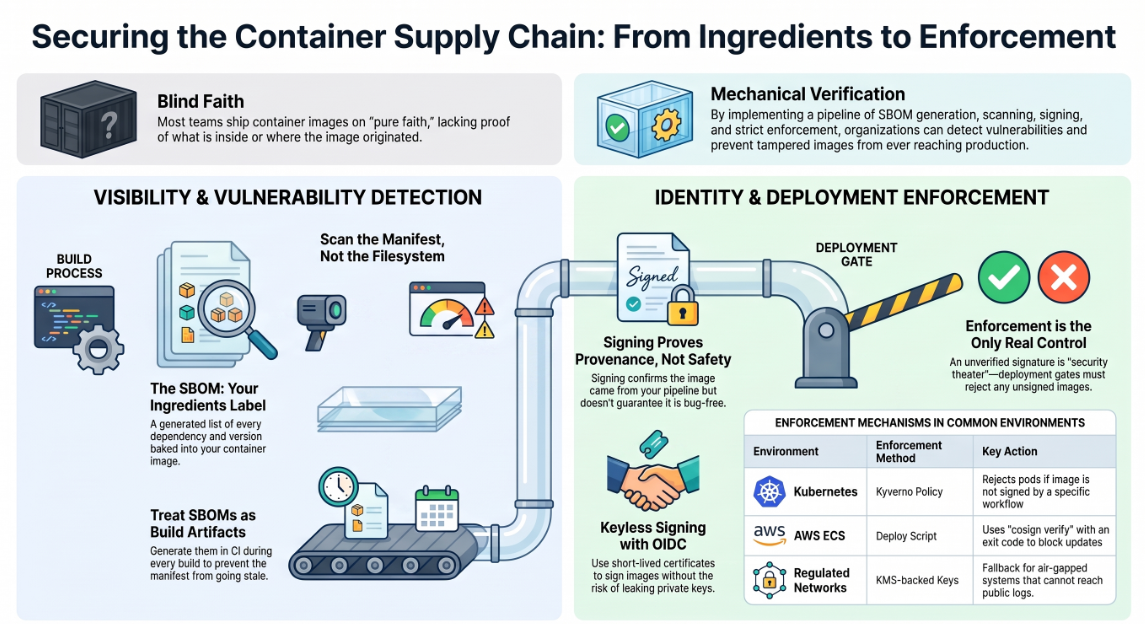
This article implements both, entirely on AWS — CodePipeline, CodeBuild, Amazon ECR, and AWS KMS — building a pipeline that generates an SBOM on every build, signs the resulting image with a KMS-backed key, and enforces that signature at deploy time, so an unsigned or tampered image is structurally incapable of reaching production rather than merely discouraged from it.
First, what an SBOM actually is
Before the config, a plain-language detour, because this term gets thrown around a lot and explained poorly just as often.
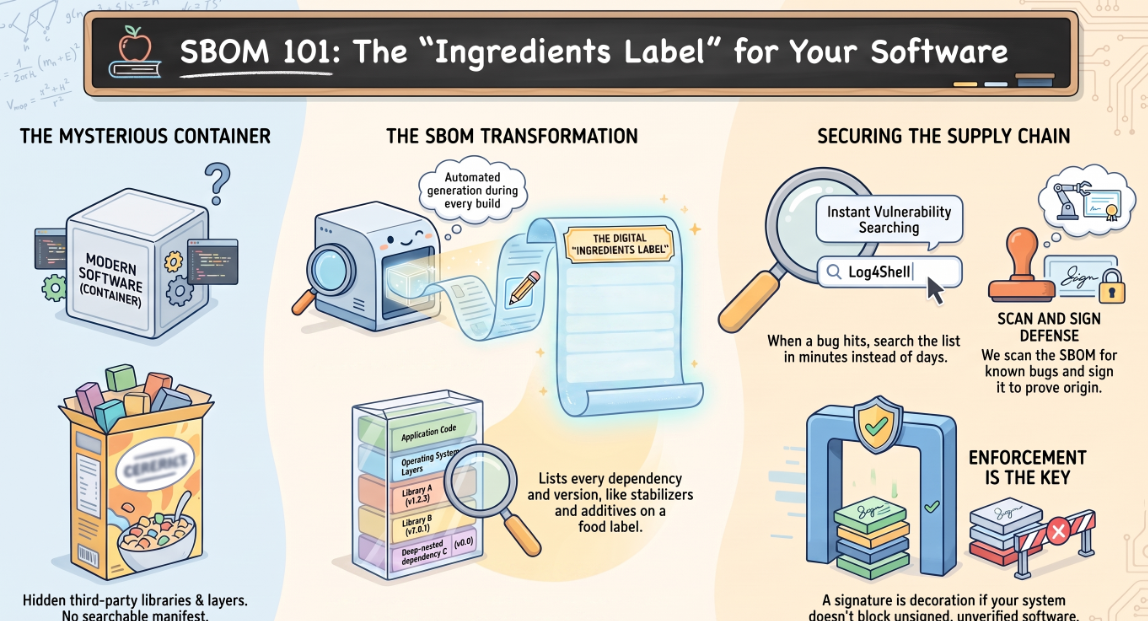
Think of a packaged food product. By law, it carries an ingredients label — not just “contains wheat,” but every ingredient, in order, including the ones buried three layers deep (the stabilizer inside the chocolate chip inside the cookie). If there’s ever a recall because one ingredient turns out to be contaminated, that label is what lets you check your pantry in thirty seconds instead of guessing.
A Software Bill of Materials, or SBOM, is that ingredients label for a container image. A typical image isn’t just your application code — it’s your code plus an operating system layer plus dozens or hundreds of open-source libraries, each pulling in its own dependencies. Nobody writes all of that down by hand, and nobody has it memorized. An SBOM is simply a generated list of every one of those pieces and their exact versions, sitting in a file.
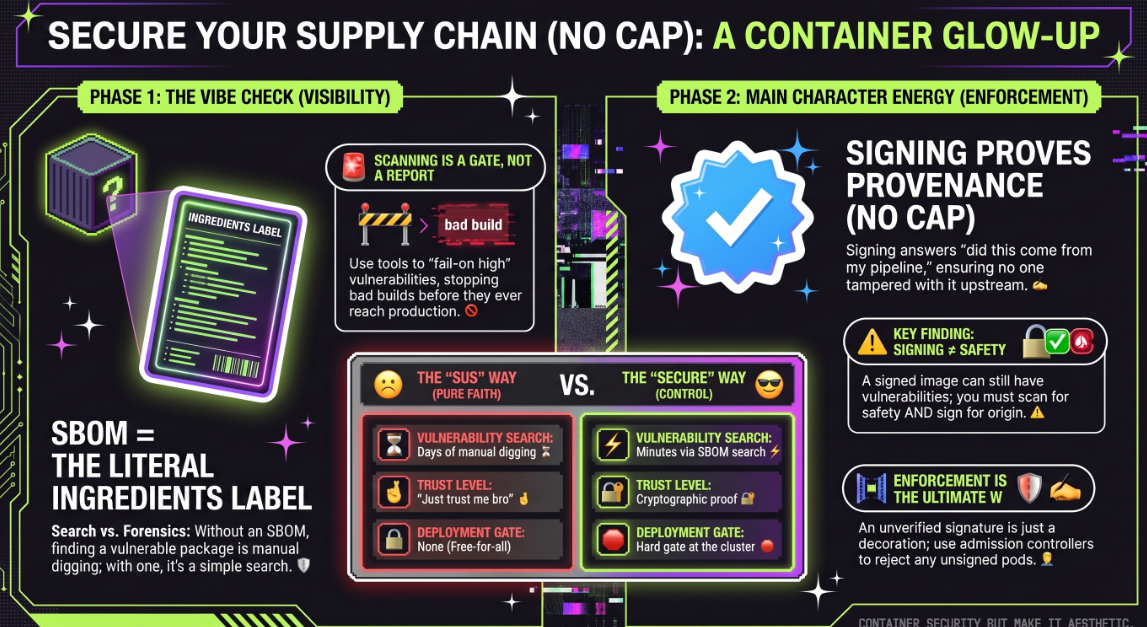
The whole reason it matters comes down to one situation: a critical vulnerability gets announced in some widely used library — Log4Shell is the famous example — and someone asks “are we affected, and where?” Without an SBOM, that’s a person manually digging through image layers, one service at a time, hoping they don’t miss one. With an SBOM generated for every image, it’s a search: does this list contain that library, at that version? Minutes instead of days, and nothing missed because someone got tired on service 38 of 50.
That’s the whole idea. Not exotic, not complicated — an automatically generated ingredients list for your software, that you can actually search when something goes wrong.
Step 1: Know what’s actually in the image
You can’t answer “do we have the vulnerable package” if you don’t have a manifest of every dependency baked into the image. Generate it with Syft, not by hand, not after the fact:
curl -sSfL https://raw.githubusercontent.com/anchore/syft/main/install.sh | sh -s -- -b /usr/local/binsyft packages docker:myapp:latest -o spdx-json > sbom.spdx.jsonThe mistake almost everyone makes here: generating the SBOM once, dropping it in a folder, and letting it go stale the next time the Dockerfile changes. Treat it as a build artifact, not documentation — generate it every build, tied to the exact image it describes. If your SBOM and your image can drift apart, you don’t have a supply chain control, you have a file nobody reads.
Here’s what actually lands in sbom.spdx.json — trimmed down to one package entry so you can see the shape of it:
{
  "spdxVersion": "SPDX-2.3",
  "name": "myapp",
  "packages": [
    {
      "name": "log4j-core",
      "SPDXID": "SPDXRef-Package-log4j-core",
      "versionInfo": "2.17.1",
      "downloadLocation": "https://repo1.maven.org/maven2/org/apache/logging/log4j/log4j-core",
      "licenseConcluded": "Apache-2.0",
      "externalRefs": [
        {
          "referenceCategory": "PACKAGE-MANAGER",
          "referenceType": "purl",
          "referenceLocator": "pkg:maven/org.apache.logging.log4j/log4j-core@2.17.1"
        }
      ]
    }
  ]
}
A real one has a packages array with one of these entries per dependency — anywhere from a few dozen to a few thousand, depending on the image. That purl (package URL) field is the part that makes it searchable — it's a standardized identifier, so "do we have log4j-core below 2.17" is a query against that field, not a fuzzy text search across a pile of files. This is also exactly what grype sbom:sbom.spdx.json reads in step 2 — it walks this same packages array and checks each purl/version pair against its vulnerability database.
Step 2: Scan the SBOM, not the filesystem
Once you have a manifest, scanning it for known CVEs is fast and consistent — Grype reads the SBOM directly instead of re-crawling the image layers:
curl -sSfL https://raw.githubusercontent.com/anchore/grype/main/install.sh | sh -s -- -b /usr/local/bingrype sbom:sbom.spdx.json --fail-on high--fail-on high is the part that matters. Without it, this is a report. With it, this is a gate that can actually stop a bad build from shipping.
Step 3: Prove the image came from your pipeline, using AWS KMS
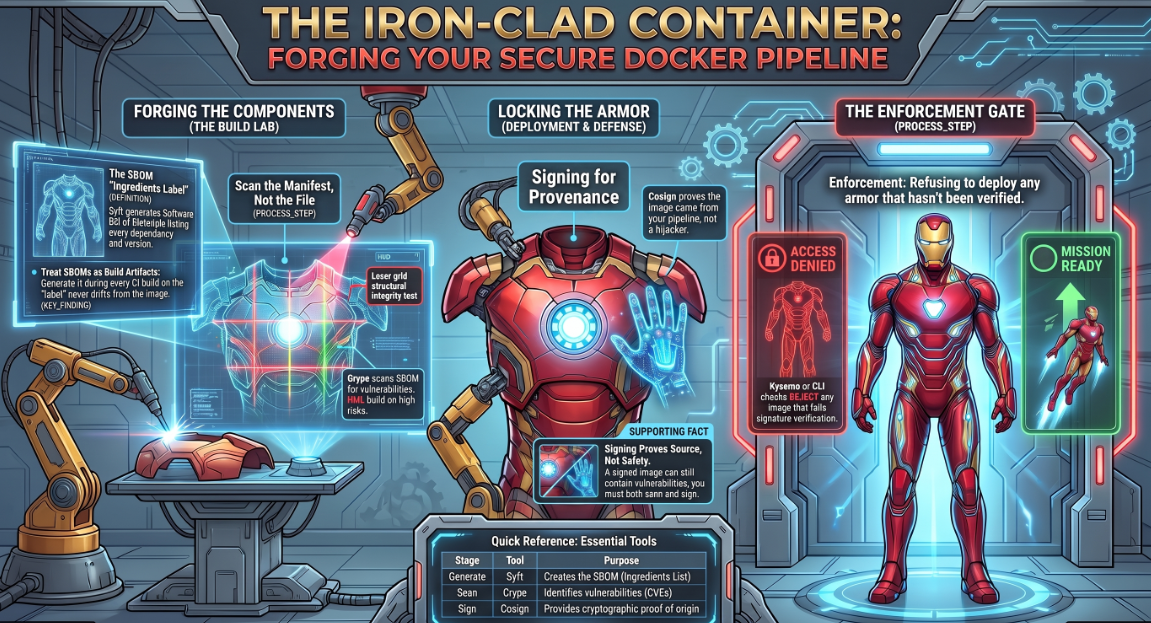
An SBOM tells you what’s inside. It says nothing about whether the image was tampered with after your pipeline built it, or whether it even came from your pipeline at all. That’s what signing is for.
cosign supports keyless signing through public OIDC issuers, but that path depends on reaching Sigstore’s public Fulcio and Rekor endpoints, which doesn’t sit comfortably in an AWS environment with tight egress controls or a compliance requirement to keep signing material inside your own account boundary. The AWS-native alternative is a KMS-backed key: cosign signs using a key that never leaves KMS, the private material is never exported, and every signing operation is an API call AWS CloudTrail logs like anything else in your account.
Create the key once:
aws kms create-key --description "cosign image signing key" \
  --key-usage SIGN_VERIFY \
  --key-spec ECC_NIST_P256
aws kms create-alias --alias-name alias/cosign-signing-key \
--target-key-id <key-id-from-above>Then sign and attest against it:
cosign sign --key awskms:///alias/cosign-signing-key myregistry/myapp:latestcosign attest --key awskms:///alias/cosign-signing-key \
--predicate sbom.spdx.json \
--type spdxjson \
myregistry/myapp:latestSay this part plainly, because a lot of write-ups gloss over it: signing proves provenance, not safety. A signed image can still have a critical CVE sitting in it. Signing answers “did this come from where I claim it came from” — it does not answer “is this safe to run.” You need both step 2 and step 3. Neither one substitutes for the other.
Step 4: The full pipeline, on CodePipeline and CodeBuild
Here’s all three steps wired into an AWS-native pipeline. The source stage can be CodeCommit or a CodeStar Connection to your Git provider — the build stage is what matters, and it’s a standard CodeBuild project with a buildspec.yml that does the actual work:
version: 0.2
env:
  variables:
    IMAGE_REPO: myapp
    KMS_KEY_ALIAS: alias/cosign-signing-key
phases:
  install:
    commands:
      - curl -sSfL https://raw.githubusercontent.com/anchore/syft/main/install.sh | sh -s -- -b /usr/local/bin
      - curl -sSfL https://raw.githubusercontent.com/anchore/grype/main/install.sh | sh -s -- -b /usr/local/bin
      - curl -O -L https://github.com/sigstore/cosign/releases/latest/download/cosign-linux-amd64
      - mv cosign-linux-amd64 /usr/local/bin/cosign && chmod +x /usr/local/bin/cosign
  pre_build:
    commands:
      - aws ecr get-login-password --region $AWS_DEFAULT_REGION | docker login --username AWS --password-stdin $AWS_ACCOUNT_ID.dkr.ecr.$AWS_DEFAULT_REGION.amazonaws.com
      - IMAGE_URI=$AWS_ACCOUNT_ID.dkr.ecr.$AWS_DEFAULT_REGION.amazonaws.com/$IMAGE_REPO:$CODEBUILD_RESOLVED_SOURCE_VERSION
  build:
    commands:
      - docker build -t $IMAGE_URI .
  post_build:
    commands:
      - syft packages docker:$IMAGE_URI -o spdx-json > sbom.spdx.json
      - grype sbom:sbom.spdx.json --fail-on high
      - docker push $IMAGE_URI
      - cosign sign --key awskms:///$KMS_KEY_ALIAS --yes $IMAGE_URI
      - cosign attest --key awskms:///$KMS_KEY_ALIAS --predicate sbom.spdx.json --type spdxjson --yes $IMAGE_URI
artifacts:
  files:
    - sbom.spdx.json
Two things that matter when you set this up:
- The CodeBuild service role needs
kms:Signandkms:GetPublicKeyon that key, plus the usualecr:GetAuthorizationToken,ecr:BatchCheckLayerAvailability,ecr:PutImage, andecr:InitiateLayerUpload/ecr:UploadLayerPart/ecr:CompleteLayerUploadfor the push. Missing the KMS permissions is the single most common way this pipeline fails on first run, and the error from cosign doesn't always make that obvious. - Wire this CodeBuild project as a stage in CodePipeline, triggered off your source stage, and it becomes the same build → SBOM → scan → sign → push flow, just running entirely inside your AWS account instead of depending on a third-party OIDC issuer.
Step 5: Actually enforce it — an unverified signature is a decoration
This is the step almost every other guide on this topic skips, and it’s the one that actually matters. Signing an image is worthless as a control if anything can still deploy an unsigned one. You need a gate at the point of deployment.
On EKS, with Kyverno, export the KMS key’s public portion once and use it in the policy — verification here doesn’t need to call KMS at all, since it’s checking a signature against a public key, not signing anything:
cosign public-key --key awskms:///alias/cosign-signing-key > cosign.pubapiVersion: kyverno.io/v1
kind: ClusterPolicy
metadata:
name: verify-image-signatures
spec:
validationFailureAction: Enforce
rules:
- name: check-signature
match:
any:
- resources:
kinds: ["Pod"]
verifyImages:
- imageReferences:
- "*.dkr.ecr.*.amazonaws.com/myapp:*"
attestors:
- entries:
- keys:
publicKeys: |-
-----BEGIN PUBLIC KEY-----
<contents of cosign.pub>
-----END PUBLIC KEY-----Pinning to your specific public key is what stops this from being theater. Without it, you’re just checking “is there some valid signature,” which doesn’t mean much on its own. With a specific key pinned, only images signed by your actual pipeline’s KMS key pass — nothing else does, regardless of how valid the signature format looks.
On ECS, there’s no admission controller, so the gate moves into the deploy script itself — verify before the service update goes out, not after:
cosign verify --key awskms:///alias/cosign-signing-key \
  $IMAGE_URI || exit 1
aws ecs update-service --cluster prod --service myapp --force-new-deploymentThat || exit 1 is not optional. Skip it and you've built a very elaborate signing pipeline that produces signatures nobody checks — which is functionally identical to not signing at all.
Where this actually gets harder
Worth knowing these before you roll it out, because they’re the parts that trip teams up mid-rollout, not at design time:
- KMS key policy and cross-account setups. If your build and deploy stages run in different AWS accounts (common in a proper CI/CD account-separation setup), the KMS key policy needs to explicitly grant
kms:Signto the build account's role and, separately, nothing to the deploy account — verification only needs the public key, never KMS access. Getting that split wrong either breaks signing or hands a deploy-side role signing capability it should never have. - Build time. Scan, sign, and attest stages add real minutes to every build, not hypothetical ones. Decide deliberately whether you’re gating every merge or only gating deploys — gating every merge catches problems earlier but slows down every PR, including the ones that were never going anywhere near production.
- KMS API throttling at scale. Each sign and attest call is a KMS API request, and a fleet doing hundreds of builds a day can start hitting default request-rate quotas. It’s a quota increase request away from being a non-issue, but it’s the kind of thing that only shows up once you’re past the pilot and nobody budgeted for it.
The shape of it, end to end
┌────────┐    ┌────────────┐    ┌────────┐    ┌────────┐    ┌───────────────┐
│ Build  │───▶│ Scan (SBOM)│───▶│  Sign  │───▶│  Push  │───▶│ Verify-on-deploy│
│ image  │    │   Grype    │    │ cosign +│   │  ECR   │    │ Kyverno / ECS gate│
│CodeBuild│   │            │    │  KMS   │    │        │    │                 │
└────────┘    └────────────┘    └────────┘    └────────┘    └───────────────┘
Each of these five stages is independently useful, but none of them is a control on its own — an SBOM nobody queries, a signature nobody verifies, a scan that doesn’t gate anything, these are all checkboxes, not defenses. The value only shows up when all five are wired together and step 5 can actually block a deploy.
Go back to the opening scenario: a tampered base image, silently baked into every downstream build, discovered weeks later during an incident. Ask what would have stopped it. Not “we have a security policy.” Not “we scan our images sometimes.” What stops it is specific and mechanical — an SBOM that lets you answer “where is this” in minutes, and a signature verification step that refuses to deploy anything that didn’t come out of your own pipeline. Everything above is that answer, written as config instead of a policy document, running entirely inside AWS.
If you take one thing from this and skip the rest, take step 5. Signing without enforcement is a habit. Signing with an admission gate or a cosign verify || exit 1 in your deploy script is a control. Those are not the same thing, and only one of them would have caught the image before it shipped.
About the Author
I’m Ashish Kasaudhan, a DevOps and platform Architect working across infrastructure automation, cloud architecture, and enterprise container platforms. I write about the mechanics behind AWS and DevOps tooling — what actually changed, not just the marketing summary.
If this was useful, I’d appreciate a connect on LinkedIn: linkedin.com/in/ashish-kasaudhan-713a4225
And if you’re reading this on Medium — a clap (or a few) helps this reach more cloud and DevOps community.
메타데이터
- post_id
- 6aeca3a9a61b
- slug
- beyond-image-scanning-building-a-trusted-container-supply-chain-on-aws-with-sboms-and-signing-6aeca3a9a61b
- url
- https://blog.devops.dev/beyond-image-scanning-building-a-trusted-container-supply-chain-on-aws-with-sboms-and-signing-6aeca3a9a61b
- canonical_url
- https://blog.devops.dev/beyond-image-scanning-building-a-trusted-container-supply-chain-on-aws-with-sboms-and-signing-6aeca3a9a61b
- author_url
- https://medium.com/@ashishkasaudhan
- status
- ok
- fetched_at
- 2026-07-17 20:05:51