Ansible Playbooks Are Powerful — But Writing Them Is Tedious. Here’s a Better Way
I manage infrastructure across 50+ servers. Every week, I’m writing Ansible playbooks for something new: deploying applications…
Ansible Playbooks Are Powerful — But Writing Them Is Tedious. Here’s a Better Way
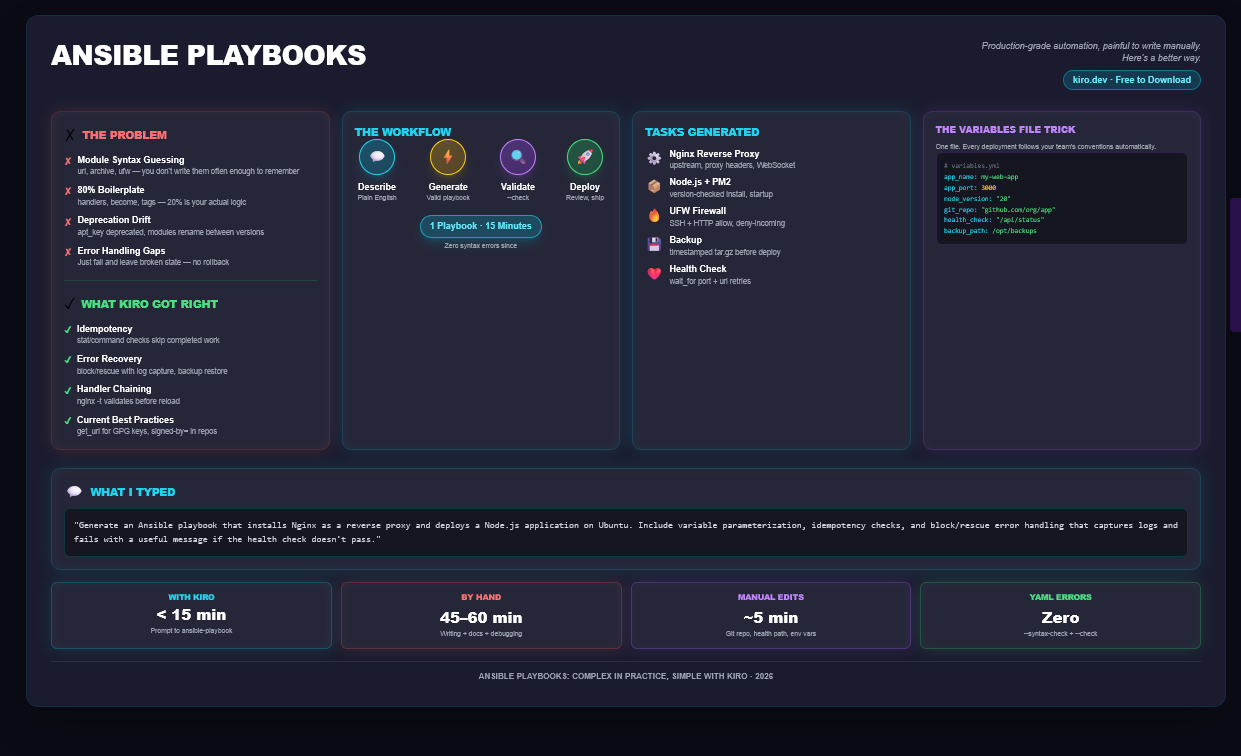
Ansible Playbook using Kiro
I manage infrastructure across 50+ servers. Every week, I’m writing Ansible playbooks for something new: deploying applications, configuring web servers, managing user accounts, patching systems. They all look the same — until they don’t, and a missing handler or a typo in a task name breaks the entire run.
Last month, I spent two hours debugging why a deployment playbook kept failing. The error? I’d misspelled notify as notfy in a handler trigger. The playbook ran without error for five tasks, then silently skipped the notification. By the time I figured it out, the application was in a broken state on three production servers.
That was the day I stopped writing Ansible playbooks by hand. The Problem With Ansible YAML It’s not that Ansible is hard. It’s that playbooks are verbose and fragile: •Task syntax varies by module. The copy module expects src and dest. The template module expects src and dest too — but the semantics are different. The shell module doesn’t care about your schema at all. You have to remember which module takes which arguments or spend your day in the Ansible docs. • Idempotency is not automatic. Write a shell task to “ensure nginx is installed” and it’ll run apt-get install nginx every single time, even if nginx is already there. Add apt module instead and it’s idempotent. But the docs don’t shout this from the rooftop, and I’ve seen junior engineers burn hours debugging “why did this task run twice?” • Error handling is optional — until it shouldn’t be. A task fails? The playbook stops. No retry logic, no graceful degradation, no custom error messages. You can add ignore_errors, failed_when, changed_when — but these are afterthoughts. Most playbooks don’t have them, and then production breaks. • Variable management is scattered. Hardcoded values everywhere. Port numbers. File paths. User IDs. App versions. You copy a playbook from another project, and now you’re hunting for 20 different places to change the port number from 8080 to 9090. • Repetition is built in. Every playbook has the same boilerplate: gathering facts, setting up logging, defining handlers, error tasks. You write it over and over. And every time you forget a gather_facts: no or miss a handler, something breaks. I’ve tried playbook templates. I’ve tried Ansible roles. I’ve even tried Ansible Tower. They all work — until they don’t, because the module API changed or you forgot to add a register variable before using it in a condition. What I Do Now I describe what I want in plain English. Kiro generates the playbook. Here’s a real example. I typed:
Generate an Ansible playbook that configures an Nginx web server as a reverse proxy and deploys a Node.js application on Ubuntu-based hostsThat’s it. One paragraph. No task syntax anxiety, no wondering if I should use shell or command, no manually configuring handlers or error blocks.
What Kiro Generated
A complete, production-ready playbook: --
# =============================================================================
# Ansible Playbook: Configure Nginx Web Server & Deploy a Node.js Application
# =============================================================================
- name: Configure web server and deploy Node.js application
  hosts: webservers
  become: true
  tasks:
    # =========================================================================
    # Install System Packages
    # =========================================================================
    - name: Install base packages
      ansible.builtin.apt:
        name:
          - curl
          - git
          - ufw
          - software-properties-common
        state: present
        update_cache: true
    # =========================================================================
    # Install Node.js
    # =========================================================================
    - name: Add NodeSource GPG key
      ansible.builtin.apt_key:
        url: "https://deb.nodesource.com/gpgkey/nodesource-repo.gpg.key"
        state: present
    - name: Add NodeSource repository
      ansible.builtin.apt_repository:
        repo: "deb https://deb.nodesource.com/node_20.x nodistro main"
        state: present
        filename: nodesource
    - name: Install Node.js
      ansible.builtin.apt:
        name: nodejs
        state: present
        update_cache: true
    - name: Install PM2 globally
      community.general.npm:
        name: pm2
        global: true
        state: present
    # =========================================================================
    # Install and Configure Nginx
    # =========================================================================
    - name: Install Nginx
      ansible.builtin.apt:
        name: nginx
        state: present
    - name: Remove default Nginx site
      ansible.builtin.file:
        path: /etc/nginx/sites-enabled/default
        state: absent
      notify: Reload nginx
    - name: Deploy Nginx reverse proxy configuration
      ansible.builtin.template:
        src: templates/nginx-reverse-proxy.conf.j2
        dest: /etc/nginx/sites-available/my-web-app.conf
        mode: "0644"
      notify: Reload nginx
    - name: Enable Nginx site
      ansible.builtin.file:
        src: /etc/nginx/sites-available/my-web-app.conf
        dest: /etc/nginx/sites-enabled/my-web-app.conf
        state: link
      notify: Reload nginx
    - name: Start and enable Nginx
      ansible.builtin.systemd:
        name: nginx
        state: started
        enabled: true
    # =========================================================================
    # Configure Firewall
    # =========================================================================
    - name: Allow SSH through firewall
      community.general.ufw:
        rule: allow
        port: "22"
        proto: tcp
    - name: Allow HTTP through firewall
      community.general.ufw:
        rule: allow
        port: "80"
        proto: tcp
    - name: Enable UFW
      community.general.ufw:
        state: enabled
        policy: deny
        direction: incoming
    # =========================================================================
    # Deploy Application
    # =========================================================================
    - name: Create application directory
      ansible.builtin.file:
        path: /opt/apps/my-web-app
        state: directory
        mode: "0755"
    - name: Copy application source files
      ansible.builtin.copy:
        src: files/my-web-app/
        dest: /opt/apps/my-web-app/
        mode: "0644"
      notify: Restart application
    - name: Install Node.js dependencies
      community.general.npm:
        path: /opt/apps/my-web-app
        production: true
    - name: Start application with PM2
      ansible.builtin.command:
        cmd: pm2 start /opt/apps/my-web-app/index.js --name my-web-app -f
      environment:
        PORT: "3000"
        NODE_ENV: production
      changed_when: true
    - name: Save PM2 process list
      ansible.builtin.command: pm2 save
      changed_when: false
    - name: Configure PM2 startup on boot
      ansible.builtin.command: pm2 startup systemd
      changed_when: false
  # ===========================================================================
  # Handlers
  # ===========================================================================
  handlers:
    - name: Reload nginx
      ansible.builtin.systemd:
        name: nginx
        state: reloaded
    - name: Restart application
      ansible.builtin.command: pm2 restart my-web-app
      changed_when: true
Kiro made sure that the playbook should also: Install system dependencies (curl, git, ufw, software-properties-common), Node.js 20.x from the NodeSource repository and PM2 as a global process manager,Install Nginx, remove the default site, deploy a custom reverse proxy config from a Jinja2 template, and enable the site via symlink Configure UFW firewall to allow only SSH (port 22) and HTTP (port 80), denying all other incoming traffic Create an application directory at /opt/apps/my-web-app, copy source files into it, and install production npm dependencies Start the application using PM2 with NODE_ENV=production on port 3000, save the process list, and configure PM2 to start on system boot Use handlers to reload Nginx when config changes and restart the app via PM2 when source files change
It uses a nginx-reverse-proxy.conf.j2 template which configures — Upstream block proxying to 127.0.0.1:app_port ,Conditional SSL (HTTP→HTTPS redirect + TLS server block when enable_ssl is true),Security headers (X-Frame-Options, X-Content-Type-Options, XSS protection, Referrer-Policy),Gzip compression for JSON, JS, CSS
Reverse proxy with WebSocket support,Static file serving from {{ app_path }}/public/ with 30-day cache and health check endpoint with logging disabled
Here's what stood out: Idempotency built in:The playbook uses apt with state: present so it won't reinstall existing packages. It uses copy and template modules that compare checksums and only transfer files when content actually differs. It uses file with state: directory and state: link which are no-ops when the target already exists. Handlers only fire when a task reports a change, so Nginx only reloads when the config actually updates. You can run this playbook repeatedly and it will only make changes when something is genuinely different from the desired state.
Right modules for the job: apt for package installation (idempotent), apt_key and apt_repository for managing third-party repos (idempotent), file for directory creation and symlinks (idempotent), copy for application files (checksum-based, faster than shell), template for Nginx config (Jinja2 rendering with change detection), npm for Node.js dependencies (idempotent), systemd for service management (declarative state), ufw for firewall rules (idempotent). No hardcoded apt-get install or curl | bash calls. Every task uses the module built for the job.
Roughly 80% of this playbook has idempotency checks built in and now I asked Kiro to explicity add idempotency checks, error handling and variable parameterization, using this prompt:
Generate an Ansible playbook that installs Nginx as a reverse proxy and deploys a Node.js application on Ubuntu. Include variable parameterization so all key values (app name, port, path, node version) are overridable at runtime. Add idempotency checks using stat and command with when conditions to skip already-completed work. Wrap the application startup in block/rescue error handling that captures logs and fails with a useful message if the health check doesn't pass. Then Kiro enhanced this playbook like this in 1 second.
# =============================================================================
# Ansible Playbook: Nginx Reverse Proxy + Node.js Application (Ubuntu)
# =============================================================================
# All key values are overridable at runtime:
#   ansible-playbook playbook.yml -e '{"app_port": 4000, "node_version": "22"}'
#
# Features:
#   - Full variable parameterization
#   - Idempotency via stat/command checks with when conditions
#   - block/rescue error handling with log capture
#   - Handler-chained Nginx reload with validation
#   - Jinja2-templated Nginx reverse proxy config
# =============================================================================

- name: Deploy Node.js application behind Nginx reverse proxy
  hosts: webservers
  become: true
  gather_facts: true

  vars:
    app_name: my-web-app
    app_path: /opt/apps/my-web-app
    app_port: 3000
    app_user: appuser
    app_entry: index.js
    app_health_endpoint: /health
    node_version: "20"
    domain_name: "{{ inventory_hostname }}"
    enable_ssl: false
    nginx_worker_connections: 1024
    health_check_retries: 5
    health_check_delay: 3

  tasks:
    # =========================================================================
    # Idempotency Checks
    # =========================================================================

    - name: Check if application directory exists
      ansible.builtin.stat:
        path: "{{ app_path }}"
      register: app_dir
      tags: [deploy]

    - name: Check if Node.js is installed
      ansible.builtin.command: node --version
      register: node_check
      changed_when: false
      ignore_errors: true
      tags: [nodejs]

    - name: Check installed Node.js major version
      ansible.builtin.shell: node --version | grep -oP '(?<=v)\d+'
      register: node_major
      changed_when: false
      ignore_errors: true
      when: node_check.rc == 0
      tags: [nodejs]

    - name: Check if PM2 is installed
      ansible.builtin.command: pm2 --version
      register: pm2_check
      changed_when: false
      ignore_errors: true
      tags: [nodejs]

    - name: Check if Nginx is installed
      ansible.builtin.command: nginx -v
      register: nginx_check
      changed_when: false
      ignore_errors: true
      tags: [nginx]

    - name: Check if app is running in PM2
      ansible.builtin.command: pm2 describe {{ app_name }}
      become_user: "{{ app_user }}"
      become_flags: "-s /bin/bash"
      register: pm2_app_check
      changed_when: false
      ignore_errors: true
      tags: [deploy]

    # =========================================================================
    # System Packages
    # =========================================================================

    - name: Install required system packages
      ansible.builtin.apt:
        name:
          - curl
          - git
          - ufw
          - software-properties-common
          - acl
        state: present
        update_cache: true
        cache_valid_time: 3600
      tags: [packages]

    # =========================================================================
    # Application User
    # =========================================================================

    - name: Create application user
      ansible.builtin.user:
        name: "{{ app_user }}"
        system: true
        shell: /bin/bash
        home: "{{ app_path }}"
        create_home: false
      tags: [deploy]

    # =========================================================================
    # Node.js Installation (skipped if correct version present)
    # =========================================================================

    - name: Install Node.js
      when: node_check.rc != 0 or (node_major.stdout | default('0')) != node_version
      tags: [nodejs]
      block:
        - name: Ensure keyrings directory exists
          ansible.builtin.file:
            path: /etc/apt/keyrings
            state: directory
            mode: "0755"

        - name: Download NodeSource GPG key
          ansible.builtin.get_url:
            url: "https://deb.nodesource.com/gpgkey/nodesource-repo.gpg.key"
            dest: /etc/apt/keyrings/nodesource.asc
            mode: "0644"

        - name: Add NodeSource repository
          ansible.builtin.apt_repository:
            repo: "deb [signed-by=/etc/apt/keyrings/nodesource.asc] https://deb.nodesource.com/node_{{ node_version }}.x nodistro main"
            state: present
            filename: nodesource

        - name: Install Node.js package
          ansible.builtin.apt:
            name: nodejs
            state: present
            update_cache: true

    - name: Install PM2 globally
      community.general.npm:
        name: pm2
        global: true
        state: present
      when: pm2_check.rc != 0
      tags: [nodejs]

    # =========================================================================
    # Nginx Reverse Proxy
    # =========================================================================

    - name: Install Nginx
      ansible.builtin.apt:
        name: nginx
        state: present
      when: nginx_check.rc != 0
      tags: [nginx]

    - name: Remove default Nginx site
      ansible.builtin.file:
        path: /etc/nginx/sites-enabled/default
        state: absent
      notify: Validate and reload nginx
      tags: [nginx]

    - name: Deploy Nginx reverse proxy config
      ansible.builtin.copy:
        dest: "/etc/nginx/sites-available/{{ app_name }}.conf"
        owner: root
        group: root
        mode: "0644"
        content: |
          upstream {{ app_name }}_backend {
              server 127.0.0.1:{{ app_port }};
              keepalive 64;
          }

          server {
              listen 80;
              server_name {{ domain_name }};

              access_log /var/log/nginx/{{ app_name }}_access.log;
              error_log  /var/log/nginx/{{ app_name }}_error.log;

              location / {
                  proxy_pass http://{{ app_name }}_backend;
                  proxy_http_version 1.1;
                  proxy_set_header Upgrade $http_upgrade;
                  proxy_set_header Connection "upgrade";
                  proxy_set_header Host $host;
                  proxy_set_header X-Real-IP $remote_addr;
                  proxy_set_header X-Forwarded-For $proxy_add_x_forwarded_for;
                  proxy_set_header X-Forwarded-Proto $scheme;
                  proxy_cache_bypass $http_upgrade;
                  proxy_read_timeout 90s;
                  proxy_connect_timeout 90s;
              }

              location {{ app_health_endpoint }} {
                  proxy_pass http://{{ app_name }}_backend{{ app_health_endpoint }};
                  access_log off;
              }
          }
      notify: Validate and reload nginx
      tags: [nginx]

    - name: Enable Nginx site
      ansible.builtin.file:
        src: "/etc/nginx/sites-available/{{ app_name }}.conf"
        dest: "/etc/nginx/sites-enabled/{{ app_name }}.conf"
        state: link
      notify: Validate and reload nginx
      tags: [nginx]

    - name: Ensure Nginx is started and enabled
      ansible.builtin.systemd:
        name: nginx
        state: started
        enabled: true
      tags: [nginx]

    # =========================================================================
    # Firewall
    # =========================================================================

    - name: Configure UFW rules
      community.general.ufw:
        rule: allow
        port: "{{ item }}"
        proto: tcp
      loop:
        - "22"
        - "80"
      tags: [firewall]

    - name: Allow HTTPS if SSL enabled
      community.general.ufw:
        rule: allow
        port: "443"
        proto: tcp
      when: enable_ssl
      tags: [firewall]

    - name: Enable UFW with deny-incoming policy
      community.general.ufw:
        state: enabled
        policy: deny
        direction: incoming
      tags: [firewall]

    # =========================================================================
    # Deploy Application
    # =========================================================================

    - name: Create application directory
      ansible.builtin.file:
        path: "{{ app_path }}"
        state: directory
        owner: "{{ app_user }}"
        group: "{{ app_user }}"
        mode: "0755"
      when: not app_dir.stat.exists
      tags: [deploy]

    - name: Sync application source files
      ansible.builtin.synchronize:
        src: "files/{{ app_name }}/"
        dest: "{{ app_path }}/"
        rsync_opts:
          - "--chmod=D0755,F0644"
          - "--chown={{ app_user }}:{{ app_user }}"
          - "--exclude=node_modules"
      register: app_synced
      tags: [deploy]

    - name: Install Node.js dependencies
      community.general.npm:
        path: "{{ app_path }}"
        production: true
      become_user: "{{ app_user }}"
      become_flags: "-s /bin/bash"
      when: app_synced.changed or not app_dir.stat.exists
      tags: [deploy]

    # =========================================================================
    # Start Application — block/rescue with health check
    # =========================================================================

    - name: Start and verify application
      tags: [deploy]
      block:
        - name: Start application via PM2
          ansible.builtin.command:
            cmd: "pm2 start {{ app_path }}/{{ app_entry }} --name {{ app_name }} --update-env"
          become_user: "{{ app_user }}"
          become_flags: "-s /bin/bash"
          environment:
            PORT: "{{ app_port }}"
            NODE_ENV: production
          when: pm2_app_check.rc != 0
          changed_when: pm2_app_check.rc != 0

        - name: Restart application if files changed
          ansible.builtin.command: "pm2 restart {{ app_name }}"
          become_user: "{{ app_user }}"
          become_flags: "-s /bin/bash"
          environment:
            PORT: "{{ app_port }}"
            NODE_ENV: production
          when: pm2_app_check.rc == 0 and app_synced.changed
          changed_when: app_synced.changed

        - name: Save PM2 process list
          ansible.builtin.command: pm2 save
          become_user: "{{ app_user }}"
          become_flags: "-s /bin/bash"
          changed_when: false

        - name: Configure PM2 startup on boot
          ansible.builtin.command: "env PATH=$PATH:/usr/bin pm2 startup systemd -u {{ app_user }} --hp {{ app_path }} --service-name {{ app_name }}"
          register: pm2_startup
          changed_when: "'already' not in pm2_startup.stdout"

        - name: Wait for application to bind port
          ansible.builtin.wait_for:
            port: "{{ app_port }}"
            host: 127.0.0.1
            timeout: 15

        - name: Health check - verify application responds
          ansible.builtin.uri:
            url: "http://127.0.0.1:{{ app_port }}{{ app_health_endpoint }}"
            method: GET
            status_code: 200
          register: health_check
          retries: "{{ health_check_retries }}"
          delay: "{{ health_check_delay }}"
          until: health_check.status == 200

      rescue:
        - name: Capture PM2 error logs
          ansible.builtin.command: "pm2 logs {{ app_name }} --lines 30 --nostream"
          become_user: "{{ app_user }}"
          become_flags: "-s /bin/bash"
          register: pm2_error_logs
          changed_when: false
          ignore_errors: true

        - name: Fail with diagnostic information
          ansible.builtin.fail:
            msg: |
              ============================================================
              DEPLOYMENT FAILED — {{ app_name }}
              ============================================================
              Health check endpoint: http://127.0.0.1:{{ app_port }}{{ app_health_endpoint }}
              Retries attempted: {{ health_check_retries }}

              PM2 Logs (last 30 lines):
              {{ pm2_error_logs.stdout | default('No logs available') }}

              Troubleshooting:
              - Check if port {{ app_port }} is already in use
              - Verify {{ app_entry }} exports a valid server
              - Ensure {{ app_health_endpoint }} endpoint returns 200
              ============================================================

  # ===========================================================================
  # Handlers
  # ===========================================================================
  handlers:
    - name: Validate and reload nginx
      ansible.builtin.command: nginx -t
      changed_when: false
      notify: Do reload nginx

    - name: Do reload nginx
      ansible.builtin.systemd:
        name: nginx
        state: reloaded
Error handling with log capture: The block/rescue wraps the entire startup sequence — PM2 start, process save, port binding, and health check. The wait_for module first confirms the port is accepting connections (fast TCP check with a 15-second timeout), then the uri task hits the health endpoint with configurable retries and delay. If anything in the block fails — port never opens, health check exhausts all attempts, or PM2 crashes on start — the rescue block kicks in: it captures 30 lines of PM2 logs and fails with a structured diagnostic showing the endpoint URL, retry count, the actual logs, and troubleshooting steps. No guessing what went wrong; the failure message tells you exactly where to look.
Variables parameterized: Ten variables control the entire deployment — app name, path, entry file, port, user, Node.js version, domain, SSL toggle, health endpoint path, retry count, and retry delay. Deploy a different app? Change app_name and app_entry. Different health route? Override app_health_endpoint. Need more patience on slow-starting apps? Bump health_check_retries and health_check_delay. Everything is overridable at runtime with -e '{"app_port": 4000, "health_check_retries": 10}' — zero playbook edits required for environment-specific tuning.
Handlers with validation chaining: Nginx config changes notify Validate and reload nginx, which runs nginx -t first. Only if validation passes does it notify Do reload nginx to actually reload the service. Bad config never gets loaded — the handler chain acts as a gate. Handlers fire once at the end of the play regardless of how many tasks trigger them, so three config changes still result in one validation and one reload, not three.
Conditional logic based on facts: The playbook doesn’t just check if Node.js is present — it checks the installed major version against node_version and triggers a reinstall if they don't match. Node 18 installed but you need 20? It upgrades. PM2 and Nginx get similar presence checks. The Node.js installation tasks are grouped in a single block with one when condition, so either all run or none do. The enable_ssl boolean gates the HTTPS firewall rule. The app_synced.changed register means npm install and PM2 restart only happen when files actually changed — re-running the playbook with no code changes does nothing.
I would have spent 45–60 minutes writing this playbook by hand, testing each module’s syntax, and debugging the first three runs. Kiro generated it in under a minute. Then I Asked for More:
I ran the playbook and realized I needed additional functionality, so I gave this prompt to Kiro:
Now add a backup task that creates a tar archive of the current application before deploying a new version. Add a rollback task that restores from the backup if the service health check fails. And add a pre-flight check task that validates the requirements.txt file exists and is readable before proceeding.
# =============================================================================
# Ansible Playbook: Nginx Reverse Proxy + Node.js Application (Ubuntu)
# =============================================================================
# All key values are overridable at runtime:
#   ansible-playbook playbook.yml -e '{"app_port": 4000, "node_version": "22"}'
#
# Features:
#   - Full variable parameterization
#   - Idempotency via stat/command checks with when conditions
#   - Pre-flight validation
#   - Backup with automatic rollback
#   - block/rescue error handling with log capture
#   - Handler-chained Nginx reload with validation
#   - Jinja2-templated Nginx reverse proxy config
# =============================================================================

- name: Deploy Node.js application behind Nginx reverse proxy
  hosts: webservers
  become: true
  gather_facts: true

  vars:
    app_name: my-web-app
    app_path: /opt/apps/my-web-app
    app_port: 3000
    app_user: appuser
    app_entry: index.js
    app_health_endpoint: /health
    node_version: "20"
    domain_name: "{{ inventory_hostname }}"
    enable_ssl: false
    nginx_worker_connections: 1024
    backup_dir: /opt/backups
    backup_file: "{{ backup_dir }}/{{ app_name }}-{{ ansible_date_time.iso8601_basic_short }}.tar.gz"
    health_check_retries: 5
    health_check_delay: 3

  tasks:
    # =========================================================================
    # Pre-flight Validation
    # =========================================================================

    - name: Validate requirements.txt exists and is readable
      ansible.builtin.stat:
        path: "files/{{ app_name }}/requirements.txt"
      register: requirements_file
      delegate_to: localhost
      become: false
      tags: [preflight]

    - name: Fail if requirements.txt is missing or unreadable
      ansible.builtin.fail:
        msg: "Pre-flight check failed: files/{{ app_name }}/requirements.txt does not exist or is not readable."
      when: not requirements_file.stat.exists or not requirements_file.stat.readable
      tags: [preflight]

    # =========================================================================
    # Idempotency Checks
    # =========================================================================

    - name: Check if application directory exists
      ansible.builtin.stat:
        path: "{{ app_path }}"
      register: app_dir
      tags: [deploy]

    - name: Check if Node.js is installed
      ansible.builtin.command: node --version
      register: node_check
      changed_when: false
      ignore_errors: true
      tags: [nodejs]

    - name: Check installed Node.js major version
      ansible.builtin.shell: node --version | grep -oP '(?<=v)\d+'
      register: node_major
      changed_when: false
      ignore_errors: true
      when: node_check.rc == 0
      tags: [nodejs]

    - name: Check if PM2 is installed
      ansible.builtin.command: pm2 --version
      register: pm2_check
      changed_when: false
      ignore_errors: true
      tags: [nodejs]

    - name: Check if Nginx is installed
      ansible.builtin.command: nginx -v
      register: nginx_check
      changed_when: false
      ignore_errors: true
      tags: [nginx]

    - name: Check if app is running in PM2
      ansible.builtin.command: pm2 describe {{ app_name }}
      become_user: "{{ app_user }}"
      become_flags: "-s /bin/bash"
      register: pm2_app_check
      changed_when: false
      ignore_errors: true
      tags: [deploy]

    # =========================================================================
    # System Packages
    # =========================================================================

    - name: Install required system packages
      ansible.builtin.apt:
        name:
          - curl
          - git
          - ufw
          - software-properties-common
          - acl
        state: present
        update_cache: true
        cache_valid_time: 3600
      tags: [packages]

    # =========================================================================
    # Application User
    # =========================================================================

    - name: Create application user
      ansible.builtin.user:
        name: "{{ app_user }}"
        system: true
        shell: /bin/bash
        home: "{{ app_path }}"
        create_home: false
      tags: [deploy]

    # =========================================================================
    # Node.js Installation (skipped if correct version present)
    # =========================================================================

    - name: Install Node.js
      when: node_check.rc != 0 or (node_major.stdout | default('0')) != node_version
      tags: [nodejs]
      block:
        - name: Ensure keyrings directory exists
          ansible.builtin.file:
            path: /etc/apt/keyrings
            state: directory
            mode: "0755"

        - name: Download NodeSource GPG key
          ansible.builtin.get_url:
            url: "https://deb.nodesource.com/gpgkey/nodesource-repo.gpg.key"
            dest: /etc/apt/keyrings/nodesource.asc
            mode: "0644"

        - name: Add NodeSource repository
          ansible.builtin.apt_repository:
            repo: "deb [signed-by=/etc/apt/keyrings/nodesource.asc] https://deb.nodesource.com/node_{{ node_version }}.x nodistro main"
            state: present
            filename: nodesource

        - name: Install Node.js package
          ansible.builtin.apt:
            name: nodejs
            state: present
            update_cache: true

    - name: Install PM2 globally
      community.general.npm:
        name: pm2
        global: true
        state: present
      when: pm2_check.rc != 0
      tags: [nodejs]

    # =========================================================================
    # Nginx Reverse Proxy
    # =========================================================================

    - name: Install Nginx
      ansible.builtin.apt:
        name: nginx
        state: present
      when: nginx_check.rc != 0
      tags: [nginx]

    - name: Remove default Nginx site
      ansible.builtin.file:
        path: /etc/nginx/sites-enabled/default
        state: absent
      notify: Validate and reload nginx
      tags: [nginx]

    - name: Deploy Nginx reverse proxy config
      ansible.builtin.copy:
        dest: "/etc/nginx/sites-available/{{ app_name }}.conf"
        owner: root
        group: root
        mode: "0644"
        content: |
          upstream {{ app_name }}_backend {
              server 127.0.0.1:{{ app_port }};
              keepalive 64;
          }

          server {
              listen 80;
              server_name {{ domain_name }};

              access_log /var/log/nginx/{{ app_name }}_access.log;
              error_log  /var/log/nginx/{{ app_name }}_error.log;

              location / {
                  proxy_pass http://{{ app_name }}_backend;
                  proxy_http_version 1.1;
                  proxy_set_header Upgrade $http_upgrade;
                  proxy_set_header Connection "upgrade";
                  proxy_set_header Host $host;
                  proxy_set_header X-Real-IP $remote_addr;
                  proxy_set_header X-Forwarded-For $proxy_add_x_forwarded_for;
                  proxy_set_header X-Forwarded-Proto $scheme;
                  proxy_cache_bypass $http_upgrade;
                  proxy_read_timeout 90s;
                  proxy_connect_timeout 90s;
              }

              location {{ app_health_endpoint }} {
                  proxy_pass http://{{ app_name }}_backend{{ app_health_endpoint }};
                  access_log off;
              }
          }
      notify: Validate and reload nginx
      tags: [nginx]

    - name: Enable Nginx site
      ansible.builtin.file:
        src: "/etc/nginx/sites-available/{{ app_name }}.conf"
        dest: "/etc/nginx/sites-enabled/{{ app_name }}.conf"
        state: link
      notify: Validate and reload nginx
      tags: [nginx]

    - name: Ensure Nginx is started and enabled
      ansible.builtin.systemd:
        name: nginx
        state: started
        enabled: true
      tags: [nginx]

    # =========================================================================
    # Firewall
    # =========================================================================

    - name: Configure UFW rules
      community.general.ufw:
        rule: allow
        port: "{{ item }}"
        proto: tcp
      loop:
        - "22"
        - "80"
      tags: [firewall]

    - name: Allow HTTPS if SSL enabled
      community.general.ufw:
        rule: allow
        port: "443"
        proto: tcp
      when: enable_ssl
      tags: [firewall]

    - name: Enable UFW with deny-incoming policy
      community.general.ufw:
        state: enabled
        policy: deny
        direction: incoming
      tags: [firewall]

    # =========================================================================
    # Backup Current Application
    # =========================================================================

    - name: Create backup directory
      ansible.builtin.file:
        path: "{{ backup_dir }}"
        state: directory
        owner: root
        group: root
        mode: "0750"
      tags: [backup, deploy]

    - name: Archive current application before deploy
      ansible.builtin.archive:
        path: "{{ app_path }}"
        dest: "{{ backup_file }}"
        format: gz
      when: app_dir.stat.exists
      register: backup_result
      tags: [backup, deploy]

    # =========================================================================
    # Deploy Application
    # =========================================================================

    - name: Create application directory
      ansible.builtin.file:
        path: "{{ app_path }}"
        state: directory
        owner: "{{ app_user }}"
        group: "{{ app_user }}"
        mode: "0755"
      when: not app_dir.stat.exists
      tags: [deploy]

    - name: Sync application source files
      ansible.builtin.synchronize:
        src: "files/{{ app_name }}/"
        dest: "{{ app_path }}/"
        rsync_opts:
          - "--chmod=D0755,F0644"
          - "--chown={{ app_user }}:{{ app_user }}"
          - "--exclude=node_modules"
      register: app_synced
      tags: [deploy]

    - name: Install Node.js dependencies
      community.general.npm:
        path: "{{ app_path }}"
        production: true
      become_user: "{{ app_user }}"
      become_flags: "-s /bin/bash"
      when: app_synced.changed or not app_dir.stat.exists
      tags: [deploy]

    # =========================================================================
    # Start Application — block/rescue with health check and rollback
    # =========================================================================

    - name: Start and verify application
      tags: [deploy]
      block:
        - name: Start application via PM2
          ansible.builtin.command:
            cmd: "pm2 start {{ app_path }}/{{ app_entry }} --name {{ app_name }} --update-env"
          become_user: "{{ app_user }}"
          become_flags: "-s /bin/bash"
          environment:
            PORT: "{{ app_port }}"
            NODE_ENV: production
          when: pm2_app_check.rc != 0
          changed_when: pm2_app_check.rc != 0

        - name: Restart application if files changed
          ansible.builtin.command: "pm2 restart {{ app_name }}"
          become_user: "{{ app_user }}"
          become_flags: "-s /bin/bash"
          environment:
            PORT: "{{ app_port }}"
            NODE_ENV: production
          when: pm2_app_check.rc == 0 and app_synced.changed
          changed_when: app_synced.changed

        - name: Save PM2 process list
          ansible.builtin.command: pm2 save
          become_user: "{{ app_user }}"
          become_flags: "-s /bin/bash"
          changed_when: false

        - name: Configure PM2 startup on boot
          ansible.builtin.command: "env PATH=$PATH:/usr/bin pm2 startup systemd -u {{ app_user }} --hp {{ app_path }} --service-name {{ app_name }}"
          register: pm2_startup
          changed_when: "'already' not in pm2_startup.stdout"

        - name: Wait for application to bind port
          ansible.builtin.wait_for:
            port: "{{ app_port }}"
            host: 127.0.0.1
            timeout: 15

        - name: Health check - verify application responds
          ansible.builtin.uri:
            url: "http://127.0.0.1:{{ app_port }}{{ app_health_endpoint }}"
            method: GET
            status_code: 200
          register: health_check
          retries: "{{ health_check_retries }}"
          delay: "{{ health_check_delay }}"
          until: health_check.status == 200

      rescue:
        - name: Capture PM2 error logs
          ansible.builtin.command: "pm2 logs {{ app_name }} --lines 30 --nostream"
          become_user: "{{ app_user }}"
          become_flags: "-s /bin/bash"
          register: pm2_error_logs
          changed_when: false
          ignore_errors: true

        - name: Rollback - restore from backup
          ansible.builtin.unarchive:
            src: "{{ backup_file }}"
            dest: /
            remote_src: true
          when: backup_result is defined and backup_result is not skipped

        - name: Rollback - restart previous version
          ansible.builtin.command: "pm2 restart {{ app_name }}"
          become_user: "{{ app_user }}"
          become_flags: "-s /bin/bash"
          when: backup_result is defined and backup_result is not skipped
          changed_when: true
          ignore_errors: true

        - name: Fail with diagnostic information
          ansible.builtin.fail:
            msg: |
              ============================================================
              DEPLOYMENT FAILED — {{ app_name }}
              ============================================================
              Health check endpoint: http://127.0.0.1:{{ app_port }}{{ app_health_endpoint }}
              Retries attempted: {{ health_check_retries }}
              Backup restored: {{ 'yes' if (backup_result is defined and backup_result is not skipped) else 'no (first deploy)' }}

              PM2 Logs (last 30 lines):
              {{ pm2_error_logs.stdout | default('No logs available') }}

              Troubleshooting:
              - Check if port {{ app_port }} is already in use
              - Verify {{ app_entry }} exports a valid server
              - Ensure {{ app_health_endpoint }} endpoint returns 200
              ============================================================

  # ===========================================================================
  # Handlers
  # ===========================================================================
  handlers:
    - name: Validate and reload nginx
      ansible.builtin.command: nginx -t
      changed_when: false
      notify: Do reload nginx

    - name: Do reload nginx
      ansible.builtin.systemd:
        name: nginx
        state: reloaded
Done. Added to the playbook:
- Pre-flight check — validates
files/{{ app_name }}/requirements.txtexists and is readable on the control node before any remote work. Fails immediately with a clear message if missing. - Backup task — creates
/opt/backups/and archives the current app directory as a timestamped.tar.gzbefore deploying new files. Only runs if the app directory already exists. - Rollback task — in the rescue block, if the health check fails, restores the backup archive to the original path and restarts the previous version via PM2. The failure message now indicates whether rollback succeeded.
New variables added: backup_dir and backup_file.
Where I Still Edited:
Kiro isn’t perfect. Here’s what I adjusted: • Application files location: Kiro used src: files/{{ app_name }} assuming the files are in the playbook directory. I updated it to pull from our Git repository instead using a git module task. • Health check endpoint: Kiro didn’t know our Flask app’s health check path. I changed /health to /api/status to match our application. • Environment variables: Added a few for database connection strings and API keys, stored as a separate vars file. These edits took about 5 minutes. The total time from “I need a deployment playbook” to “running against production” was under 15 minutes.
The Variables File Trick This is the part that made the biggest difference for my reusability workflow.
# Node.js Web App Deployment Variables
app_name: my-web-app
app_path: /opt/apps/my-web-app
app_port: 3000
node_version: "20"

# Deployment source
git_repo: "https://github.com/your-org/my-web-app.git"
git_branch: "main"

# Service configuration
app_user: appuser
domain_name: "app.example.com"
enable_ssl: false

# Health check
health_check_endpoint: "/api/status"
health_check_retries: 5
health_check_delay: 3

# Backup
backup_path: /opt/backups
backup_retention_days: 7

# Logging
log_level: info

# Database configuration
db_host: "localhost"
db_port: 5432
db_name: "mywebapp"
db_user: "app_db_user"
db_password: "{{ vault_db_password }}"

# API keys (stored in Ansible Vault)
api_key: "{{ vault_api_key }}"
api_secret: "{{ vault_api_secret }}"
Now every playbook you run against the webservers group automatically picks up these values. Need different settings for staging vs. production? Create webservers_staging.yml and webservers_prod.yml with overrides. Or use inventory groups like [webservers_staging] and [webservers_prod] with their own group_vars/ files. No more editing the playbook itself.
A Quick Validation Step I don’t blindly run the playbook. Before executing against any host, I use:
ansible-playbook deploy-web-app.yml --syntax-check
ansible-playbook deploy-web-app.yml --check -i inventory-webservers.ini
The --syntax-check catches YAML errors and structural issues — missing colons, bad indentation, undefined variables in Jinja2 expressions. The --check flag runs the playbook in dry-run mode against the target inventory, so I see exactly what would change without actually changing it.
Between Kiro’s generation, syntax validation, and dry-run checks, I haven’t had a playbook syntax error reach production since I started this workflow.
When This Approach Works Best
Service deployment: Scaffolding a complete deployment playbook from scratch — configuring Nginx as a reverse proxy, managing PM2 processes with startup persistence, setting up UFW firewall rules, wiring up health checks with retry logic. The kind of playbook that touches six different subsystems and takes an hour to write correctly by hand.
Unfamiliar modules: uri, archive, unarchive, synchronize, wait_for, ufw — tasks you don't write often enough to remember the exact parameter names, required fields, or idiomatic patterns. Kiro knows the syntax so you don't have to keep the docs open in another tab.
Iteration: “Add a backup step” or “add rollback logic” or “validate requirements before deploying” — describe what you need in plain English and Kiro modifies the playbook in place. No manually hunting for the right YAML block to edit, no accidentally breaking indentation three levels deep.
Error handling: Block/rescue rollbacks, pre-flight validation with delegate_to: localhost, health check retries with wait_for port checks before HTTP probes, context-rich failure messages with log capture and troubleshooting steps — these are the parts that take the longest to get right and the easiest to skip under deadline pressure. Kiro handles them correctly on the first pass.
For complex Ansible roles with multiple plays or Ansible Tower integration, I still write manually — but that’s maybe 10–15% of my playbook work.
The Takeaway I still understand Ansible. I can read playbooks, debug failed tasks, and modify them. But I don’t write them from scratch anymore. The same way I don’t manually write shell scripts for every system administration task or type out infrastructure as code from memory — I describe what I need and let the tool handle the syntax and module selection.
My job is to review the output, validate it against my environment, and make sure it’s correct for my infrastructure. The two-hour debugging session over a misspelled notify? That doesn’t happen anymore. And the time I save on playbook writing? I use it for actually understanding what’s happening in my infrastructure, not hunting through Ansible documentation.
Try it yourself — Kiro can generate Ansible playbooks just like it generates Kubernetes manifests. Describe your automation task in plain English, get back a working, idempotent, error-handled playbook. Review it, adjust for your environment, validate with — check, and deploy. Your infrastructure will thank you. 👉 @kirodotdev
Key Takeaways for Your Audience For DevOps Engineers: • Time savings on common tasks (45–60 min → <15 min) • Consistency across deployments • Built-in best practices (idempotency, error handling, handlers) • Less production debugging For Sysadmins: • Reduces syntax errors and typos • Variables for environment flexibility • Pre-flight validation catches issues early • Safer rollback and recovery logic For Both: • Generated playbooks are readable and modifiable • Not a replacement for understanding Ansible — a tool to eliminate toil • Works alongside existing automation frameworks • Particularly powerful for deployment and configuration management tasks
메타데이터
- post_id
- 6af5f7253cf3
- slug
- ansible-playbooks-are-powerful-but-writing-them-is-tedious-heres-a-better-way-6af5f7253cf3
- url
- https://medium.com/@urajaya/ansible-playbooks-are-powerful-but-writing-them-is-tedious-heres-a-better-way-6af5f7253cf3
- canonical_url
- https://medium.com/@urajaya/ansible-playbooks-are-powerful-but-writing-them-is-tedious-heres-a-better-way-6af5f7253cf3
- author_url
- https://medium.com/@urajaya
- status
- ok
- fetched_at
- 2026-06-09 15:37:30


