DuckDB: The In-Process Database Quietly Eating Pandas, Snowflake, and Half Your Data Stack
Sub-second analytics on 100-million-row datasets, no server, no ETL, no cluster. A deep dive on why DuckDB has become the default tool for…
DuckDB: The In-Process Database Quietly Eating Pandas, Snowflake, and Half Your Data Stack
Sub-second analytics on 100-million-row datasets, no server, no ETL, no cluster. A deep dive on why DuckDB has become the default tool for analytical work that fits on one machine — which turns out to be most analytical work.
The 100-Million-Row Pandas Crash That Started It
Every data person’s origin story with DuckDB is roughly the same.
You’re working in a Jupyter notebook. You load a Parquet file with pd.read_parquet(). It's 8 GB on disk. Pandas tries to load it into memory, your laptop swaps, the kernel dies, and you spend the next 20 minutes wondering whether to (a) chunk the file manually, (b) spin up a Spark cluster for what should be a 5-minute analysis, or (c) export to your warehouse and write SQL there.
Then someone tells you to try DuckDB:
import duckdb
duckdb.sql("SELECT category, COUNT(*) FROM 'big_file.parquet' GROUP BY 1").show()
Three seconds. No crash. No cluster. No warehouse. The query ran directly against the file, in your Python process, using every CPU core you have.
That moment — for a lot of people — was the conversion point. DuckDB has quietly eaten enough of the data world that “should we use DuckDB here?” is now the default question on data-engineering RFCs, not the contrarian one. 37,500+ GitHub stars. A growing list of teams that replaced their Snowflake bills with a single VM. And a still-surprising amount of working data infrastructure that fits in a single pip install.
This post is a tour of what DuckDB actually is, why the architecture matters, the four real patterns where it wins, and the honest tradeoffs. Whether you’re a data engineer, a backend developer adding analytics features, or an architect trying to make sense of where this fits, by the end you’ll know whether DuckDB belongs in your stack.
What DuckDB Actually Is
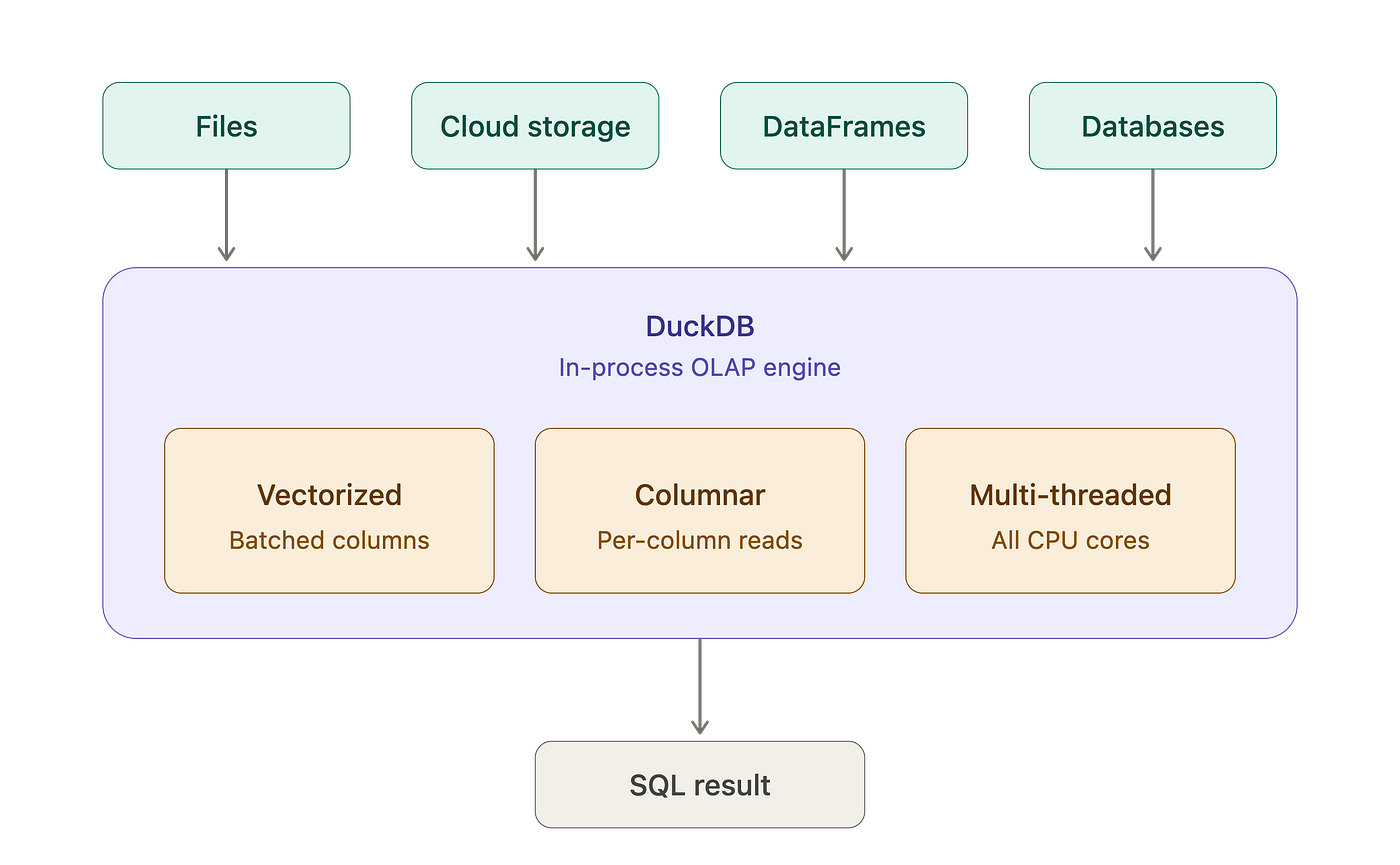
DuckDB is an in-process, columnar OLAP database. Each of those words is doing work.
- In-process — there’s no server. No daemon. No port. You
pip install duckdband it runs inside your Python (or R, or Node, or Rust, or browser-via-WASM) process. SQLite for analytics, in every sense that matters. - Columnar — data is stored column-by-column, not row-by-row. Aggregations and analytical queries hit only the columns they need. This is the same architectural choice that makes Snowflake and BigQuery fast at scale; DuckDB brings it to your laptop.
- OLAP — Online Analytical Processing. It’s optimized for
GROUP BY,JOIN,WINDOW, and aggregations across millions to billions of rows. It is not optimized for high-concurrency OLTP — that's Postgres's job.
The killer architectural property is that DuckDB doesn’t need data to be in the database. You can query Parquet files, CSVs, JSON, S3 buckets, Pandas DataFrames, Polars DataFrames, Arrow tables, and (since 2026) Iceberg and Delta Lake catalogs — all directly, with full SQL. No ETL step. No schema migration. No “load data into the database first.”
import duckdb
# Query a CSV
duckdb.sql("SELECT * FROM 'sales.csv' WHERE region = 'EMEA' LIMIT 10").show()
# Query a Parquet file on S3 - no download
duckdb.sql("SELECT COUNT(*) FROM 's3://my-bucket/events/2026/*.parquet'").show()
# Query a Pandas DataFrame directly
import pandas as pd
df = pd.read_csv('customers.csv')
duckdb.sql("SELECT country, COUNT(*) FROM df GROUP BY country").show()
# Join across all three
duckdb.sql("""
    SELECT c.country, SUM(s.amount) as total
    FROM df c
    JOIN 'sales.csv' s ON c.id = s.customer_id
    JOIN 's3://my-bucket/events/*.parquet' e ON s.id = e.sale_id
    GROUP BY c.country
""").show()
That last query — joining a DataFrame, a local CSV, and a partitioned Parquet dataset on S3 — would have been a multi-hour ETL exercise a few years ago. With DuckDB, it’s one SQL statement.
How It Actually Works (The Architecture Worth Understanding)
DuckDB’s speed isn’t magic — it’s the result of a few deliberate engineering decisions that compound. Understanding them helps you predict when it’ll be fast (almost always) and when it won’t (rare, but real).
Vectorized execution
Most traditional databases process data one row at a time. For analytical workloads — GROUP BY, Aggregations, window functions — this is enormously wasteful. DuckDB processes data in vectors (typically 1024 or 2048 values at a time), in tight loops that the CPU can pipeline and SIMD-accelerate.
The practical impact: queries that touch millions of rows often run an order of magnitude faster than the same query against a row-oriented database, even when both are running on the same hardware against the same data.
Multi-threading by default
DuckDB uses every CPU core on your machine automatically. There’s no SET parallel = TRUE to remember. A query against a 50-million-row Parquet file on an 8-core laptop runs across all 8 cores in parallel, with the scheduler partitioning work and merging results without your involvement.
Compare this to Pandas, which is single-threaded by default and requires libraries like Dask or Polars to parallelize. With DuckDB, parallelism is the default, and you have to opt out if you want serial execution.
Spill-to-disk for memory pressure
If a query needs more memory than you have RAM, DuckDB automatically spills intermediate state to disk. Sorts, hash joins, and aggregations that would crash Pandas with an OutOfMemoryError instead get slower — but they finish. On a 16 GB laptop, queries against 100 GB+ datasets are routinely possible, just not instant.
Columnar storage (when you persist data)
DuckDB has its own native storage format — a single .duckdb file that's columnar, compressed, and supports ACID transactions. You can use it as a real database, not just an ephemeral query engine:
import duckdb
# Create a persistent database
con = duckdb.connect('analytics.duckdb')
con.execute("CREATE TABLE events AS SELECT * FROM 'raw_events.parquet'")
con.execute("CREATE INDEX idx_user ON events(user_id)")
# Later, in another process
con = duckdb.connect('analytics.duckdb', read_only=True)
result = con.execute("SELECT COUNT(*) FROM events").fetchone()
The .duckdb file is portable — copy it to another machine, open it, and your data is there. Backups are cp. There's no server state to lose.
Push-down optimization across formats
When you query a Parquet file with a WHERE clause, DuckDB doesn't load the whole file. It reads the Parquet column statistics, skips row groups that don't match, and reads only the columns you actually reference. For partitioned datasets, it skips entire partitions. For S3, it makes range requests for only the bytes it needs.
The result: querying a 50 GB Parquet dataset on S3 with WHERE region = 'EU' AND year = 2025 might read only a few hundred MB of actual data over the wire. This is the same kind of optimization that makes BigQuery and Snowflake fast — DuckDB does it from your laptop.
Does DuckDB re-read data with every query?
This is the question that comes up about ten minutes into anyone’s first DuckDB project, and the honest answer is: it depends on which of three patterns you’re using.
Pattern 1: Direct queries against files
duckdb.sql("SELECT SUM(amount) FROM 'orders.parquet'")DuckDB opens the file with every query. It doesn’t keep it loaded between queries. This sounds expensive, but rarely is, because of two things:
- Push-down (covered above) means each query reads only the columns and row groups it actually needs — often 5–10% of the file, not the whole thing.
- The OS file system cache keeps recently-read bytes in RAM. The second query against the same file is dramatically faster than the first because the OS hands the pages back instantly.
For Parquet on local disk or warm S3 ranges, this is the right pattern. The “re-read” cost is mostly fictional.
Pattern 2: External database scanners (Postgres, MySQL, etc.)
duckdb.sql("ATTACH 'host=db.local dbname=app' AS pg (TYPE postgres);")
duckdb.sql("SELECT SUM(amount) FROM pg.orders WHERE region = 'EU'")
This is where the “re-read” concern is real. DuckDB pushes down what it can, but the data still has to be fetched from Postgres over the wire on every query. If you run 100 queries against the same Postgres table, you fetch the data 100 times.
For ad-hoc exploration, this is fine. For repeated analytical workloads, you want pattern 3.
Pattern 3: Load once, query many times
con = duckdb.connect('analytics.duckdb')
# Pay the conversion cost ONCE
con.execute("""
    CREATE TABLE orders AS
    SELECT * FROM postgres_scan('host=db.local', 'public', 'orders')
""")
# Every subsequent query reads from DuckDB's own columnar storage
con.execute("SELECT region, SUM(amount) FROM orders GROUP BY region")
con.execute("SELECT customer_id, COUNT(*) FROM orders GROUP BY customer_id")
After the CREATE TABLE, The data lives in DuckDB's native columnar format inside analytics.duckdb. There's no Postgres round-trip per query. There's no row-to-column conversion. Every query reads pre-vectorized data from disk, hitting the buffer pool on repeats.
The tradeoff is freshness — your DuckDB copy is a snapshot. Most teams refresh it on a schedule (every hour, every night) that matches how stale they can tolerate the data being.
The mental model
DuckDB has three personalities depending on how you use it:
- Query engine — points at external files or databases, reads on every query, convenient for exploration.
- Cache layer — load external data into a
.duckdbfile once, query many times, refresh on a schedule. - Primary store — write data into DuckDB’s columnar format from the start, no conversion ever.
Most production deployments use #3 for hot analytical data and #1 only for exploratory work. Pattern #2 is the migration step from a row-oriented source.
The SQL Dialect You’ll Actually Enjoy Writing
DuckDB’s SQL dialect is a quietly delightful piece of design. It supports the full standard — window functions, recursive CTEs, lateral joins, complex grouping — but it also adds quality-of-life extensions that make analytical SQL less painful.
GROUP BY ALL and SELECT * EXCLUDE
The annoying parts of SQL get fixed:
-- Old SQL: list every non-aggregated column in GROUP BY
SELECT region, product, country, COUNT(*), SUM(amount)
FROM sales
GROUP BY region, product, country;
-- DuckDB: just GROUP BY ALL
SELECT region, product, country, COUNT(*), SUM(amount)
FROM sales
GROUP BY ALL;
-- And exclude columns easily
SELECT * EXCLUDE (internal_id, debug_info) FROM events;
FROM-first query syntax
You can put the FROM clause first — useful when writing queries iteratively or letting LLMs generate them:
FROM 'events.parquet' SELECT user_id, COUNT(*) GROUP BY user_id;Friendly type casts and string functions
:: for casting, LIKE with case-insensitive ILIKE, full regex support, STRING_AGG, LIST and STRUCT types for nested data — the dialect feels written by people who actually write SQL.
Extensions for everything else
DuckDB ships with a built-in extensions system. Need to query Parquet? INSTALL parquet. Iceberg tables? INSTALL iceberg. S3? INSTALL httpfs. Postgres tables? INSTALL postgres_scanner. JSON, spatial, full-text search, ML scoring — there's an extension for each, and you install them in one SQL statement.
INSTALL httpfs;
LOAD httpfs;
SET s3_region='us-east-1';
SELECT COUNT(*) FROM 's3://my-bucket/events/*.parquet';
The Ecosystem Around DuckDB
DuckDB itself is the engine. What makes it genuinely viable as production infrastructure — and not just a notebook toy — is the ecosystem that’s grown around it. Two pieces are worth knowing about by name.
DuckLake is DuckDB’s lakehouse layer — a catalog stored in any standard SQL database (Postgres, MySQL, SQLite, or DuckDB itself), with data files in Parquet on object storage. Time travel, ACID transactions, schema evolution — the things that make Apache Iceberg useful, without the JVM and the operational complexity. For teams who tried Iceberg and bounced off, DuckLake is the sane alternative.
ATTACH 'ducklake:postgres:host=db.local dbname=catalog'
  AS lake (DATA_PATH 's3://my-lake/');
CREATE TABLE lake.events (id BIGINT, ts TIMESTAMP, payload JSON);
SELECT * FROM lake.events AT (VERSION => 42);  -- time travel
pg_duckdb is a Postgres extension that runs the DuckDB engine inside a Postgres process. It transparently routes analytical queries to DuckDB and OLTP queries to Postgres — meaning you can finally run GROUP BY over millions of rows in your transactional database without watching it crawl. If your "I should move analytical queries off Postgres" plan has been on the backlog for two years, pg_duckdb may quietly retire it.
CREATE EXTENSION pg_duckdb;
-- This uses DuckDB's columnar engine, against data living in Postgres
SELECT date_trunc('month', created_at) AS month, SUM(amount)
FROM orders
GROUP BY 1;
Beyond those two, there’s DuckDB-WASM (full SQL in the browser), client libraries for every major language, and a growing list of integrations with BI tools, orchestrators, and dbt. The pace of ecosystem development has been fast enough that “Is there a way to do X with DuckDB?” is increasingly answered with “Yes, there’s an extension for that.”
Where DuckDB Wins: Four Real Patterns
1. The Pandas Replacement
The simplest, most common use. You have data in CSV, Parquet, or a DataFrame, and you want to do real analytical work — group, join, aggregate, window — without watching Pandas die.
import duckdb
# A 50-line Pandas chain replaced with one SQL query
result = duckdb.sql("""
    WITH ranked AS (
        SELECT
            customer_id,
            amount,
            ROW_NUMBER() OVER (PARTITION BY customer_id ORDER BY amount DESC) AS rn
        FROM 'transactions.parquet'
    )
    SELECT * FROM ranked WHERE rn <= 3
""").df()  # Returns a Pandas DataFrame
DuckDB’s .df() Integration means it slots into existing Pandas workflows. You use Pandas for what it's good at (display, ML pipeline integration), and DuckDB for what it's good at (the actual analytical work).
2. Embedded Analytics in SaaS Products
You’re building a SaaS product. Customers want dashboards. The traditional answer is: export data to Snowflake/BigQuery, run dbt, embed Metabase. Three services, three failure points, several seconds of latency per query.
The DuckDB alternative: schedule Parquet exports from Postgres to S3, query them with DuckDB inside your API. Single-digit-millisecond response times. No warehouse. No BI tool license. For a 5-person SaaS team shipping analytics for the first time, this is genuinely the right architecture.
3. Replacing Your Cloud Warehouse for SME Workloads
This is the one that surprises people. Teams have replaced Snowflake or BigQuery bills with single-VM DuckDB setups for 50–200 GB workloads — and reported 80% cost reductions. The setup: Parquet files on S3, DuckDB on a single beefy VM (or even a Lambda), DuckLake or Iceberg for the catalog.
This isn’t right for everyone. Warehouses still win on multi-team concurrency, ecosystem maturity, and large-scale workloads (north of a few TB of actively-queried data). But for the long tail of small- and medium-sized analytical workloads — which is most analytical workloads — DuckDB is now genuinely competitive on TCO and faster on most queries.
4. Edge and Local Analytics
DuckDB-WASM runs DuckDB in the browser. Full SQL, full performance, querying remote Parquet files directly from the user’s browser. This unlocks a category of analytics products (interactive data explorers, in-browser dashboards) that previously required server-side query backends.
For desktop apps, CLIs, internal tools, and AI agents that need to “look at the data” without a network round-trip, DuckDB at the edge is the right call.
DuckDB vs The Alternatives
DuckDBPandasSnowflake/BigQuerySparkDeploymentIn-processIn-processManaged cloudClusterConcurrencySingle-processSingle-userMulti-tenantMulti-tenantScaleUp to ~1 TB on a single nodeUp to RAMPetabytePetabyteQuery languageSQLDataFrame APISQLSQL + DataFrameCostFree (compute only)Free$$$$$Best atLocal + embedded analyticsSmall-data ML pipelinesMulti-team enterprise warehousingTruly massive ETLWorst atHeavy concurrency, OLTPAnything > RAMCost-per-query at small scaleAnything small enough not to need a cluster
The short version: DuckDB is the default for analytical workloads that fit on one machine. Spark stays relevant when you actually have petabytes. Snowflake/BigQuery stay relevant for multi-team enterprise environments. Pandas stays relevant for small DataFrames inside Python pipelines. DuckDB is everywhere in between — and “everywhere in between” turns out to be most of the actual analytics work happening in the world.
Where DuckDB Doesn’t Shine (Be Honest)
It’s not the right answer for everything. The honest limitations:
1. Concurrency is its weak spot
In-process means single-process. Multi-user shared analytics over the same database file is awkward — you typically end up with read-only replicas or one-file-per-tenant patterns. If your use case is “100 analysts querying the same dataset simultaneously,” you want a server-based warehouse instead.
2. It’s not an OLTP database
DuckDB optimizes for analytical reads, not transactional writes. Single-row inserts are slow compared to Postgres. Heavy update workloads are painful. Don’t use it as your application’s primary database — use it alongside Postgres for the analytical workload.
3. Memory pressure on huge JOINs
DuckDB spills to disk gracefully, but very large hash JOINs can still saturate I/O and slow to a crawl. For most workloads this never matters; for the workload that crosses the line, you’ll know.
4. Smaller ecosystem than the giants
Compared to Postgres or Snowflake, DuckDB has fewer mature integrations, fewer enterprise BI tool connectors, and fewer “battle-tested in production at Fortune 500” case studies. This gap is closing fast — but if your buying committee wants ten reference customers in your industry, DuckDB may not have them yet.
5. Operational maturity is still maturing
Backup, point-in-time recovery, role-based access control, audit logging — the operational features that enterprise databases ship with by default are still being filled in. The roadmap is clearly headed here, but if you need every enterprise checkbox today, you’ll find gaps.
When to Reach for DuckDB
Use DuckDB when:
- You’re doing analytical work in Python, R, or Node and Pandas is hitting walls
- You’re building a SaaS product with embedded analytics features
- Your warehouse bill is disproportionate to your data volume
- You need to query Parquet/CSV/JSON files directly without ETL
- You’re building local/desktop/browser analytics tools
- You want analytical queries inside your Postgres database (via pg_duckdb)
- You’re prototyping a data pipeline before committing to heavier infrastructure
Don’t use DuckDB when:
- You have genuine petabyte-scale workloads — Spark/Snowflake still win
- You need true multi-user concurrency today (wait for Quack to mature)
- You need OLTP — use Postgres
- Your organization has compliance requirements that haven’t yet been audited against DuckDB
- You need a mature BI tool ecosystem with deep DuckDB integration — getting better, not there yet
A Closing Thought
The shift DuckDB represents isn’t really about a new database. It’s about the realization that a huge fraction of “big data” wasn’t actually that big — it just felt big because the tools we had treated 10 GB the same way they treated 10 TB.
DuckDB bets that modern laptops and single VMs are absurdly powerful, that columnar execution and vectorized engines extract orders of magnitude more performance from existing hardware than row-oriented databases ever did, and that “warehouse-class” performance no longer requires a warehouse.
That bet has paid off. DuckDB isn’t the future of analytics. It’s the present.
bash
pip install duckdbpython
import duckdb
duckdb.sql("SELECT 'hello' AS greeting").show()
Five seconds. You’re already running it.
If you’ve put DuckDB into production — or evaluated it and chose otherwise — I’d love to hear the call you made and what surprised you most.
메타데이터
- post_id
- 6b97fd786349
- slug
- duckdb-the-in-process-database-quietly-eating-pandas-snowflake-and-half-your-data-stack-6b97fd786349
- url
- https://medium.com/@amaan2000mohd/duckdb-the-in-process-database-quietly-eating-pandas-snowflake-and-half-your-data-stack-6b97fd786349
- canonical_url
- https://medium.com/@amaan2000mohd/duckdb-the-in-process-database-quietly-eating-pandas-snowflake-and-half-your-data-stack-6b97fd786349
- author_url
- https://medium.com/@amaan2000mohd
- status
- ok
- fetched_at
- 2026-06-14 11:28:49