How to use Koin Compiler in a Multimodule Project?
Hey everyone! Today we’re diving into how to use the Koin Compiler in a Compose Multiplatform multi-module project. In the previous…
How to use Koin Compiler in a Multimodule Project?
Hey everyone! Today we’re diving into how to use the Koin Compiler in a Compose Multiplatform multi-module project. In the previous article, we explored how to migrate a multimodule setup to Koin Annotations, using a convention Gradle plugin to move forward in small, safe steps. We’ll follow that same approach diving deep into a project called MovieDB-App👋
A sticky note attached to a wall with the words “how to” written on it - Unsplash by walls_io
First step: Update your project, if necessary
🚀 Your project is eligible to support the Koin Compiler if it meets at least the following requirements:
✅ Kotlin 2.3.x or higher (K2 is required) ✅ Koin 4.2.x or higher
Our sample project is using the following stack overview:
- 🤖 AGP: 9.1.0
- 🧩 Kotlin: 2.3.20
- 💉 Koin: 4.2.1
- 🏷️ Koin Annotations: 2.3.1
Second step: Configure Koin compiler dependency
Let’s add our Koin Compiler dependency into the libs.versions.toml :
#gradle/libs.versions.toml
[versions]
koin-compiler-plugin = "1.0.0"
...

[libraries]
koin-compiler-plugin = { group = "io.insert-koin", name = "koin-compiler-gradle-plugin", version.ref = "koin-compiler-plugin" }
Now, let’s run Gradle Sync 🐘
Our mission is to create a conventional plugin in our build-logic so we can migrate the project module by module, taking small and safe steps along the way. To achieve that let’s add the koin compiler dependency as a depency of our build-logic:
// build-logic/build.gradle.kts

...

dependencies {
    implementation(libs.koin.compiler.plugin)
}
After syncing Gradle, it’s time to create our conventional plugin:
// build-logic/src/main/kotlin/plugins/KoinCompilerSetupPlugin.kt
package plugins

import org.gradle.accessors.dm.LibrariesForLibs
import org.gradle.api.Plugin
import org.gradle.api.Project
import org.gradle.kotlin.dsl.configure
import org.gradle.kotlin.dsl.dependencies
import org.gradle.kotlin.dsl.the
import org.koin.compiler.plugin.KoinGradleExtension

// Ref: https://github.com/InsertKoinIO/koin-compiler-plugin/blob/main/docs/CASE_STUDY_NOW_IN_ANDROID.md#the-convention-plugin
class KoinCompilerSetupPlugin : Plugin<Project> {
    override fun apply(target: Project) {
        with(target) {
            // Apply Koin Compiler Plugin (replaces KSP)
            pluginManager.apply("io.insert-koin.compiler.plugin")

            // Configure logging
            extensions.configure<KoinGradleExtension> {
                userLogs.set(true)
                compileSafety.set(true)
            }

            val libs = the<LibrariesForLibs>()

            dependencies {
                add("commonMainImplementation",libs.koin.core)
                add("commonMainImplementation",libs.koin.annotations)
            }
        }
    }
}
After that, we need to expose this plugin to the app:
// build-logic/build.gradle.kts
...

gradlePlugin {
    plugins {
        create("koinConvention") {
            id = "koin-compiler-setup"
            implementationClass = "plugins.KoinCompilerSetupPlugin"
        }
    }
}
Third step: Apply the new plugin to the modules
I did the migration in a single-shot, but I will use as an example the domain module, which was previously migrated to support Koin Annotations with KSP. The idea now is to replace the conventional plugin responsible for adding Koin Annotations + KSP support with the new plugin we just created, which adds support for the Koin Compiler.
// domain/build.gradle.kts
plugins {
    ...
    //id("koin-annotations-setup-plugin")
    id("koin-compiler-setup")
}
Now, let’s sync 🐘
You will see an error in your app module declaration, it is normal:
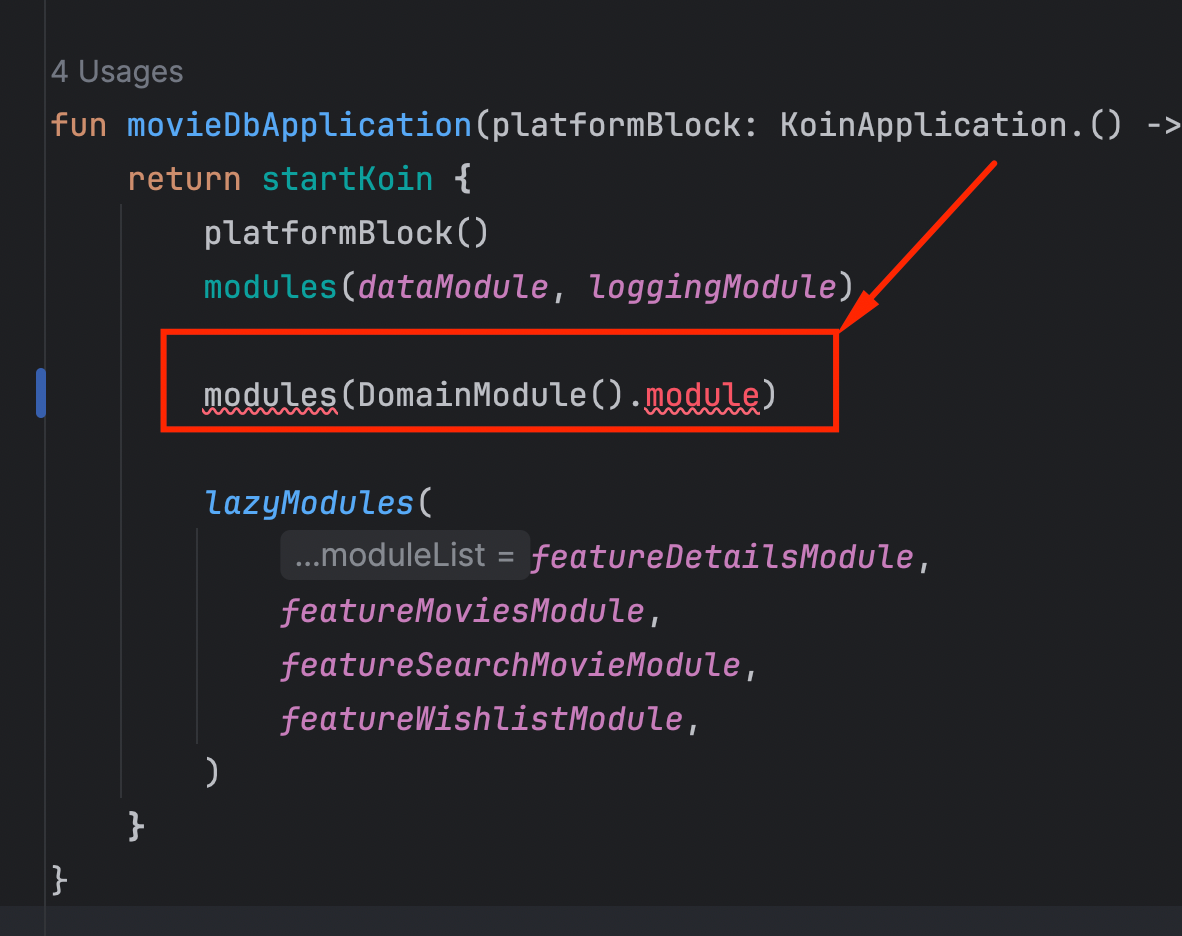
Expected error in the module initialization
Previously, Koin Annotations with KSP generated module objects automatically. With the Koin Compiler, this is no longer necessary. Because of that, we need to update our module initialization to use the new mechanism provided by the Koin Compiler. Let’s apply the custom plugin we created to the app module. In our case, it is called composeApp :
//composeApp/build.gradle.kts
plugins {
    ...
    id("koin-compiler-setup")
}
Again, we need to call our friend Gradle sync 🐘
Now, we can update the module initialization:
// composeApp/src/commonMain/kotlin/di/AppModules.kt

import org.koin.plugin.module.dsl.modules

fun movieDbApplication(platformBlock: KoinApplication.() -> Unit): KoinApplication {
    return startKoin {
        platformBlock()
        modules(dataModule, loggingModule)

        // Using Koin Compiler extension
        module<DomainModule>()

        lazyModules(
            featureDetailsModule,
            featureMoviesModule,
            featureSearchMovieModule,
            featureWishlistModule,
        )
    }
}
The new extension module is provided by the Koin compiler plugin 🙌
Conclusion
To apply the new Koin Compiler, we removed the previous custom Gradle plugin implementation (~80 lines) and replaced it with a much simpler setup (~30 lines). We now achieve the same compile-time safety directly through the K2 compiler, eliminating the need for KSP-based code generation. You can take a look at the merge commit here ⭐️
Useful links:
- Migration guide used in this article: https://github.com/InsertKoinIO/koin-compiler-plugin/blob/main/docs/MIGRATION_FROM_KSP.md
- Repository used in this article: https://github.com/gabrielbmoro/MovieDB-App
메타데이터
- post_id
- 6bd8e57d5e4b
- slug
- how-to-use-koin-compiler-in-a-multimodule-project-6bd8e57d5e4b
- url
- https://blog.insert-koin.io/how-to-use-koin-compiler-in-a-multimodule-project-6bd8e57d5e4b
- canonical_url
- https://blog.insert-koin.io/how-to-use-koin-compiler-in-a-multimodule-project-6bd8e57d5e4b
- author_url
- https://medium.com/@gabrielbronzattimoro.es
- status
- ok
- fetched_at
- 2026-06-18 00:10:23