Snowpark API: The Object Model
The Snowpark API Reference for Python looks great. But when you have dozens of classes with hundreds of methods and properties, some class…
Snowpark API: The Object Model
The Snowpark API Reference for Python looks great. But when you have dozens of classes with hundreds of methods and properties, some class diagrams for the whole object model will help as well.
Read here the post for free if you do not have a Medium subscription.
I’ll use a variation of UML here because I like to isolate the methods and properties that return another type of object. I’ll also skip the full method signatures, and I’ll group classes by functionality, to avoid one single big picture with everything.
Several methods provide alternative notations with camel case and underscore intermediate characters — like in**orderBy and `order_by`** — but I’ll select here only one version.
Snowflake Connections
The Session class is the one you have to start with, to pass your connection parameters and reach a Snowflake database. You usually do this through the **builder** property. Any other Snowpark object will then be created in the context of your current session.
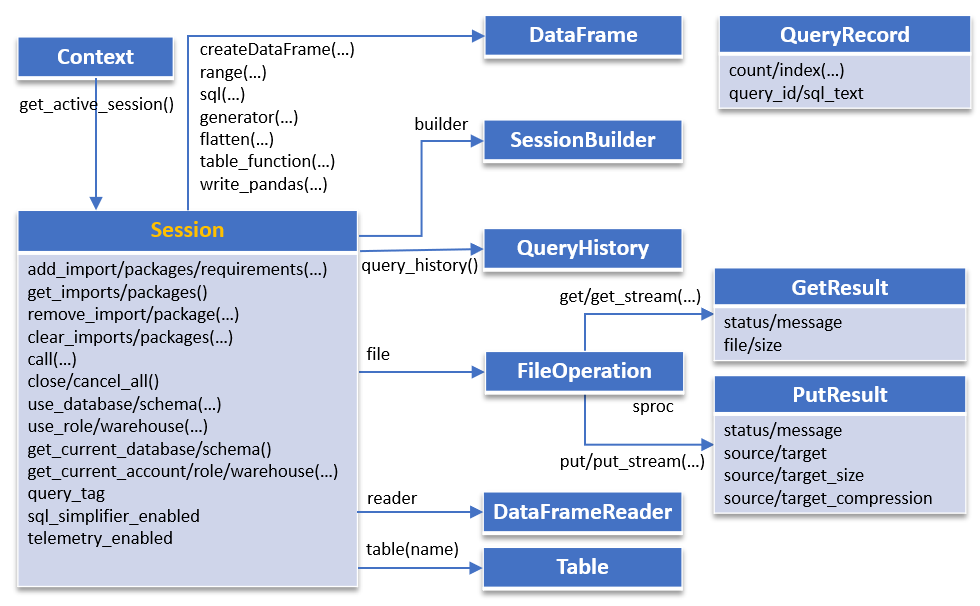
The Session object can also generate DataFrame objects through different operators. It links to a FileOperation object, to GET and PUT data through REST API calls.
Example of creating a Session object in Python, with the password from a local environment variable and everything else hard-coded (not recommended in practice!):
from snowflake.snowpark import Session

pars = {
   "account": "<my Snowflake account>",
   "user": "<my user name>",
   "password": os.getenv('SNOWFLAKE_PASSWORD'),
   "role": "<my role>",
   "warehouse": "<my warehouse>",
   "database": "<my database>",
   "schema": "<my schema>"
}
with Session.builder.configs(pars).create() as session
   # create DataFrame objects etc
Data Frames
DataFrame is the central class in Snowpark. Inspired by Spark’s similar class, which was inspired by the DataFrame from Pandas in Python, a DataFrame allows you lazy transformations on a dataset and is heavily used in data science.
The following diagram displays the methods you can apply recursively on a DataFrame object — like **select, `filter**,orderBy`, **union, `join**,limit`, etc. — using a functional fluent notation. Most of these lazy transformations apply related SQL clauses under the hood, but nothing is executed until you call a method like **show**, known as an “action”:

You refer to columns either by their name, by a call to the DataFrame **col method, or with a similar `col** function. A further call toalias`, from a Column class instance, will add a display column name with the SQL AS clause. Individual columns can be further transformed iteratively, each call returning another Column instance.
Example of generating a simple SQL SELECT query, with some top 3 items. Remark how saving an intermediate df data frame object allows you to refer to its columns as properties (because they are also keys in the dictionary of column names):
df = session.table("item") \
   .select("i_category", "i_brand", "i_item_sk")
df.filter(df.i_category == "Beer") \
   .sort(df.i_brand.desc()) \
   .limit(3) \
   .show()
Grouping and Window Functions
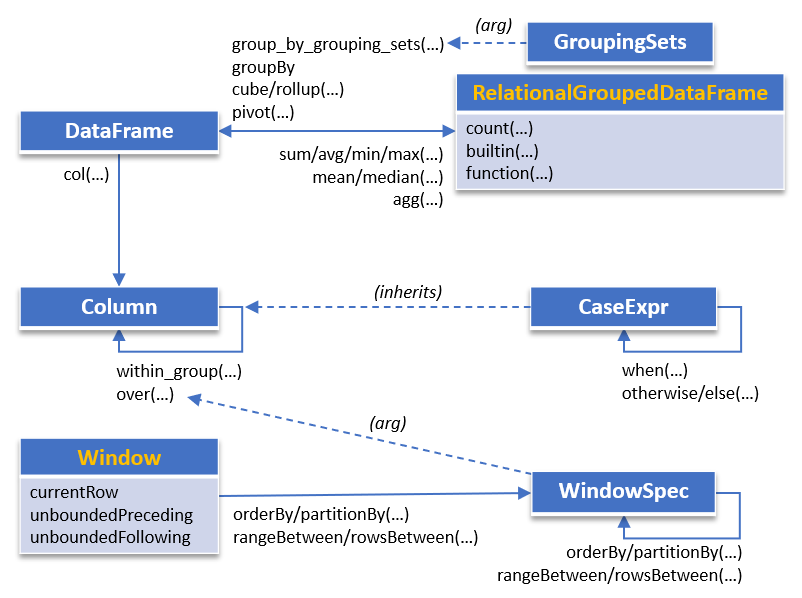
The GROUP BY operations — like **groupBy, `pivot**,cube`, **rollup — will return a RelationalGroupedDataFrame object. Pass a GroupingSets object to the `group_by_grouping_sets`** method.
Return another DataFrame object with one aggregate function call: **sum, `avg**,min`, **max for one single column. Or `agg`** for multiple columns, each with its own specific aggregate function call:
The following returns a list of rows for groups by column “a”, with SUM and MAX on column “b”:
df.group_by("a").agg(
    sum("b").alias("sum_b"),
    max("b").alias("max_b")
  ).collect()
For the window functions, you create a PARTITION BY or ORDER BY clause — with the optional ROWS BETWEEN or RANGE BETWEEN clause — by calling static methods of the Window class. The resulting WindowSpec object can be further refined, and you pass the result as an argument to the **over method, on a Column** class instance, which usually is part of a DataFrame.
A CASE statement can be built with the CaseExpr class, which is based on Column and instantiated by a call to the **when** function.
Input/Output
You can load data into a DataFrame from a Table object or DataFrameReader class — from a CSV, JSON, XML, Parquet, ORC or AVRO file. The write method returns a DataFrameWrite that you can use to save data in a table or COPY TO another location:

The DataFrame can be also copied to a Pandas DataFrame, calling the **toPandas** method. But calling such a method would bring all your data to the client side, eventually!
Call **collect on the data frame to return the result as a list of Row** objects.
MERGE Statements
Generating the SQL MERGE statement may require several classes, with Table as a central class. WHEN MATCHED and WHEN NOT MATCHED clauses have special classes instantiated through global function calls. And a call to **merge returns a MergeResult** object:
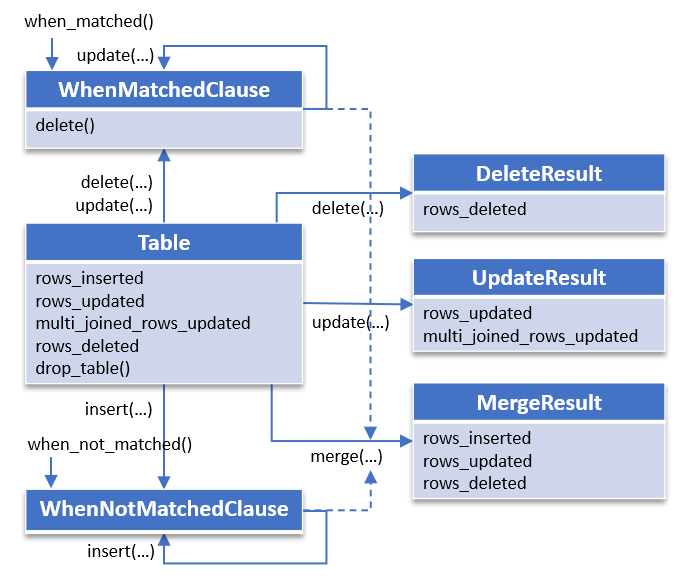
You use WhenMatchedClause and WhenNotMatchedClause classes to fill in conditions for the INSERT, DELETE and UPDATE statements. DeleteResult, UpdateResult and MergeResult classes return the number of rows processed by each DML operation.
Here is an example of calling the **merge** method on a Table instance:
from snowflake.snowpark import Session
from snowflake.snowpark.functions import when_matched, when_not_matched

...

source = session.create_dataframe(
   [(10, "new"), (12, "new"), (13, "old")],
   schema=["key", "value"])

session.create_dataframe(
      [(10, "old"), (10, "too_old"), (11, "old")],
      schema=["key", "value"]
   ).write.save_as_table(
      "my_table", mode="overwrite", table_type="temporary")
target = session.table("my_table")

target.merge(source,
   (target.key == source.key) & (target.value == "too_old"),
   [when_matched().update({"value": source["value"]}),
   when_not_matched().insert({"key": source["key"]})])
print(target.collect())
Procedures and Functions
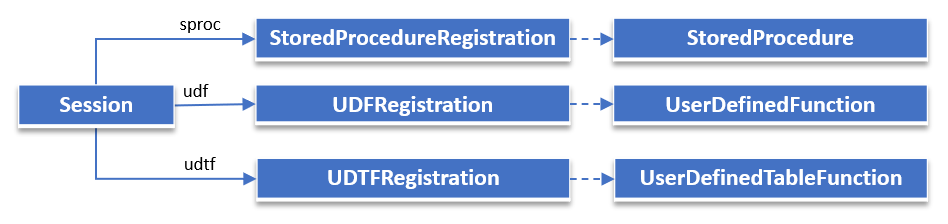
The Session object offers links to classes you can use to register stored procedures, UDFs and UDTFs:
Final Throughs
Snowpark for Python is a library with classes that allow you to build lazy transformations on dataset objects on the client side, and trigger their execution — through “actions” — in Snowflake’s virtual machines, on the server side. The whole API is referenced properly on the Snowflake site.
However, if you want to better understand how classes relate to each other, and what intermediate objects are created by each transformation, I hope these visual cheat sheets — with object diagrams — helped as well.
메타데이터
- post_id
- 6c09d0361ab8
- slug
- snowpark-api-the-object-model-6c09d0361ab8
- url
- https://medium.com/snowflake/snowpark-api-the-object-model-6c09d0361ab8
- canonical_url
- https://medium.com/snowflake/snowpark-api-the-object-model-6c09d0361ab8
- author_url
- https://medium.com/@cristian-70480
- status
- ok
- fetched_at
- 2026-07-24 16:48:48