Linux Failures Explained Practically — File Descriptors, Disk Pressure, CPU Load, Networking &…
After understanding processes and memory, the next level of real system debugging is learning why systems look alive but still don’t work.
Linux Failures Explained Practically — File Descriptors, Disk Pressure, CPU Load, Networking & Diagnosis Lab
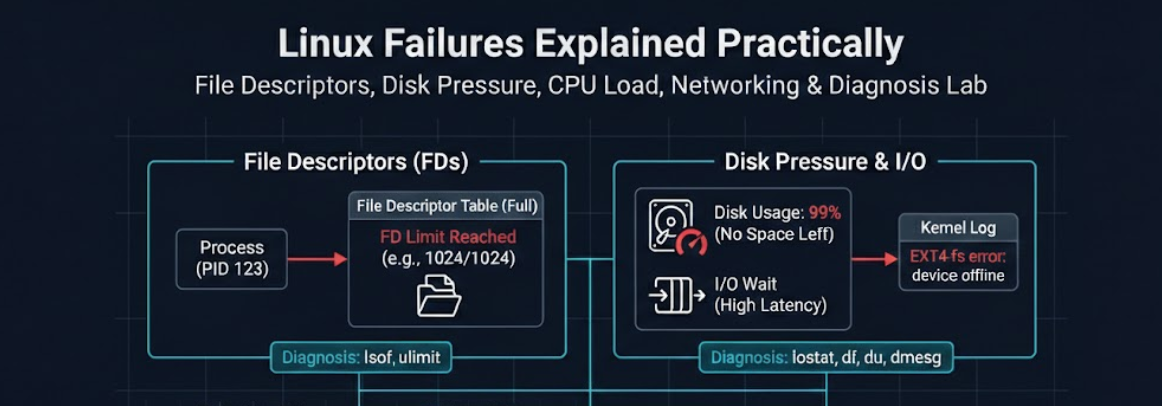
After understanding processes and memory, the next level of real system debugging is learning why systems look alive but still don’t work.
Most production outages are not crashes. They are resource exhaustion.
This guide explains the most common ones in simple terms, with commands you can run yourself.
1) File Descriptors & I/O Limits
(The classic: “Too many open files”)
What is a File Descriptor?
Linux treats almost everything as a file:
- real files
- network connections
- pipes
- terminals
- sockets
Whenever a program opens something, the kernel gives it a number:
File Descriptor (FD)Think of FD as a ticket number for a conversation.
Every program starts with three:

Check your shell:
ls /proc/$$/fdSeeing Open Resources
Start a simple server:
python3 -m http.server 8000Find PID:
ps aux | grep http.serverSee what it opened:
ls /proc/<PID>/fdOr easier:
lsof -p <PID>This shows files, sockets, ports ,everything the program is using.
Why Limits Exist
Each process has a maximum allowed open descriptors.
Check limit:
ulimit -nTypical output:
1024Meaning the program can only talk to 1024 things at once.
Trigger the Failure
Create a leak:
nano fd_leak.pyfiles = []
while True:
files.append(open("/dev/null"))Run:
python3 fd_leak.pyEventually:
OSError: [Errno 24] Too many open filesThe program is alive but cannot communicate anymore. That’s why websites sometimes stop accepting users while still running.
Increase Limit (temporary)
ulimit -n 4096What This Means
Memory exhaustion kills programs. FD exhaustion keeps programs alive but useless.
2) Disk Pressure & Log Behavior
(The silent killer)
Systems rarely crash when disk fills. They just stop functioning.
Check disk:
df -hWhen usage hits 100%:
- services fail to write
- databases stop
- login may fail
- containers restart
Why Logs Cause This
Programs constantly write logs:
/var/log/syslog
/var/log/auth.log
app.log
Without rotation → disk slowly dies.
Watch log size:
watch -n 1 "du -sh /var/log"Simulate Full Disk
fallocate -l 5G bigfile
df -h
Try writing:
touch test.txtResult:
No space left on deviceNot permission issue it is storage exhausted.
Find What Filled Disk
du -h --max-depth=1 /
du -h --max-depth=1 /var
du -h --max-depth=1 /var/log
Real Lesson
Disk full = system alive but unable to record reality.
3) CPU Load & Performance Observation
(Busy vs overloaded)
Many people panic at high CPU usage. But CPU busy is not always bad.
Load Average
Run:
uptimeExample:
load average: 2.10, 1.90, 1.70Load = number of tasks waiting for CPU.
Check cores:
nprocIf cores = 4:

See CPU Behavior
topImportant line:
%Cpu(s): us sy id wa
Meaning :
High us → heavy computation
High wa → storage bottleneck
Low id → CPU saturated
Create CPU Load
nano burn.pywhile True:
passRun multiple times:
python3 burn.py &Now check withtop.
Key Insight keep in mind :
CPU usage = what CPU is doing Load average = how many want CPU
4) Networking Fundamentals (DNS → TCP → TLS → HTTP)
Opening a website is a chain of steps.
1) DNS
2) TCP
3) TLS
4) HTTP
Step 1 — DNS (Find address)
dig example.comIf fails → cannot find server.
Step 2 — TCP (Connect)
nc -vz example.com 443If fails → firewall or port closed.
Step 3 — TLS (Secure)
openssl s_client -connect example.com:443If fails → certificate problem.
Step 4 — HTTP (Content)
curl https://example.comIf fails → application issue.
Debug Order
dig → nc → openssl → curlEach isolates a different layer.
5) Linux Failure Simulation Lab
(Real diagnosis skill)
You can classify almost every outage using five commands:
top
free -h
df -h
ulimit -n
dig / nc / curl
Quick Diagnosis Table

Conclusion of Phase 1
so here we are done with phase 1 of devops course , in the next part we will deep dive into docker and container internals. Till that stay tuned…..
you can follow me on → https://x.com/nullAffi
메타데이터
- post_id
- 6d63f0fd9243
- slug
- linux-failures-explained-practically-file-descriptors-disk-pressure-cpu-load-networking-6d63f0fd9243
- url
- https://medium.com/@code.afridi/linux-failures-explained-practically-file-descriptors-disk-pressure-cpu-load-networking-6d63f0fd9243
- canonical_url
- https://medium.com/@code.afridi/linux-failures-explained-practically-file-descriptors-disk-pressure-cpu-load-networking-6d63f0fd9243
- author_url
- https://medium.com/@code.afridi
- status
- ok
- fetched_at
- 2026-06-24 11:06:28



