Top 10 Test Case Management Tool for 2025 Compared
Top 10 Test Case Management Tools 2025: Compare free & paid options like Testsigma, TestRail, Zephyr & more to boost QA, speed & teamwork.
Top 10 Test Case Management Tools for 2025 (Free & Paid Compared)
Quality assurance can become fragmented due to the loss of context in spreadsheets, the short-lived nature of CI logs, and inconsistencies in bug trackers. Test case management (TCM) platforms centralize these activities. In 2025, leading solutions enable test design, manual and automated execution, traceability to requirements and defects, and clear reporting without relying on multiple separate tools. This guide reviews top options, both free and paid, outlines core TCM capabilities, and provides a streamlined approach to selecting the right fit.
What is a Test Case Management Tool?
A test case management (TCM) tool is software that helps teams organize and manage all their testing activities in one place. It lets you plan and document test cases, run manual and automated tests, record results, track defects, and link everything back to requirements. By bringing these pieces together, a TCM tool ensures traceability, consistency, and visibility across the entire QA process, making it easier to monitor progress, maintain quality standards, and prepare clear reports for stakeholders. Some of the features of a good Test Case Management
Looking for a deeper primer? Here’s a practical guide to test case management basics and an overview of **test management software**.
Importance of Test Case Management Tools
A test case management tool brings all testing activities and data together in one place. It improves accuracy, shortens feedback cycles, ensures compliance, and provides clear information for release decisions.
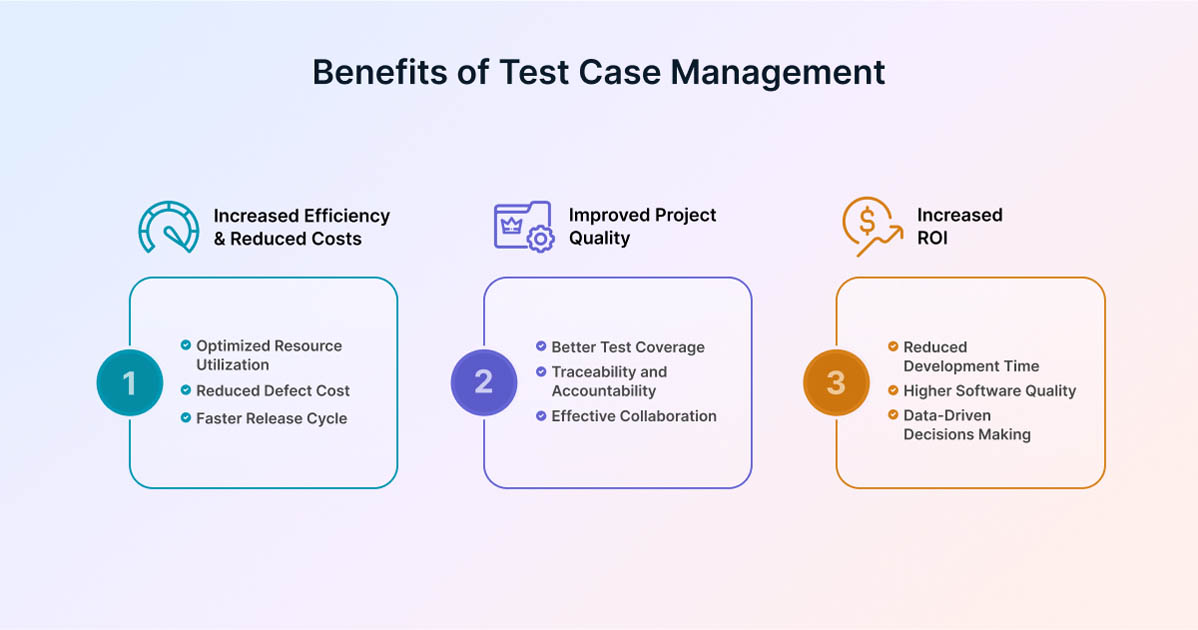
- Centralized Testing Information: Combines manual and automated tests to reduce confusion and duplication.
- Clear Reporting: Delivers consistent dashboards and historical insights to support informed release decisions.
- Compliance and Audit Support: Maintains traceable records from requirements to test results and defects, including approvals and timestamps.
- Faster Feedback: Collects results from CI/CD and manual testing to help teams identify issues quickly.
- Risk-Focused Planning: Highlights test coverage by requirement or risk area to guide priorities.
- Team Coordination: Uses permissions, reviews, and notifications to help teams work together efficiently.
Free vs Paid Test Case Management Tools
The choice is a trade-off between control, convenience, and compliance. Free test management tools avoid license fees but require in-house operation. Freemium/SaaS speeds setup and reduces upkeep. Enterprise editions add governance and support for larger or regulated teams. Let us take a closer look at them, one by one:
Open-source (self-hosted)
Open-source tools are installed and managed by the organization itself. They provide complete control and flexibility without license fees but require internal resources for setup, maintenance, and security.
- What You Get: Full control, no license fees, and source code you can modify.
- Trade-Offs: You are responsible for hosting, upgrades, security patches, backups, and integrations; advanced analytics and SSO usually require extra work.
- Best For: Teams with strong DevOps capability, on-prem requirements, or customization needs.
Freemium / SaaS
Open-source tools are installed and managed by the organization itself. They provide complete control and flexibility without license fees but require internal resources for setup, maintenance, and security.
- What You Get: Quick setup, managed updates, APIs, and common integrations. Free tiers often limit seats, projects, storage, or API usage; paid plans add scale, SSO, and richer reports.
- Trade-Offs: Feature and usage limits; review data export options, rate limits, and how automated results are counted.
- Best For: Small to mid-size teams seeking fast time-to-value and low operational overhead.
Enterprise Editions
Enterprise editions are designed for large or regulated organizations. They include advanced controls such as SSO, audit logs, and data residency, along with dedicated support and compliance features, but come at a higher cost.
- What You Get: SSO/SAML, SCIM, audit logs, granular permissions, data residency options, sandbox environments, support SLAs, and governance features.
- Trade-Offs: Higher cost and more procurement steps; migrations may require professional services.
- Best For: Large organizations or regulated industries where compliance, scale, and support are required.
How to Choose the Best Test Case Management Tool
Selecting the right test case management tool should focus on suitability rather than lengthy evaluations. Use this checklist to confirm in one demo whether the tool aligns with your workflow, reporting needs, and long-term plans.
- Start with Outcomes: Identify the key questions the tool should help answer, such as ‘Are we ready to release?’
- Workflow Fit: Ensure it supports your process, from defining requirements to writing tests, running them (manual and automated), reviewing results, and logging defects.
- Integrations: Verify smooth two-way connections with Jira or Azure DevOps, and CI/CD tools like JUnit, NUnit, Cypress, or Playwright.
- Reporting You’ll Use: Look for built-in reports on release readiness, coverage, and trends, with export options that don’t depend on spreadsheets.
- Traceability and Control: Confirm that every requirement, test, run, and defect is linked end-to-end, with versioning, approvals, and audit history.
- User Experience and Adoption: Evaluate whether the tool allows quick authoring, simple evidence capture, and easy onboarding for new users.
- Security and Governance: Check for SSO/SAML, role-based permissions, data residency options, backups, and full data export capabilities.
Pricing and Exit: Understand usage limits, total costs, and how easily data can be migrated if you change tools later.
Top 10 Test Case Management Tools for 2025
Test case management (TCM) tools help teams plan tests, run them (both manually and automatically), track results and defects, and report progress in one centralized location. The following list highlights ten well-known options for 2025, focusing on fit for workflow, integrations, reporting, and ease of adoption rather than marketing claims.
1. Testsigma
Test Management by Testsigma is an Agentic AI-based unified test management tool for manual, automated, and exploratory testing. It’s designed to seamlessly integrate into modern development workflows. The platform features Atto, your AI coworker, who assists with planning, test generation, execution, and bug reporting, while ensuring you stay fully in control.

Key Features
- Central Repository: Store requirements, test cases, suites, runs, and results in one place, with roles, permissions, custom fields, and consistent naming for the organization.
- Plain-English and AI Authoring: Write test cases in natural language, or use the Generator Agents to automatically create tests from the steps of Jira stories, Figma files, images, and documents; refine the output interactively.
- Data-Driven Tests: Parameterize inputs to cover variations without duplicating test cases.
- Manual Execution with Evidence: Execute steps and capture notes, screenshots, and videos to maintain a clear audit trail.
- Automation in the Same Workspace: Aggregate web, mobile, and API results, run in parallel across browsers and devices, and review manual and automated outcomes together.
- Two-Way Jira Traceability: Map stories to tests, link failures to new or existing Jira issues, and keep requirements, tests, and defects aligned.
- Planning and Coverage: Rely on Sprint Planner to detect active sprints, pull relevant stories, and display coverage from day one.
- Dashboards and Reports: Use release-readiness and run/case reports with evidence, and drill into failures quickly.
- Contextual Bug Reporting: Prefill reproduction steps, logs, and artifacts, then review and file with one click.
- CI/CD Integrations: Connect Jenkins, GitHub, GitLab, Azure DevOps, and other tools so pipeline results flow in automatically.
- Easy Onboarding: Import from Excel/CSV and common open-source tools to migrate existing assets quickly.
2. Kiwi TCMS (Open Source)
Kiwi TCMS is a self-hosted, open-source test management system for planning, running, and tracking tests. It emphasizes manual testing with clear workflows, built-in bug tracking, and plugins/APIs to bring in automated results when needed.
Key features
- Structured Entities and Reviews: Work with Test Plans, Test Cases, Test Runs, and Test Executions, each with history, parameters, tags, and optional peer review before execution.
- Bug Tracking (Built-in and Integrated): Use the internal bug tracker or connect to Jira, GitHub, GitLab, Bugzilla, Redmine, and others; file bugs from runs or executions with one click.
- Automation via Plugins: Import results using official reporters for JUnit 5, pytest, Robot Framework, PHPUnit, and generic junit.xml/TAP formats.
- Reports, Telemetry, and API: Access visual reports and testing telemetry, automate tasks through a comprehensive API, and deploy with Docker or enterprise images for easier management.
3. Qase
Qase is a cloud-based test management tool for manual and automated testing. It supports many test frameworks, offers an optional ‘tests as code’ workflow, and includes dashboards for analyzing test, run, and defect data.
Key features
- Automation at scale: Use built-in reporters and quick-start guides for Playwright, Cypress, pytest, TestNG/JUnit 4–5, Robot Framework, PHPUnit, Codeception, and more.
- Dashboards & QQL: Create analytics with dashboard widgets and the Qase Query Language (QQL), and save queries to track the metrics you care about.
- Manual test management: Organize suites and cases clearly; the Mind Map view (beta) helps visualize and edit large hierarchies.
- CI/CD & APIs: Connect pipelines through the REST API and hooks to send automated run results into the same workspace used for reporting.
4. Tuskr

Tuskr is a cloud-based test management tool that keeps authoring, running, and reporting tests straightforward. It offers practical integrations through a REST API, webhooks, and a CLI, and it can import automated results such as JUnit reports. Native Jira issue creation from test results was added in April 2024.
Key features
- Jira Integration and Issue Filing: Create Jira issues directly from test results
- Automation via CLI/JUnit: Use the Tuskr CLI to import JUnit XML, which can auto-create runs and cases; guides are available for Playwright and Cypress.
- Test Cases, Suites, and Runs: Organize cases into suites and sections, create runs, and monitor progress easily.
- API and Webhooks: Connect custom workflows and pipelines using the REST API and webhooks.
5. TestLink (open source)

Long-standing, self-hosted web TMS covering test specification/cases, test plans, execution, and reporting, with community plugins and external issue-tracker integrations.
Key features
- Test cases & plans: Create/manage cases and organize them into plans for execution & tracking.
- Requirements & coverage links: Link requirements to test cases to track coverage.
- Issue-tracker integrations: Works with Jira, MantisBT, Bugzilla, Redmine, etc., for filing/linking defects.
- Open source & extensible: Community codebase and docs with long-term support.
6. Testmo
Testmo is a unified test management tool that brings manual test cases, exploratory sessions, and automated results into one place. It offers strong integrations with Jira and CI/CD tools and includes a modern Reporting Center with an Automation Metrics report.
Key features
- Cases, Runs, and Sessions: Manage test cases and runs, and track exploratory sessions with notes and evidence.
- Automation and CI Pipelines: Submit results from any framework; use the CLI and guides for Jenkins, GitHub Actions, GitLab, and more.
- Reporting Center: Build live, configurable reports, such as Automation Metrics, for a clear, consolidated view.
- Jira Integration: Create and link Jira issues directly from Testmo with deep Jira Cloud support.
7. Xray (for Jira)

Xray is a Jira-native test management app that uses Jira issue types to plan, design, execute, and report on manual and automated tests. It supports full BDD/Gherkin workflows and provides end-to-end traceability inside Jira.
Key features
- Jira Issue–Based Model: You can link requirements, test cases, test plans and executions, and defects using Xray’s dedicated Jira issue types to keep relationships clear.
- Automation and BDD: You can import automated results (e.g., JUnit, TestNG, NUnit, Robot, Cucumber) through the REST API, and manage scenarios with native BDD/Gherkin support.
- Dynamic Test Plans (Enterprise): You can build test plans from JQL filters that target versions, labels, or other fields, so plans stay current as issues change.
- Advanced Jira Querying: You can use Xray’s JQL functions to query links and relationships between Xray entities for precise filtering and reporting.
8. Zephyr Essential (Jira)

Zephyr Essential is a Jira-native test management app. It keeps test cases, cycles, and executions inside your Jira projects, so planning, running, and tracking tests, including automated results, happen where the team already works.
Key features
- Jira-Native Planning and Execution: Create test cases, group them into test cycles, run executions, and view coverage and links directly from Jira issues.
- Automation Imports via Test Automation: Configure tasks to upload results by file or through the ZBot agent, optionally auto-create bugs, and use the Jenkins plugin to publish JUnit/TestNG (Maven Surefire) results.
- CI/CD and APIs: Integrate pipelines with the Zephyr (Squad/Essential) Cloud REST API and Test Automation API to push results and manage test assets programmatically.
- BDD/Gherkin Support: Work with feature and scenario content through the BDD Content API when a BDD workflow is required.
9. PractiTest

PractiTest is an end-to-end test management platform that links requirements, tests, runs, and issues in one place. It includes real-time dashboards and reports, and its SmartFox AI helps speed up test authoring.
Key features
- Connected Workflow and Traceability: Requirements, a central Test Library, and Test Sets & Runs are linked so you can follow items from start to finish.
- Dashboards and Reports: Customizable dashboards and shareable report templates give stakeholders a clear view of progress and quality.
- AI Assistance: SmartFox can generate and manage test steps to reduce manual effort.
- Automation Integrations: An API and documented connectors let you import automated results into the same workspace.
10. QA Touch

QA Touch is a lightweight, cloud-based test case management tool focused on speed and low cost. It supports cases, runs, requirements mapping (RTM), shareable dashboards, Jira Cloud integration, and a simple API for sending automation results from CI.
Key Features
- Requirements and Test Traceability: A visual RTM provides two-way links and coverage reports between requirements and tests.
- Runs and Evidence Capture: Execute runs, attach artifacts, and record issues with audio-visual capture; CSV import helps migrate data quickly.
- Dashboards and Reports: Built-in progress and execution reports include a shareable dashboard; documentation also references mind-mapping tools for planning.
- API-Driven Automation: Publish test run results programmatically using the API (domain and API token headers), with step-by-step guides and examples.
Conclusion
An effective test case management tool centralizes test design, execution, traceability, and reporting, enabling consistent quality and confident releases. Select a modern tool like Test Management by Testsigma that aligns with your workflow, integrates cleanly with Jira and your CI/CD pipelines, and provides reliable data export. Validate the fit with a brief trial using your own test assets and metrics.
메타데이터
- post_id
- 6e4568faf8de
- slug
- top-10-test-case-management-tool-for-2025-compared-6e4568faf8de
- url
- https://medium.com/@amaralisa321/top-10-test-case-management-tool-for-2025-compared-6e4568faf8de
- canonical_url
- https://medium.com/@amaralisa321/top-10-test-case-management-tool-for-2025-compared-6e4568faf8de
- author_url
- https://medium.com/@amaralisa321
- status
- ok
- fetched_at
- 2026-08-10 11:00:44