What I Learned While Developing a System to Summarize My Project Notes — Part 2
From 21MB to 234KB, from 10 sections to 24 files, from Chinese output to a clean Turkish summary.
What I Learned While Developing a System to Summarize My Project Notes — Part 2
From 21MB to 234KB, from 10 sections to 24 files, from Chinese output to a clean Turkish summary.
**[If you cannot access the full article, please click here]**
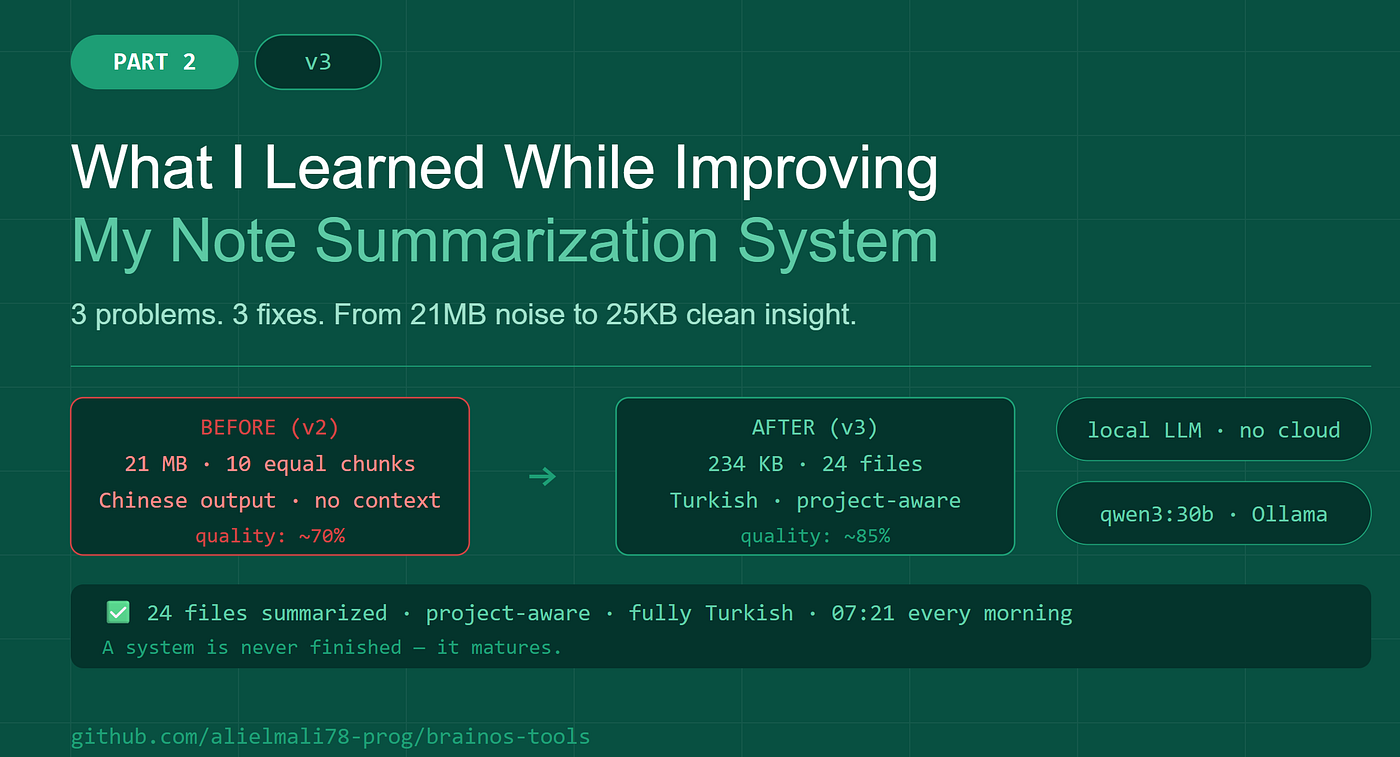
Image generated using AI (Claude) by the author.
Hello,
I described the system I set up a few days ago in my previous posts: a setup that automatically collects all project notes in Fedora, summarizes them using a local LLM, and sends a notification to Telegram at 7:00 AM. It was working. But it wasn’t working well.
This post explains how that system matured. Three concrete problems, three concrete solutions.
Problem 1: 21MB, Over 1 Million Lines
On the first run, I got the following output:
[13:02:19] Sync started - 2026–06–03
[13:02:38] Read: 21,484,628 characters / 1,104,778 lines
Why? Because it was scanning everything under /home/ali. There were also MD files in system directories like .cache, .local, node_modules, and snap — Python library licenses, Steam documentation, JupyterLab templates.
I added these to the exclude list:
.git, .cache, .local, .venv, venv, node_modules,
__pycache__, .config, snap, .var, MDbackup,
archive, backup, backups, markdown, staging,
epub_validation, Downloads, .gitkraken
But the real issue was different. The script was grabbing all MD files from every directory. If there were 10 files in a directory, all 10 would be included — old versions, backups, drafts, all together.
The correct logic is: take only the most recently modified file from each directory.
NEWEST=$(find "$DIR" -maxdepth 1 -name "*.md" \
  -printf '%T@ %p\n' | sort -rn | head -1 | cut -d' ' -f2-)
After correction:
[13:14:31] Copied: 24 files
brain_2026–06–03.md 100% 234KB 2.0MB/s 00:00
- 21MB → 234KB. Reduced by 90 times.
Problem 2: Files Were Being Split in Half
In the first version, the summarizer worked like this: take the merge file, split it into 10 equal line segments, and summarize each segment separately.
It sounds logical, but it isn’t. Because a Reels Pipeline file was being split into 3 different parts. The AEIN brain file was left incomplete in one segment. The model didn’t know what it was reading.
Result: The project context was lost, and the summaries turned out to be generic and meaningless.
Solution: Summarize each MD file separately.
The merge file is generated in the following format:
## aein_master.md
content…
 - -
## projects_asuli_ASULI_PROJECT_ROADMAP.md
content…
Using this structure, I processed each section as a separate part:
parts = re.split(r'\n - -\n## ', content) for part in parts[1:]: filename = part.split('\n', 1)[0].strip() body = part.split('\n', 1)[1].strip()
summarize each file separately
10 parts → 24 files. Each file is summarized in its own context.

**Part 5**

“这是一个关于构建个人AI助手的技术文档…”

qwen3:30b is a model trained on Chinese data. From time to time, it forgets the prompt and starts writing in Chinese.

I made two changes:
1. I added a mandatory rule to the prompt:
WRITE ONLY IN TURKISH. Do not use any other language.
2. I provided the file name and project information to the model:
prompt = f"""You are a technical project assistant.
File: {filename}
Project: {project}
 - -
{body[:8000]}
 - -
"""
The model now knows what it’s reading. It summarizes the AEIN file within the AEIN context. It handles the Reels Pipeline file separately.
Project Detection
I wrote a simple function that automatically detects the project based on the file name:
def detect_project(filename):
    f = filename.lower()
    if any(x in f for x in ["aein", "ali_reset", "private"]):
        return "AEIN / Kariyer"
    if any(x in f for x in ["asuli", "roadmap", "changelog"]):
        return "Asuli"
    if any(x in f for x in ["reels", "fb.brain"]):
        return "Reels Pipeline"
    if any(x in f for x in ["telegram", "tbrain"]):
        return "Telegram Bot"
    if "morning" in f:
        return "Morning Briefing"
    return "Genel"
The executive summary is now organized by project:
AEIN / Career
- …
Asuli
- …
Reels Pipeline
- …
Result
The message received on Telegram at 7:21 AM is the same. But the content is very different:
[21:07:04] 24 file segments found
[21:07:04] [1/24] [AEIN / Career] aein_master.md
[21:08:38] [1/24] Completed
…
[21:25:17] Summary written: 25 KB
[21:25:18] Telegram notification sent
| | v2 | v3 | | - - --- - --- -| | Method | 10 equal parts | 24 separate files | | Chinese output | Present | Absent | | Project separation | Absent | 7 projects | | Quality | 70% | 85%+ |
The system is working. I can say I’m happy that it will work even better tomorrow morning. When you build a system, it’s never finished — it matures.

## Code

All scripts are open source:
👉 https://github.com/alielmali78-prog/brainos-tools
— -
Part 1: I Wanted a Summary of All My Project Notes Every Morning When I Wake Up - So I Set It Up*
- This post is based on notes from an actual setup. All commands and outputs have been tested.*
- [**You can read my other articles on Medium.](https://alielmali.medium.com/all-articles-at-a-glance-english-56a9a8a4ba6f)**
- I hope you enjoy reading this, and I’d really appreciate it if you could share any relevant experiences you have in the comments.
메타데이터
- post_id
- 6ea2573d844f
- slug
- what-i-learned-while-developing-a-system-to-summarize-my-project-notes-part-2-6ea2573d844f
- url
- https://medium.com/becoming-for-better/what-i-learned-while-developing-a-system-to-summarize-my-project-notes-part-2-6ea2573d844f
- canonical_url
- https://medium.com/becoming-for-better/what-i-learned-while-developing-a-system-to-summarize-my-project-notes-part-2-6ea2573d844f
- author_url
- https://medium.com/@alielmali
- status
- ok
- fetched_at
- 2026-06-14 11:28:49