Introduction to Machine Learning Inference on iOS
If you wanna run your machine learning model on an iOS device, first you have to know what CoreML is. CoreML is the machine learning…
Introduction to Machine Learning Inference on iOS
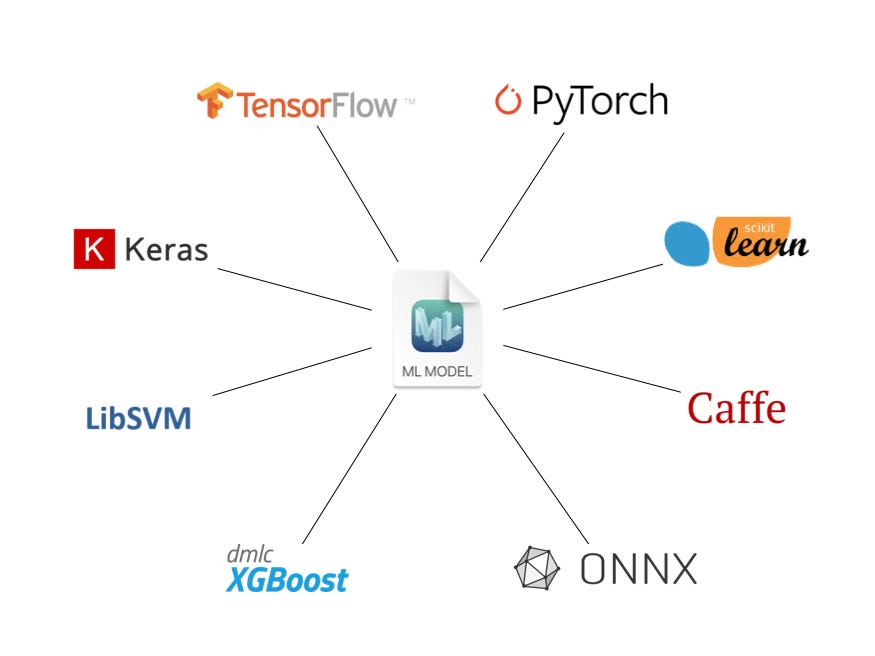
If you wanna run your machine learning model on an iOS device, first you have to know what CoreML is. CoreML is the machine learning framework maintained by Apple. To get the best hardware-optimized and advanced performance on an iOS device with a machine learning model, it is recommended to use CoreML.
What about TensorFlow Lite?
You can use TensorFlow Lite (TFLite) on iOS devices too, though most TFLite models are known to use more resources (e.g. — RAM) while delivering worse performance compared to CoreML counterparts. In addition, CoreML generally supports more types of operators/layers than TFLite.
CoreML model formats
The file type of a machine learning model depends on the framework that was used to generate it.
- TensorFlow by Google — “.pb”, “.h5”, “savedModel”
- PyTorch by Facebook (Meta AI) and The Linux Foundation — “.pt”, “.pth”
- ONNX by The Linux Foundation — “.onnx”
- Caffe by Berkeley Vision and Learning Center — “.caffe”
CoreML models can be saved as either a Neural Network or a ML Program, in either “.mlmodel” (Neural Net) or “.mlpackage” (Neural Net/ML Program) format depending on the minimum iOS deployment target. ML Programs are only available for iOS15+ devices and only in “.mlpackage” format.
How can we get a trained CoreML model?
There are several basic methods you can try.
1. Pretrained models by Apple
You can go to this web page by Apple and use the models, if they satisfy your requirements.

Some trained models provided by Apple
In most cases, there will also be code examples and links to the original code and paper, so that one can understand more about the model. In addition, there may be multiple models with different precisions (FP32/FP16/INT8), so that you can choose one, depending on the accuracy you seek and the model size you are willing to allow.

YOLOv3 models with different precisions, code sample and links to original code and paper
Pros
- Models are optimized for performance.
- They are well trained for their purpose.
Cons
- Cannot customize the model structure.
- May not exactly satisfy your requirements.
2. CreateML on MacOS to train a model
If you have the latest Xcode on your Mac, search for “***CreateML***” using Spotlight and open it. It can be used to train models without coding.

Model types that can be trained using CreateML
You can choose the model type depending on your requirements, import the dataset in the required format, set the options according to your preferences, train on your Mac, test with sample data and finally export the model. You should check out “***Training Object Detection Models in Create ML***” and other related WWDC videos for further understanding.
Pros
- No coding is necessary.
- Easy to use for anyone.
- Easily test models by dragging and dropping sample data.
Cons
- Cannot customize the model structure.
- Data preprocessing has to be done prior to training anyway.
- App is only available for MacOS, since it comes with Xcode.
3. Turicreate
Turicreate is a python library built on top of TensorFlow 2. We can use its task focused toolkits to create models with minimal coding and export them to CoreML easily with model.export_coreml(“my_model.mlmodel”) .
Pros
- Very little coding.
- Easy to visualize datasets and results.
Cons
- Little to zero model customization.
- Training of only some model types can be GPU accelerated depending on the OS (Linux/MacOS).
4. Convert a trained model using CoreMLTools
If you use a popular machine learning framework such as TensorFlow or PyTorch to train a customized model, you can use CoreMLTools to convert the trained model to a “.mlmodel” or “.mlpackage” file.
To convert from TensorFlow, PyTorch, scikit-learn, XGBoost and LibSVM, you may be able to use CoreMLTools 5.1+. However, if you must convert from ONNX or Caffe, you may have to use an older version (e.g. — CoreMLTools ≤ v4.0).
Pros
- You can train a customized model with a popular framework and then convert.
- Unified converter (one library to convert from multiple frameworks to CoreML).
- Quantize models to reduce file size. (see — for ML Programs, for Neural Nets)
Cons
- Some advanced operators/layers of other popular ML frameworks are not supported yet. (Mostly because they can be computationally expensive and not optimized for hardware yet. However, one can use composite operators or custom operators to implement them, if they must.)
- To perform inference with CoreMLTools, you will need a MacOS device.
You should check out “***Get models on device using Core ML Converters***” and other related WWDC videos for further understanding.
After you have your CoreML model, you can add it to you Xcode project and use it. You can refer to this sample code by Apple to find out how to use a simple model in an app. In addition, you can find more sample code snippets from links under section 1 and 3.
Do we need CoreML models?
If your requirement is common, you may be able to use On-device APIs such as Vision, Natural Language, Speech and Sound Analysis by Apple without CoreML models.
Similarly, you may be able to use ML-Kit by Google, if your requirements are common and do not wanna worry about CoreML. However, ML-Kit usually downloads a TFLite model and runs it to get the job done. Therefore, drawbacks of TFLite on iOS will still be there.
Other Useful Links
- CoreMLHelpers — Additional operations that are helpful to CoreML
- Machine Think — CoreML in depth
메타데이터
- post_id
- 6fc0a8bdb84f
- slug
- introduction-to-machine-learning-inference-on-ios-6fc0a8bdb84f
- url
- https://medium.com/@hdpoorna/introduction-to-machine-learning-inference-on-ios-6fc0a8bdb84f
- canonical_url
- https://medium.com/@hdpoorna/introduction-to-machine-learning-inference-on-ios-6fc0a8bdb84f
- author_url
- https://medium.com/@hdpoorna
- status
- ok
- fetched_at
- 2026-07-26 05:00:11