Understanding the MediaPipe Library: A Framework for Real-Time Perception
Introduction
Understanding the MediaPipe Library: A Framework for Real-Time Perception
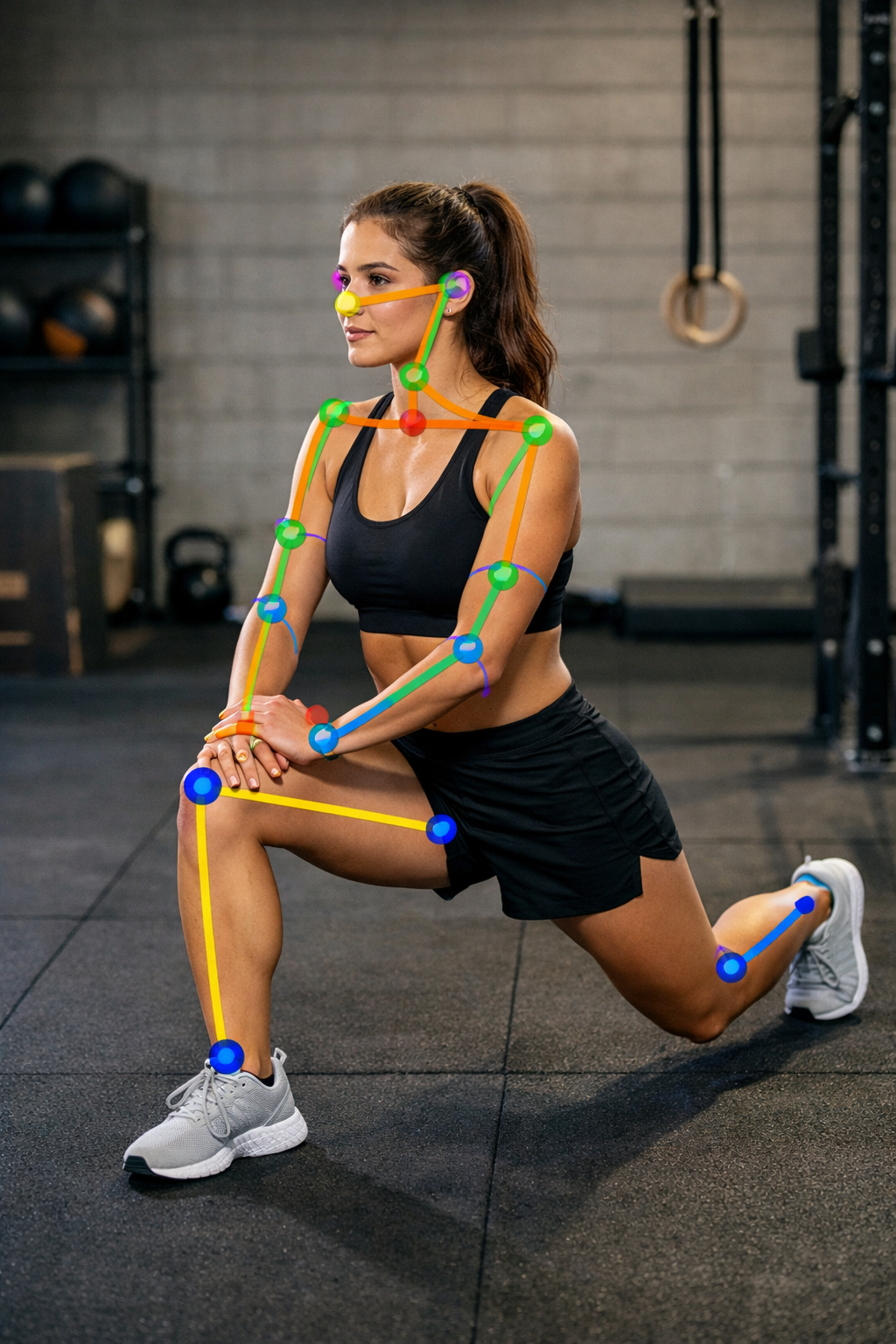
Introduction
In recent years, computer vision and machine learning have become integral parts of a wide range of applications, from augmented reality to healthcare. One of the most powerful frameworks enabling real-time perception is MediaPipe, an open-source cross-platform framework developed by Google. MediaPipe provides ready-to-use machine learning (ML) solutions for live and streaming media, making it especially useful for applications requiring fast and efficient feature extraction, such as pose estimation, hand tracking, and face mesh detection.
This article explores the MediaPipe library, explaining how it works, the mathematical foundations behind pose estimation, and how to estimate pose accuracy and how to generate feedback for pose correction.
Architecture of MediaPipe
MediaPipe is built around a graph-based framework where data flows through interconnected calculators. A calculator is a processing unit that performs a specific function, such as image preprocessing, model inference, or rendering results.
The workflow generally involves: 1. Input Source — video feed or image. 2. Preprocessing — resizing, normalization. 3. ML Inference — deep learning models for landmark detection. 4. Postprocessing — deriving angles, distances, or classifications. 5. Output — annotated images, features, or structured data.
This modular architecture allows customization and makes MediaPipe suitable for both research and production-level deployment.
Landmark Points
In the MediaPipe framework, landmark points are key 3D coordinates representing specific anatomical locations on a human body, face, or hands. Different MediaPipe solutions use machine learning models to detect various sets of landmarks for tasks like pose estimation, hand tracking, and facial feature analysis.
Pose landmarks
The Pose Landmarker detects 33 key landmarks on the human body to identify posture and movements. These include points for the head, torso, and limbs as shown below.

Figure 1 Landmarks of human skeleton extracted by MediPipe framework
(Source: https://ai.google.dev/edge/mediapipe/solutions/vision/pose_landmarker))
Landmark list:
- Head: Eyes, nose, mouth, and ears.
- Shoulders: Left and right shoulders.
- Arms: Elbows, wrists, and finger points for the pinky, index, and thumb on both hands.
- Torso and hips: The hips.
- Legs: Knees, ankles, and feet.
Face mesh landmarks
The Face Mesh solution estimates 468 3D facial landmarks for detailed facial feature analysis and expression tracking. An optional model with attention can increase this to 478 points for more accurate eye and lip tracking.

Figure 2 Original face (Left) and Face with landmarks(Right)
Landmark details:
- The landmarks cover facial features like the eyes, eyebrows, nose, mouth, and jawline.
- The solution also provides “blendshape scores” — coefficients that represent different facial expressions — which are useful for creating virtual avatars.
(Source: https://ai.google.dev/edge/mediapipe/solutions/vision/face_landmarker))
Hand landmarks
The Hand Landmarker task detects 21 key points for each hand, allowing for hand gesture recognition and tracking.

Figure 3 List of 21 hand landmarks extracted by MediPipe Framework
(Source: https://ai.google.dev/edge/mediapipe/solutions/vision/hand_landmarker)
Landmark list (per hand):
- Wrist: The base of the hand.
- Fingers: Four points each for the thumb, index, middle, ring, and pinky fingers, representing the tip and knuckles.
Holistic landmarks
The Holistic Landmarker combines the pose, face, and hand solutions to track all landmarks simultaneously, providing a complete full-body landmark detection.
Combined landmark count:
- 33 pose landmarks.
- 468 face landmarks.
- 21 hand landmarks per hand.
- The total number of landmarks detected in real-time is 543.
Coordinate system
All landmark data from these solutions include 3D coordinates:
- Image Coordinates (x, y): Normalized values, typically within the range [0.0, 1.0], relative to the image’s width and height.
- Depth Coordinate (z): A relative value representing the landmark’s depth. A smaller value indicates that the landmark is closer to the camera.
- World Coordinates: Some solutions, such as the Hand Landmarker, also provide landmarks in real-world 3D coordinates, measured in meters from the geometric center of the detected object.
Mathematical Foundations
At the core of MediaPipe’s pose estimation lies landmark detection. The model predicts a set of keypoints on the human body. Suppose an image is represented as a tensor

where H and W are height and width, respectively. A convolutional neural network (CNN) maps this image to 3D keypoints:

where N is the number of landmarks (e.g., 33 in the BlazePose model).
From these landmarks, joint angles can be computed using vector algebra. For example, if three points represent joints A(x1,y1), B(x2,y2), C(x3,y3), the angle at B is:

This equation is widely used in applications such as yoga or physiotherapy assessment.
MediaPipe framework and Machine Learning:
MediaPipe framework uses ML models at various stages. For example:
· Hand Tracking → MediaPipe uses a deep learning–based palm detector to localize hands and then another neural network for hand landmark regression (21 keypoints).
· Face Detection & Face Mesh → Uses convolutional neural networks (CNNs) for face detection and predicting dense 3D face landmarks.
· Pose Estimation → Uses ML models to first detect a person’s presence and then regress pose landmarks (33 keypoints).
· Object Detection / Segmentation → Relies on trained ML models like SSD, BlazePose, BlazeFace, and MobileNet-based variations.
So, MediaPipe itself is not “just ML” — it’s a framework for running and combining different stages of a data-processing pipeline. Some stages can be conventional image/audio processing, while others (like detection, tracking, landmarking) are powered by machine learning models.
Using MediaPipe framework for pose correction
It can be done using the following steps:
- Capture live video of the practitioner.
- Use MediaPipe Pose to extract 33 body landmarks.
- Compute joint angles (e.g., knee, elbow, shoulder).
- Compare angles with reference pose thresholds.
- Provide feedback (e.g., ‘raise your arm higher’).
For instance, in Warrior II posture, the front knee should ideally be at 90° and arms should be parallel to the floor. Using the formula for (\theta) above, the system can automatically evaluate correctness.
MediaPipe Pose is mainly acting as a feature extractor. It gives you the raw landmark coordinates (x, y, z, visibility) for 33 key body points. You don’t train MediaPipe itself; it’s already pre-trained with deep learning models (BlazePose). So it’s just a pose estimation engine. The actual assessment logic (correct vs. incorrect posture, scoring, feedback) happens after feature extraction, and you can choose how to implement it, using either of the two approaches:
· Rule-based → Using geometric relationships (angles, distances, alignment).
· Machine learning → Training a classifier/regressor on the extracted features (landmarks /angles).
So in short MediaPipe is a feature extractor (pose landmarks) and your code/model is a decision-maker (correctness evaluation).
Measuring pose accuracy and generating feedback for pose correction:
1. ML for Closeness Score
Machine learning (classifier/regressor) gives a quantitative score or probability that the pose is correct: e.g., 87/100. It tells you how close the person is to the ideal posture, but not why it’s off. ML models are usually “black boxes”: they combine multiple features, so you can’t easily extract the specific joint that is causing the score to drop.
2. Rule-Based for Specific Feedback
To provide actionable guidance (“raise the left arm”, “bend the knee more”), you need interpretable rules based on joint angles, distances, or orientations. Rules let you pinpoint exactly which joint is off and generate human-readable feedback.
For example:
If left_arm_angle < desired_range:
  feedback = "Raise the left arm
If left_arm_angle < desired_range:feedback = "Raise the left arm"If front_knee_angle < desired_range:feedback = "Bend the front knee slightly"This approach is used in practice, by combining ML model and Rule based approach.
-
ML model → gives overall pose score (robust, adapts to natural variations).
-
Rule-based system → identifies specific errors and generates feedback.
In addition to this a user friendly UI/UX shows both the score and the corrective suggestions. This is actually how a typical fitness apps work: the ML model handles the evaluation of correctness of a pose, while a rule based system provides interpretable feedback.
Applications:
MediaPipe has been applied in:
-
Fitness apps: counting push-ups, squats, or correcting form.
-
Yoga Pose detection
-
Sign language recognition: hand-tracking solutions for real-time translation.
-
AR/VR: facial mesh tracking for avatars.
-
Healthcare: physiotherapy progress monitoring.
-
Gaming: gesture-based controls.
MediaPipes cross-platform support (Python, C++, JavaScript) makes it accessible to developers across industries.
Conclusion:
MediaPipe is more than a feature extraction tool; it bridges ML research with real-time applications. By providing robust, pre-trained models for pose, face, and hand tracking, it empowers developers to build applications that understand human movement and interaction.
Whether using it for rule-based assessments (angles, thresholds) or as input features for machine learning classifiers, MediaPipe has proven to be a versatile framework. Its ability to run efficiently on mobile devices makes it particularly impactful for scalable applications in fitness, education, and healthcare.
In summary, MediaPipe demonstrates how cutting-edge computer vision can be made accessible and practical for solving everyday problems.
References:
-
Lugaresi, C., Tang, J., Nash, H., McClanahan, C., Uboweja, E., Hays, M., … & Grundmann, M. (2019). MediaPipe: A Framework for Building Perception Pipelines. arXiv preprint arXiv:1906.08172.
-
Google AI Blog. (2019). MediaPipe: A Framework for Building Cross-Platform ML Solutions. Retrieved from: https://ai.googleblog.com/2019/08/mediapipe-framework-for-building-cross.html
-
MediaPipe Documentation. (2025). https://developers.google.com/mediapipe
-
MediaPipe Solutions guide https://ai.google.dev/edge/mediapipe/solutions/guide
메타데이터
- post_id
- 6ffff80e9f2f
- slug
- understanding-the-mediapipe-library-a-framework-for-real-time-perception-6ffff80e9f2f
- url
- https://medium.com/@kkbhoyar/understanding-the-mediapipe-library-a-framework-for-real-time-perception-6ffff80e9f2f
- canonical_url
- https://medium.com/@kkbhoyar/understanding-the-mediapipe-library-a-framework-for-real-time-perception-6ffff80e9f2f
- author_url
- https://medium.com/@kkbhoyar
- status
- ok
- fetched_at
- 2026-06-14 11:28:49





