How to Connect Rally to Your RAG-Based Agentic System: An Enterprise-Grade Guide
A step-by-step guide for AI and Data Engineers on integrating Rally (CA Agile Central) as a robust data source for Retrieval-Augmented…
How to Connect Rally to Your RAG-Based Agentic System: An Enterprise-Grade Guide
A step-by-step guide for AI and Data Engineers on integrating Rally (CA Agile Central) as a robust data source for Retrieval-Augmented Generation systems.
In the world of enterprise AI, the power of a Retrieval-Augmented Generation (RAG) system is directly tied to the quality and richness of its data sources. For many organizations, Rally (formerly CA Agile Central) is the central nervous system for project management, holding invaluable structured data like user stories, tasks, and defects, as well as unstructured data in attachments.
Unlocking this data and feeding it into your RAG agents can supercharge their capabilities, providing them with deep, real-time context about your projects, processes, and history. But how do you build a data pipeline that is scalable, reliable, and tailored for AI?
This guide provides a complete, enterprise-tested blueprint for integrating Rally as a data source for your RAG system, based on extensive research into what works in large-scale deployments.
Understanding the Data Landscape in Rally
Before building the pipeline, it’s crucial to understand what we’re working with. Rally provides two primary types of data:
- Structured Data: This includes the core objects you work with every day, such as User Stories, Defects, Tasks, and Test Cases. This data is rich with organized metadata, relationships, and status information.
- Attachments: Users can attach a wide variety of files to Rally artifacts, including PDFs, Word documents, Excel spreadsheets, and CSVs. This unstructured data often contains deep contextual information, such as detailed specifications, reports, or logs.
A successful integration must handle both types of data effectively to provide a complete picture to your RAG system.
The Recommended Architecture: A Hybrid, Enterprise-Grade Approach
After evaluating numerous connection methods — including direct API calls, middleware, and SaaS connectors — a clear winner emerges for enterprise use: a hybrid architecture that combines the strengths of Rally’s API, a scalable ingestion tool like Azure Data Factory (ADF), a data lake, and custom Python processing.
This model is favored by large enterprises for its scalability, flexibility, and alignment with modern data engineering practices.
Here is the high-level flow:
Rally API
   ↓
Azure Data Factory (ADF) for bulk ingestion
   ↓
Azure Data Lake Storage (ADLS)
   ↓
Python Processing (Chunking & Embedding)
   ↓
Vector Database
   ↓
RAG Agents
Why This Architecture Works
- Scalability: ADF is designed for high-volume data movement, making it perfect for initial bulk loads and handling large, ongoing data streams.
- Flexibility: Using a data lake decouples ingestion from processing. Python gives you unlimited flexibility to implement custom logic for parsing, chunking, and embedding that is perfectly tuned to your needs.
- Cost-Effectiveness: This approach leverages existing, powerful components of the Azure ecosystem and avoids the high costs and potential vendor lock-in of specialized SaaS connectors.
- Comprehensive Data Handling: It seamlessly manages both structured data from Rally objects and unstructured data from attachments.
The Integration Flow: A Step-by-Step Breakdown
Let’s break down the journey of data from Rally to your RAG system’s memory.
1. Initial Bulk Load
The first step is to pull all historical data from Rally.
Flow Diagram:
Rally → ADF → Data Lake → Python → Vector DB- Rally to ADF: Configure an ADF pipeline using its REST connector to call Rally’s REST API (WSAPI). This pipeline will be responsible for fetching all user stories, defects, attachments, etc.
- ADF to Data Lake: ADF lands the raw JSON data and downloaded files into your Azure Data Lake. This creates a cheap, scalable, and persistent staging area for your data.
- Python Processing: An Azure Function or Databricks notebook is triggered. It reads the raw data from the lake, parses the structured JSON, extracts text from attachments, and applies your chunking strategy.
- Embedding and Storage: The processed chunks are then converted into vector embeddings and stored in your chosen Vector Database (e.g., Azure AI Search, Pinecone, Weaviate).
2. Incremental Synchronization
Once the initial load is complete, you need to keep your Vector DB updated with the latest changes from Rally. Since Rally’s API doesn’t have a true delta-token or change-feed feature, we rely on timestamp-based polling.
Flow Diagram:
Scheduler → Python → Rally API → Update Vector DB- Scheduler: An Azure Function with a timer trigger or an ADF scheduled trigger kicks off the sync process at a regular interval (e.g., every 15 minutes).
- Python Logic: The script calls the Rally API, using the
LastUpdateDatefilter to query for all items created or modified since the last successful run. It's critical to maintain a checkpoint of the last sync time. - Process and Update: The new and updated data is processed, chunked, and embedded just like in the initial load. The script then “upserts” this data into the Vector DB, adding new records and overwriting existing ones.
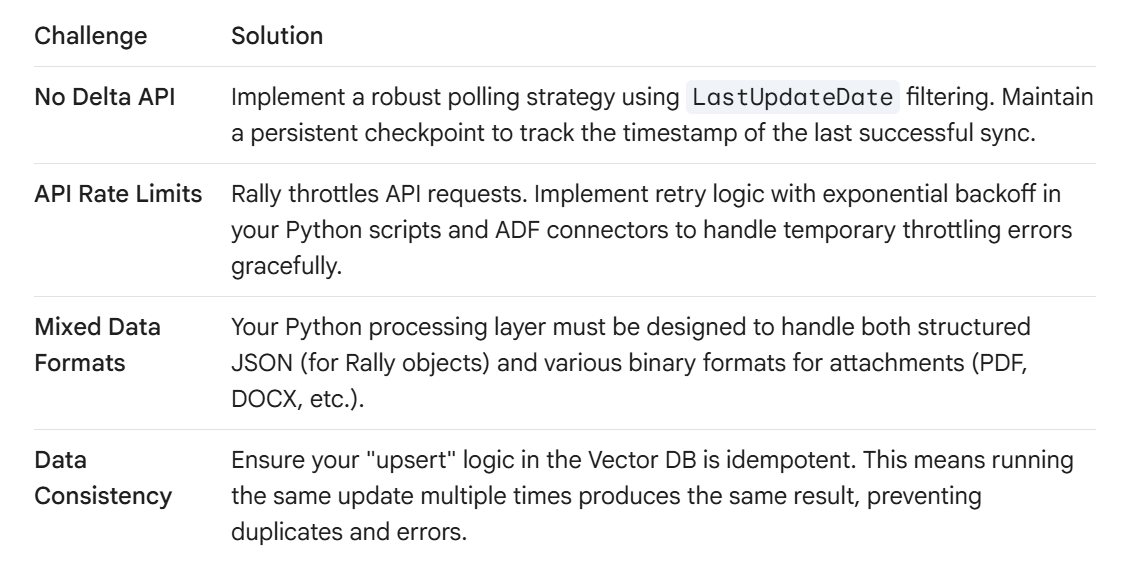
Key Challenges and How to Solve Them
Building this pipeline comes with a few common challenges, but they are all solvable with the right strategies.
Final Thoughts
Connecting Rally to your RAG system is a high-impact project that can transform your AI agents from generic helpers into expert assistants with deep domain knowledge.
By adopting a hybrid architecture using ADF and Python, you build a solution that is not only powerful and flexible but also aligns perfectly with the best practices of enterprise data engineering. This approach ensures that as your Rally data grows and your RAG system evolves, your data pipeline will be ready to scale with them.
NOTE: The Connecting method totally depends on the requirements, your system, and scenarios, it's similar to system design principle, Something will work according to my edge case and may not optimal for your requirements. So explore what fits with your environment and requirements and choose best one.
메타데이터
- post_id
- 703af9bdf4e4
- slug
- how-to-connect-rally-to-your-rag-based-agentic-system-an-enterprise-grade-guide-703af9bdf4e4
- url
- https://medium.com/@brajendra472/how-to-connect-rally-to-your-rag-based-agentic-system-an-enterprise-grade-guide-703af9bdf4e4
- canonical_url
- https://medium.com/@brajendra472/how-to-connect-rally-to-your-rag-based-agentic-system-an-enterprise-grade-guide-703af9bdf4e4
- author_url
- https://medium.com/@brajendra472
- status
- ok
- fetched_at
- 2026-07-09 00:50:33



