The Structural Evolution of LLM Interfaces
Act I: Markdown and the Blank Screen Crisis
The Structural Evolution of LLM Interfaces
Act I: Markdown and the Blank Screen Crisis
1.1 The UX Nightmare
A developer sitting in front of a monitor at 2 a.m. faces a familiar nightmare: staring at a completely unresponsive user interface while waiting for an API response. In the early days of LLM developer APIs, this “Blank Screen Problem” was the default experience. Users submitted a query and waited in total silence as the server buffered the entire completion.
The interface behaved like a static telegraph line, returning the complete payload only after the model had processed every single token. For a lengthy 500-token completion, this meant several seconds of painful latency, severely degrading the interactive flow of conversation.
1.2 The Progress Bar Illusion
[embed]
Engineering teams began optimizing for two critical phases of user perception: Time to First Token (TTFT) and Time Per Output Token (TPOT). TTFT tracks the time elapsed before the first character appears on the screen, while TPOT measures the average generation speed of subsequent tokens. Because LLMs generate one token at a time based on the preceding sequence, buffering the entire completion on the server is unnecessary.
[embed]
By exposing each token to the client immediately after generation, the interface leverages the psychological “progress bar effect”. This presentation-layer shift does not change the actual backend compute time, but the continuous visual update dramatically reduces perceived latency, making the system feel instantaneous and keeping the user engaged during long-running tasks.
Act II: The Plumbing of Real-Time Streams
2.1 The Transport Layer: Server-Sent Events
As conversational AI consists of a simple, lightweight client request followed by a massive, unidirectional server push, a bidirectional socket is often an overkill. Server-Sent Events, an unidirectional transport built directly on top of standard HTTP, emerged as the superior solution. SSE establishes a persistent connection where the server pushes sequential text blocks using the text/event-stream format. This design leverages native browser capabilities via the EventSource API, providing automatic reconnection, backoff tracking, and event categorization without the heavy overhead of stateful socket brokers.
Act III: Vercel AI SDK and the Memory Trap
3.1 The Local Store Conundrum
Once tokens arrive safely at the client, the UI must coordinate input state, streaming message buffers, and conversation history. Managing this state with local React hooks like useState or useReducer often leads to scattered, unmaintainable state mutations across components. While centralized stores like Redux Toolkit resolve this state chaos by funneling mutations through predictable, typed reducers and slices, the sheer volume of boilerplate code required can feel over-engineered.
3.2 Vercel’s useChat Hook and the Quadratic Payload Trap
To make things easier, Vercel built the AI SDK, introducing standard primitives like the useChat hook. The SDK simplifies state management by abstracting stream accumulation, form bindings, and loading states into a clean, framework-agnostic hook.
However, keeping conversation history in client-side memory creates a hidden performance trap. By default, useChat transmits the entire chat history with every new message payload. As a conversation deepens, the payload size grows quadratically, that inflates bandwidth consumption.
[embed]
3.3 Server-Side Persistence and Cache Offloading
To mitigate this client-side state inflation, architectures offload chat history to high-performance caches. Using a server-side Redis instance, the API route intercepts incoming requests. The client only transmits the current prompt and a unique chat session identifier over the wire. The backend retrieves the historical context from Redis, merges it with the prompt, routes the stream to the model, and utilizes the SDK’s built-in hooks (such as onFinish) to save the completed response. This approach cuts network overhead while preserving full persistence across sessions.
Act IV: React Server Components and its Pitfalls
4.1 The Dream of Server-Side Component Streaming
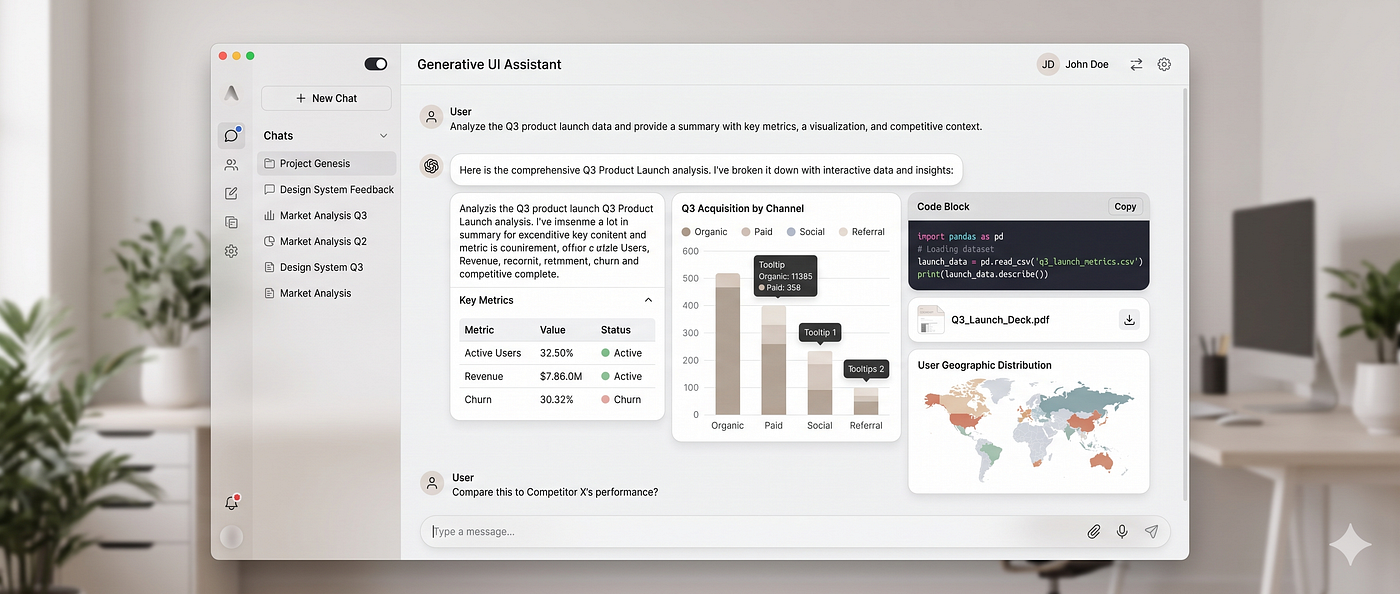
As chat experiences matured, text-based markdown became a conversational bottleneck. Forcing users to manually read text blocks or fill out rigid form wizards broke the flow of conversation. The industry sought a dynamic, “Generative UI” paradigm where models could render rich, interactive elements, such as claim summaries, flight selectors, or charts, directly inside the chat timeline.
Vercel AI SDK 3 pioneered this shift by introducing the experimental ai/rsc package and the streamUI helper, allowing developers to stream React Server Components (RSCs) directly from the server. When a model invoked a tool, the server executed the query, rendered a corresponding Server Component, and streamed the serialized virtual DOM nodes directly to the client over standard Server Actions.
4.2 The RSC Implosion: Structural Friction and the Quadratic Trap
While server-side visual rendering was conceptually elegant, it introduced severe friction:
- Stream Abort Failures: Server Actions do not natively support client-side abort signals, preventing users from canceling ongoing API requests and resulting in wasted tokens.
- Component Flickering: Streamed components often forced a complete remount upon stream completion (
.done()), causing disruptive visual flickering in the client. - Quadratic Serialization Costs: Transmitting serialized React component nodes over Server Action streams resulted in quadratic data transfer, heavily inflating bandwidth requirements.
4.3 The Return to Client-Side Tool Mapping
Faced with these problems, Vercel paused development on AI SDK RSC, shifting its recommended architecture back to client-side orchestration. Today, the modern production standard uses client-side useChat combined with structured JSON tool schema validation (using Zod).
The backend returns a highly structured JSON tool-call payload over standard SSE. The client-side UI parses this payload and maps it to pre-compiled, highly responsive React views based on the tool’s lifecycle state. This pattern isolates raw rendering logic from backend transport issues, yielding faster, safer, and fully cancelable user interactions.
Act V: The Agent-User Interface Protocol
5.1 The Silent Agent Problem
As applications transitioned from simple single-turn chats to complex multi-agent workflows, user experience hit a new wall. When a complex agent begins a multi-step task, such as conducting web research, compiling documents, or waiting for database responses in the background, the user is left staring at a static loading spinner. Without real-time visual feedback, the interface feels completely frozen, leaving the user with no idea what the system is actually doing.
5.2 Enter the AG-UI Protocol
To solve this feedback gap, the Agent-User Interface (AG-UI) protocol emerged. AG-UI is an event-driven standard designed specifically to stream an agent’s reasoning steps and active state directly to the client using SSE. Instead of waiting in total silence for a final text block, the browser receives immediate, structured event states as the agent thinks and acts behind the scenes.
5.3 Standardizing the Reasoning Stream
Under AG-UI, events are streamed sequentially to indicate the exact stage of the agent’s run. This allows the frontend to dynamically render live progress bars, step-by-step reasoning logs, and interactive approval forms, keeping the human firmly in the loop.
Act VI: OpenAI ChatKit and the Architectural Cage
6.1 The Polished Mirage
If you want to deploy a polished interface quickly, OpenAI introduced ChatKit, a framework-agnostic, drop-in web component. ChatKit handles the entire presentation layer out of the box, including chat bubbles, responsive input composers, file attachments, and interactive widgets. However, ChatKit forced a rigid, OpenAI-centric model that is incredibly hard to customize if your application’s backend doesn’t perfectly match their design.
Act VII: OpenUI and the Language the LLM Speaks
7.1 The Format Tax
Every previous attempt at Generative UI inherited the same original sin: the output format was designed for humans or for general-purpose data exchange, never for progressive, line-by-line UI rendering. Markdown is linear prose with no component semantics. JSON is deeply nested and fundamentally hostile to streaming; its tree structure means the parser cannot begin rendering until the closing brace of the root object arrives, locking the client in silence while thousands of redundant bytes pour down the wire. Keys like "component", "props", and "children" are repeated for every single element, consuming tokens on ceremony rather than substance.
The math is brutal: at 60 tokens per second, a JSON payload encoding a modest UI response can consume 849 tokens and take over 14 seconds to fully resolve. The interface is frozen, waiting. This is not a transport problem. It is not an orchestration problem. It is a language problem.
7.2 Enter OpenUI Lang

OpenUI, built by Thesys, attacked Generative UI from first principles. Rather than forcing the model to emit JSON or raw HTML, OpenUI defines a purpose-built, compact, line-oriented language that the LLM generates directly in response to user messages, instead of markdown or tool-call payloads.
The syntax is positional and minimal by design. A single line like root = Stack([chart, summary]) expresses the full structural intent of a component tree. There are no repeated key strings, no nested brackets to close, no deferred parsing. Because the language is line-oriented, each line is a self-contained, parseable statement in the form identifier = Expression. The renderer can begin mounting components the moment the first line arrives over the SSE stream. Structure renders first and data fills in progressively behind it.
The efficiency gains are concrete. OpenUI claims 3x faster rendering and up to 67.1% lesser tokens than json-render. The same UI that costed 849 tokens in JSON would cost 294 tokens in OpenUI Lang. That same payload, streamed at 60 tokens per second, resolves in 4.9 seconds instead of 14.2.
7.3 The Four-Stage Pipeline
The framework is built around a disciplined four-stage pipeline that keeps the developer in control of the component surface while letting the model drive composition entirely.
The developer begins by registering their own React components using defineComponent and assembling them into a named library with createLibrary, both imported from @openuidev/react-lang. Each component declaration carries a Zod schema that constrains the props the model is allowed to emit, making hallucinated props structurally impossible to render.
OpenUI then reads this library definition and automatically generates the corresponding system prompt fragment, appending the component specification alongside the application’s own system prompt. The model is instructed to respond exclusively in OpenUI Lang, scoped strictly to the registered component set.
When the user sends a message, the model streams an OpenUI Lang response over standard SSE. On the client, the **<Renderer /> component from @openuidev/react-lang reads the incoming stream line by line. As each line resolves, the corresponding React component is instantiated and mounted, giving the user a live, progressively-revealed interface. Invalid or hallucinated component names are silently dropped by the parser** and structured errors are surfaced via onError callbacks, designed to be piped directly back to the model for self-correction loops.
7.4 The Sovereign Component Model
Earlier Generative UI approaches from Vercel’s RSC experiment to client-side tool-call mapping, treated UI as a side effect of the model’s output. OpenUI inverts this relationship entirely. The developer’s component library is the constraint that defines what the model is even permitted to say. The LLM is not generating arbitrary interfaces; it is selecting, configuring, and composing from a pre-declared, Zod-validated surface.
This makes the renderer safe by construction. No arbitrary code is executed at runtime. The model can only invoke components the developer has explicitly registered and typed.
메타데이터
- post_id
- 70e166327ad5
- slug
- the-structural-evolution-of-llm-interfaces-70e166327ad5
- url
- https://medium.com/front-end-weekly/the-structural-evolution-of-llm-interfaces-70e166327ad5
- canonical_url
- https://medium.com/front-end-weekly/the-structural-evolution-of-llm-interfaces-70e166327ad5
- author_url
- https://medium.com/@moresiddhesh
- status
- ok
- fetched_at
- 2026-07-13 06:45:54