When a Power Cut Took Down My Home Lab
A real outage, real consequences, and real lessons — from power to networking to storage dependencies
When a Power Cut Took Down My Home Lab
A real outage, real consequences, and real lessons — from power to networking to storage dependencies
Context: The Environment
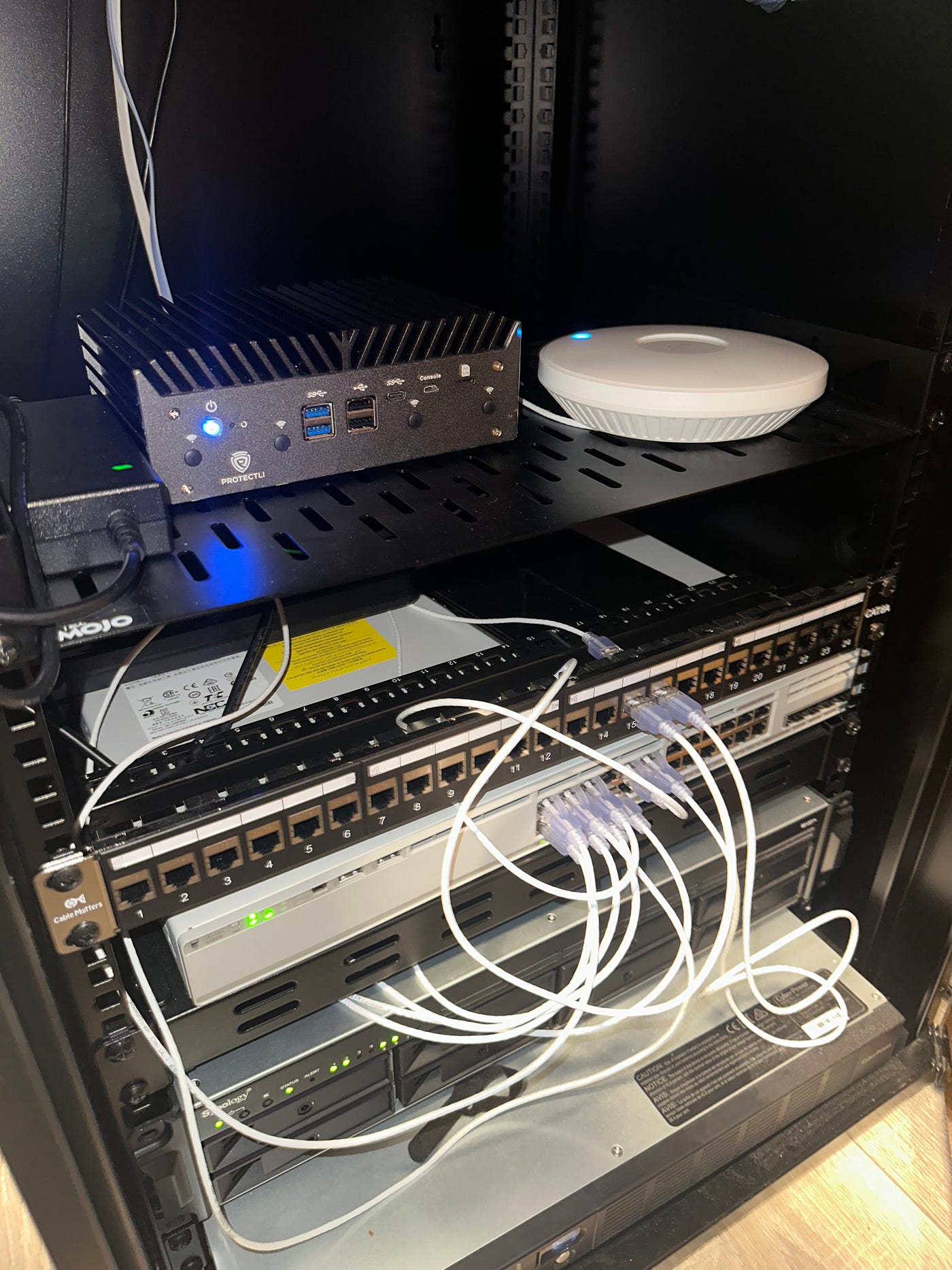
This home lab is not a casual setup; it mirrors real infrastructure patterns and failure modes.
Core components
- UPS: CyberPower OR1500ERM1U
- Firewall / Router: OPNsense
- Hypervisor: Proxmox
- Storage: Synology NAS (NFS datastore for Proxmox)
- Networking: Cisco Catalyst 9200, VLANs, trunking, LACP, TP-Link EAP
- Management: DHCP, VLAN-segmented management network
Critical dependency All Proxmox virtual machines reside on an NFS datastore hosted on the NAS.
If the NAS is unavailable → Proxmox cannot mount storage → VMs cannot start.

This dependency chain is intentional, explicit, and central to the incident.
The Incident: What Actually Happened
A brief power grid failure occurred. On the surface, the environment appeared to recover. In reality, several systems reacted independently, creating a cascading failure across layers.
Timeline
- Power grid failure
- NAS powered off
- Power restored
- Core infrastructure appeared online, except the NAS
- NAS was manually powered back on
- Port-Channel1 (NAS ↔ Switch) came back up
- NAS received a new DHCP IP address
- Proxmox failed to mount NFS storage (old IP still configured)
- VMs refused to start
- Infrastructure was “partially up” but functionally broken
This was not a single failure — it was a layered cascade.
Symptoms Observed
- Proxmox VMs would not start
- NFS datastore reported as unavailable
- Network connectivity looked healthy at first glance
- Switch access ports were up, but Port-Channel1 was down
- UPS and NAS logs showed power loss and restoration
- NAS was reachable only after manual power-on — but not at its expected IP

At this stage, it was clear this was not just a power issue.
Troubleshooting: Layer by Layer
This is where the real signal lives.
Layer 1 — Power (Physical)
✔ UPS batteries healthy ✔ Runtime within expected range ✔ No overload conditions
Critical discovery
All core infrastructure devices (NAS, Proxmox host, networking) were connected to surge-only outlets on the UPS not the battery-backed outlets hence there was no load on the UPS.

Result
- During the grid failure, power was cut immediately
- The UPS provided no power backup
- Devices shut down abruptly
- Shutdown sequencing and graceful recovery logic never executed
- The UPS did not fail — it behaved exactly as designed

This explained:
- Why everything powered off despite a healthy battery
- Why recovery appeared inconsistent
- Why the outage felt more severe than expected
Layer 2 — Network (Switching)
- Physical interfaces: UP
- Port-channel: DOWN
LACP failed because the NAS (the end host) had been powered off.
Layer 1 failure cascaded directly into Layer 2.

`Layer 3 — Network (IP / Routing)
This is where the true break occurred.
- NAS came back online
- DHCP assigned a new IP address
- OPNsense lease table confirmed the change
- Proxmox NFS configuration still referenced the old IP


Outcome NFS mount failed → storage unavailable → VM startup blocked.


Proxmox refused to start VMs without storage, exactly as it should.
This was not a Proxmox bug; it was dependency protection working as designed.
Logs & Signals That Mattered
No single log told the story.
Key signals included:
- UPS event logs confirming power loss and restoration
- OPNsense DHCP leases revealing the NAS IP change
- Proxmox storage status showing NFS unreachable
- Switch port-channel state reflecting NAS availability
The solution required correlating events across multiple systems and layers.
Root Cause (Not Just “The Power Went Out”)
Primary cause
- Dynamic IP addressing on a critical storage dependency
Contributing factors
- Core infrastructure connected to surge-only UPS outlets
- NAS relying on DHCP instead of static / reserved IP
- NFS mounts bound to IP addresses
- No automated post-power-loss validation
- No centralised syslog or alert correlation
Changes Implemented After the Incident
This is where the incident became valuable.
1. Corrected UPS Outlet Usage
- All critical infrastructure moved to battery-backed outlets
- Surge-only outlets reserved for non-critical equipment
- Load distribution reviewed against runtime targets
Result
- Power continuity during outages
- Predictable shutdown behaviour
- Proper sequencing between storage and compute
2. Static IP / DHCP Reservations
During recovery, I also observed that the UPS itself received a new IP.
Actions taken:
- Static DHCP reservations configured in OPNsense
- Fixed IPs assigned to all critical infrastructure
I had to manually change the IP that the NFS mount was pointing by editing: “etc/pve/storage.cfg” in Proxmox and restarting.
Result
- No silent address changes
- Stable service dependencies
3. Monitoring Improvements
- Power draw monitored via smart energy plug
- UPS metrics reviewed regularly
- Clear operational distinction between:
- Surge protected outlets
- Battery-backed power outlets
4. Post-Incident Runbook Created
After any power event:
- Verify UPS state and logs
- Confirm NAS availability and IP
- Validate NFS mounts
- Only then start VMs
What This Incident Demonstrates
· Layered troubleshooting (physical → data link → network → services)
· Correct interpretation of logs and system signals
· Implementing systemic improvements, not temporary fixes
· Treating incidents as learning opportunities
· Documenting and standardising recovery procedures
In short: production thinking, applied consistently even in a home lab.
Final Reflection
This outage caused my infrastructure to partially recover leaving core systems in an inconsistent state.
This incident reinforced a critical lesson:
Each layer has the power to affect other layers, understanding and troubleshooting from the ground up will reveal the truth.
메타데이터
- post_id
- 715d4e258c0c
- slug
- when-a-power-cut-took-down-my-home-lab-715d4e258c0c
- url
- https://medium.com/@pmagyei/when-a-power-cut-took-down-my-home-lab-715d4e258c0c
- canonical_url
- https://medium.com/@pmagyei/when-a-power-cut-took-down-my-home-lab-715d4e258c0c
- author_url
- https://medium.com/@pmagyei
- status
- ok
- fetched_at
- 2026-06-17 08:20:12