Motion Is Becoming Part of the Design System
Figma Motion (via Figma)
Motion Is Becoming Part of the Design System

Figma Motion (via Figma)
Among everything announced at Config 2026, Figma Motion was the first thing I wanted to try.
Now in open beta, it brings UI design and motion work together on the same Figma canvas.
Until now, if you wanted to design and share UI motion in any real detail, Figma’s Prototype and Smart Animate could only take you so far. You often had to bring in external tools like After Effects or Lottie, or go back and forth with engineers to work out the details.
And yet, motion is inseparable from the product experience. The way a button responds when you press it, how a modal slides in, how a card expands, how one screen flows into the next — the products we use every day are full of these moments of motion.

Motion in action in Figma Motion (via Figma)
And this motion isn’t just decoration. It communicates state changes, guides the user’s attention to where to look next, and shapes the product’s personality. Motion has a job to do.
Figma Motion expands what you can do in Figma. You can now define motion right within your UI design workflow and share it with your team. That should make it easier to put motion at the center of the design process.
What interests me most is the possibility of making motion part of the design system. In this post, I’ll build a small UI component and explore what that could look like in practice.
Building (and animating) a small UI component
For this experiment, I built a small UI component — a card that expands to show details when clicked — and added motion to it.
1. Build a static UI component
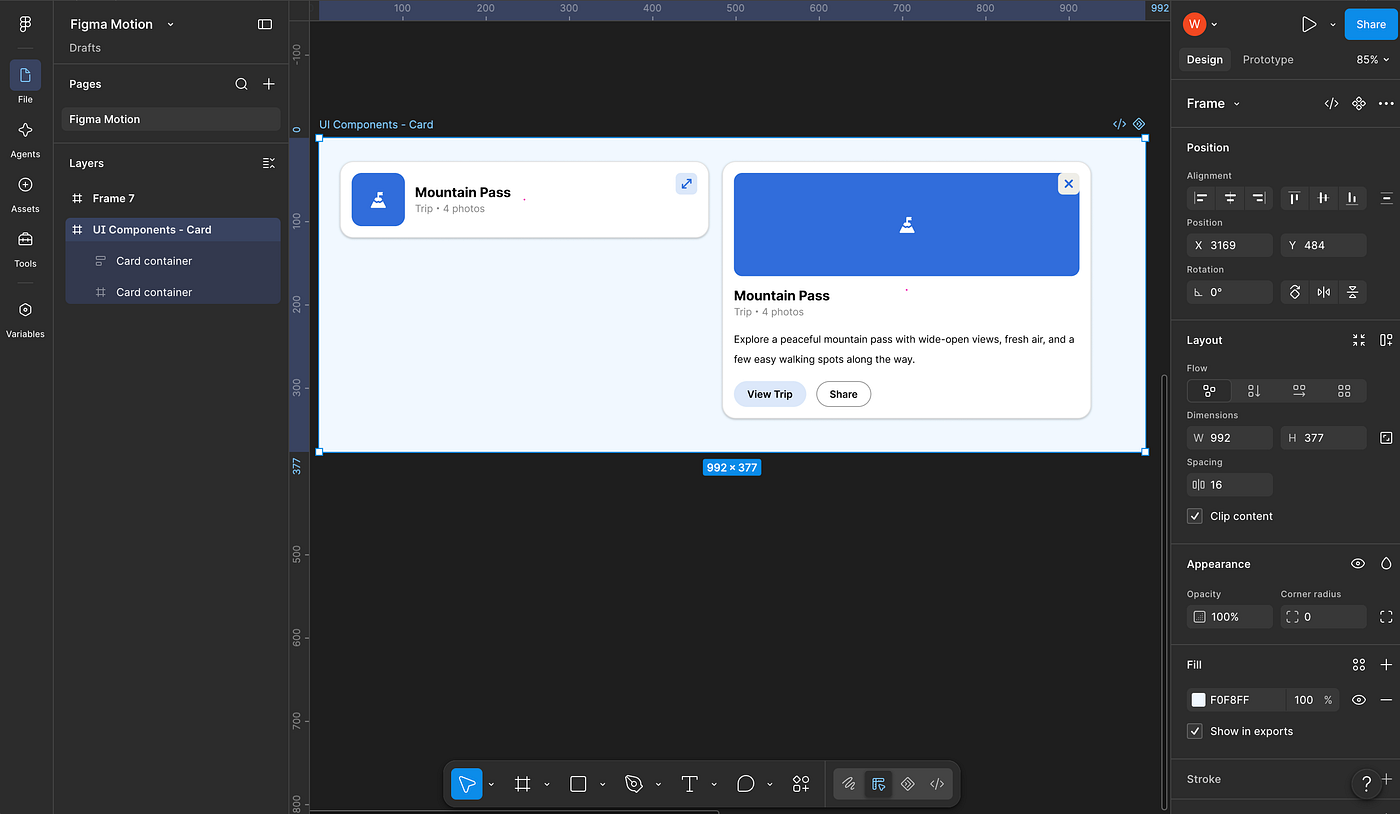
The card UI, built in Figma as usual
In the collapsed state, the card shows just a thumbnail, a title, and some metadata. When clicked, it expands: the thumbnail turns into a large visual area, and a description and action buttons appear.
First, I created two frames as usual: one for the collapsed state and one for the expanded state. At this stage, everything is still static.
2. Add motion to each element
Click the second icon from the right in the toolbar, and a timeline opens at the bottom of the screen. You can adjust the UI and edit the timeline in the same place, which makes everything much smoother than when you had to switch to a separate tool.

The Figma Motion icon in the toolbar opens a timeline at the bottom of the canvas
The easiest place to start is the preset animation styles. Fade, Rotate, Scale, Resize, and others come built in — all you have to do is pick one and apply it. You can also combine styles, and custom styles are reportedly coming soon.
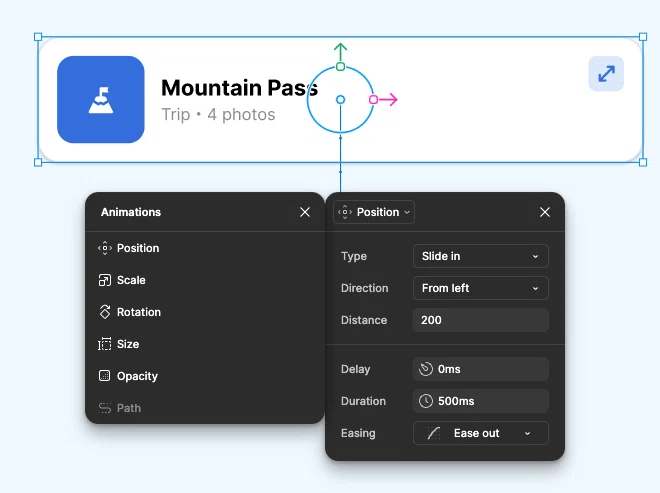
The built-in animation presets
Easing changes the very feel of a movement. Take the same positional change: does the element glide smoothly into place, or land with a slight bounce? You can fine-tune the motion down to that level of nuance.

Fine-tuning the motion with a custom easing curve on the timeline
For finer control, you can add keyframes to the timeline and specify when a movement starts, how much it changes, and when it ends.
And Motion isn’t the only expansion: at Config 2026, Figma also announced Depth, Texture, and other new ways to work visually on the canvas. Going forward, the expressive range of UI motion looks set to keep growing.
3. Try Figma Agent
On top of that, with Figma Agent you can simply describe the motion you want in words, and it generates the keyframes on the timeline for you. I figured I’d give it a try.

Figma Agent’s animation plan for each element, generated from a single prompt
I described the motion I wanted, and then all I had to do was hit “Play animation” — animations were applied to all eight elements, and the motion played back just as I had imagined.

The finished animation: collapsed to expanded
If you’re not used to motion work, setting everything up from scratch can be a bit of a hurdle. Seeing a single prompt build all of this out for me made the feature feel really practical.
4. Think of motion as a system
What makes Figma Motion especially interesting is that it gives you the machinery to run motion as a system. At the heart of that machinery are components and Variables.
Animations can be tied directly to components. Once you’ve defined motion for a component, it can move consistently wherever that component is reused — across screens and files. UI components that used to be static can now carry motion with them as part of the system.
What’s more, you can save animation timing (Delay and Duration) and easing as Variables. Define your brand’s standard motion once, and you can deliver a consistent experience across the entire product.

Setting up timing variables (via Figma)
Motion used to sit outside the design process. Now it can be designed on the same canvas as the UI — and managed consistently as part of a design system. Clearly, Figma’s canvas can express more than it used to.
Closing thoughts
With Figma Motion, the pieces are now in place to define, share, and reuse motion. Being able to save timing and easing as Variables and manage animated components within a design system could well change how teams work with motion.
That said, the easier motion becomes to create, the more important the question “why should this move?” becomes. From an accessibility standpoint, too much motion can hurt the experience for some people. Motion can help communicate state changes, but it can also steal attention and become a burden. That’s a question I want to hold on to.
For me, the value of Figma Motion isn’t just that it makes animation easier to create — it’s that it lets motion fit naturally into experience design, the design system, and developer handoff.
Going forward, I want to do more than just try new tools — I want to watch how they actually shape product development and team workflows.
References
메타데이터
- post_id
- 716b87befe35
- slug
- motion-is-becoming-part-of-the-design-system-716b87befe35
- url
- https://www.designsystemscollective.com/motion-is-becoming-part-of-the-design-system-716b87befe35
- canonical_url
- https://www.designsystemscollective.com/motion-is-becoming-part-of-the-design-system-716b87befe35
- author_url
- https://medium.com/@wakapix
- status
- ok
- fetched_at
- 2026-07-14 20:46:09