c++ chrono for time
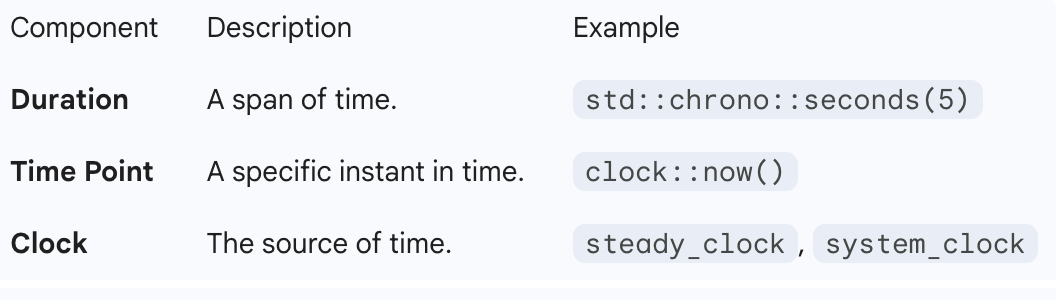
To effectively use std::chrono in C++, you need to understand its three core components: Clocks, Time Points, and Durations.
c++ chrono for time
To effectively use std::chrono in C++, you need to understand its three core components: Clocks, Time Points, and Durations.
Here is a guide to the essentials.
1. The Three Core Components
2. Which Clock Should You Use?
**std::chrono::steady_clock: ALWAYS** use this for measuring elapsed time (stopwatch). It is monotonic, meaning it can never go backwards (even if the OS changes the system time).**std::chrono::system_clock**: Use this for "Wall Clock" time (e.g., getting the current date/time to display to a user). It syncs with the system time and can jump forward/backward.**std::chrono::high_resolution_clock**: Usually just an alias for one of the above. Stick tosteady_clockfor robustness.
3. Example: Measuring Execution Time (Stopwatch)
This is the most common use case: checking how long a function takes to run.
#include <iostream>
#include <chrono>
#include <thread>

int main() {
    // 1. Start the timer
    auto start = std::chrono::steady_clock::now();

    // ... Do some work (simulated here by sleeping) ...
    std::this_thread::sleep_for(std::chrono::milliseconds(500));

    // 2. Stop the timer
    auto end = std::chrono::steady_clock::now();

    // 3. Calculate duration
    // You must cast it to the unit you want (e.g., milliseconds, microseconds)
    auto duration = std::chrono::duration_cast<std::chrono::milliseconds>(end - start);

    std::cout << "Time elapsed: " << duration.count() << " ms" << std::endl;

    return 0;
}
4. Example: Getting Current Date/Time
Use system_clock when you need a human-readable timestamp.
#include <iostream>
#include <chrono>
#include <ctime> // For std::time_t
int main() {
// 1. Get current time point
auto now = std::chrono::system_clock::now();
// 2. Convert to time_t (C-style time) to print it easily
std::time_t currentTime = std::chrono::system_clock::to_time_t(now);
// 3. Print
// ctime converts time_t to a string like "Wed Dec 31 17:00:00 2025\n"
std::cout << "Current time: " << std::ctime(¤tTime);
return 0;
}5. Cheat Sheet: Duration Conversions
C++ allows you to do math with time units directly.
using namespace std::chrono;

// Literals (C++14 and later)
auto time1 = 10s;        // 10 seconds
auto time2 = 150ms;      // 150 milliseconds
auto time3 = 1h + 30min; // 1 hour 30 mins

// Precision Math
// If you subtract two time_points, you get a duration
duration<double> exact_sec = steady_clock::now() - start;
std::cout << exact_sec.count(); // Returns fractional seconds (e.g., 0.50023)
Summary Rule of Thumb
- If you are benchmarking code or building a timer →
**steady_clock**. - If you are printing a date or scheduling a calendar event →
**system_clock**.
Happy learning !!!
메타데이터
- post_id
- 71b73d9e33f6
- slug
- c-chrono-for-time-71b73d9e33f6
- url
- https://medium.com/@dilipkumar/c-chrono-for-time-71b73d9e33f6
- canonical_url
- https://medium.com/@dilipkumar/c-chrono-for-time-71b73d9e33f6
- author_url
- https://medium.com/@dilipkumar
- status
- ok
- fetched_at
- 2026-07-13 19:00:05


