Basics Of Python
Overview of the Python Language With Practical Implementation
Basics Of Python
Overview of the Python Language With Practical Implementation
Photo by Rubaitul Azad on Unsplash
Python is a popular language created by Guido Van Rossum in 1991; it is a high-level language (we do not manage memory manually like C/C++), interpreted( code runs line by line), object-oriented (supports classes and objects), dynamically typed( no need to declare variable type), and has a rich library.
So let’s start learning some basics of Python. If you are a non-member, you can click on the ***link***.
Input and output in Python
For output in Python, we use the print statement.
print("Hello World")
print("Hello")

'''
output:
Hello World
Hello
'''
print takes a newline after end of each print statement. We can replace it with any value we want rather that of new line.
print("Hello World",end=" ")
print("Hello",end="#")

'''
output:
Hello World Hello#
'''
Input:
In Python, we use the input() function to take the input from the user, and it will only move when we type the value, and we can also give directions to the user by outputting the value to type. The default data type is a string type of input. If we want to change the type, we can convert its type by explicit conversion.
a=input('Enter a:')
b=int(input('Enter b:'))
Python Data Types
In Python, 3 types are supported:-
- Basic types: int, float, complex, bool, string and bytes.
- Container types: list, tuple, set and dictionary.
- User-defined types: class.
Basic Types
Int: Int can be of any arbitrary size(no limit), one can create as big integers as they want, no issue of overflow and underflow.
a=100020323130103103133
print(a)
Float: A float is used to represent decimal values. The range of float is 2.22 × 10⁻³⁰⁸ to 1.79 x 10³⁰⁸, and it stores values as double precision values(64-bit).
#to show min max value of float
import sys
print(sys.float_info.max)
print(sys.float_info.min)
Complex: numbers containing real and imaginary parts.
#complex number addition
complex1=complex(2,3)
complex2=complex(4,5)
print(complex1+complex2) #6+8j
Bool: There are two values of bool, True and False.
#bool values
print(1==1) #True
print(2==3) #False
print('a'=='ab') #False
print('a'==97) #False
String: Strings in Python are immutable(i.e we cannot assign some other character or we cannot change the value), a collection of Unicode values enclosed in ‘’ or “”.
#strings
name='hello'
print(name[0]) #h
print(name) #hello
name[0]='a' #error: 'str' object does not support item assignment
Bytes: binary data that is immutable and mostly used in sending data over a network.
size=10
byte_arr= bytes(size)
print(byte_arr) #b'\x00\x00\x00\x00\x00\x00\x00\x00\x00\x00'

str="Hello"
print(str.encode()) #b'Hello'
In Python, there is no need of defining data type of the variables; the type is inferred automatically during execution.
#type in python
print(type(10)) #int
print(type(10.0)) #float
print(type("H")) #str
Operators
Arithmetic operators
Python supports +,-,*,/,%,//,**
num1=45
num2=4

print(num1+num2) #49
print(num1-num2) #41
print(num1*num2) #180
print(num1/num2) #11.25
‘//’ is floor division, which divides the first argument by the second and rounds the result down to the nearest whole number, making it equivalent to the math floor function. For negative numbers, if the result is greater than x.00, for example, -10.01 than the result will be -11 or -x-1.
num1=45
num2=4

print(num1//num2) #11

num3=-100
print(num3//num2) #-25
Modulo operation(%) is evaluated as a%b= a-(b*a//b)
num4=-10
print(num4%4) #2
The exponential operator(**) is used to calculate the power of any variable x. All the arithmetic operators except exponential had precedence left to right; for exponential, it is right to left.
print(2**10) #1024Order of precedence : ()-> * -> ,/ -> //,% -> +,-
The operation between int and float will yield float, the operation between int and complex will yield complex, and the operation between float and complex will yield complex.
Relational operators
It compares left hand side and right hand side and return bool.
a<b : less than
a< = b: less than or equal
a>b: greater than
a> =b: greater than or equal
a==b: is equal to
a!=b: not equal to
#comparison
a=10
b=20

if a<b:
  print("a is less than b")
else:
  print("a is greater than b")

if a<=b:
  print("a is less than or equal to b")
else:
  print("a is greater than b")

if a>b:
  print("a is greater than b")
else:
  print("a is less than b")

if a>=b:
  print("a is greater than or equal to b")
else:
  print("a is less than b")

if a==b:
  print("a is equal to b")
if a!=b:
  print("a is not equal to b")

"""
output:
a is less than b
a is less than or equal to b
a is less than b
a is less than b
a is not equal to b
"""
Logical Operators
a and b: gives True result if both a and b are true, else False.
a or b: gives True result if either a or b is true, else False.
not a: gives True if a is false and False if a is true.
a=True
b=0
print(a  and b) #0
print(a and a) #True
print(a or b) #True
print(not a) #False
Assignment operator
x=y: equal to
x+=1 : x=x+1
x-=1 : x=x-1
x=2 : x=x2
x/=2 : x=x/2
x%=2 : x=x%2
x=10
print(x) #10
x+=10
print(x) #20
x-=10
print(x) #10
x*=10
print(x) #100
x/=10
print(x) #10.0
x%=3
print(x) #1.0
Bitwise operator
It is supported for int, byte and bool.
& (bitwise and): gives result 1 &1 =1, else 0.
| (bitwise or): gives result 0 | 0 =0, else 1.
^ (bitwise xor): gives result 1 ^ 1= 0 and 0 ^ 0=0 else 1.
~ (bitwise not): gives result ~1=0 and ~0=1.
<< (bitwise left shift): The left operand’s value is moved towards left by number of bits specified. x<<1 = x2, so x<<n = x(2^n).
>> (bitwise right shift): The right operand’s value is moved towards right by number of bits specified. x>>1 = x/2, so x>>n = x/(2^n).
x=2
y=5
print(x&y) #0
print(x|y) #7
print(x^y) #7
print(~x)  #-3
print(x<<y) #64
print(x>>y) #0
Strings
Strings are immutable in nature i.e, str[0]=’a’ is not a valid statement and the content is not changeable.
Strings can be enclosed using single(‘ ‘) or double(“ “) quotes i.e, str=’abc’ and str=”abc” is same. For multiple line strings we can use triple(‘’’ or “””)quotes.
str="hello"
print(str)
s1='''this
     is a code'''
print(s1)

#output
# hello
# this
#      is a code
Special characters in strings
If there is use of special characters in the string like \, “, \,. Then, if we print the string with the special characters the functionality of the special characters is implemented not and not the special characters.
print("hello \n world")
#output
# hello
# world
In the above example, the \n is the next line character and used to print the characters in the next line however, if we want to implement \n as a raw string, i.e., we want to print hello \n world. For this we user escape character() before the special character which forces the interpreter to think it as a raw string.
print("hello \\n world")
#Output
# hello \n world
We can also prepend the string with an ‘r’ indicating that it’s a raw string.
print(r"hello \n world")
#Output
# hello \n world
An f-string (formatted string literal) is a concise, readable way to include the value of Python expressions inside string literals.
name='XYZ'
address="ABC street"
print(f"The name is {name} and the address is {address}")

#Output
# The name is XYZ a0nd the address is ABC street
Indexing on strings
To find the length of the string, we use the len(str) function.
Slicing is the technique which show the particular range according to the specified limit. -> s[start: end]: extract from start to end-1 -> s[start:]: extract from start to len(str)-1 -> s[: end]: extract from 0 to end-1 -> s[:-end]: extract from 0 to end-1 -> s[-start:]: extract from len(str)- start(included) to len(str)-1 -> s[::-1]: reverse the string
s="Welcome to the Python world"
print(len(s))
print(s[3:6])
print(s[8:])
print(s[:5])
print(s[:-3])
print(s[-2:])
print(s[::-1])

# Output
# 27
# com
# to the Python world
# Welco
# Welcome to the Python wo
# ld
# dlrow nohtyP eht ot emocleW
In slicing, if there is index out of bounds then it will not give any error however, if we try to access the index out of range in string, it will give an error.
print(s[:1000])# Welcome to the Python world
print(s[1000:]) # empty string
print(s[1000]) #IndexError: string index out of range
String methods
Concatenation: It combines two string by using the ‘+’ operator.
a="HEllo"
b="World"
print(a+b) #HElloWorld
Substring check: If we want to check for whether the substring is part of the string or not we can use ‘in’ for validation. Please note that it is case sensitive.
text="Love is life"
sub="Love"
msg="LIFE"
print(sub in text) #True
print(msg in text) #False
Min & Max: The minimum or maximum value from the string is analysed using the ASCII value for the string. If space is added to the string, then it also considers the ASCII value of the space and provides the result according to it.
text="World"
print(min(text)) #W
print(max(text)) #r

text='World is'
print(min(text)) #
print(max(text)) #s
Content test function: - isalpha(): check if all characters in strings are alphabet.
- isdigit(): check if all characters in strings are digits.
- isalnum(): checks if all characters in strings are alphabet or digits.
- islower(): checks if all characters in strings are in lowercase.
- isupper(): checks if all characters in strings are in uppercase.
- startswith(value): check if string starts with a value. It is case sensitive.
- endswith(value): check if string ends with a value. It is case sensitive.
s1="life"
s2="24"
s3="24life"
s4="LIFE"
print(s1.isalpha()) #True
print(s2.isdigit()) #True
print(s3.isalnum()) #True
print(s1.islower()) #True
print(s4.isupper()) #True
print(s1.startswith('l')) #True
print(s1.endswith('e')) #True
Find & Replace: - find(): searches for a value and returns its position.
- replace(): replace one value with another.
print("Hello".find('H')) #0
print("Hello".find('h')) #-1
print("Hello".replace('e','t')) #Htllo
**Trim:
- **lstrip(): removes whitespaces from left of string including \t(Tab).
- rstrip(): removes whitespaces from right of string including \t(Tab).
- strip(): removes whitespaces from left and right.
text=" Hello world      "
print(text.lstrip())
print(text.rstrip())
print(text.strip())

#Output
# Hello world
#  Hello world
# Hello world
Split, partition and join: - split(): it splits the string at a specified separator string; however it does not include that separator in the result. It gives the list as result.
- partition(): it splits the string and also includes the separator. It gives tuple as a result.
- join(): it joins the split string into one.
print("Hello world".split()) #if none provided it takes the spacce as separator
print("IS this world".split('this'))
print('Partioning it by it'.partition('it'))
arr="The sky is not the limit it's just a begining".split()
print('_'.join(arr)) #_ is replaced by spaces in result

#Output
# ['Hello', 'world']
# ['IS ', ' world']
# ('Partioning ', 'it', ' by it')
# The_sky_is_not_the_limit_it's_just_a_begining
String conversion: - upper(): converts string to uppercase. -lower(): converts string to lowercase.
- capitalize(): converts the first character of the string to uppercase.
- swapcase(): swap cases in the string.
print("hello".upper())
print("HELLo".lower())
print("life".capitalize())
print("LiFeS".swapcase())

#Output
# HELLO
# hello
# Life
# lIfEs
**Chr and Ord:
- **chr(): It returns a string representing its unicode value.
- ord(): it returns a unicode value representing the string.
print(chr(97)) #a
print(ord('a')) #97
Lists
A list is a collection of objects (can be dissimilar ones) defined by writing comma-separated elements within [].
lst=[0,'xyz',[1,2],2.0]
print(type(lst)) #<class 'list'>
print(lst) #[0, 'xyz', [1, 2], 2.0]
print(lst[3]) #2.0

#indexing is same as the string
print(lst[1:3]) #['xyz', [1, 2]]
print(lst[1:]) #['xyz', [1, 2], 2.0]'
print(lst[:2]) #[0, 'xyz']
print(lst[:-1]) #[0, 'xyz', [1, 2]]
print(lst[-1:]) #[2.0]
print(lst[::-1]) #[2.0, [1, 2], 'xyz', 0]
Lists are mutable in nature, and the content of the lists can be changed by assigning a new value.
lst=[0,'xyz',[1,2],2.0]
lst[3]=1.0
print(lst) #[0, 'xyz', [1, 2], 1.0]

#concatenation
l1=[1,2,3,4]
l2=[5,6,7]
l1+=l2
print(l2) #[5, 6, 7]
print(l1) #[1, 2, 3, 4, 5, 6, 7]

#merge
l1=[1,2,3,4]
l2=[5,6,7]
l3=l2+l1
print(l1) #[1, 2, 3, 4]
print(l2) #[5, 6, 7]
print(l3) #[5, 6, 7, 1, 2, 3, 4]
Shallow and deep copy
Shallow copy gives an alias name to the existing list without creating a new list, so if we make a change in any one other will be changed. Memory allocated once.
l1=[1,2,3,4]
l2=l1
l2[1]=10
print(l1) #[1, 10, 3, 4]
print(l2) #[1, 10, 3, 4]
While a deep copy makes a new list, the changes in the one list will not be reflected in the other list.
l1=[1,2,3,4]
l2=[]
l2+=l1
l2[0]=9
print(l1) #[1, 2, 3, 4]
print(l2) #[9, 2, 3, 4]

#OR

l1=[1,2,3,4]
l2=l1.copy()
l2[0]=9
print(l1) #[1, 2, 3, 4]
print(l2) #[9, 2, 3, 4]
Checks in lists
- in: checks whether the element is present in the list or not.
- is: checks whether the memory location is equal to the memory location of another.
- bool(list): checks whether the list is empty or not.
l=[1,2,3,4]
print(1 in l1) #True
print('a' in l1) #False

l2=l1
l3=l1.copy()
print(l1 is l2) #True
print(l1 is l3) #False

print(bool(l2)) #True
Comparisons
- ==: Checks whether each element present in one list equals the other list element.
- < =: Checks whether each element is less than or equal to the other list element.
-
=: Checks whether each element is greater than or equal to the other list element.
l1=[1,2,3,4,5]
l2=[3,4,5,6]
l3=[1,2,3,4]
l4=[5,6,7,1]
l5=[9,1,2,3,9]
print(l1==l3) #False
print(l1<=l2) #True
print(l1>=l2) #False
print(l1<=l4) #True
print(l1>=l5) #False
print(l5>=l1) #True

# It compares elements one by one from left to right:
#First elements → if different → decision made
#If same → move to next element
#Continues until a difference is found
#Comparison continues until mismatch
Inline methods
These methods, when called, then the result can be printed; however, the result is not saved or reflected in the original list unless it is stored in a variable.
- len(list): return the number of items present in the list.
- max(list): return the maximum element present in the list.
- min(list): return the minimum element present in the list.
- sum(list): return the total of the elements.
- any(list): return True if any element of list is True.
- all(list): return True if all elements of the list are True.
- sorted(list): return an ascending sorted list.
- sorted(list, reversed=True): return descending sorted list.
- reversed(list): return the reverse list iterator.
lst=[33,21,4,23,98,10,0]

print(len(lst))
print(min(lst))
print(max(lst))
print(sum(lst))
print(any(lst))
print(all(lst))
print(sorted(lst))
print(lst) #sorted doesn't reflect change in original
print(sorted(lst,reverse=True))
print(reversed(lst)) #Returns the iterator
print(list(reversed(lst)))

#Output:
# 7
# 0
# 98
# 189
# True
# False
# [0, 4, 10, 21, 23, 33, 98]
# [33, 21, 4, 23, 98, 10, 0]
# [98, 33, 23, 21, 10, 4, 0]
# <list_reverseiterator object at 0x7b692e461db0>
# [0, 10, 98, 23, 4, 21, 33]
del(list): del elements or entire list.
l1=[1,2,3]
l2=l3=l1
del(l1)
print(l2,l3)
print(l1) #error: l1 is not defined
List methods
These are the methods that can be invoked by objects only. Suppose lst is the object of the list.
- lst.append(ele): Add the ele in the list at the last.
- lst.remove(ele): Removes the element after finding it, and it starts to find from left, so the first element it finds it will be deleted.
- lst.pop(): Deletes the last element.
- lst.pop(3): Deletes the n-3 or 3rd last element.
- lst.insert(5,3): In 5th index the element 3 is entered.
- lst.count(2): Counts the number of 2s present in the list.
- lst.index(3): Show the index of 3 and indexing starts from 0, and it will find from left, so the first element it finds gives the index of that element.
- lst.sort(): prints the sorted list and also brings the change in the original one.
- lst.reverse(): prints the reversed list and also brings a change in the original.
lst=[1,1,2,3,2,4,3,1,3,2,5,1,6,1,3,2,3,2]

lst.append(8)
print(lst)
lst.remove(1)
print(lst)
lst.pop()
print(lst)
lst.pop(3)
print(lst)
lst.insert(5,10)
print(lst)
print(lst.count(2))
print(lst.index(3))
lst.sort()
print(lst)
lst.reverse()
print(lst)

#output:
# [1, 1, 2, 3, 2, 4, 3, 1, 3, 2, 5, 1, 6, 1, 3, 2, 3, 2, 8]
#[1, 2, 3, 2, 4, 3, 1, 3, 2, 5, 1, 6, 1, 3, 2, 3, 2, 8]
# [1, 2, 3, 2, 4, 3, 1, 3, 2, 5, 1, 6, 1, 3, 2, 3, 2]
# [1, 2, 3, 4, 3, 1, 3, 2, 5, 1, 6, 1, 3, 2, 3, 2]
#[1, 2, 3, 4, 3, 10, 1, 3, 2, 5, 1, 6, 1, 3, 2, 3, 2]
# 4
# 2
# [1, 1, 1, 1, 2, 2, 2, 2, 3, 3, 3, 3, 3, 4, 5, 6, 10]
# [10, 6, 5, 4, 3, 3, 3, 3, 3, 2, 2, 2, 2, 1, 1, 1, 1]
Lists are ordered.
Tuples
Tuples are lot like lists:-
- They are ordered.
- Can be accessed via index.
- Can contain any type of object.
Yet they are different:-
- They are immutable.
- Takes less space than the lists and hence is used for the privacy and optimisation codes.
- Uses () to represent the tuples.
t=(1,'2',3.0)
print(t) #(1, '2', 3.0)
t1=1,'2',3.0
print(t1) #(1, '2', 3.0)

print(type(t)) #<class 'tuple'>

print(t[0]) #1

t[0]=1 #error:'tuple' object does not support item assignment
Construction of tuples from the list and string
t=tuple([1,2,'3'])
print(t) #(1, 2, '3')

t=tuple('depth of sea')
print(t) #('d', 'e', 'p', 't', 'h', ' ', 'o', 'f', ' ', 's', 'e', 'a')

#nested
t1=(1,2,'a')
t=('depth',t1)
print(t) #('depth', (1, 2, 'a'))
Tuple unpacking
t=(1,2,3)
a,b,c=t
print(a,b,c) # 1 2 3

#unpacking for swap
a=1
b=99
a,b= b,a
print(a) #99
print(b) #1

#Getting username and domain
addr="xyz@gmail.com"
username,domain=addr.split('@')
print(username) #xyz
print(domain) #gmail.com
Accessing, slicing, concatenation, replication, len, in, and sorted work alike list.
Sets
Sets are unordered, contain unique items, and are unindexed and mutable. Represented by {} and can be created by set() constructor also.
The set is mutable but cannot contain mutable objects like a list, as the set follows the key hash, and if the key is mutable, then it can be changed and is not hashable, which can cause conflict and memory errors.
s={1,2,3,1,'a'}
print(s) #{1, 2, 3, 'a'}
s1=set((1,2,3)) #{1, 2, 3}
print(s1)
# s={[1,2,3]} #TypeError: unhashable type: 'list'
Set methods
- add(): The add method is used to add the element to the set and is called by the object of the set.
- remove(): it is used to remove an element present in the set; however if not found, then it will throw an error.
- discard(): it is like remove, but the only difference is that it ignores if it doesn’t find the value.
- update(): it is used to update the value of the set in place.
- pop(): removes a random value from the set and returns it; if the set is empty, it throws an error.
- clear(): removes all elements from the set.
- len(): finds the length of the set.
- union(): it is used to find the universal set that covers all elements of set1 and set2, and is denoted by s1|s2.
- intersection(): it is used to find the intersection point or common point between two sets denoted by s1&s2.
- difference (): it is used to show the value present in set1 after removing common values of set2, it denotes set difference s1-s2.
- symmetric_difference(): it is used to highlight all the values of both sets except the common values, it denotes the symmetric set difference s1^s2.
- intersection_update(): method removes the items not present in both sets, it updates the set in place and returns none and represented by &=.
- difference_update(): method removes the items present in the second set, it is in place and returns none, represented by -=.
- symmetric_difference_update(): method removes the intersection from the set, in place updation and returns none and represented by ^=.
- isdisjoint(): True if intersection between sets is none.
- issubset(): True if intersection is set1.
- issuperset(): True if intersection is set2.
- frozenset(): used to make the set immutable.
s1={1,2,3,4,5,6,7}
s2={5,6,7,8,9,10,11}

s1.add(8)
print(s1) #{1, 2, 3, 4, 5, 6, 7, 8}

s2.remove(11)
#s2.remove(18) #KeyError: 18
print(s2) #{5, 6, 7, 8, 9, 10}

s1.discard(8)
s1.discard(18)
print(s1) #{1, 2, 3, 4, 5, 6, 7}

s1.update([10,8])
print(s1) #{1, 2, 3, 4, 5, 6, 7, 8, 10}

s1.pop()
print(s1) #{2, 3, 4, 5, 6, 7, 8, 10}

s1.clear()
print(s1) #set()
#s1.pop() #KeyError: 'pop from an empty set'

print(len(s2)) #6

s1={1,2,3,4,5,6,7}

print(s1.union(s2)) #{1, 2, 3, 4, 5, 6, 7, 8, 9, 10}

print(s1.intersection(s2)) #{5, 6, 7}

print(s1.difference(s2)) #{1, 2, 3, 4}

print(s1.symmetric_difference(s2)) #{1, 2, 3, 4, 8, 9, 10}

s1.intersection_update(s2)
print(s1) #{5, 6, 7}

s2.difference_update(s1)
print(s2) #{8, 9, 10}

s1.symmetric_difference_update(s2)
print(s1) #{5, 6, 7, 8, 9, 10}

print(s1.isdisjoint(s2)) #False

print(s1.issubset(s2)) #False

print(s2.issuperset(s1)) #False

s=frozenset(s1)
print(s) #frozenset({5, 6, 7, 8, 9, 10})
#s.remove(5) #AttributeError: 'frozenset' object has no attribute 'remove'
Dictionary
It is a mutable collection of key-value pairs, and keys should uniquely identify a value.
birth={'a':'12/12/1995','b':'01/03/2002'}
print(birth) #{'a': '12/12/1995', 'b': '01/03/2002'}
print(type(birth)) #<class 'dict'>
print(birth['a']) #12/12/1995

#using constructor
birth=dict(a='12/12/1995',b='01/03/2002')
print(birth) #{'a': '12/12/1995', 'b': '01/03/2002'}
Properties of a dictionary:
- The keys should be unique.
- Keys must be immutable types.
- Value can be of any type.
- They are ordered as of Python 3.7
Accessing dictionary items
If we print(birth[‘a’]) and if a is not present it will give error so we print(birth.get(‘c’)) it will give none.
birth=dict(a='12/12/1995',b='01/03/2002')
print(birth['a']) #12/12/1995
# print(birth['d']) #KeyError: 'd'
print(birth.get('a')) #12/12/1995
print(birth.get('d')) #None
We can also set the default values in the dictionary, and it is helpful when we have various keys with the same values.
keys=['a','b','c']
default_value= 'not_avaialable'
birthday= dict.fromkeys(keys, default_value)
print(birthday) #{'a': 'not_avaialable', 'b': 'not_avaialable', 'c': 'not_avaialable'}
Adding and updating keys
If the key is already present in the dictionary, its value is replaced by the new one without any warning. If the key is new, then it is added to the dictionary with its value.
birth=dict(a='12/12/1995',b='01/03/2002')
birth['d']='01/02/2003' #Adding
print(birth) #{'a': '12/12/1995', 'b': '01/03/2002', 'd': '01/02/2003'}
birth['b']='3/12/2008' #update
print(birth) #{'a': '12/12/1995', 'b': '3/12/2008', 'd': '01/02/2003'}
Merge two dictionaries
We use the update function to merge two dictionaries; however, in the process, the original dictionary is replaced by the merged one.
birth=dict(a='12/12/1995',b='01/03/2002')
dic={'e':'12/12/2002','v':'20/01/2004'}
birth.update(dic)
print(birth) #{'a': '12/12/1995', 'b': '01/03/2002', 'e': '12/12/2002', 'v': '20/01/2004'}
Remove dictionary items
- pop(): If we know the key of the item we want, we can use the pop function, which removes the key and returns its value.
- popitem(): It removes and returns the last inserted item key and value.
- del(): It does not return any value and is used to delete a specific key-value or to delete all keys and pairs present in the dictionary.
- clear(): It is used to clear all the key-value pairs present in the dictionary.
birth=dict(a='12/12/1995',b='01/03/2002',c='02/3/2002')
print(birth.pop('a')) #12/12/1995
print(birth) #{'b': '01/03/2002', 'c': '02/3/2002'}

print(birth.popitem()) #('c', '02/3/2002')
print(birth) #{'b': '01/03/2002'}

birth['d']='01/02/2003' #Adding
# print(del(birth['d'])) #SyntaxError: invalid syntax
del(birth['d'])

del(birth)
# print(birth) #NameError: name 'birth' is not defined

birth=dict(a='12/12/1995',b='01/03/2002',c='02/3/2002')
birth.clear()
print(birth) #{}
Getting Keys and Values
To get the key, we use the keys method, and for values, we use the values method.
birth=dict(a='12/12/1995',b='01/03/2002',c='02/3/2002')
print(birth.keys()) #dict_keys(['a', 'b', 'c'])
print(birth.values()) #dict_values(['12/12/1995', '01/03/2002', '02/3/2002'])
print(birth.items()) #dict_items([('a', '12/12/1995'), ('b', '01/03/2002'), ('c', '02/3/2002')])
Control Flow
If statement
It is used to execute a block of code if a specified condition is true.
if 10<20:
  print('Hello') #Hello
Elif Statement
It is used to specify a new condition to test if the first condition is false.
if 10>20:
  print('Hello') #Hello
elif 10<21:
  print("World") #World
Else Statement
It works when all the specified conditions in if and elif are false.
if 10>20:
  print('Hello') #Hello
elif 21>30:
  print("World") #World
else:
  print('No luck!') #No luck!
Note: Any non-zero value or non-empty container is considered True, whereas zero, None, and an empty container are considered as False.
Ternary Condition
variable= statement1 if condition else statement2 If the condition is true, then statement1 is assigned to the variable; otherwise, statement2.
x,y=7,5
max=x if x>y else y
print(max) #7
Loops
For loop
The for statement is used for iterating over the items of any iterable(list, tuple, dictionary, set, string). The items are iterated in the order they appear in the iterable.
fruits=['orange','banana','grapes','litchi']
for fruit in fruits:
  print(fruit)
#output:
 #orange
 #banana
 #grapes
 #litchi
The range in the for loop is used to include a set of defined values, in this start is included and runs till end-1.
fruits=['orange','banana','grapes','litchi']
for i in range(0,2):
  print(i)
  print(fruits[i])

#output:
 # 0
 # orange
# 1
# banana
To show both index and value, we use the enumerate method.
fruits=['orange','banana','grapes','litchi']
for index,value in enumerate(fruits):
  print(index,value)
#Output
# 0 orange
# 1 banana
# 2 grapes
# 3 litchi
We can unpack the values using a for loop.
T=[(1,2),(3,4),(5,6)]
for (a,b) in T:
  print(a,b)

#Output
# 1 2
# 3 4
# 5 6
A for loop is also used to loop through nested lists and print the values of the elements.
T=[[1,2,3],[4,5,6]]
for i in T:
  for j in i:
    print(j,end=" ")
  print()

#Output
# 1 2 3
# 4 5 6
A for loop can also help in dictionary unpacking and gives us the key and index value.
D={'name':'ABC','address':'XYZ'}
for key,value in D.items():
  print(key, value)
#Output
# name ABC
# address XYZ
To make a replica of the list, we use [:] as sometimes the original content change leads to an infinite loop.
fruits=['orange','banana','litchi']
#The below code runs result in infinite loop as each time the index 0 is changed with the cherry
"""for f in fruits:
  if f=='orange':
    fruits.insert(0,'cherry')
    print(fruits)"""

#So we use fruits[:] to make replica

for f in fruits[:]:
  if f=='orange':
    fruits.insert(0,'cherry')
    print(fruits) # ['cherry', 'orange', 'banana', 'litchi']
To loop through multiple lists at once, we use zip, which runs up to the length of the shortest list.
fruits=['orange','banana','litchi']
color=['red','yellow','green','khaki']
for f,c in zip(fruits,color):
  print(f,c)

#Output
# orange red
# banana yellow
# litchi green
We use a break in a for loop to exit the loop immediately. It is not an exhaustive termination.
fruits=['orange','banana','litchi']
for f in fruits:
  if f=='banana':
    break
  print(f) #orange
We use continue in a for loop to skip the current iteration of a loop and continue with the next iteration.
fruits=['orange','banana','litchi']
for f in fruits:
  if f=='orange':
    continue
  print(f) #banana litchi
We use else in a for loop to know if the loop ends naturally or not. It will be executed if the loop is not interrupted.
fruits=['orange','banana','litchi']
for f in fruits:
  if f=='orange':
    break
else:
  print("Terminated properly") #in this case nothing will be printed as the break is used

for f in fruits:
  if f=='apple':
    break
else:
  print("Terminated properly") #Terminated properly
While loop
A while loop is used when we want to perform a task indefinitely, until a particular condition is met. It is a conditioned controlled loop.
x=10
while x>=0:
  print(x,end=" ") #10 9 8 7 6 5 4 3 2 1 0
  x-=1
Functions
A function is a reusable block of code that can be used repeatedly in a program.
Syntax: def func_name(arguments): statement return value func_name #calling of the function
def hello():
  print("Hello world!")
hello() #Hello world!
Passing arguments
We can send information to a function by passing values, known as arguments. This information can be anything, such as a set, a list, or variables.
def hello(name):
  print(f"Hello {name}")
hello("XYZ") #Hello XYZ

def hello(name,place):
  print(f"Hello {name} from {place}")
hello("XYZ","Delhi") #Hello XYZ from Delhi
Return values from functions
def sum(a,b):
  return a+b
def subtract(a,b):
  return a-b

print(sum(10,20)) #30
print(subtract(20,10)) #10
Different types of arguments
Positional arguments: Values are copied to their corresponding parameters in order.
def greet(name,place):
  print(f"Hello {name} from {place}")
greet("XYZ","Delhi") #Hello XYZ from Delhi
Keyword arguments: Order of arguments does not matter anymore because variable names match arguments.
def greet(name,place):
  print(f"Hello {name} from {place}")
greet(place="Delhi",name="XYZ") #Hello XYZ from Delhi
Default arguments: It allows us to make selected arguments optional; however, if we send a value, the sent value is used, not default one.
def greet(name,place="Delhi"):
  print(f"Hello {name} from {place}")
greet(name="XYZ") #Hello XYZ from Delhi

greet(name="ABC",place="New York") #Hello ABC from New York
Variable-length positional arguments: It is used when we do not know beforehand how many arguments can be passed to the function by the user. *args is used for variable length, and args can be changed with any name you want. It collects all the unmatched positional arguments into tuple and can handle any number of arguments.
def sum(*args):
  total=0
  for i in args:
    total+=i
  return total
print(sum(10,20,30,40,50,60,70,80,90,100)) #550
Variable-length keyword arguments: It is denoted by **kwargs where kwargs can be replaced by any other name and collects arguments into a new dictionary, where argument names are the keys, and their values are the corresponding dictionary values.
def print_value(**user_value):
  for key,value in user_value.items():
    print(f'{key}={value}')

print_value(name="XYZ",place="Delhi") #name=XYZ place=Delhi
Nested functions A function inside a function is called a nested function.
def outer_func():
  def inner_func():
    print("Inner function called") #Inner function called

  inner_func()
  print("Outer function called")
outer_func() #Outer function called
Recursion
A function that calls itself repeatedly until some condition is met.
def fact(x):
  if x==1:
    return 1
  else:
    return x*fact(x-1)

print(fact(10)) #3628800
Variable scopes
The part of the program where the variable is accessible is called its scope. It is determined by where the variable is declared, and it throws a name error if the variable is not accessible. Python has three different scopes:
- Local scope: A variable declared within a function has a local scope; it is accessible from the point at which it is declared until the end of the function; it exists for as long as the function is executing.
def hello():
  x=10 #Local scope of x in hello
print(x) #NameError: name 'x' is not defined
hello()- Global scope: A variable declared outside all functions has a global scope; it is accessible throughout the file and any file that imports that file. If we bring change in the variable in the function, then it brings change in local copy not in the global and after the function error if we print again then it shows the global value.
x=10
def hello():
  x=20
  print(x) #20
hello()
print(x) #10
If we want to modify the global variable in the local scope, then we use the global variable to implement the change.
x=10
def hello():
  global x
  x=30
  print(x) #30
hello()
print(x) #30- Enclosing scope: If a variable is declared in an enclosing function, it is non-local to nested functions. It allows us to assign to variables in an outer, but not a global scope.
def outer():
  x=42
  def inner():
    #as x is not global but for inner it can be accessible
    print(x) #42
  inner()
  print(x) #42
outer()
To modify the non-local, we use the nonlocal keyword
def outer():
  x=42
  def inner():
    #to change the value of the x in the outer we use nonlocal keyword
    nonlocal x
    x=100
    print(x) #100
  inner()
  print(x)
outer()
Anonymous functions
Lambda function: It is a simpler way to define functions and is used to create one-line functions where def functions might be overkill. They can be immediately invoked.
add= lambda x,y,z: x+y+z
print(add(2,3,4)) #9
Map function: It accepts two arguments, a function and a list. It takes the function and applies it to every item of the list and returns the modified list.
def triple(x): return x*3
lst=[1,2,3]
triple_lst=map(triple,lst)
print(list(triple_lst)) #[3, 6, 9]

# OR using lamda

lst=[1,2,3]
triple_lst=map(lambda x:x*3,lst)
print(list(triple_lst)) #[3, 6, 9]
Filter function: It accepts two arguments, a function and a list. It takes a function, applies it to the list, and returns the result, which is true.
def is_greater(x):
  return x>15
lst=[3,1,5,43,1,54,15,53,16]

greater_than_15=filter(is_greater,lst)
print(list(greater_than_15)) #[43, 54, 53, 16]

#Or lambda function

greater_than_15=filter(lambda x:x>15,lst)
print(list(greater_than_15)) #[43, 54, 53, 16]
Reduce function: It also accepts two arguments: a function and a list. It applies the rolling calculation to each item of the list and provides the results.
from functools import reduce
def greater(a,b):
  if a>b:
    return a
  else:
    return b

lst= [3,1,5,43,1,54,15,53,16]
max=reduce(greater,lst)
print(max) #54

#Or lambda function

max=reduce(lambda a,b:a if a>b else b,lst)
print(max) #54
Flatten list using lambda:
nested_lst=[[1,2,3],[4,5,6]]
flatten= lambda x: [item for sublist in nested_lst for item in sublist]
print(flatten(nested_lst)) #[1, 2, 3, 4, 5, 6]
Lambda key functions: Key functions are higher-order functions that take another function(which can be a lambda function) as a key argument.
L=[('Alice',10),('Bob',1),('Charles',43),('Daniel',0)]
print(sorted(L)) #[('Alice', 10), ('Bob', 1), ('Charles', 43), ('Daniel', 0)]

x=sorted(L, key=lambda x: x[1]) #accroding to value
print(x) #[('Daniel', 0), ('Bob', 1), ('Alice', 10), ('Charles', 43)]
Object Oriented Programming(OOPs)
OOPs binds the data and the function that work together as a single unit. This is done so that no other part of the code can access this data.
Class
A class is the blueprint from which individual objects are created. Only when objects are created does a class get the memory.
class  Car:
  pass #if nothing to perform pass is used

maruti=Car() #creating object
print(maruti) #<__main__.Car object at 0x7ac879619a60>
Constructor
It is a special method that initializes an individual object and runs automatically each time an object of the class is created and used to perform operations that are necessary before the object is created. In Python, the init() method is the constructor method.
class Bike:
  def __init__(self,color,price):
    self.color=color
    self.price=price
honda=Bike('red',100000)
print(honda.color) #red
print(honda.price) #100000
Self parameter: It is the first parameter in the constructor and refers to the individual object itself. It is used to fetch or set attributes of the particular instance.
Every class has two basic components: attributes and methods.
Attributes
The individual things that differentiate one object from another determine the appearance, state or other qualities of the object. Attributes are defined in the classes by variables, and each object can have its own values for these variables. There are two different types of attributes: class and instances.
Instance attributes: Variables that are unique to each object, like variable name, age, etc. Every object of the class has its own copy of that variable, and any changes made to the variable do not reflect in other objects of the class.
class Car:
  def __init__(self):
    self.color="red"
    self.top_speed=100
    self.type="petrol"

maruti=Car()
tata=Car()
print(maruti.color) #red
print(tata.color) #red

maruti.color="blue"
print(maruti.color) #blue
print(tata.color) #red
Class attributes: Attributes are the same for all objects, there is only one copy of that variable and it is shared among all the objects, any changes made to class variable will reflect in other object. The memory is same allocated and if we try to assign the value then it will make a new variable and new address is there, and it reflects there because the precedence of instance attribute is greater than class attributes.
class Car:
  number_of_wheels=4 #Class attributes
  def __init__(self):
    self.color="red"
    self.top_speed=100
    self.type="petrol"

maruti=Car()
tata=Car()
print(maruti.number_of_wheels) #4
print(tata.number_of_wheels) #4
Car.number_of_wheels=5 #Class attribute change
print(maruti.number_of_wheels) #5
print(id(maruti.number_of_wheels)) #addr: 11645480
print(tata.number_of_wheels) #5
print(id(tata.number_of_wheels)) #addr: 11645480

#but if we perform tata.number_of_wheels change which is instance attribute but it will works as of precedence

tata.number_of_wheels=6
print(maruti.number_of_wheels) #5
print(id(maruti.number_of_wheels)) #addr: 11645480
print(tata.number_of_wheels) #6
print(id(tata.number_of_wheels)) #addr: 11645512
#The address is changed which is property of instance attribute
Methods
It determines what type of functionality a class has, how it handles the data and its overall behaviour. Without methods, a class would be simply a data structure.
Instance methods Functions defined inside a class that operate on instances of that class, instance methods can only access their own instance variables and class variables.
class Car:
  no_of_wheels=4
  def __init__(self,color,top_speed,type):
    self.color=color
    self.top_speed=40
    self.type=type
  def start(self):
    print("Starting the car",self.color)
  def stop(self):
    print("Stopping the car",self.color)

maruti=Car('red',100,'petrol')
tata=Car('blue',200,'diesel')
maruti.start() #Starting the car red
tata.stop() #Stopping the car blue
Static methods These are the methods that we used when we don’t want to access the class attributes, and it is called during the object initialisation without invoking the methods, no need to pass self. @staticmethod decorator is used to define static methods. *Decorators* are wrapper functions and returns the value according to the function defined, adding the functionality to it.
class Car:
  def __init__(self, name):
    self.name=name
    self.welcome() #call of static method
  @staticmethod  #define of static method
  def welcome():
    print("Welcome to the world of cars")
maruti=Car('maruti') #Welcome to the world of cars

                      #OR

class Calculator:
    @staticmethod
    def add(x, y):
        return x + y

# Calling via class name
result = Calculator.add(5, 3)
print(result) # Output: 8
Class methods These are the methods that can access class attributes and are defined using a decorator @classmethod and should pass ‘cls’ as the first argument.
class Car:
  type='petrol' #class attribute
  def __init__(self,name):
    self.name=name
  @classmethod #class method decorator
  def change_type(cls,type):
    cls.type=type
maruti=Car('maruti')
honda=Car('honda')
print(maruti.type) #petrol
print(honda.type) #petrol
Car.change_type('diesel')
print(maruti.type) #diesel
print(honda.type) #diesel
**Deleting an object or attribute **del keyword is used to delete the instances.
class Car:
  def __init__(self,name):
    self.name=name

maruti=Car('maruti')
del maruti.name
# print(maruti.name) #AttributeError: 'Car' object has no attribute 'name'
del maruti
# print(maruti) #NameError: name 'maruti' is not defined
del Car
Private attributes and methods
Attributes which are accessed only inside the class are private attributes. They are defined as __name.
class Bank:
  def __init__(self,name,ac, password):
    self.name=name
    self.ac=ac
    self.__password=password #private
  def show(self):
    print(self.name,self.ac, self.password)

B=Bank('A',100, 'ACD')
# B.show() #AttributeError: 'Bank' object has no attribute 'password'A
Methods which are not accessed outside the class is private methods
class Bank:
  def __init__(self,name,ac, password):
    self.name=name
    self.ac=ac
    self.__password=password #private
  def __resetpassword(self,passw):
    self.__password=passw
  def show(self):
    print(self.name,self.ac)

B=Bank('A',100, 'ACD')
B.show()
#B.resetpassword('newpassword') #AttributeError: 'Bank' object has no attribute 'resetpassword'
B._Bank__resetpassword('newpassword') #to access private method
B.show()
Four pillars of OOPs
- Abstraction: Hiding the implementation details of a class and only showing the essential features into a single unit. Example: starting a car, ATM, etc. Python uses the built-in abc(Abstract Base Class) module to achieve abstraction.
- Abstract Class: A class that cannot be instantiated on its own; it serves as a blueprint.
- Abstract Method: A method declared in the blueprint but with no implementation. Subclasses must override these methods
from abc import ABC, abstractmethod

# 1. The Blueprint (Abstract Base Class)
class PaymentProcessor(ABC):

    @abstractmethod
    def process_payment(self, amount):
        """This method must be implemented by subclasses"""
        pass

    def print_receipt(self, amount):
        """A concrete method: common logic shared by all subclasses"""
        print(f"Receipt printed for ${amount}")

# 2. Specific Implementation: Credit Card
class CreditCardProcessor(PaymentProcessor):
    def process_payment(self, amount):
        print(f"Processing credit card payment of ${amount} via Bank Gateway.")

# 3. Specific Implementation: PayPal
class PayPalProcessor(PaymentProcessor):
    def process_payment(self, amount):
        print(f"Processing PayPal payment of ${amount} via PayPal API.")

# Usage
# payment = PaymentProcessor()  # This would raise a TypeError

cc = CreditCardProcessor()
cc.process_payment(100) #Processing credit card payment of $100 via Bank Gateway.
cc.print_receipt(100) #Receipt printed for $100
2. Encapsulation: Wrapping properties and functionality in a single unit.
class BankAccount:
    def __init__(self, owner, balance):
        self.owner = owner          # Public: anyone can read/write
        self.__balance = balance    # Private: hidden from direct outside access

    # Getter: Safely view private data
    def get_balance(self):
        return f"Current balance: ${self.__balance}"

    # Setter: Controlled modification with validation
    def deposit(self, amount):
        if amount > 0:
            self.__balance += amount
            print(f"Deposited ${amount}")
        else:
            print("Deposit amount must be positive!")

# Usage
account = BankAccount("Alice", 1000)

print(account.owner)            # Alice
# print(account.__balance)      # Raises AttributeError: cannot access private member directly

account.deposit(500)            # Deposited $500
print(account.get_balance()) # Current balance: $1500- Inheritance: A class can derive properties from another class while exhibiting its own properties. There are 3 types of inheritance:
- Single level: A(parent) -> B(child). A single child is inheriting the properties of the parent.
class Car:
  def __init__(self):
    self.company="XUV"
  def company_name(self):
    print(self.company)

class SUV(Car):
  def __init__(self):
    super().__init__() #Used to call the constructor of parent class
    self.age=10

  def age_car(self):
    print(self.age)
suv=SUV()
suv.company_name() #XUV
suv.age_car() #10- Multi-level: A(parent) -> B(sub parent) -> C(child).
class Car:
  def __init__(self):
    self.company="XUV"
  def company_name(self):
    print(self.company)

class SUV(Car):
  def __init__(self):
    super().__init__() #Used to call the constructor of parent class
    self.age=10

  def age_car(self):
    print(self.age)
class SUV2(SUV):
def __init__(self):
super().__init__()
self.price=1000000suv2=SUV2()
suv2.company_name() #XUV
suv2.age_car() #10
print(suv2.price) #1000000- Multiple inheritance:
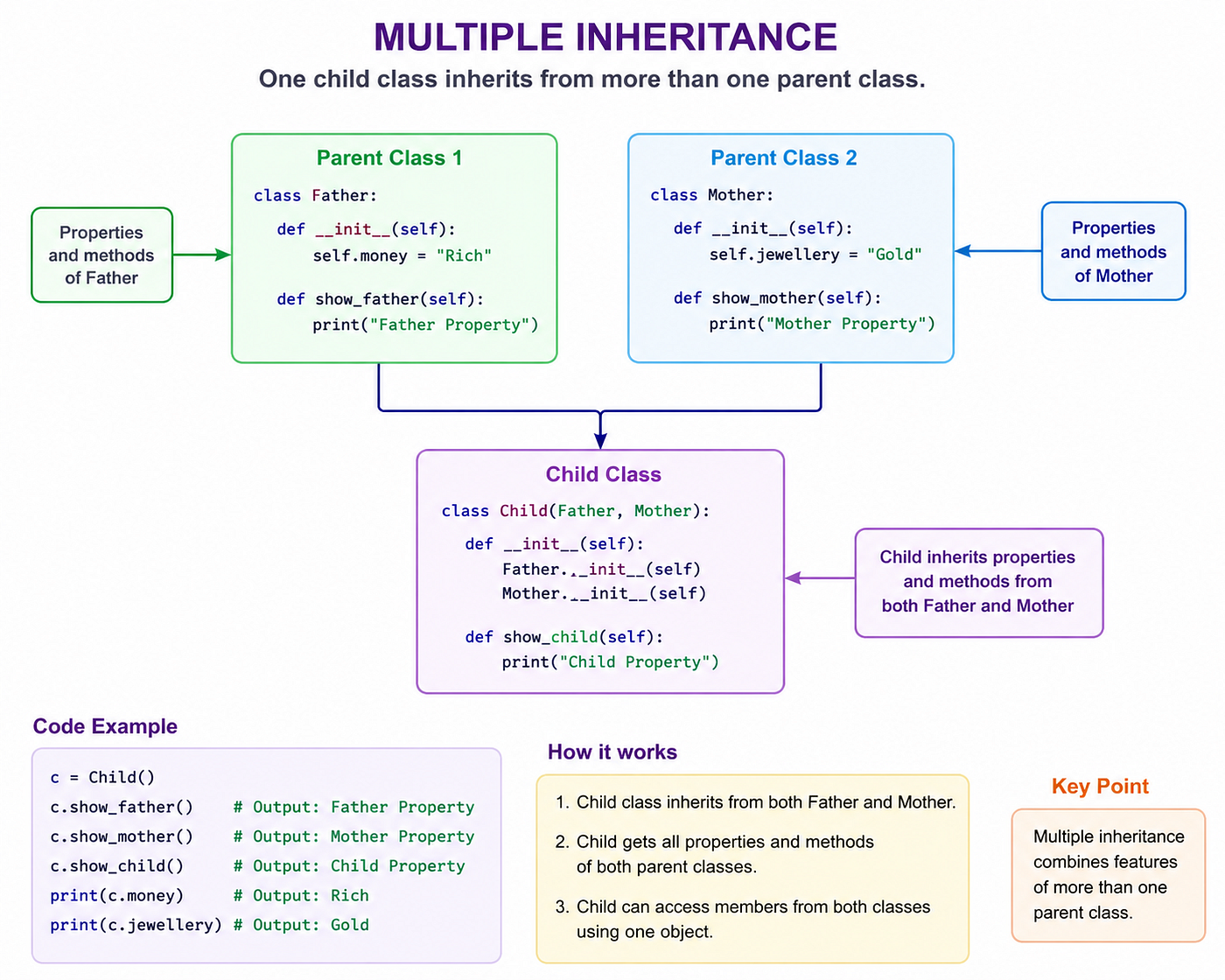
Multiple inheritance
class Engine:
  def __init__(self,engine_type):
    self.engine_type=engine_type
  def display_engine(self):
    print(self.engine_type)
class Body:
def __init__(self,body_type):
self.body_type=body_type
def display_body(self):
print(self.body_type)class Car(Engine,Body):
def __init__(self,engine_type,body_type,brand,model):
Engine.__init__(self,engine_type)
Body.__init__(self,body_type)
self.brand=brand
self.model=model
def display_car(self):
self.display_engine()
self.display_body()
print(self.brand,self.model)
car=Car('petrol','SUV','Maruti','800')
car.display_car()
#petrol
#SUV
#Maruti 800
Python solves the diamond problem in multiple inheritance using MRO (Method resolution order), which respects the order of inheritance while avoiding duplication.
- Polymorphism: When the same operator or function is allowed to behave differently according to context. Overloading is not supported in Python as the overloading run during compilation and Python supports run executions only. There are two different types:
- Function overriding: Functions defined with the same name and parameters.
class Shape:
  def area(self):
    raise NotImplementedError("subclass shold be inherited") #this will cause error if we try to print Shape.area()
class Circle(Shape):
def __init__(self,radius):
self.radius=radius
def area(self):
return 3.14*self.radius*self.radiusclass Square(Shape):
def __init__(self,side):
self.side=side
def area(self):
return self.side*self.side
circle=Circle(10)
print(circle.area()) #314.0
square=Square(10)
print(square.area()) #100- Operator overriding: When an operator’s functionality can be changed between objects.
class Complex:
  def __init__(self,real,img):
    self.real=real
    self.img=img
  def __add__(self,other):
    return Complex(self.real+other.real,self.img+other.img)
  def sub(self,other):
    return Complex(self.real-other.real, self.img-other.img)
  def __str__(self): #to print the string not object during execution of result
    return f"{self.real} + {self.img}i"
c1=Complex(1,2)
c2=Complex(3,4)
result=c1+c2 # it is used as we use __add__()
print((result)) #4 + 6i
result=c2.sub(c1) #it is used as we use sub()
print(result) #2 + 2iReferences
Thank you, https://www.depthofml.in/learn team, for the wonderful course on Python.
ChatGPT for creating images.
Thank you to all the readers for your valuable time! If you like the content, please clap and subscribe, as I will try to post other content related to data science soon.
메타데이터
- post_id
- 71c77e6bacb8
- slug
- basics-of-python-71c77e6bacb8
- url
- https://medium.com/learn-data-science-with-ayush-nautiyal/basics-of-python-71c77e6bacb8
- canonical_url
- https://medium.com/learn-data-science-with-ayush-nautiyal/basics-of-python-71c77e6bacb8
- author_url
- https://medium.com/@anautiyal3355
- status
- ok
- fetched_at
- 2026-06-09 15:37:30