How to Migrate ColdFusion to Lucee: Pitfalls, Wins, and Timeline Estimates
Lucee is an open-source CFML engine (LGPL-licensed, stewarded by the Lucee Association Switzerland), originally forked from Railo CFML…
How to Migrate ColdFusion to Lucee: Pitfalls, Wins, and Timeline Estimates
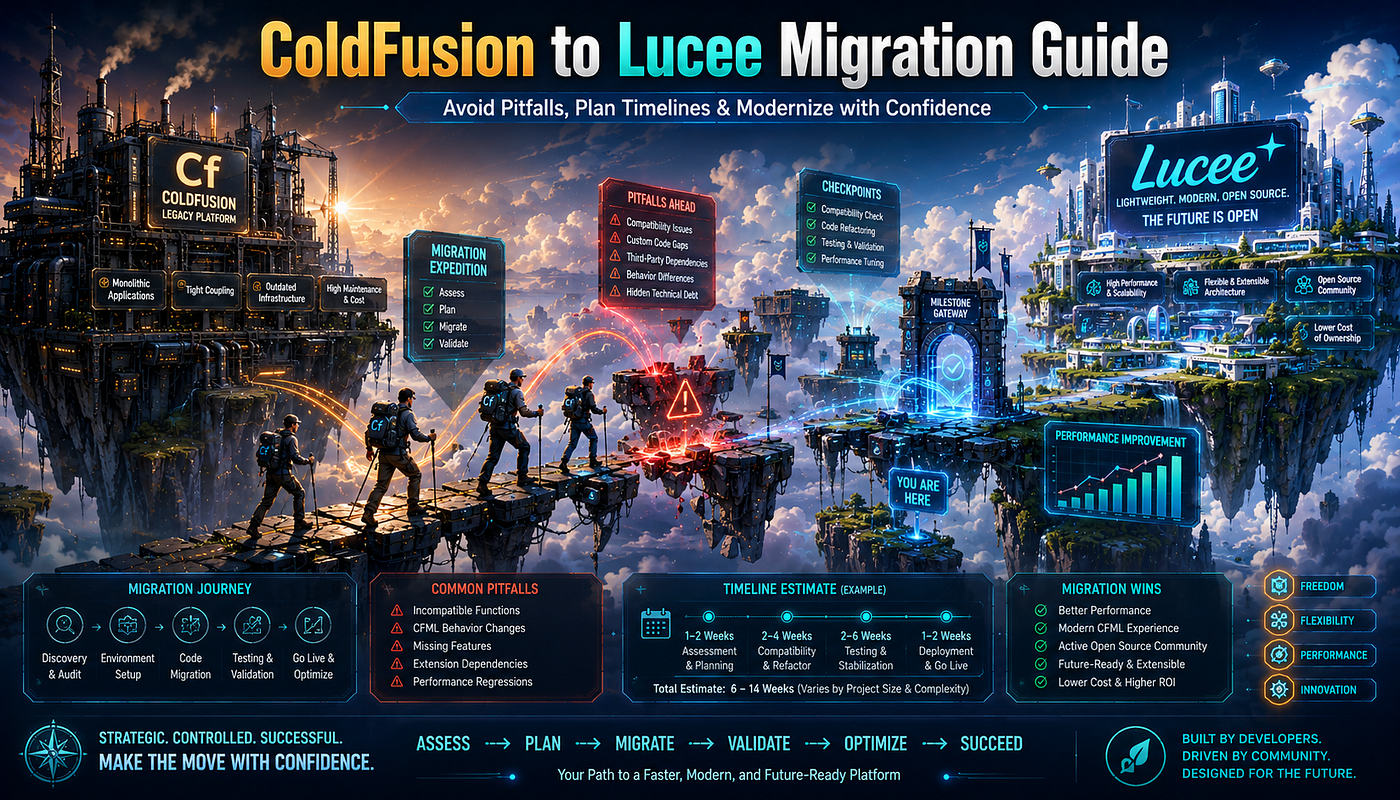
Lucee is an open-source CFML engine (LGPL-licensed, stewarded by the Lucee Association Switzerland), originally forked from Railo CFML Server 4.2, currently at Lucee 6. Its own documentation describes it as “highly compatible” with Adobe ColdFusion but not 100% drop-in — most CFML ports without changes, but a small set of verified differences will catch you if you don’t plan for them. The biggest pitfalls: arrays are passed by reference in Lucee, by value in Adobe CF; local scope behavior differs; JSON casing is different; CFX native tags don’t work; Verity is gone; and PDF/Chart/ORM features are extensions (not built-in). The biggest wins: zero licensing cost, smaller footprint, Docker-native deployment, per-application configuration, and an active open-source community. Realistic timelines: 4–8 weeks for small applications (under 50k lines), 3–6 months for mid-sized (50k-250k lines), 6–18 months for large enterprise codebases (500k+ lines) — assuming a Fixinator-driven compatibility scan upfront, not a “just install Lucee and see what breaks” approach.
How to Migrate ColdFusion to Lucee: Pitfalls, Wins, and Timeline Estimates
Why Lucee, And Why Now: The 2026 Case
If you’re reading this in 2026 and still running Adobe ColdFusion, two pieces of context matter:
- Adobe ColdFusion 2025 introduced subscription licensing — annual recurring spend, must be renewed to keep the server running. For organizations operating multiple CF servers, the multi-year TCO comparison with a free, open-source CFML engine has never looked less favorable for Adobe.
- The CFML ecosystem has gained a third option: BoxLang from Ortus Solutions, with version 1.13 released in April 2026 and active CFML compatibility modules now in stable release. The market has moved from “Adobe or Lucee” to “Adobe, Lucee, or BoxLang” — and that competition is producing real innovation in all three engines.
For most CFML shops, Lucee is the pragmatic answer to the question “how do we keep our CFML applications running without an annual subscription bill?” It runs nearly all the same code, deploys to all the same infrastructure (and more — it’s a first-class Docker citizen in a way Adobe CF only recently became), and ships at a fraction of the operational footprint.
That said, “most” is not “all.” This guide walks through honest verified facts about the migration: what works, what breaks, what the practical timeline looks like, and the cases where Lucee isn’t the right answer.
The Lucee Project: What It Actually Is
Per the Lucee project’s own documentation at docs.lucee.org and the TeraTech analysis at teratech.com:
- Lucee is an open-source CFML engine licensed under the LGPL (Lesser General Public License). No annual license fees, no per-server licensing, no subscription model.
- It is stewarded by the Lucee Association Switzerland (LAS) — a non-profit organization registered in Switzerland that holds the project’s IP and manages its governance. Notable contributors include Michael Offner and Gert Franz.
- Lucee 4.5 was forked from the Railo CFML Server 4.2 codebase in 2014 after a governance split in the Railo community. Lucee has been independently developed since.
- The current major version is Lucee 6, with documented migration guidance from Lucee 5 to Lucee 6 covering the changes between those versions.
- It runs on the JVM — the same Java foundation as Adobe ColdFusion. Anywhere Java runs (Linux, Windows, macOS, Docker containers, AWS, Azure, GCP), Lucee runs.
The non-trivial implication of LGPL licensing: organizations can use Lucee in commercial production environments at no cost. You can ship a commercial product running on Lucee. You can modify Lucee for your own internal needs (though redistributing modifications has LGPL obligations). For most CFML deployments, this is simply “free to use, no questions asked.”
The trade-off, honestly stated: you are responsible for monitoring Lucee security advisories yourself, applying updates yourself, and seeking community help for issues. Adobe ColdFusion’s commercial support model — where Adobe pushes patches and customers can open support tickets — is a real value when something goes wrong. Lucee has a vibrant community and commercial support is available from independent vendors (TeraTech, Ortus Solutions, Webapper, and others) for organizations that want a paid support relationship.
A Brief Note on the Third Option: BoxLang
In 2025 and 2026, BoxLang from Ortus Solutions emerged as a third major CFML-runtime option that’s worth understanding even if your migration ultimately lands on Lucee.
Per Ortus’s own announcements at Into The Box 2026 (held April 29-May 1, 2026 in Washington, DC):
- BoxLang is a new JVM language with a built-in CFML parser/transpiler that converts CFML into BoxLang bytecode.
- Current version is 1.13 (released April 2026), described as production-ready.
- CFML compatibility is the explicit design goal, achieved through compatibility modules including
bx-compat-rest(CFML REST compatibility for the BoxLang web runtime, first stable release announced at Into The Box 2026) andbx-compat-soap(SOAP web services compatibility, first stable release also announced at the same event). - The product is led by Luis F. Majano, CEO of Ortus Solutions and creator of the ColdBox framework.
- Production customers reference: at Into The Box 2026, Ortus highlighted a customer story from Ian Clark, a contractor supporting the U.S. Small Business Administration, who described working with over a million lines of ColdFusion code across more than 20 applications using Ortus tooling.
For the purposes of this post, the relevant question is “Lucee or BoxLang for your CFML migration target?” Honest answer: Lucee has a longer track record, larger active community, and an established compatibility surface that’s been stress-tested for over a decade; BoxLang is newer (1.13 is recent), but specifically designed for the modernization use case and offers paths Lucee doesn’t (transpilation to other targets via Ortus’s new MatchBox virtual machine for JavaScript, WebAssembly, etc.). For most teams in 2026, Lucee is the lower-risk migration target; BoxLang is worth evaluating in parallel for the architectural roadmap.
This guide focuses on the Lucee migration. The pattern of evaluation and the migration phases are broadly similar for BoxLang.
The Compatibility Reality: High, But Not 100%
Lucee’s own documentation at docs.lucee.org/guides/updating-lucee/migrate-from-acf.html states the position honestly: Lucee is highly compatible with Adobe ColdFusion, and most CFML and CFScript code that runs on Adobe CF will run on Lucee without modification. There are known issues of compatibility, and Lucee maintains an acf-compat label in its issue tracker that catalogs the differences.
Webapper’s CFML migration guidance describes the practical experience as “nearly all CFML/CFScript code that runs on ACF will run on Lucee without modification” — a position echoed across the CFML community.
In practical terms, your migration findings will typically break down like this:
Category Approximate share Example issues Code that ports without any changes 80–95% Most tags, most functions, most CFC patterns, most database access Code that needs minor refactoring 5–15% Local scope explicit declaration, JSON casing settings, mappings re-add Code that requires careful rework 1–5% Array-by-reference semantics, query-of-queries edge cases, ORM behavior Code that won’t work in Lucee at all 0–2% CFX native tags, Verity-specific search, certain ACF Enterprise APIs
For most applications, this maps to a manageable refactor effort, not a rewrite. For applications that lean heavily on the “won’t work” tail — Adobe-CF-specific features built around enterprise integrations — Lucee may not be the right migration target, or may only be appropriate for parts of the application.
The Pitfalls: Verified Specific Incompatibilities
A walkthrough of the documented, verified differences you’ll encounter. Each is cited from a primary or strong secondary source.
Pitfall 1: Arrays Passed By Value (ACF) vs By Reference (Lucee)
The single most-cited verified difference, taken directly from Lucee’s own migration documentation:
In Adobe ColdFusion, when you pass an array as a function argument, the array is copied — a fresh object is created and the function operates on the new copy. Modifications to the array inside the function do not affect the original array in the calling scope.
In Lucee, the same code passes the array by reference — like other complex objects. Modifications inside the function do affect the original array.
A code example to illustrate:
<cfscript>
    function modifyArray(required array data) {
        arrayAppend(arguments.data, "newItem");
        return arrayLen(arguments.data);
    }

myList = ["a", "b", "c"];
    newLen = modifyArray(myList);
    // On Adobe CF: writeDump(myList) shows ["a","b","c"] - unchanged
    // On Lucee:    writeDump(myList) shows ["a","b","c","newItem"] - modified
    writeOutput(newLen);  // 4 on both engines
</cfscript>
This difference is the most-bitten-by-it pitfall in real migrations. Any function that takes an array argument and modifies it internally — even just for “temporary” purposes — will produce different observable behavior on the two engines.
The fix pattern: explicitly duplicate arrays at the entry of any function that might modify them, to make the behavior deterministic across both engines:
<cfscript>
    function modifyArray(required array data) {
        // Explicit copy at function entry — works correctly on both engines
        var localData = duplicate(arguments.data);
        arrayAppend(localData, "newItem");
        return arrayLen(localData);
    }
</cfscript>
For new code targeting Lucee specifically, you can rely on by-reference semantics (it’s the same as how most modern languages handle arrays). But for code that needs to run identically on both engines during transition, explicit duplication is the safer pattern.
Pitfall 2: Local Scope Handling Differences
Per the syntax-differences analysis on medium.com cross-referenced against Lucee's documentation, Adobe ColdFusion automatically creates the local scope inside functions. Lucee can be stricter, requiring more explicit scope handling in certain patterns.
<cfscript>
    function myFunction() {
        // On Adobe CF, this works without ceremony — local is auto-created
        local.myVar = "Hello World";
        return local.myVar;
    }
</cfscript>
The cross-engine-safe pattern is to use var declarations explicitly:
<cfscript>
    function myFunction() {
        var myVar = "Hello World";  // explicitly scoped via var
        return myVar;
    }
</cfscript>
This is the recommended pattern regardless of engine and avoids accidental variable-scope leakage that’s been a CFML footgun for two decades. Run a scope-leakage scan on your codebase before migration — Fixinator catches these.
Pitfall 3: JSON Serialization (Case Sensitivity and More)
Adobe ColdFusion has historically had complex rules for how struct keys are serialized to JSON — sometimes preserving case, sometimes uppercasing, depending on context. Lucee’s default behavior differs from Adobe’s in some edge cases.
The ColdFusion Central guidance on Lucee migration compatibility identifies this explicitly: JSON casing differences can affect API contracts where the consuming client expects specific casing.
The Lucee-side control is in Application.cfc:
component {
    this.name = "MyApp";

// Preserve struct key case during JSON serialization
    this.serialization = {
        preserveCaseForStructKey = true
    };
}
Test every JSON API endpoint after migration. If a client expects {"firstName": "..."} and starts receiving {"FIRSTNAME": "..."} or vice versa, you've hit this issue.
Pitfall 4: Null Handling
Lucee and Adobe CF handle null values somewhat differently in certain edge cases — particularly around function argument defaults, struct key access, and database query columns containing NULL.
The cross-engine-safe pattern: be explicit. Use isNull(), structKeyExists(), and the Elvis operator (?:) defensively rather than relying on engine-default behavior.
<cfscript>
    // Cross-engine safe defaults
    safeTitle    = isNull(arguments.title) ? "" : arguments.title;
    safeName     = structKeyExists(arguments, "name") ? arguments.name : "Unknown";
    safeFallback = arguments.value ?: "default";  // Elvis operator (CF 2018+ / Lucee)
</cfscript>
For database queries, treat columns that may be NULL as explicitly null-checked rather than relying on implicit conversions to empty strings.
Pitfall 5: Session and Cookie Behavior
Per the ColdFusion Central compatibility guide, session and cookie behavior can differ between Adobe CF and Lucee in subtle ways — particularly around session ID format, cookie attribute defaults (HttpOnly, Secure, SameSite), and timeout handling.
The migration-safe pattern: set session and cookie behavior explicitly in Application.cfc rather than relying on engine defaults:
component {
    this.name = "MyApp";
    this.sessionManagement = true;
    this.sessionTimeout    = createTimeSpan(0, 2, 0, 0);  // 2 hours
this.sessionCookie = {
        httpOnly = true,
        secure   = true,
        sameSite = "Lax",      // or "Strict" or "None" per your needs
        timeout  = 0,          // 0 = session cookie
        domain   = ".example.com"
    };
}
This is explicit configuration both engines respect identically.
Pitfall 6: Query of Queries (QoQ)
Query of queries — re-querying an in-memory cfquery result with another SQL statement — has historically been an area where Adobe CF and Lucee implementations diverge. Both engines parse the QoQ SQL with their own internal SQL engines, and the supported SQL syntax isn't identical.
Per ColdFusion Central, the migration guidance is:
- Test every QoQ in your application explicitly after migrating.
- For complex QoQ patterns, consider rewriting them as
QueryExecute()calls back to the database — let the database do the SQL, which is more reliable, often faster, and avoids the engine-specific QoQ parser entirely. - Avoid database-vendor-specific SQL functions inside QoQ statements.
For a typical CFML codebase, QoQ usage is rare enough that this is a small-effort review item, not a major refactor.
Pitfall 7: Mappings Model — Server-Level → Per-Application
Adobe ColdFusion has server-level CF mappings configured in the Administrator (and neo-runtime.xml underneath). Lucee supports server-level mappings too, but it strongly emphasizes per-application mappings declared in Application.cfc. This is part of Lucee's per-application configuration philosophy.
Per the ColdFusion Central migration guide, the Lucee-friendly pattern is to declare mappings in your application:
component {
    this.name = "MyApp";
this.mappings = {
        "/lib"        = expandPath("/shared/lib"),
        "/customtags" = expandPath("/cfml/tags"),
        "/models"     = expandPath("./models"),
        "/services"   = expandPath("./services")
    };
}
This works on both engines and removes a configuration dependency on the CF Administrator settings — making the application more portable, more reproducible, and easier to deploy in containers.
Pitfall 8: The Administrator Model
Adobe ColdFusion has a single Administrator (/CFIDE/administrator/) that controls the entire server. Lucee's model is different — and arguably better:
- Server context Administrator — manages JVM, extensions, server-wide settings.
- Web context Administrators — one per virtual host or per-application context, manages data sources, mappings, and per-context settings.
This means in Lucee, two applications on the same server can have different data source configurations, different timeouts, different mail server settings — without interfering with each other. ACF can do this only through Enterprise sandbox security, which is being deprecated.
The migration implication: your existing CF Administrator configuration needs to be split between Server context and Web context settings in Lucee. Per Lucee’s documentation, this is straightforward but it’s a one-time conceptual shift the operations team needs to absorb.
Pitfall 9: Extensions Model — PDF, Chart, ORM Are Not Built-In
Adobe ColdFusion ships with PDF generation (<cfdocument>, <cfpdf>), charting (<cfchart>), and ORM (Hibernate-based) built into the base install. Lucee ships these as extensions — separate modules you install on top of the base Lucee server.
In practical terms:
- Lucee PDF Extension provides
<cfdocument>and<cfpdf>functionality. Install it via the Lucee Administrator's extensions page. - Lucee Chart Extension provides charting.
- Lucee ORM Extension provides Hibernate-based ORM.
This is generally a non-issue — install the extensions, and your code works as expected — but if you provision Lucee containers in CI/CD and forget to install the extensions, your application will fail with “tag not found” errors that confuse developers expecting Adobe-CF-like out-of-the-box behavior.
Best practice: include extension installation in your Dockerfile or provisioning script so it’s not forgotten:
FROM lucee/lucee:6
# Install the PDF and Chart extensions at image-build time
RUN echo "extensions=lucee-pdf-extension,lucee-chart-extension" \
        >> /opt/lucee/server/lucee-server/context/lucee-extensions.cfconfig
Pitfall 10: CFX Native Tags Are Not Supported
If your Adobe ColdFusion application uses CFX native tags — custom tags written in Java or C++ and registered with CF — they will not work on Lucee. Per the ColdFusion Central guidance, CFX is not supported in Lucee; the replacement is to write the equivalent logic in CFML calling Java directly via createObject("java", ...), or to wrap the Java code as a standard JAR loaded via Lucee's classpath.
CFX is relatively rare in modern CFML codebases — it was more common in the early 2000s — but legacy applications occasionally have them. Inventory CFX dependencies in Phase 1 of your migration.
Pitfall 11: Verity Discontinued
If your Adobe ColdFusion application uses the Verity collection-based full-text search (the <cfsearch> and <cfcollection> tags configured for Verity), that backend is discontinued.
Replacements:
- Lucee Search extension or Apache Solr backend (continues the CFML tag-based search pattern).
- Amazon OpenSearch / Elasticsearch for cloud-native deployments.
- For simple text search needs, modern database full-text indexes (SQL Server FTS, PostgreSQL
tsvector, MySQL FULLTEXT) are often the right answer.
This may be the single most-effort refactor for older CF applications that lean on Verity heavily. Inventory it in Phase 1.
The Wins: What You Get From the Move
The compatibility table looks like work; the wins justify it. The honest list of what improves when you move to Lucee:
Win 1: Zero Licensing Cost
The most-cited reason organizations choose Lucee. LGPL means no annual subscription bills. For organizations running multiple CF servers (development, staging, production, DR), the cost difference is material — and recurring forever.
Webapper’s CFML migration guidance and TeraTech’s coverage both emphasize this point: migrating from fully-licensed Adobe ColdFusion to Lucee lowers your costs, often substantially. Concrete savings depend on your current licensing arrangement, but eliminating per-server annual subscription costs typically returns the migration investment within 12–24 months.
Win 2: Smaller Footprint, Faster Startup
Per Webapper’s comparison analysis, Lucee uses less memory and has a smaller installation footprint than Adobe ColdFusion. Startup time is generally faster. For containerized deployments where you spin instances up and down frequently — and especially for serverless-adjacent patterns where cold-start matters — this can be a real architectural advantage.
(I am avoiding specific percentage numbers here because they vary enormously by workload and configuration. Run your own benchmarks before quoting figures to a leadership audience.)
Win 3: Docker-Native Deployment
Lucee was designed for modern deployment patterns. Official Lucee Docker images are available at lucee/lucee on Docker Hub. A minimal containerized Lucee app:
FROM lucee/lucee:6

# Copy your application code
COPY ./www/ /var/www/

# Optional: bake in mappings, extensions, datasources via CFConfig
COPY ./.cfconfig.json /opt/lucee/server/lucee-server/context/.cfconfig.json

EXPOSE 8888
This kind of single-file Dockerfile, combined with CommandBox (the CFML CLI tool from Ortus Solutions that’s also widely used in the Lucee community) and CFConfig (also from Ortus, the canonical tool for portable CFML server configuration), produces immutable, reproducible CFML deployments that drop into any container orchestrator.
Win 4: Per-Application Configuration
Lucee’s Web context model means each application can have its own datasources, mail servers, mappings, and security settings — without affecting any other application on the same server. This is genuinely better than Adobe CF’s “one Administrator for everything” model.
The practical implication: hosting multiple applications on the same Lucee server is safer and easier than on Adobe ColdFusion.
Win 5: Active Community and Faster Patches
The Lucee community moves quickly. Security advisories and patches typically ship within days of disclosure (sometimes hours), and the community is responsive to bug reports via the Lucee GitHub issue tracker. For organizations with operations teams comfortable with open-source software workflows, this is faster and more transparent than Adobe’s quarterly bulletin cadence.
The flip side, honestly stated: you don’t have an Adobe support contract to escalate to. For organizations that need that, paid commercial support is available from TeraTech, Ortus Solutions, Webapper, and others — but it’s a separate procurement decision.
Win 6: A Modern Ecosystem
Lucee benefits from the same modern CFML tooling that’s emerged over the last decade:
- CommandBox for CLI, package management, server provisioning (Ortus Solutions).
- CFConfig for portable server configuration (Ortus Solutions).
- ForgeBox for CFML package distribution (Ortus Solutions).
- TestBox for testing (Ortus Solutions).
- ColdBox as the dominant CFML framework (Ortus Solutions).
- Fixinator for security scanning and Lucee-compatibility scanning (Foundeo).
These tools work with both Adobe ColdFusion and Lucee, but the Lucee community has been particularly receptive to integrating them into standard workflows.
The Migration Toolkit
Three tools do most of the practical work in a Lucee migration:
Fixinator (Foundeo) — Compatibility and Security Scanning
Per Pete Freitag’s published documentation at petefreitag.com, Fixinator has supported compatibility scanning since version 5 (October 2024) and added enhanced support in version 6.1 (early 2026). The command to scan a CFML codebase for Lucee 6 compatibility:
fixinator path=/path/to/your/code goals=compatibility engines=lucee@6The engines parameter accepts both Adobe and Lucee targets and can be combined:
# Scan for issues affecting both engines
fixinator path=/path/to/your/code goals=compatibility engines=adobe@2023,lucee@6

# Lucee-only scan (default scans both)
fixinator path=/path/to/your/code goals=compatibility engines=lucee@6

# Also run a security scan (compatibility is separate from security)
fixinator path=/path/to/your/code
Per Pete Freitag’s analysis, the Lucee compatibility scanner detects hundreds of issues including the array-by-value/by-reference semantic differences, JSON casing settings, scope-leakage patterns, and deprecated/removed features. Run this in Phase 1 of your migration.
Fixinator runs on Lucee 5+ or any supported Adobe ColdFusion version (2023, 2025, etc.) and can run fully locally in air-gapped environments (with the Enterprise tier).
CFConfig (Ortus Solutions) — Portable Server Configuration
CFConfig, part of the CommandBox ecosystem from Ortus Solutions, lets you export CF Administrator settings to JSON and import them into a different CFML engine. This is the canonical tool for migrating CF Administrator configurations (data sources, mappings, mail servers, scheduled tasks, etc.) between Adobe ColdFusion and Lucee.
A typical workflow:
# Install CommandBox first (one-time setup)
# Then from CommandBox CLI:

# Export from your existing Adobe CF
cfconfig export from=adobe@2023 to=./acf-config.json

# Import into Lucee
cfconfig import from=./acf-config.json to=lucee@6

# Or directly transfer between two running servers
cfconfig transfer from=adobe@2023 to=lucee@6
CFConfig understands both Adobe CF and Lucee’s configuration formats and translates between them. Not every setting maps 1:1 (Adobe-CF-specific settings have no Lucee equivalent and vice versa), but the vast majority of operational configuration transfers cleanly.
CommandBox (Ortus Solutions) — CFML CLI
CommandBox is the standard CFML command-line tool. It does package management, server provisioning, REPL, and a dozen other things. For Lucee specifically, it’s the easiest way to spin up a Lucee server for local development:
# Install CommandBox (one-time setup)

# Start a Lucee 6 server with your code in current directory
box server start cfengine=lucee@6 port=8888

# Or with a specific version
box server start cfengine=lucee@6.1 port=8888
This is genuinely useful in the migration process — developers can run the same codebase against multiple engines side-by-side, validating that fixes work on both.
The Migration Plan: Six Phases, Realistic Timelines
The end-to-end migration arc, with timeline estimates per phase. Total elapsed time varies by codebase size and complexity:
- Small applications (under 50k lines, 1–5 data sources, no enterprise integrations): 4–8 weeks.
- Mid-sized applications (50k-250k lines, multiple data sources, some integrations): 3–6 months.
- Large enterprise codebases (250k-1M+ lines, dozens of integrations, multi-tenant): 6–18 months.
Phase 1: Inventory and Compatibility Scan (1–2 weeks)
- Build a written inventory of every CFML file (
.cfm,.cfc,.cfml). - Catalog every data source, scheduled task, mapping, custom tag path, mail server config — export from CF Administrator via CFConfig.
- Identify CFX native tag usage (
grepfor<cfx_). - Identify Verity-based search usage.
- Run Fixinator with
goals=compatibility engines=lucee@6and triage findings by severity. - Identify ACF Enterprise features in use (sandbox security, distributed caching, Exchange/SharePoint integration).
- Determine which Lucee extensions you’ll need (PDF, Chart, ORM, Search, etc.).
Deliverable: a migration scope document with effort estimate, risk register, and the list of “must-fix” items found by Fixinator.
Phase 2: Lucee Setup in Dev (1–2 weeks)
- Stand up a Lucee 6 instance — easiest path is Docker on the developer’s workstation via CommandBox or directly via
docker run -p 8888:8888 lucee/lucee:6. - Install required extensions (PDF, Chart, ORM, Search).
- Import data source and mapping configuration via CFConfig.
- Deploy the codebase to the Lucee dev instance and observe what breaks immediately.
- Configure JSON serialization, session, and cookie settings explicitly in
Application.cfc. - Add server-level mappings as per-application mappings in
Application.cfc.
Deliverable: a Lucee dev environment that boots the application without immediate crashes (even if individual features fail).
Phase 3: Code Remediation (2–12 weeks, depending on codebase size)
The heart of the migration work:
- Fix every high-severity Fixinator finding.
- Refactor array-modification patterns to use explicit
duplicate()or accept by-reference semantics deliberately. - Add explicit
vardeclarations for local function variables. - Replace any CFX native tag usage with Java interop or CFML-native equivalents.
- Replace Verity-based search with Lucee Search, Solr, or a modern stack.
- Test every JSON API endpoint for casing-related regressions.
- Test every query of queries; rewrite complex ones as
QueryExecute()against the database. - Test session-dependent flows; fix any cookie/session attribute mismatches.
Work module-by-module. After each module is fixed, run that module’s test suite against Lucee and confirm parity with Adobe CF behavior. Continuous regression testing during this phase is essential.
Deliverable: a codebase that passes Fixinator’s Lucee-compatibility scan with zero high-severity findings.
Phase 4: Extension and Configuration (1–2 weeks)
- Install and configure every required Lucee extension (PDF, Chart, ORM, Search, mail, etc.) in your target Lucee environment.
- Verify CFConfig-imported configuration is correct (data sources connect, mail server works, scheduled tasks fire).
- Set up Lucee Server context settings (JVM args, security, logging) —
lucee-server.xmlor via the Server context Administrator. - Set up Lucee Web context settings per application —
lucee-web.xmlor via the Web context Administrator. - Verify the application boots cleanly in a non-dev environment that resembles production.
Deliverable: a Lucee staging environment running your migrated application with all extensions and configurations in place.
Phase 5: Performance Testing and Tuning (1–3 weeks)
- Baseline performance: measure response times, throughput, memory usage on Lucee.
- Compare to your historical Adobe CF baseline.
- Profile any regressions — sometimes a specific query, function, or template behaves differently and needs tuning.
- Tune JVM arguments (
-Xms,-Xmx, garbage collector) for your workload. - Tune Lucee-specific settings: cache configuration, template cache, request timeout defaults.
- Run load tests against the Lucee staging environment.
Deliverable: performance numbers within acceptable range of the Adobe CF baseline (often better, occasionally requiring optimization).
Phase 6: Production Cutover (1 week)
- Provision production Lucee infrastructure (servers, containers, load balancers, monitoring).
- Plan the cutover window — typically a maintenance window with rollback procedure documented.
- Final data sync if applicable (if migration involves changing data stores).
- DNS or load-balancer cutover to the Lucee environment.
- Monitor for 4–24 hours, page someone if errors spike.
- Keep the Adobe CF production environment running standby for 30 days for rollback capability.
Deliverable: production traffic served by Lucee, Adobe CF retained as fallback.
After the 30-day standby and confirmation of stable operation, decommission Adobe CF infrastructure and end the Adobe subscription.
Practical Code: The Most Common Refactors
A reference quick-list for the common patterns you’ll touch during migration:
1. Array Argument Patterns
<!--- ❌ Breaks across engines unpredictably --->
<cfscript>
    function addToList(required array data) {
        arrayAppend(arguments.data, "x");  // mutates caller's array on Lucee
        return arguments.data;
    }
</cfscript>
<!--- ✅ Works the same on both engines --->
<cfscript>
    function addToList(required array data) {
        var localData = duplicate(arguments.data);
        arrayAppend(localData, "x");
        return localData;
    }
</cfscript>
2. Explicit Variable Scoping
<!--- ❌ Relies on auto-local-scope behavior --->
<cfscript>
    function process() {
        result = something();  // unscoped — engine-dependent behavior
        return result;
    }
</cfscript>
<!--- ✅ Explicit local scoping --->
<cfscript>
    function process() {
        var result = something();
        return result;
    }
</cfscript>
3. JSON Serialization Settings
<!--- In Application.cfc --->
component {
    this.name = "MyApp";
// Preserve struct case in serialization output
    this.serialization = {
        preserveCaseForStructKey = true
    };
}
4. Per-Application Mappings
<!--- In Application.cfc --->
component {
    this.name = "MyApp";
this.mappings = {
        "/lib"        = expandPath("./shared/lib"),
        "/customtags" = expandPath("./cfml/tags"),
        "/models"     = expandPath("./models")
    };
}
5. Session and Cookie Cross-Engine Safety
component {
    this.name = "MyApp";
    this.sessionManagement = true;
    this.sessionTimeout    = createTimeSpan(0, 2, 0, 0);
this.sessionCookie = {
        httpOnly = true,
        secure   = true,
        sameSite = "Lax",
        timeout  = 0,
        domain   = ".example.com"
    };
}
6. Null-Safe Access
<cfscript>
    // Engine-independent null handling
    title    = isNull(arguments.title) ? "" : arguments.title;
    name     = structKeyExists(arguments, "name") ? arguments.name : "Unknown";
    fallback = arguments.value ?: "default";
</cfscript>
7. QoQ to Direct Database Query
<!--- ❌ Cross-engine fragile QoQ --->
<cfquery name="filtered" dbtype="query">
    SELECT *
    FROM   sourceQuery
    WHERE  status = 'active'
      AND  category IN ('a', 'b')
    ORDER  BY created_at DESC
</cfquery>
<!--- ✅ Database does the work, deterministic across engines --->
<cfscript>
    filtered = queryExecute(
        "SELECT * FROM items
         WHERE status = :status
           AND category IN (:categories)
         ORDER BY created_at DESC",
        {
            status = { value: "active", cfsqltype: "varchar" },
            categories = { value: "a,b", cfsqltype: "varchar", list: true }
        },
        { datasource: "appdb" }
    );
</cfscript>
When NOT to Migrate to Lucee
An honest list of scenarios where Lucee may not be the right answer:
- Heavy CFX native tag dependencies that would require significant Java rewriting. The cost of refactoring may exceed the licensing savings.
- Vendor-locked applications where the third-party vendor specifically certifies Adobe ColdFusion and not Lucee. Get vendor confirmation before committing.
- Specific Adobe ColdFusion Enterprise features: distributed caching, Adobe-specific sandbox security, Exchange/SharePoint integration tags, ColdFusion-administered clustering. These have Lucee alternatives but the work to migrate them is non-trivial.
- Compliance requirements that mandate Adobe support contracts: some regulated environments (certain federal, defense, or healthcare contracts) require commercial support agreements that Lucee’s community model doesn’t satisfy on its face. Paid Lucee support from TeraTech, Ortus Solutions, or other vendors may satisfy the requirement — verify with your compliance team.
- Organizational risk tolerance: if your operations team is uncomfortable with open-source-supported infrastructure, a Lucee migration is also an organizational-change project, not just a technical one. Budget for that.
For these cases, the alternatives are: (1) stay on Adobe ColdFusion and pay the subscription, (2) evaluate BoxLang (which has commercial support from Ortus), or (3) a hybrid approach where some applications run on Lucee and others stay on Adobe CF.
Deployment Options
Lucee deployment patterns are diverse enough to deserve a quick survey:
Option A: Direct VM / EC2 Install
Download the Lucee installer from download.lucee.org, install on a VM (Linux or Windows), configure via the Server and Web context Administrators. Conceptually identical to how you've been running Adobe CF — different engine, same operational model.
Option B: Docker / Container
The Lucee project publishes official Docker images at lucee/lucee on Docker Hub. The pattern that's gaining adoption fastest:
# Quick test run
docker run -d -p 8888:8888 \
    -v $(pwd)/www:/var/www \
    lucee/lucee:6

# For production, build a custom image based on lucee/lucee with your app
# pre-baked, your extensions installed, and your configuration applied
This is generally the right pattern for new Lucee deployments in 2026.
Option C: Kubernetes
Lucee runs cleanly on Kubernetes. The standard pattern: Docker image as above, Deployment object, Service, optional Ingress, ConfigMap for environment variables, Secret for credentials.
Option D: PaaS (Heroku, Render, Railway, etc.)
Lucee’s container-friendliness makes it work on container-based PaaS providers. CommandBox + Heroku has been a documented pattern for a decade; Render, Railway, and similar modern PaaS providers all run Lucee Docker images natively.
Option E: AWS Specifically
For AWS-targeted Lucee deployments, the patterns from our prior CF-to-AWS strangler-pattern post apply directly: ECS or Fargate with the Lucee Docker image, ALB in front, RDS for the database, S3 for uploads, SES for email, EventBridge for scheduled tasks. Lucee actually fits the AWS-native deployment model slightly better than Adobe ColdFusion because of its smaller footprint and faster startup.
The Hybrid Approach: Some Apps on Lucee, Some on Adobe CF
You don’t have to migrate everything. Many organizations end up in a steady state where:
- High-volume customer-facing applications run on Lucee (cost savings scale with traffic).
- Compliance-critical or vendor-locked applications stay on Adobe CF (where the support contract matters).
- New green-field development happens on whichever engine the team prefers.
This is a legitimate end state, not a failure to commit. The Strangler Fig pattern from our previous post applies here too — you can migrate per application, not per company.
Cost Model
A realistic framing for executive sponsors. Concrete numbers vary by organization; the pattern is consistent.
One-time migration cost (Phase 1–6):
- Internal engineering time: typically 1–3 senior CFML engineers part-time for the duration.
- Fixinator subscription: hundreds to low thousands of dollars annually depending on tier.
- Optional commercial Lucee support / consulting: pricing varies by vendor.
- Infrastructure (parallel run during cutover): a few months of double the production infrastructure cost.
Recurring savings:
- Adobe ColdFusion subscription cost eliminated. (Specific savings depend on number of CF instances and Adobe contract terms; for organizations running multiple production CF instances, this is typically the dominant line item.)
- Operational savings from smaller footprint (fewer/smaller servers required for equivalent load).
- Reduced patching cadence overhead (Lucee patches are typically smaller and faster to apply than Adobe APSB bulletins).
Recurring costs:
- Optional paid commercial support if procured.
- Optional Fixinator subscription for ongoing security and compatibility scanning.
- Infrastructure costs (which would exist regardless of engine choice).
For most organizations, the migration cost recovers within 12–24 months from licensing savings alone, with ongoing recurring savings every year thereafter. Build the business case with conservative estimates and a 24-month payback window.
Special Considerations for Enterprise Teams
- Compliance audits: When auditors ask about your CFML engine support, document the Lucee Association Switzerland’s governance, the LGPL license, and any paid commercial support contract you have. Most compliance frameworks accept open-source software with documented support — but the documentation has to exist.
- Disaster recovery testing: Lucee’s smaller footprint can simplify DR — you can fit more standby instances on the same DR infrastructure, or scale up faster from cold.
- Security advisory monitoring: Subscribe to the Lucee mailing list / GitHub releases for security advisory notifications. You’re now responsible for what Adobe’s PSIRT was doing for you.
- JDK strategy: Lucee runs on the JDK, same as Adobe CF. Apply the same JDK update discipline from our prior post on CF JDK updates — patch the JDK quarterly with Oracle’s CPUs (or your chosen distribution’s equivalent).
- Training: Most CFML developers transition between Adobe CF and Lucee quickly — the language is the same and most patterns work identically. Budget a few days of team training on the Lucee-specific Administrator model and extension model.
- Vendor relationships: If your application integrates with vendor products that historically supported Adobe ColdFusion, contact each vendor about Lucee support before migration. Most vendors don’t care which engine you run as long as your code emits standard outputs (HTTP, JSON, SOAP), but explicit confirmation matters.
Common Migration Pitfalls (Found The Hard Way)
A non-exhaustive list of things that have caught real CF-to-Lucee migrations in the wild:
- The “we’ll just install Lucee and see what breaks” approach. Skip Phase 1 (the compatibility scan), and you spend Phase 3 firefighting in production instead of planning in staging. Always scan first.
- The forgotten extension. Deploy Lucee in production, watch users hit
<cfdocument>and get "tag not found" errors because the PDF extension wasn't installed. Bake extensions into your Docker image at build time. - The CFX native tag that nobody remembered. A custom Java tag from 2008 that’s still being invoked from one obscure form. Inventory CFX usage in Phase 1 explicitly —
grep -r "<cfx_". - The Verity full-text search. “We just need to migrate the engine” turns into “we also need to migrate to a different search backend.” Identify Verity dependencies in Phase 1.
- The mapping that wasn’t migrated. Server-level CF mapping referenced from one rarely-used module breaks after cutover. CFConfig handles most of this, but verify every mapping by code-search before declaring victory.
- The session-management surprise. Sticky sessions are working in staging but fail in production because load balancer configuration is different. Test multi-instance scenarios in staging.
- The vendor that doesn’t certify Lucee. Three months in, the team discovers a vendor support contract specifies Adobe CF. Vendor confirmation is a Phase 1 deliverable, not a Phase 5 discovery.
- The JSON case regression nobody caught. External API consumer was depending on uppercase JSON keys from Adobe CF; Lucee emits camelCase. Set
preserveCaseForStructKeyexplicitly and test every API response. - The QoQ that worked on Adobe CF. Complex QoQ using SQL functions Adobe’s QoQ parser supports but Lucee’s doesn’t. Rewrite as direct database query.
- The Adobe-CF-licensed third party that doesn’t work on Lucee. Some commercial CFML libraries (rare but real) explicitly license against Adobe CF only. Inventory third-party CFML libraries in Phase 1.
ColdFusion-to-Lucee Migration FAQ
Is Lucee 100% compatible with Adobe ColdFusion?
No. Per Lucee’s own documentation, Lucee is “highly compatible” — most CFML and CFScript code runs without modification — but there are documented differences. Lucee maintains an acf-compat label in its GitHub issue tracker that catalogs known compatibility differences. Plan for 80-95% of code to port unchanged, 5-15% to need minor refactoring, and 1-5% to need careful rework or replacement.
How long does a typical ColdFusion-to-Lucee migration take?
Heavily dependent on codebase size and complexity. Small applications (under 50k lines, 1–5 data sources): 4–8 weeks. Mid-sized applications (50k-250k lines): 3–6 months. Large enterprise codebases (250k-1M+ lines): 6–18 months. These ranges assume a Fixinator-driven compatibility scan upfront, not a “just install Lucee and see what breaks” approach.
Is Lucee really free?
Yes. Lucee is licensed under the LGPL (Lesser General Public License). No annual fees, no per-server licensing, no subscription model. Commercial use is permitted. Optional paid commercial support is available from independent vendors (TeraTech, Ortus Solutions, Webapper, and others) for organizations that want a paid support relationship.
What’s the biggest pitfall in migrating to Lucee?
The single most-common surprise is the array-by-value vs by-reference semantic difference. In Adobe ColdFusion, arrays passed to functions are copied; in Lucee, they’re passed by reference. Functions that modify their array arguments will behave differently. The fix is to duplicate() the array explicitly at function entry, or to deliberately adopt by-reference semantics for new code.
What about Lucee compared to BoxLang for new modernization projects in 2026?
Lucee has a longer track record (since 2014), a larger active community, and a well-stress-tested compatibility surface with Adobe ColdFusion. BoxLang (v1.13 released April 2026) is newer but is specifically designed for the modernization use case, has dedicated CFML compatibility modules in stable release, and offers paths Lucee doesn’t (transpilation to JavaScript, WebAssembly, and other targets via Ortus’s new MatchBox VM). For most teams migrating off Adobe CF in 2026, Lucee is the lower-risk target; BoxLang is worth evaluating for architectural roadmap considerations.
Can I run Lucee in Docker on AWS?
Yes, and it’s the recommended deployment pattern in 2026. Official Lucee Docker images are at lucee/lucee on Docker Hub. Deploy to ECS, Fargate, EKS, or any other container runtime. Our prior post on the strangler-pattern AWS migration applies directly — replace the Adobe CF image with lucee/lucee and the patterns work identically.
Do I need to install ColdBox or other frameworks to use Lucee?
No. Lucee runs plain CFML directly, same as Adobe ColdFusion. The Ortus ecosystem (ColdBox framework, TestBox testing, CommandBox CLI, ForgeBox packages, CFConfig configuration) is widely used in the Lucee community but optional — your application code does not have to depend on any of it.
What about Lucee’s support for <cfdocument>, <cfchart>, and ORM?
Available as Lucee extensions. The Lucee PDF Extension provides <cfdocument> and <cfpdf>; the Lucee Chart Extension provides charting; the Lucee ORM Extension provides Hibernate-based ORM. Install via the Lucee Server context Administrator's extensions page, or bake into your Docker image at build time.
How do I migrate my Adobe CF Administrator configuration to Lucee?
Use CFConfig from Ortus Solutions (part of the CommandBox ecosystem). Export Adobe CF settings to JSON via cfconfig export from=adobe@2023 to=./config.json, then import to Lucee via cfconfig import from=./config.json to=lucee@6. Most settings translate cleanly; some Adobe-CF-specific settings have no Lucee equivalent and vice versa, but the bulk of operational configuration transfers without manual work.
Are CFX tags supported in Lucee?
No. Adobe ColdFusion’s CFX (native Java or C++ custom tag) support is not present in Lucee. Replacements: write the equivalent logic in CFML calling Java directly via createObject("java", ...), or wrap the Java code as a standard JAR loaded via Lucee's classpath.
What about Verity full-text search?
Discontinued in modern CFML. Replacements: Lucee Search extension (Solr-backed), standalone Apache Solr, Amazon OpenSearch / Elasticsearch, or modern database full-text indexes (SQL Server FTS, PostgreSQL tsvector, MySQL FULLTEXT). For older applications relying heavily on Verity, this may be the single most-effort refactor in the migration.
Does the security posture change after migrating to Lucee?
You become responsible for security advisory monitoring (Lucee GitHub releases / mailing list) and patching, rather than relying on Adobe’s PSIRT bulletins and pushed updates. The Lucee community typically ships patches within days of disclosure, sometimes hours — but the operational responsibility shifts to your team. Subscribe to the Lucee security mailing list and integrate Fixinator into your CI pipeline as standard hygiene.
Can I migrate just some applications and keep others on Adobe CF?
Yes. Many organizations end in a steady state with high-volume customer-facing applications on Lucee (cost savings scale with traffic) and compliance-critical or vendor-locked applications staying on Adobe CF. The Strangler Fig pattern applies per-application, not per-company.
Conclusion: A Pragmatic Migration, Not a Religious One
The CFML community has spent the last decade in a slightly tribal “Adobe vs Lucee” debate. The honest reality in 2026 is more pragmatic: most CFML applications can run on Lucee with manageable refactoring effort, the licensing savings are material, and the operational benefits (smaller footprint, Docker-native deployment, per-application configuration) genuinely matter. Some specific applications shouldn’t move — and that’s fine. The migration is per-application, not per-organization.
The teams that come through these migrations successfully follow a predictable pattern:
- They scan first with Fixinator at
goals=compatibility engines=lucee@6and triage findings before opening any installer. - They use CFConfig to migrate Administrator configuration deterministically rather than copying settings by hand.
- They bake extensions into their Docker image so PDF / Chart / ORM are never “forgotten” in production.
- They run side-by-side testing during Phase 3 — same codebase, same tests, both engines, find the divergences before users do.
- They keep Adobe CF running for 30 days after cutover so rollback is always a documented procedure away.
- They commit to one path — full migration, partial migration, or hybrid steady state — rather than oscillating between “we should move” and “let’s wait.”
The Lucee project has been a credible, production-ready CFML engine for over a decade. In 2026, with the Adobe ColdFusion 2025 subscription model in place and BoxLang emerging as a third option, the question is no longer “is Lucee real?” but “is the migration cost worth the licensing savings for my specific applications?” For most organizations running multiple CF servers, the answer is yes — sometimes overwhelmingly so.
For organizations without dedicated CFML migration expertise in-house, this is exactly the kind of project where a specialist **ColdFusion development** and security partner adds real value: compatibility assessment, code remediation, infrastructure design, performance tuning, and ongoing support as a single coordinated engagement. The engagement cost is typically recovered within the first year of licensing savings.
The CFML language continues to evolve, on multiple engines, with active communities behind each. The choice of engine matters less than the discipline of running whichever engine you choose on supported software, with current patches, behind a properly-configured WAF, with audited code. Lucee makes the first decision easier on the budget. The rest of the discipline still belongs to you.
Further Reading:
- Lucee Documentation — Migrating to Lucee from ColdFusion —
docs.lucee.org/guides/updating-lucee/migrate-from-acf.html(the canonical compatibility reference) - Lucee Documentation — Compatibility / Migration with other CFML engines —
docs.lucee.org/categories/compat.html - Lucee Project —
lucee.org/(downloads, news, documentation) - Lucee Association Switzerland —
lucee.org/about.html(project governance) - Pete Freitag (Foundeo) — Fixinator’s New Compatibility Scanner —
petefreitag.com/blog/coldfusion-compatibility-scan/ - Pete Freitag (Foundeo) — Fixinator Version 6 Released —
petefreitag.com/blog/fixinator-v6/ - Fixinator product site —
fixinator.app/ - Foundeo Fixinator on GitHub —
github.com/foundeo/fixinator - CommandBox & CFConfig (Ortus Solutions) —
commandbox.ortusbooks.com/ - Ortus Solutions Blog (BoxLang and CFML ecosystem updates) —
ortussolutions.com/blog - BoxLang official site —
boxlang.io/ - TeraTech — Is Lucee CFML Better Than ColdFusion? —
teratech.com/is-lucee-cfml-now-better-than-adobe-coldfusion/ - Webapper — ColdFusion & Lucee Migration —
webapper.com/coldfusion-lucee-migration/ - ColdFusion Central — Is ColdFusion Compatible with Lucee? —
coldfusioncentral.com/coldfusion-lucee-compatibility/ - ColdFusion Central — How to Fix Lucee Migration Compatibility Issues —
coldfusioncentral.com/fix-lucee-migration-compatibility/
Sitting on Adobe ColdFusion and unsure whether Lucee is the right migration target, or which applications should move first and which should stay? A specialist **ColdFusion development** and security team can absorb the full migration as a single coordinated engagement — compatibility assessment with Fixinator, code remediation, CFConfig-driven configuration migration, infrastructure design, performance tuning, and ongoing support. The engagement cost is typically recovered within the first year of licensing savings.
Verification:
- Lucee project license (LGPL), Lucee Association Switzerland governance, Railo 4.2 origin — sourced from Lucee’s own documentation at
docs.lucee.organd the TeraTech analysis atteratech.com. - Lucee 4.5 fork from Railo 4.2 — sourced from Lucee’s compatibility documentation page.
- Current Lucee 6 release — sourced from Lucee project documentation and ColdFusion Central migration guidance.
- Notable contributors (Michael Offner, Gert Franz) — sourced from TeraTech’s coverage.
- Array-by-value (ACF) vs by-reference (Lucee) semantic difference — verified directly from Lucee’s official migration documentation at
docs.lucee.org/guides/updating-lucee/migrate-from-acf.html. - Local scope handling, JSON casing differences (
preserveCaseForStructKey), null handling, session/cookie behavior, query-of-queries, mappings, CFX tag absence, Verity discontinuation — sourced from ColdFusion Central's Lucee migration compatibility guide. - Architectural difference (single ACF Administrator vs Lucee Server + Web contexts) — sourced from ColdFusion Central and Lucee documentation.
- Extension model (PDF, Chart, ORM as Lucee extensions) — sourced from Lucee documentation and community migration guidance.
- Fixinator’s Lucee compatibility scanner including the
engines=lucee@6syntax — sourced from Pete Freitag's blog posts atpetefreitag.com/blog/coldfusion-compatibility-scan/andpetefreitag.com/blog/fixinator-v6/, and the Fixinator GitHub README. - Fixinator runs on Lucee 5+ or supported ColdFusion — sourced from the Fixinator product documentation.
- CFConfig and CommandBox — sourced from Ortus Solutions’ CommandBox documentation.
- BoxLang v1.13 (April 2026), Into The Box 2026 conference (April 29-May 1, 2026, Washington DC), bx-compat-rest and bx-compat-soap first stable releases, CEO Luis F. Majano, Small Business Administration customer Ian Clark and 1M+ line CFML codebase reference — all sourced from Ortus Solutions’ April 2026 blog posts and the Into The Box 2026 recap.
- Webapper’s CFML migration guidance (“nearly all CFML/CFScript code that runs on ACF will run on Lucee without modification”) — sourced from
webapper.com/coldfusion-lucee-migration/. - Lucee Docker images at
lucee/luceeon Docker Hub — verified via the Lucee documentation and Docker Hub registry.
메타데이터
- post_id
- 71d1a75da0f9
- slug
- how-to-migrate-coldfusion-to-lucee-pitfalls-wins-and-timeline-estimates-71d1a75da0f9
- url
- https://medium.com/@Coding-Algorithms/how-to-migrate-coldfusion-to-lucee-pitfalls-wins-and-timeline-estimates-71d1a75da0f9
- canonical_url
- https://medium.com/@Coding-Algorithms/how-to-migrate-coldfusion-to-lucee-pitfalls-wins-and-timeline-estimates-71d1a75da0f9
- author_url
- https://medium.com/@Coding-Algorithms
- status
- ok
- fetched_at
- 2026-06-09 15:37:30