Querying CLP-compressed logs with SQL via Presto
How we implemented a CLP connector for Presto, allowing users to query their CLP-compressed logs through Presto using SQL.
Querying CLP-compressed logs with SQL via Presto
Nowadays, SQL has become the de facto language for querying all manner of data, including log data. As a result, many users have turned to Presto, a distributed SQL query engine that can query data from a variety of sources — even when the underlying source doesn’t natively support SQL.
In this blog, we describe how we integrated CLP with Presto, and how this integration makes querying semi-structured logs both faster and easier. We’ll walk through the design, highlight some interesting technical details, share performance numbers, and touch on what’s coming next.
What is CLP?
CLP is an open-source log management system that achieves high compression on log data and supports efficient queries without full decompression. Today’s internet-scale companies (e.g., eBay, Uber, etc.) generate petabytes of log data per day, which is useful for a variety of tasks including debugging, security auditing, trend analysis, and so on.
In this context, log data is composed of log events, where a log event is a set of key–value pairs (kv-pairs), often represented as a JSON object. We define an event’s schema as the set of (key, value-type)pairs it contains.
Log events differ from rows in a fixed relational table because they often have dynamic schemas — each event may have a different set of keys, and the same key can map to different value types over time. Conventional systems struggle with logs due to the volume of data and the events’ dynamic schemas. Databases and formats like Parquet require a stable schema, so to store log data, the common workaround is to store known keys as individual columns and place everything else into a single string column. Unfortunately, this inflates storage size and slows down queries. Even log management tools like Elasticsearch incur high storage costs; not to mention, their significant management overhead due to limitations like being unable to handle values with polymorphic types.
CLP’s approach is different. As described in our research (OSDI) paper and blog, it automatically groups log events with identical schemas into their own column-oriented tables, eliminating the need to retrofit dynamic data into a single fixed schema. CLP achieves lower storage overhead, handles polymorphic values natively, and can execute queries on compressed data without decompressing the entire dataset.
From a user’s perspective, CLP still looks table-like. Logs from a service or application are collected, aggregated, and compressed into a dataset, which is split into many archives. Each archive stores data in a columnar format, with one column for each flattened (key, type)pair. (By flattened, we mean the key is relative to the root of the event, in dot notation, and the value type corresponds to a primitive value — e.g., a boolean — in the event.) Archives are independent, making them a natural unit of parallelism. When a query is submitted, CLP uses its metadata store — which might track attributes like the time range of each archive — to prune irrelevant archives before distributing the query to workers in a scatter–gather execution model.
Users can query log events in the dataset using a flavor of the Kibana Query Language (KQL). A KQL query is a combination of conditions (predicates) where:
- each predicate filters for matching kv-pairs;
- keys are specified relative to the root of the event; and
- the values to filter for are primitives.
For example, consider the log events in Table 1 and the following KQL query:
(level: "INFO" OR level <= 3) AND attr.service: "*DonorService*"
The query has three predicates joined by boolean operators. Notice how one of the predicates is for a nested kv-pair, attr.service, where the key is specified relative to the root of the event. Also notice that the query filters for primitives values (as opposed to filtering for objects or arrays). This query would match events 1 & 3 in Table 1. Note that unlike a relational database table, CLP supports values with polymorphic types, so queries can include the same key with different value types (e.g., levelin the example query).
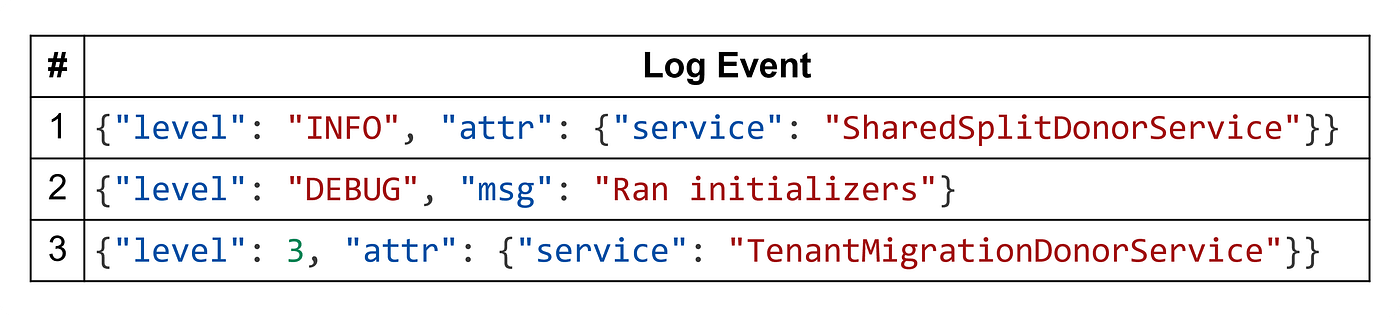
Table 1: Example semi-structured (JSON) log events.
Why plug into Presto?
Presto is a distributed SQL query engine designed for running fast, interactive queries over large datasets from many sources. It’s widely used to explore and join datasets from data lakes, data warehouses, and operational stores.
CLP doesn’t yet support SQL (although we’re working on it!), so naturally some users have asked whether we could build a CLP connector for Presto. This would allow users to write expressive SQL queries against their CLP-compressed logs and correlate them with other data sources connected to Presto.
Why Parquet falls short for logs
Archived logs are often collected, converted into Parquet, and queried in Presto via the Hive connector. This works well for datasets with stable, well-defined schemas — but semi-structured logs, especially JSON, expose Parquet’s limitations:
Schema management friction — Parquet files have fixed schemas, and moreover, Hive-backed tables require all Parquet files to be compatible with the table’s schema. Thus, the dynamic nature of semi-structured logs forces you to pick between:
- a schema containing all possible columns (i.e., with many optional columns in a huge, sparse schema). However, in most cases, it’s impossible to know all possible columns that could appear in the logs.
- a schema with individual columns for known columns and a single string column for the remainder of the JSON event, resulting in high storage overhead and poor query performance.
- a schema with a single
MAP<STRING, STRING>column. This avoids predefining the columns but values lose their type information, and queries still scan the whole map.
None of these options delivers both simplicity and performance.
Lower compression efficiency — Parquet compresses columns independently, using encodings that work well, but only when values are repetitive or predictable. In cases where the schema uses a JSON string or MAP for dynamic columns, those columns will have high entropy and don’t compress well with codecs like Zstandard or Snappy.
Strict schema matching in Hive/Presto — Parquet supports limited schema evolution (e.g., adding columns), but Hive and Presto enforce a single table schema for all files. Incompatible changes — like type mismatches or removed fields — can cause read failures and often require rewriting old data or managing multiple table versions.
Inefficient JSON and map filtering — Even with predicate pushdown, Parquet must decompress and scan entire row groups to evaluate JSON paths or map keys. Without native JSON awareness, filtering wide or deeply nested structures remains expensive.
Advantages of CLP for logs
CLP is purpose-built for compressing and searching log data, which avoids many of Parquet’s pitfalls for semi-structured JSON:
- Higher compression ratios — CLP tokenizes and encodes recurring patterns in text logs, achieving much smaller file sizes than general-purpose compressors on JSON log data.
- Schema-free storage — Logs can be ingested without predefining a rigid schema. This makes it trivial to handle dynamic fields, schema drift, and mixed log formats.
- Fast selective search — CLP can filter the logs while compressed and only the relevant portions of the log are decompressed for a query.
- Designed for log workloads — CLP’s encoding model is optimized for the entropy patterns of real-world logs, unlike columnar formats designed for tabular analytics.
Design overview

Figure 1: Architecture of the CLP connector within Presto. Blue components are existing Presto components, whereas red components are connector interfaces exposed to CLP.
At a high level, we built a CLP connector that enables Presto to query CLP’s metadata and archives directly — without running CLP as a separate service. In this model, the Presto coordinator queries CLP’s metadata, while Prestissimo workers (Presto’s native Velox-based execution engine) read the archives themselves. Since both Velox and CLP are implemented in C++, this design minimizes integration overhead and allows more efficient archive access.
To support this execution model, the connector implements four main categories of interfaces (illustrated in the figure above):
- Table and column resolution (Metadata API): These interfaces are necessary so that Presto can determine what tables (CLP datasets) exist, and what columns should be directly exposed in each table.
- Query plan optimization (Optimizer API): These interfaces are necessary so that the connector can rewrite the logical query plan to push down any operations that CLP can handle when searching the data in each archive.
- Splits retrieval (Data Splits API): These interfaces are necessary so that the connector can query CLP’s metadata database to retrieve and return the splits (CLP archives) relevant to a particular query.
- Table scanning and projection (Data Source API): These interfaces are necessary so that Prestissimo can search each CLP archive and retrieve any query results for further processing.
Implementation
Implementing a CLP connector has three unique aspects:
- How to query events with dynamic schemas;
- How to leverage CLP’s metadata for splits retrieval; and
- How to push down compatible SQL expressions to CLP.
Querying Events with Dynamic Schemas
In a typical connector, column resolution involves enumerating all columns in a table. For CLP datasets, where the set of columns may change frequently, enumerating every column across all archives can introduce scalability issues.
Instead, we use the following approach:
- Stable column set — During column resolution, return only a predefined set of stable columns, configured manually or automatically by the dataset creator. These columns are expected to exist in most events and cannot have polymorphic types.
- Deferred resolution via UDFs — Users can query other columns using one or more UDFs, deferring resolution until execution time when each worker processes its assigned archive. This distributes the resolution workload. (These UDFs can also be used to query stable columns.)
For the first point, column metadata for these stable columns is retrieved directly from CLP’s metadata database. For the second point, we plan to expose a handful of CLP_GET_<TYPE>(<json-path>)UDFs, where <TYPE>is the Presto column type and <json-path>specifies the column’s JSON path. For instance, to reference the attr.servicecolumn from Table 1, a user could use CLP_GET_STRING('$.attr.service'). When optimizing the query, the connector should replace these UDFs with the corresponding column names and types. Note that when querying an archive, if CLP does not find the given column name with the given type, it will simply return an empty result set.
We use type-specific UDFs instead of a single UDF combined with an extract-and-cast strategy (like is used with JSON_EXTRACT_SCALAR) since CLP queries are sensitive to data types; promoting explicit typed field-accesses can improve query performance and specificity.
Since CLP doesn’t use SQL/Presto types internally, these UDFs need to convert from CLP’s column types to Presto’s as shown in Table 2 below. We name the UDFs roughly based on the type that they return rather than the corresponding CLP type since multiple CLP types may be mapped to the same Presto type (e.g., ClpStringand VarString).

Table 2: CLP column types and the corresponding Presto column types that they’re converted to when returned by the CLP UDFs.
Besides the UDFs for retrieving primitive values above (Table 2), we’re also adding a few UDFs useful for retrieving select non-primitive values. Table 3 below lists these UDFs. The first UDF, CLP_GET_JSON_STRING, is useful for retrieving the entire log event rather than individual columns; without this UDF, users would have no practical way of retrieving an entire event since, given their dynamic schemas, each event may have a different set of kv-pairs.
Similarly, the second UDF, CLP_GET_STRING_ARRAY, is useful for retrieving an array value as a whole, rather than accessing each element individually. Again, since the arrays in a log event can contain elements with heterogeneous types, without the UDF, there would be no practical way to iterate over the elements of the array. Note that because Presto doesn’t support arrays whose elements have heterogeneous types, the UDF converts all values to strings.
Finally, CLP_WILDCARD_COLUMNis a UDF that can be used to search all columns for a given value. Since the UDF can only be used for filtering, the connector will validate that it only appears as the left or right side of a comparison expression (e.g., CLP_WILDCARD_COLUMN() LIKE '%foo%'). If the query is valid, the connector’s query plan optimizer will convert the expression into a KQL query where the key is a wildcard (e.g., *: "*foo*").

Table 3: Useful CLP UDFs for working with schemaless data in CLP.
During query optimization, the connector replaces UDF calls with the corresponding column names and types. If a column with the given name and type doesn’t exist in the archive, CLP simply returns NULLfor the value.
Leveraging Metadata for Split Retrieval
Each CLP deployment contains a metadata database that enables the connector to prune irrelevant archives before query execution. For instance, the open-source CLP package records the time range of log events in each archive, enabling the system to skip archives that fall outside the query’s specified time range. Other CLP users have their own metadata database format (and storage layout). Therefore, during query optimization, the connector:
- analyzes query filters and generates a metadata query
- runs the metadata query to identify relevant archives.
- if the metadata is at the granularity of files rather than archives, for each split, adjust the KQL query to search the relevant files.
A ConnectorSplitManagercan implement this by:
- querying CLP’s metadata database in batches to retrieve archive IDs.
- converting archive IDs into physical paths or URLs depending on storage layout.
- merging additional predicates into per-archive KQL queries when file-level metadata is available.
Each ConnectorSplit includes both an archive path and the KQL query to execute on that archive. The connector uses the metadata query computed during query plan optimization to retrieve archive IDs from CLP’s metadata database, then converts those IDs into physical paths or URLs. CLP supports both filesystem and S3 backends, and users may organize archives in different ways — for example, by storing each dataset under a separate object storage prefix or placing all datasets together in a single filesystem directory. To handle these variations, the connector provides a ClpSplitProvider interface that users of the connector can implement (the included implementation is for the open-source CLP package). The interface accepts a CLP metadata query, executes it against the metadata database, and returns the corresponding archive paths or URLs.
Query Optimization
Beyond metadata pruning, the connector takes advantage of CLP’s execution model to minimize data scanning and deserialization using the following techniques:
- UDF inlining — Replacing UDFs that reference columns with direct column reads wherever possible, enabling the query engine to apply predicate pushdown and projection pruning.
- Predicate pushdown into CLP archives — Translating supported filter expressions into CLP’s native query format so they can be evaluated during archive search, reducing the volume of data read.
- Projection pruning — Requesting only the columns needed for downstream processing, whether stable or dynamically resolved ones.
- Metadata-driven execution planning — Using metadata query results to enable splits pruning, ensuring workers process only the minimal, relevant subset of the dataset.
On the coordinator side, this is implemented through two plan optimizers: a UDF rewriter in the logical phase and a predicate pushdown optimizer in the physical phase. We illustrate these steps using the example query shown in Figure 2.

Figure 2: An example SQL query.
This query searches for events that match a few predicates and projects two columns from the results. Note that:
- the predicates include a time range filter;
- only one of the projected columns is used in the predicates (
a); and - both the projection and filtering involve CLP UDFs.
Figure 3 shows the initial query plan, where the predicates are represented in a tree structure.

Figure 3: Initial query plan for the example query.
Step 1: UDF Rewriting
The first step rewrites CLP UDFs into regular column references within both the ProjectNodeand FilterNode. These column references are also added to the TableScanNode to ensure the required fields are included during scanning. As Figure 4 shows, after rewriting, the query plan adds c and msg.error to the TableScanNode.

Figure 4: Query plan after UDF rewriting. Changes are indicated in red.
Step 2: Query Pushdown and Metadata Query Generation
The second step involves query pushdown and metadata query generation. For query pushdown, it requires:
- analyzing all operators in the query plan to find any that CLP can execute natively when searching each archive.
- determining which of these operators can be pushed down to CLP, to improve performance.
- converting any of these operators into a KQL query that CLP can understand.
Currently, the query pushdown supports the following operators:
- Boolean logic (
AND,OR,NOT) - Numeric comparisons (
<,<=,>,>=) - Equality (
=,!=) LIKE(wildcard string matches)
Importantly, any pushdown must preserve query semantics by returning a superset of the correct results. For example, in the query plan above, CLP supports all filters except REGEX_LIKE. However, because of the OR condition, pushing down b = 2 would incorrectly change the semantics from REGEX_LIKE(a, 'foo') OR b = 2to REGEX_LIKE(a, 'foo') AND b = 2. Accordingly, only the < and > comparisons are pushed down, producing the query plan shown in Figure 5.

Figure 5: Query plan after query pushdown and metadata query generation.
Note that in some cases, e.g., SELECT a FROM schema1.catalog1.table1 WHERE a = 1, the entire filter expression can be pushed down, eliminating the FilterNode entirely.
For metadata query generation, the process is similar to query pushdown but specifically targets columns that can be resolved in CLP’s metadata database. However, one key distinction is how the system handles OR operators.
First, to allow metadata query generation, users must provide a filter configuration file that specifies:
- The columns that exist in the metadata.
- Optional mappings between columns in the query to columns in the metadata (e.g., mapping a timestamp column to a pair of columns that define its range in an archive).
- Whether a column is optional or required in predicates (e.g., to reject queries that don’t include any metadata filters and thus would require scanning all archives).

Figure 6: An example split-filtering config file.
Figure 6 shows an example configuration file (what we call a “split-filtering config file” since it’s used to filter splits). In this config file, the clp scope defines general metadata fields such as level, the clp.defaultscope adds fields common to most tables (e.g., author),and the clp.default.table_1scope defines the following table-specific metadata fields:
msg.tsmust map tobegin_timestamp/end_timestampand is required.file_nameis optional.
For the example query, archive metadata may include begin_timestamp and end_timestamp. Thus, the generated metadata query would map the msg.tspredicates to begin_timestampand end_timestamppredicates, allowing the system to prune archives before scanning.
Like in the query pushdown, metadata queries must always produce a superset of the archives required by the original filter. For ORconditions, they must ensure that all child predicates are eligible for pushdown and that they reference metadata columns defined in the configuration. For instance, given a filter of the form msg.ts < 1735689600000 OR a = 1, the metadata query cannot rely solely on the time range predicate, since doing so might exclude archives necessary for the a = 1predicate.
Evaluation
In our previous blog, we benchmarked the Presto-CLP integration against a range of other tools including Presto + Parquet. Overall, the results demonstrated that in queries, the Presto-CLP integration is, on average, 15.7x (hot queries) to 16.64x (cold queries) faster than the fastest configuration of Presto + Parquet we evaluated. In fact, the Presto-CLP integration was faster than all other tested tools except Elasticsearch and CLP. The performance difference between Presto + CLP compared to CLP alone is to be expected since querying through Presto adds a layer of overhead; but with additional query pushdowns and performance improvements, this gap should shrink.
Although the Presto-CLP integration doesn’t affect compression ratio compared to CLP alone, it is worth comparing compression against Parquet, since Parquet is frequently used to archive logs. In our benchmarks, we saw that, on average, CLP’s compression is 2.31x better than the best configuration of Parquet we evaluated.
For a deeper dive into the results, check out our previous blog.
What’s next?
The current Presto-CLP integration is open-source in our fork of the Presto repository and includes:
- Support for querying (using SQL) semi-structured log events stored in CLP archives, but without the use of the CLP UDFs.
- Support for some query pushdowns.
Over the next few months, we plan to:
- merge the CLP connector into the official Presto repository.
- open-source the CLP UDFs.
- extend pushdown capabilities for more query patterns.
Overall, this should improve the connector’s scalability and performance while allowing current Presto users to deploy it easily.
Getting started
To try the Presto-CLP integration, check out our guide on using Presto with CLP. The current version will allow you to compress your logs using CLP and search them using Presto. If you have any questions, issues, or feature requests, feel free to reach out — you can file an issue in our Presto fork or chat with us directly on Discord.
About the authors
Rui Wang is a software developer at YScope. He holds an MASc in Computer Engineering from University of Toronto, where he started the μSlope (CLP-S) project — a system for compressing and searching semi-structured logs. He then joined YScope to open-source CLP-S and continue building it, strengthening core functionality and usability. He now focuses on enabling distributed SQL over CLP-S via PrestoDB and Velox connectors.
Xiao (啸 xiào) Chong (冲 chōng) Wei (魏 wèi) is a software developer at YScope. He holds an MASc in Electrical and Computer Engineering from University of Toronto, where he was supervised by Prof. Ding Yuan. He earned his BE (Hons) in Computer Science and Technology from the Hongyi Honor College at Wuhan University. His research interests focus on performance analysis, failure diagnosis, and optimization in large-scale software systems. Outside of work, he enjoys playing fingerstyle guitar, solving competitive programming problems, and playing video games.
Devin Gibson is a software developer at YScope. He too holds an MASc in Computer Engineering from University of Toronto, where he joined the μSlope (CLP-S) project to design and author the search subsystem. At YScope he has continued working on CLP-S in order to support new storage and search features, offer excellent reliability, and improve performance.
Jack Luo is a co-founder of YScope. He continues to build upon the direction of his PhD research on highly efficient log and tracing compression technologies, together with analytics algorithms that directly operate on compressed data without full decompression, spanning across cloud, edge, and agentic systems.
Kirk Rodrigues is a co-founder of YScope. He is a maintainer of the open-source CLP project and was one of the authors and core developers of the CLP system during his PhD research at University of Toronto.
메타데이터
- post_id
- 71dff29a0b82
- slug
- querying-clp-compressed-logs-with-prestosql-71dff29a0b82
- url
- https://medium.com/@y-scope/querying-clp-compressed-logs-with-prestosql-71dff29a0b82
- canonical_url
- https://medium.com/@y-scope/querying-clp-compressed-logs-with-prestosql-71dff29a0b82
- author_url
- https://medium.com/@y-scope
- status
- ok
- fetched_at
- 2026-07-17 22:16:43

