How to Migrate from On-Premise IVR to Cloud IVR Solutions Seamlessly
Migrating from an on-premise IVR system to cloud IVR solutions is one of the most impactful decisions a modern call center can make — but…
How to Migrate from On-Premise IVR to Cloud IVR Solutions Seamlessly
Migrate from On-Premise IVR to Cloud IVR Solutions Seamlessly
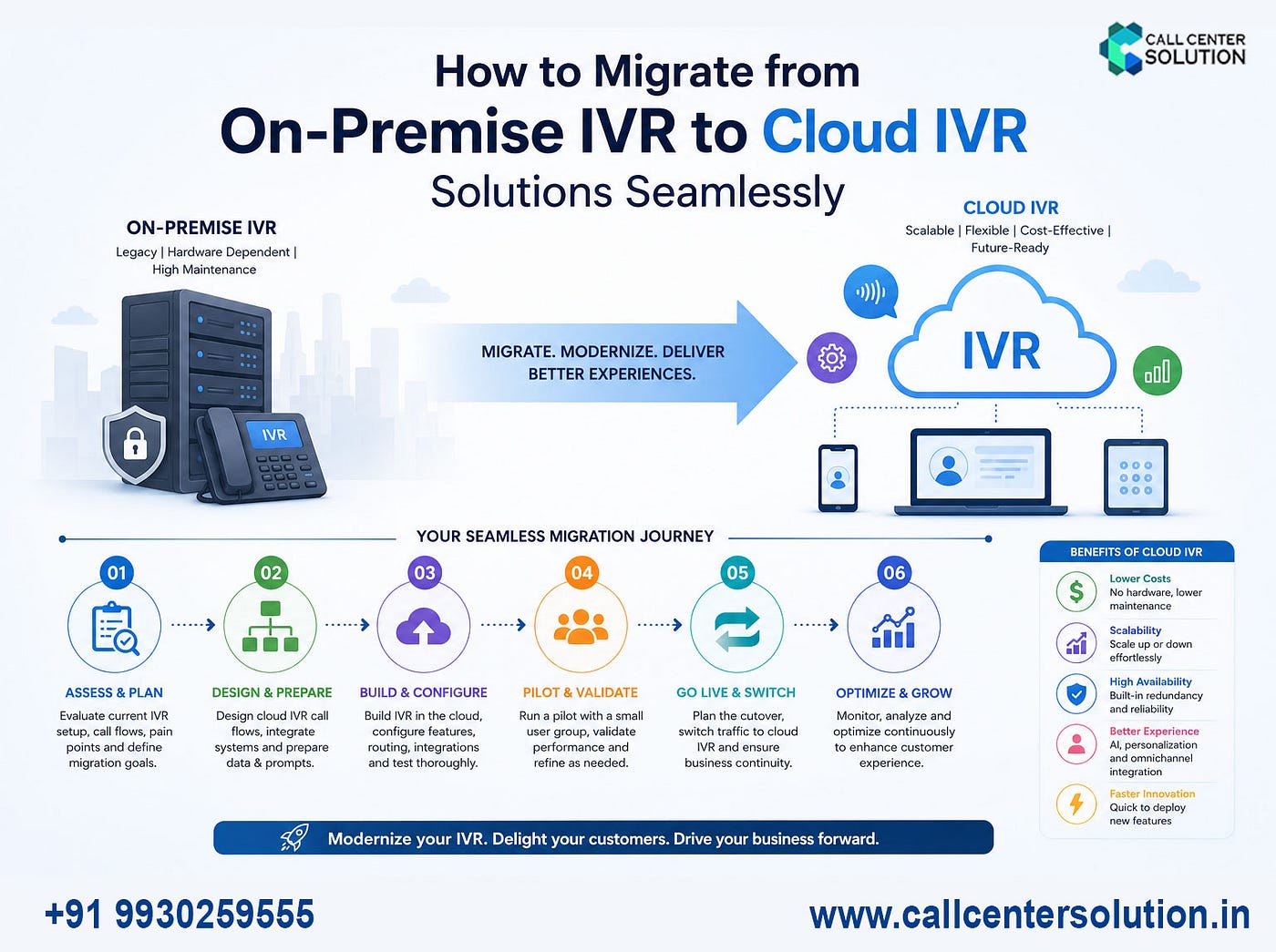
Migrating from an on-premise IVR system to cloud IVR solutions is one of the most impactful decisions a modern call center can make — but only when done right. This step-by-step guide walks you through everything you need to know to migrate seamlessly, minimize downtime, and maximize ROI.
What Are Cloud IVR Solutions?
**Cloud IVR solutions** (Interactive Voice Response) are phone automation systems hosted entirely on cloud infrastructure rather than on physical hardware at your premises. They allow businesses to route calls, gather input, play automated messages, and connect callers to the right agents — all managed through a web-based dashboard with zero hardware dependency.
Unlike traditional on-premise IVR systems, cloud IVR platforms are delivered as a service (SaaS/PaaS), meaning you pay for what you use, scale effortlessly, and get automatic updates without IT overhead.
On-Premise IVR
-
High (hardware + licenses)
-
Limited, requires hardware
-
In-house IT team required
-
Manual, complex backup
-
Complex legacy integrations
Cloud IVR Solutions
- Low (subscription-based)
- Instant, on-demand scaling
- Managed by provider
- Built-in redundancy & failover
- Full access from anywhere
3. Why Businesses Are Moving to Cloud IVR
The shift toward cloud-based IVR systems is driven by several compelling business and operational factors:
- Cost efficiency: Eliminate expensive PBX hardware, reduce IT staffing costs, and switch to predictable monthly pricing.
- Business continuity: Cloud IVR ensures uninterrupted service during power outages, natural disasters, or hardware failures.
- Remote workforce support: Agents can handle calls from anywhere — a must-have in today’s hybrid work environment.
- Faster deployment: Go live in days instead of months, without procurement delays.
- AI & automation readiness: Modern cloud IVR solutions integrate seamlessly with conversational AI, chatbots, and NLP engines.
- Omnichannel integration: Connect IVR with WhatsApp, email, SMS, and live chat on a unified platform.
Pro Insight from callcentersolution.in: Businesses that migrate to cloud IVR solutions before a digital transformation initiative complete implementation 40% faster and experience 2x better customer satisfaction scores within the first quarter.
Common Migration Challenges & How to Avoid Them
Challenge 1: Data Loss During Transition
Call recordings, IVR logs, and customer interaction history can be lost if not exported properly.
Solution: Export all historical data to a cloud storage bucket before decommissioning on-premise servers. Verify backups before cutover.
Challenge 2: Number Porting Delays
Porting existing toll-free or DID numbers to a new carrier can take days. Solution: Initiate number porting requests at least 2–4 weeks before go-live and maintain a fallback routing plan.
Challenge 3: Agent Resistance to Change
Agents may resist new interfaces and workflows. Solution: Involve agents early in the testing phase and offer hands-on training sessions. Highlight how the new system makes their jobs easier.
Also Read This: Best IVR Service Provider in India

Cloud IVR Menu Solutions
Best Practices for a Smooth Transition
- Start with low-risk call flows first (e.g., business hours info, FAQs) before migrating complex sales or support flows.
- Use a phased rollout — route 20% of traffic initially, monitor, then scale to 100%.
- Keep menus short — the ideal cloud IVR menu has no more than 4–5 options per level. Callers abandon deep menus.
- Enable speech recognition — modern cloud IVR solutions support natural language processing; upgrade callers from DTMF-only menus.
- Set up real-time alerts for call drop rates, agent overflow, and error prompts so issues are caught immediately.

IVR Solutions Demo
Also Read This: Best Automatic Call Distribution Software
Frequently Asked Questions (FAQs)
Q. How long does it take to migrate from on-premise IVR to cloud IVR?
A typical migration takes 4–12 weeks depending on complexity, number of call flows, integrations, and number of DIDs. Simple setups can go live in under 2 weeks with the right cloud IVR provider.
Q. Can cloud IVR integrate with my existing CRM?
Yes. Modern cloud IVR solutions offer native or API-based integrations with popular CRMs including Salesforce, Zoho CRM, Freshdesk, HubSpot, Leadsquared, and more. This enables screen-popping, personalized greetings, and call logging automation.
[embed]
메타데이터
- post_id
- 71f7780f439b
- slug
- how-to-migrate-from-on-premise-ivr-to-cloud-ivr-solutions-seamlessly-71f7780f439b
- url
- https://medium.com/@callcentersolutionccs/how-to-migrate-from-on-premise-ivr-to-cloud-ivr-solutions-seamlessly-71f7780f439b
- canonical_url
- https://medium.com/@callcentersolutionccs/how-to-migrate-from-on-premise-ivr-to-cloud-ivr-solutions-seamlessly-71f7780f439b
- author_url
- https://medium.com/@callcentersolutionccs
- status
- ok
- fetched_at
- 2026-06-14 13:58:26