KNIME Snippets (3) — Rules and Conditions do apply
Part 3 in a series of smaller KNIME related topics I came across over the years and that you might find interesting
GETTING STARTED | WORKFLOW CONTROL | KNIME ANALYTICS PLATFORM
KNIME Snippets (3) — Rules and Conditions do apply
Part 3 in a series of smaller KNIME related topics I came across over the years and that you might find interesting
Photo by Mark Duffel on Unsplash.
The low code tool KNIME has a lot of options to set rules and conditions to filter rows or create new data. Since there are a lot of them I will provide you with some examples and try to clarify what they do and what your options are.
If You want more hints about KNIME you can take a look at: “KNIME Snippets — A Collection”
As it is so often with KNIME there might be several ways to do things and that is OK.
An Overview over existing Nodes and Concepts
- The new Expression node with the **KNIME Expression Language**. This is still developing and features sill be added
- The classic Rule Engine — with a pseudo-Java syntax which also supports Ruleset Editor and Predictor to store and re-use rules as PMML
- The Math Formula and String Manipulation nodes. The Math node also does support some column aggregation syntax where you can run calculations like the minimum or maximum of a column think COL_MIN(col_name) as well as aggregations across a row
- For strings there is a special String Manipulation (Multi Column) node and also for numbers a Math Formula (Multi Column) dealing with several columns at once
- Then there is the mighty **Column Expressions* node (which you will have to install as a separate extension — see Video). This node also supports complex statements and multi-row formulas (though you will have to specifically activate this feature*)
- With the same Java Script there also is the Variable Expression node to allow you to create -well- variables using the same logic
- Then you can also do a lot of stuff with the Java nodes
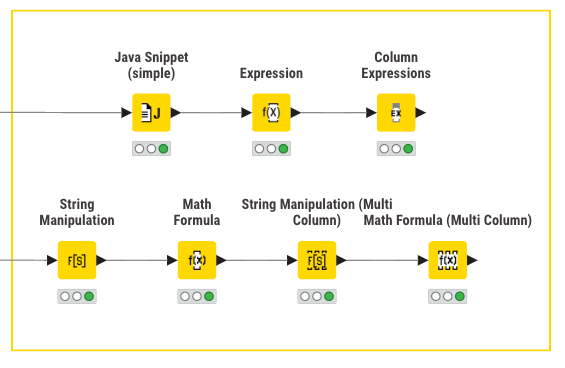
Several nodes to apply Rules and Conditions in KNIME.
If-Then-Else Operations
Besides the standard operations on one line you will most likely use an if-then-else construct to have more advanced operations and of course if you need really complicated operations there is always the (full) Java Snippet or you use Python. But if you want to stick to one (relatively) simple node you can also do this:
Java Snippet Simple node
You can use this node to have smaller Java (script) operations and also define temporary variables inside using KNIME columns and Flow Variables. It often comes in handy and follow standard syntax. You might want to be aware that often .equals() will be best to compare the actual content.
// capture a possible problem with null values - if not the code might crash
if($var1$ == null) {
  return "missing";
}
else if ($var1$ > v_input_factor) {return "> " + v_input_factor_string;}
else if ($var1$ <= v_input_factor) {return "<= " + v_input_factor_string;}
else {return "something else";}In addition the (simple) Rule Engine also can do some case operations — though you will have to think about the logic of each row. The syntax will also be used in the Rule Based Row Filter and others.
Column Expressions node
The next option to do if-then operations is the Column Expressions node which at some point seems to take over the reign but now is to be surpassed by the next example, Expression.
Again a simple syntax that you can then expand. Be sure to also check out the articles linked at the end of this text about this mighty node.
if ((column("column A") > 2*column("column B"))
    && equals(column("column C"), "Student")
   )
       {"Great"}
else if (1 == 2)
       {"Not Great"}
else {"Something Else"}You can also access rows other than the current one in Column Expressions although you will have to activate the setting to allow “multi-row access” in the advanced tab.
[embed][datetimediff in column expression Hello, I'm trying to convert the following code from Alteryx to Knime: if [Row-1:Tail Number]=[Tail Number] AND [Origin…forum.knime.com](https://forum.knime.com/t/datetimediff-in-column-expression/74434/4?u=mlauber71)
Please note that the operators sometimes might not be the ones you expect. For the Column Expressions node for example not equal is “!=” and not “<>”.
The (new) Expression node
Along comes another instalment of data manipulation, the Expression node with a dedicated language. This one also has access to the KNIME AI Assistant (“K-AI”) to help you write or improved code:

The Expression node in KNIME comes with the KNIME AI Assistant.
A very simple if-then-else would look like this. You can also stack them into several layers.
if($["Column_B"] = MISSING or is_nan($["Column_B"])
 , $["Column_A"]
 , $["Column_B"])
Also you can have more complicated if-then-else constructs with the Expression node like this:
if(
    $["Universe_0_0"] <0.1,"A",
    $["Universe_0_0"] <0.2,"B",
    $["Universe_0_0"] <0.3,"C",
    "D"
)
Also you can now combine several expressions beneath each other to have multiple of them in one node. Just make sure to set the output correctly if you want to create a new column or replace an existing one!

In the KNIME Expression node you must decide if you want a new column or replace an existing one
You can also go further and combine functions into more complicated constructs as we will see…
Combining Boolean Conditions
One advanced example is the combination of several rules that would then result in a single decision to keep or drop a row (or do something else). The rules can be applied to several columns at once with the help of the String Manipulation (Multi Column) node:
The ‘trick’ is to convert what you want (or do not want) into boolean conditions that can also stretch over several columns, then aggregate these true/false statements into one column and now you can set up a condition to see if you have any ore some true/false and then act accordingly (also counting them might be an option).
Nested If-statements and undocumented features
The great Brian Bates (takbb) has presented some interesting examples of the use of Column Expressions:
… and some undocumented features which show you what might be possible:
Additional articles to explore
There are additional articles about Column Expressions on Medium which might be worth exploring:
[embed]KNIME — Column Expressions By Willem Lotteringmedium.com
In case you enjoyed this story you can follow me on Medium (https://medium.com/@mlxl) or on the KNIME Hub (https://hub.knime.com/mlauber71) or KNIME Forum (https://forum.knime.com/u/mlauber71/summary).
메타데이터
- post_id
- 72b6ffbd4c9f
- slug
- knime-snippets-3-rules-and-conditions-do-apply-72b6ffbd4c9f
- url
- https://medium.com/low-code-for-advanced-data-science/knime-snippets-3-rules-and-conditions-do-apply-72b6ffbd4c9f
- canonical_url
- https://medium.com/low-code-for-advanced-data-science/knime-snippets-3-rules-and-conditions-do-apply-72b6ffbd4c9f
- author_url
- https://medium.com/@mlxl
- status
- ok
- fetched_at
- 2026-07-22 22:17:30