Proxy vs Reverse Proxy: Why Your Laravel Octane App Needs Nginx in Front of It
Picture this: you just finished setting up Laravel Octane because you were tired of waiting on API responses that dragged every time the…
Proxy vs Reverse Proxy: Why Your Laravel Octane App Needs Nginx in Front of It
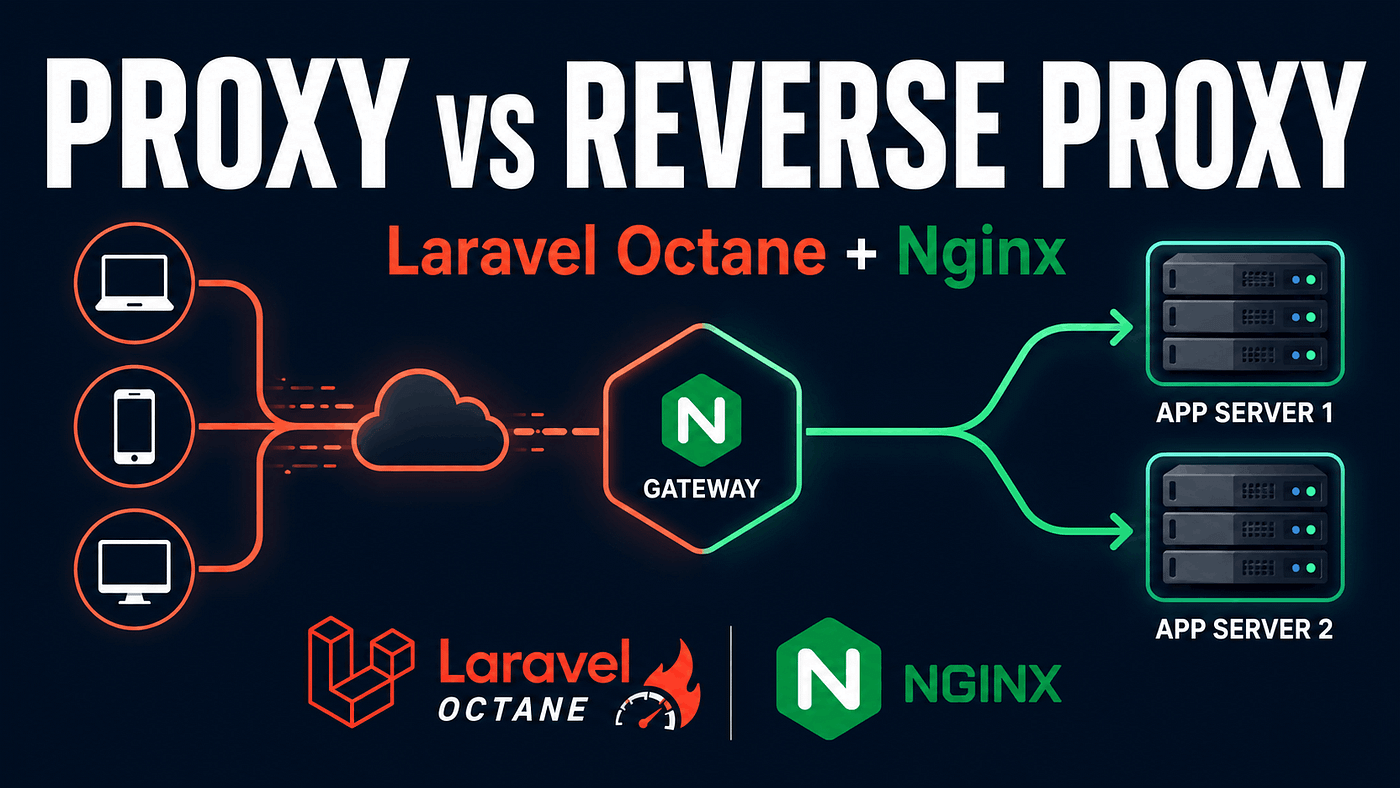
Picture this: you just finished setting up Laravel Octane because you were tired of waiting on API responses that dragged every time the framework had to bootstrap from scratch. Octane runs smooth, the benchmarks make you grin. So you go ahead and expose the Octane port straight to the public, run php artisan octane:start, and point your domain's DNS at that server.
A few days later, your server gets hit with a traffic flood, the Octane worker hangs, and every request piles up because the one process that’s supposed to handle thousands of connections gets stuck babysitting a single slow client.
That’s not an Octane bug. It’s because one piece was missing: a reverse proxy.
A lot of people hear “proxy” and assume it means one single thing. But proxy and reverse proxy are two concepts that work in opposite directions, and mixing them up can leave the backend architecture you’re building either exposed or just plain inefficient.
A proxy acts on your behalf, not the server’s
Picture having a personal assistant. Every time you want to buy something, you don’t walk into the shop yourself. You send your assistant, and the shop only ever sees their identity, not yours. The store knows “someone” bought the item, but has no idea it was actually you behind it.
That’s exactly how a proxy (more precisely, a forward proxy) works. A proxy sits on the client side, acting on your behalf when reaching out to another server. The destination server only sees the request coming from the proxy’s IP, never your real one.
Some examples you run into every day:
- The VPN you use for browsing
- A Squid proxy set up by a company to filter which sites employees can reach
- A proxy used for scraping data so requests don’t get rate-limited from a single IP
The core idea: a proxy protects the client’s identity.
A reverse proxy flips the whole thing around
Now picture a different scenario. You show up at a big office building to meet someone from the finance team. You can’t just walk straight into their room. You go through the receptionist first, and the receptionist decides which floor, which room, or whether you even get in without an appointment.
From your side as a visitor, all you know is “this company’s receptionist.” You never find out exactly which desk that finance person sits at or what their extension number is.
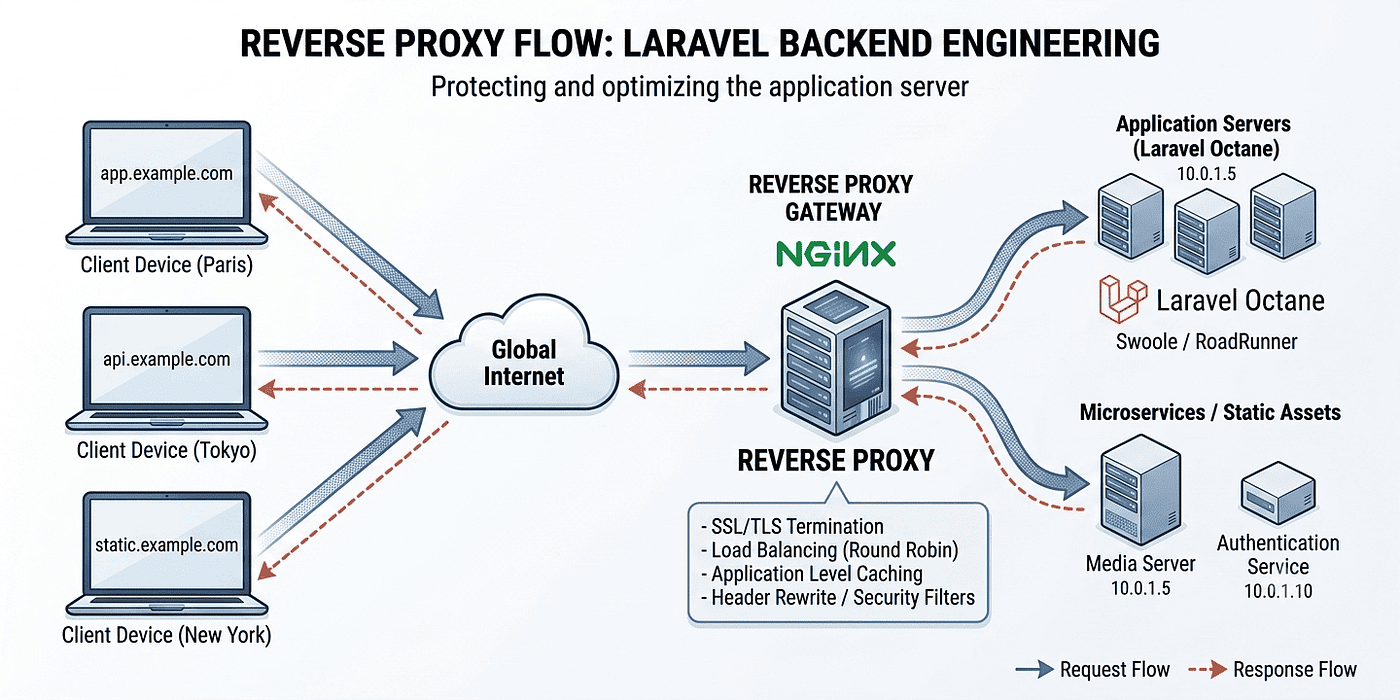
That’s how a reverse proxy behaves. Unlike a regular proxy, a reverse proxy sits on the server side, acting on behalf of the backend to receive requests from many clients. The client only ever sees one entry point, while behind it there could be one server, two, or dozens working together.
Nginx, Apache running as a reverse proxy, Traefik, HAProxy, even Cloudflare sitting in front of your website — they all play this same role.
Put simply:
- A proxy hides who’s making the request (the client’s identity)
- A reverse proxy hides what’s handling the request (the backend’s identity)
Why this matters so much for Laravel Octane
A regular Laravel app running on PHP-FPM has a short lifecycle. Every incoming request spins up a new process, boots the entire framework from zero, handles the request, and the process dies. That’s actually a safe default against weird traffic spikes, because every request is isolated from the last.
Octane works differently. It boots Laravel once, keeps the application sitting in memory, and then serves every following request through that same living process, powered by Swoole, RoadRunner, or FrankenPHP. That’s the whole reason it’s so much faster: there’s no repeated boot overhead per request.
But that speed comes with a tradeoff. The Octane process is long-running and sensitive. Expose it directly to the internet without a reverse proxy in front, and you’ll run into a handful of problems:
- Octane isn’t built to efficiently serve static files like images or CSS — that’s a job for a regular web server like Nginx
- SSL/TLS handshakes are heavy and should be terminated at the reverse proxy, not dumped on an Octane worker that should be focused on processing PHP
- A slow client connection can hold an Octane worker hostage without buffering from a reverse proxy in front, when it should be free to move on to the next request
- Scaling gets messy, since there’s no single point to distribute traffic across multiple Octane instances
Laravel Octane’s official documentation is explicit about this: in production, your Octane app should run behind a traditional web server such as Nginx or Apache. That web server handles static assets and SSL certificate termination, while Octane stays focused on your application logic.
So the setup ends up looking like this: requests come in through Nginx (the reverse proxy), then get forwarded to Octane running on an internal port, usually 127.0.0.1:8000, which never touches public traffic directly.
Implementation: putting Nginx in front of Laravel Octane
Here’s a baseline config you can adapt. Save it as a file under /etc/nginx/sites-available/your-domain:
map $http_upgrade $connection_upgrade {
    default upgrade;
    ''      close;
}

server {
    listen 80;
    server_name your-domain.com;
    client_max_body_size 16m;
    location / {
        proxy_http_version 1.1;
        proxy_set_header Host $host;
        proxy_set_header Scheme $scheme;
        proxy_set_header X-Forwarded-Proto $scheme;
        proxy_set_header X-Forwarded-For $proxy_add_x_forwarded_for;
        proxy_set_header Upgrade $http_upgrade;
        proxy_set_header Connection $connection_upgrade;
        proxy_read_timeout 60s;
        proxy_connect_timeout 5s;
        proxy_pass http://127.0.0.1:8000;
    }
}
A few lines here matter enough that you shouldn’t just copy-paste blindly:
proxy_pass http://127.0.0.1:8000— the core of it all, every request gets forwarded to Octane running on port 8000, an internal port that's never exposed publiclyX-Forwarded-For— lets Laravel know the client's real IP instead of Nginx's, since without this header every request would look like it's coming from127.0.0.1X-Forwarded-Proto— tells Laravel the original request came in over HTTPS, even though the connection between Nginx and Octane itself is plain HTTP
For Laravel to actually trust those headers, you need to register Nginx as a trusted proxy in bootstrap/app.php (Laravel 11 and up) or app/Http/Middleware/TrustProxies.php (Laravel 10 and below):
$middleware->trustProxies(at: '127.0.0.1');If your reverse proxy sits at a different layer, say a cloud load balancer, adjust the IP or CIDR range accordingly.
Keep Octane running in the background through a process manager like systemd or Supervisor, not a raw terminal session:
[Unit]
Description=Laravel Octane
After=network.target

[Service]
User=www-data
WorkingDirectory=/var/www/your-app
ExecStart=/usr/bin/php artisan octane:start --server=swoole --host=127.0.0.1 --port=8000
ExecStop=/usr/bin/php artisan octane:stop
Restart=always
RestartSec=5
[Install]
WantedBy=multi-user.target
Mistakes beginners keep making
- Exposing the Octane port directly to the public because it feels simpler — this is the most common cause of both performance and security headaches
- Forgetting to set trusted proxies, which makes every log entry and rate limit in Laravel think all requests come from the same IP
- Not restarting workers after deployment — since Octane keeps the app in memory, old code stays live until you run
php artisan octane:reload - Treating the reverse proxy as optional, something to figure out later — it’s part of the baseline architecture, not an optimization you bolt on at the end
So, proxy or reverse proxy?
If you need to hide or act on behalf of the client while reaching some other service, that’s a proxy. If you need a single entry point that hides and distributes traffic to your backend servers, Laravel Octane included, that’s a reverse proxy.
If you’re learning how to deploy a Laravel app to production, get this concept straight before diving into configuration. Once you understand why Nginx needs to sit in front of Octane, debugging missing headers, odd SSL behavior, or wrong client IPs in your logs gets a lot easier.
메타데이터
- post_id
- 72dd8116ffc8
- slug
- proxy-vs-reverse-proxy-why-your-laravel-octane-app-needs-nginx-in-front-of-it-72dd8116ffc8
- url
- https://medium.com/codex/proxy-vs-reverse-proxy-why-your-laravel-octane-app-needs-nginx-in-front-of-it-72dd8116ffc8
- canonical_url
- https://medium.com/codex/proxy-vs-reverse-proxy-why-your-laravel-octane-app-needs-nginx-in-front-of-it-72dd8116ffc8
- author_url
- https://medium.com/@developerawam
- status
- ok
- fetched_at
- 2026-07-10 11:40:45