Load Balancing MongoDB Reads with HAProxy and Docker
🚀 Introduction
Load Balancing MongoDB Reads with HAProxy and Docker
🚀 Introduction
In MongoDB replica sets, write operations are handled by the primary node, while read operations can be distributed across secondary nodes. This improves performance and scalability for read-heavy workloads. However, most client applications lack built-in logic to route reads intelligently.
This is where HAProxy comes in.
In this guide, we’ll enhance the MongoDB replica set setup from the previous article by configuring HAProxy as a TCP load balancer to distribute read requests across MongoDB secondary nodes using Docker.
🧠 Why Use HAProxy?
HAProxy enables:
- Load balancing of read traffic between secondaries (
mongodb2,mongodb3) - High availability and improved performance
- A built-in monitoring dashboard on port
8404
🧱 Architecture
      [ Client Application ]
                |
           +----+----+
           | HAProxy |
           +----+----+
             |    |
       [mongodb2][mongodb3]   <-- Secondary Nodes
HAProxy listens on port 27018, forwarding read requests in a round-robin fashion to available secondaries.
🛠 Prerequisites
- Complete the MongoDB Replica Set setup from the mongodb-replicaset-docker article.
- Ensure all MongoDB nodes are running and healthy.
- Confirm all containers are in the same Docker network (
connet). - Generate the
replica.keyas described in the replica set guide.
⚙️ Setup Instructions
1. Clone the HAProxy Repository
git clone https://github.com/azita-abdollahi/haproxy-mongodb-balancer.git
cd haproxy-mongodb-balancer
2. Start HAProxy
docker compose up -dThis starts the HAProxy service, which connects to mongodb2 and mongodb3.
📁 Repository Contents
docker-compose.yml: Defines the HAProxy service and links to MongoDB containers.haproxy.cfg: Main HAProxy configuration file with backend servers defined.
🔍 haproxy.cfg (Key Section)
backend mongodb_replicas
  mode tcp
  balance roundrobin
  server mongo2 mongo2:27017 check
  server mongo3 mongo3:27017 check
This configuration balances TCP connections across the two secondary MongoDB nodes.
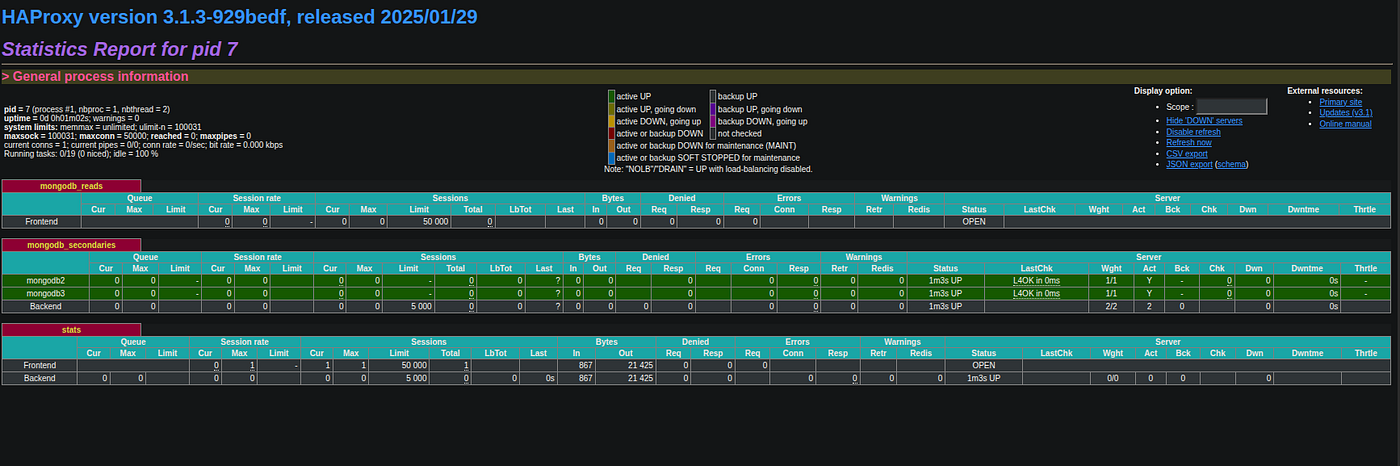
📊 Accessing HAProxy Stats
Open http://localhost:8404 in your browser. Login with:
Username: admin
Password: admin123
You’ll see a live dashboard showing backend node health and traffic.
⚠️ Important Considerations
- HAProxy does not detect MongoDB roles. Ensure that only secondary nodes are listed as HAProxy backends.
- For production, consider using a MongoDB-aware proxy or building a custom router if your application needs to route writes and reads intelligently.
🧩 Complements the MongoDB Replica Set Project
Together with the MongoDB replica set Docker project, this HAProxy setup provides:
- High availability (via replica sets)
- Read scalability (via load balancing)
🎯 Conclusion
By placing HAProxy in front of MongoDB secondaries, you can efficiently scale out your read-heavy workloads. This setup is ideal for development and staging environments, and it lays the groundwork for more advanced production deployments.
Check out both repositories for a full working example:
메타데이터
- post_id
- 732a976b41e9
- slug
- load-balancing-mongodb-reads-with-haproxy-and-docker-732a976b41e9
- url
- https://medium.com/@azita.abdollahi/load-balancing-mongodb-reads-with-haproxy-and-docker-732a976b41e9
- canonical_url
- https://medium.com/@azita.abdollahi/load-balancing-mongodb-reads-with-haproxy-and-docker-732a976b41e9
- author_url
- https://medium.com/@azita.abdollahi
- status
- ok
- fetched_at
- 2026-06-11 05:11:55


