Error unable to start XMind in Linux
When I installed XMind in Linux Mint, I encountered an error related to eclipse. Error unable to start XMind in Linux after installation. I installed the software correctly, but can not start it. After looking at the log error I thought I had found the cause.
Error unable to start XMind
If you can see the log file of XMind, you will see the log as below.
You Might Be Interested In
- Script Creates Sudo User In Linux
- How To Use Lets Encrypt Ssl In Centminmod
- Backup And Restore Data For Gitlab Ce
!SESSION 2018-03-14 16:29:05.549 -----------------------------------------------
eclipse.buildId=R3.6.52.201801312336
java.version=1.7.0_79
java.vendor=Oracle Corporation
BootLoader constants: OS=linux, ARCH=x86_64, WS=gtk, NL=en_US
Command-line arguments:  -os linux -ws gtk -arch x86_64 -data ../opt/xmind/XMind_amd64/workspace

!ENTRY org.eclipse.osgi 4 0 2018-03-14 16:29:06.033
!MESSAGE Application error
!STACK 1
java.lang.IllegalStateException: Unable to acquire application service. Ensure that the org.eclipse.core.runtime bundle is resolved and started (see config.ini).
    at org.eclipse.core.runtime.internal.adaptor.EclipseAppLauncher.start(EclipseAppLauncher.java:78)
    at org.eclipse.core.runtime.adaptor.EclipseStarter.run(EclipseStarter.java:380)
    at org.eclipse.core.runtime.adaptor.EclipseStarter.run(EclipseStarter.java:235)
    at sun.reflect.NativeMethodAccessorImpl.invoke0(Native Method)
    at sun.reflect.NativeMethodAccessorImpl.invoke(NativeMethodAccessorImpl.java:57)
    at sun.reflect.DelegatingMethodAccessorImpl.invoke(DelegatingMethodAccessorImpl.java:43)
    at java.lang.reflect.Method.invoke(Method.java:606)
    at org.eclipse.equinox.launcher.Main.invokeFramework(Main.java:669)
    at org.eclipse.equinox.launcher.Main.basicRun(Main.java:608)
    at org.eclipse.equinox.launcher.Main.run(Main.java:1515)
    at org.eclipse.equinox.launcher.Main.main(Main.java:1488)
The above log shows that the XMind application can not be started, because the workspace can not create a right way. At least I think so.
Fix error unable to start XMind in Linux
I wrote an article on how to install XMind 7.5 in Linux. In that article, I had said in part about having to edit the config file of XMind .ini it will fix error unable to start this software.
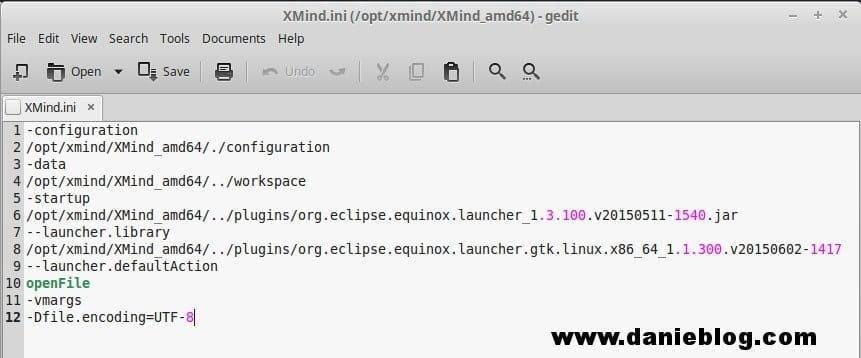
Edit file XMind.ini to fix ‘error unable to start XMind in Linux’.
-configuration
/opt/xmind/XMind_amd64/./configuration
-data
/opt/xmind/XMind_amd64/../workspace
-startup
/opt/xmind/XMind_amd64/../plugins/org.eclipse.equinox.launcher_1.3.100.v20150511-1540.jar
--launcher.library
/opt/xmind/XMind_amd64/../plugins/org.eclipse.equinox.launcher.gtk.linux.x86_64_1.1.300.v20150602-1417
--launcher.defaultAction
openFile
-vmargs
-Dfile.encoding=UTF-8
You just need to edit the XMind.ini file located in **/opt/xmind/XMind_amd64 or Your_install_folder/XMind_amd64**.
As you can see above, you must add the path to where you installed the software into the configuration lines. Example in my file, it’s **/opt/xmind/XMind_amd64/**.
Conclusion
After you add the directory path to the config lines in the above file. You can try opening XMind and see how it works. I have successfully installed XMind this way on Linux Mint 17.3 Cinnamon.
(This is an article from my old blog that has been inactive for a long time, I don’t want to throw it away so I will keep it and hope it helps someone).
Original post: https://devopslite.com/error-unable-to-start-xmind-in-linux
메타데이터
- post_id
- 736d8a45fbe8
- slug
- error-unable-to-start-xmind-in-linux-736d8a45fbe8
- url
- https://medium.com/@devopslite/error-unable-to-start-xmind-in-linux-736d8a45fbe8
- canonical_url
- https://medium.com/@devopslite/error-unable-to-start-xmind-in-linux-736d8a45fbe8
- author_url
- https://medium.com/@devopslite
- status
- ok
- fetched_at
- 2026-06-23 03:48:11